To delete a profile safely, audit before you click: confirm the exact URL, handle and linked email, map what the profile controls such as logins, admin roles, billing and evidence, and check whether the platform separates profile deletion from account termination. Then execute through the correct administrative path, log out and test the public URL, and clean up search residue.
Key facts
- Google states that deleting a public profile does not delete the underlying Google Account.
- Deactivate first when the profile may be needed for litigation, investigation or platform escalation.
- Salesforce Marketing Cloud bulk deletion is permanent and cannot be stopped once processing starts.
- On Windows, use SystemPropertiesAdvanced and User Profiles rather than deleting the folder manually.
Where ContentRemoval.com comes in. ContentRemoval.com steps in when deletion is not in your hands: fake or impersonation profiles, abandoned or inherited accounts nobody can log into, profiles on uncooperative or foreign hosts, and deleted pages that still rank in search. We preserve the evidence, route the case through trust and safety rather than frontline support, and monitor for clones. The individual or their counsel usually makes contact. A free 15-minute Exposure Scan maps what is removable and the report is yours to keep. Get a Free, Confidential Exposure Scan or read how our content removal work is done.
A delete request usually starts after something has already gone wrong. An executive finds an old profile still ranking in search. A family office discovers a dormant account exposing staff names and contact paths. A public figure sees an impersonation profile pulling attention, press, or donor trust away from their own profile. At that point, “how do you delete a profile” stops being a casual support question and becomes a containment question.
Most deletion mistakes happen because people move too fast. They delete the visible profile, assume the problem is over, then learn the account is still active elsewhere, the URL is still indexed, or the wrong profile was removed. A clean deletion is different. It is deliberate, documented, and verified after the fact.
The Reality of Digital Deletion
A client in crisis rarely asks for a tutorial. They want certainty. They want the profile gone, the residue gone, and the risk of reappearance reduced.
That distinction matters because digital deletion is rarely a single act. It’s a chain of actions inside a larger reputation strategy. If you skip the chain, you create new problems while trying to solve the old one.

A rushed deletion often leaves three kinds of damage behind. The first is data loss. The second is identity confusion, where a person deletes a profile but leaves the underlying account or linked access untouched. The third is public residue, where search engines, screenshots, cached pages, and duplicate profiles continue to circulate after the supposed removal.
What people usually get wrong
Most generic guides treat deletion like housekeeping. Click settings. Find delete. Confirm. Done.
That advice fails in high-stakes situations because profiles often carry dependencies. They can control logins, subscriptions, messaging history, administrator roles, or employee access. In the wrong context, deleting a profile without checking those dependencies is the digital equivalent of pulling a fire alarm and locking yourself out of the building.
A deletion that isn’t verified isn’t a deletion. It’s an assumption.
That is why reputation teams start with scope, not clicks. You identify exactly what must disappear, what must remain, who controls the profile, what records need preserving, and whether the platform distinguishes between profile removal and account termination. If your concern is broader than one login, a full digital footprint cleanup is usually the more accurate objective.
What a clean deletion looks like
A clean deletion has four traits:
- Correct target identified: You’ve confirmed the exact profile, URL, handle, and associated email before taking action.
- Dependencies mapped: You know whether the profile controls anything else.
- Removal confirmed: The profile no longer resolves on-platform in the way the platform intends after deletion.
- Residual visibility addressed: Search listings, mirrors, and stray references are reviewed after the deletion event.
If you approach deletion this way, you reduce the chance of a second crisis caused by the first fix.
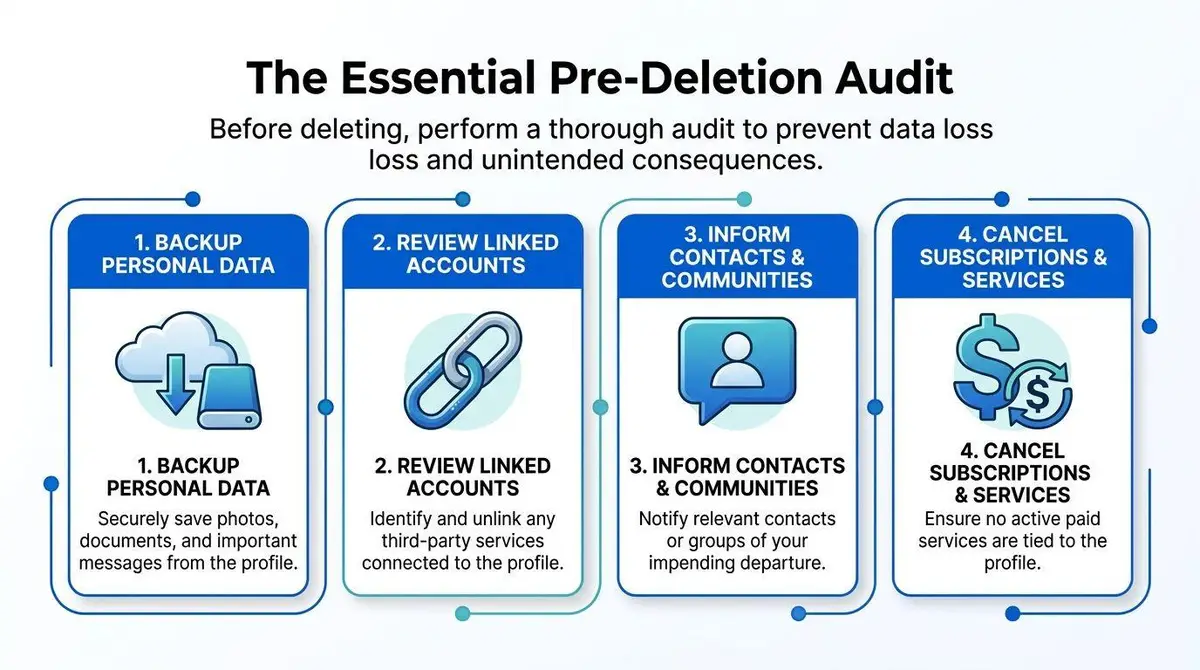
The Pre-Deletion Audit
The pre-deletion phase is where professionals earn their keep. It isn’t clerical. It’s where you prevent self-inflicted loss.
People under pressure want to act immediately. That instinct is understandable and often wrong. Once a profile is deleted, you may lose access to messages, evidence, administrator privileges, or platform history that would have helped you resolve the wider problem.
Separate the profile from the account
One of the most common errors is assuming profile deletion and account deletion mean the same thing. They often don’t.
Google explicitly states that deleting your public profile does not delete your Google Account, and Windows guidance also distinguishes removing a user profile from removing the user account itself, as explained in Google’s profile removal guidance. If you miss that distinction, you can end up with a half-removed identity that still holds access, billing relationships, or data exposure.
This is the first question I ask any client: are you trying to remove a presentation layer, or terminate the underlying identity? Those are different operations with different consequences.
Audit what the profile controls
Before deletion, map every dependency tied to that profile. Don’t rely on memory. Open each service and verify.
A disciplined pre-deletion audit should cover:
- Access dependencies: Single sign-on, shared inboxes, admin dashboards, password manager entries, and recovery emails.
- Evidence preservation: Direct messages, account notices, abuse reports, prior impersonation complaints, billing logs, and screenshots.
- Asset ownership: Pages, ad accounts, social handles, cloud folders, saved drafts, and any business or legal records attached to the profile.
- External ties: Recurring services, memberships, autofill payment relationships, and partner platform connections.
Decide whether deactivation is safer first
Deletion is final on many systems. Sometimes you need a freeze before you need an erasure.
If the profile may be relevant to litigation, internal investigation, or platform escalation, deactivate or restrict access first if the platform allows it. That gives you time to preserve records and transfer control. It also lets you test whether other systems break when the profile is disabled.
Practical rule: If you haven’t mapped the profile’s login, billing, and evidence dependencies, you are not ready to delete it.
Preserve records like a lawyer, not a casual user
In reputation matters, records matter because platforms change interfaces and content disappears unevenly. Capture the current state before you touch anything. Keep a dated folder with screenshots, URLs, username variants, notices, and all support interactions.
That record serves three purposes:
| Issue | Why the record matters |
|---|---|
| Wrong profile deleted | You can prove the intended target and reconstruct events |
| Platform dispute | You can show prior ownership, impersonation, or abuse history |
| Search residue persists | You can document what remained visible after deletion |
The pre-deletion audit feels slow when you’re stressed. It is still the fastest way to avoid irreversible mistakes.
Executing Deletion Across Key Platforms
Deletion fails in practice for one reason more than any other. People treat every profile like the same object.
A consumer social profile, a CRM contact record, an enterprise user, and a Windows local profile are different assets with different dependencies, permissions, and recovery rules. When accuracy is critical, your job is not just to find the delete button. Your job is to remove the right object, through the right authority path, without leaving active ties behind.

Social platforms and consumer accounts
Social platforms create identity confusion by design. One login can control a personal profile, a creator profile, business assets, alternate profiles, and page roles. In a takedown scenario, that is where expensive mistakes happen.
Use a strict execution sequence:
- Open the exact target profile first and confirm the URL, handle, display name, profile photo, and linked email.
- Check platform roles tied to that profile, including page admin access, group ownership, ad accounts, and business tools.
- Choose deactivation or deletion based on risk, not emotion. If the profile may still be needed for evidence, access transfer, or escalation, pause.
- Record the platform’s stated recovery window before you confirm removal.
- Log out and test the public profile URL after the action completes.
That discipline matters because the visible profile is often only one layer of the account structure. Deleting the profile while leaving the parent account, linked page, or connected login active can leave the reputation problem half solved.
Internal and enterprise systems
Enterprise deletion is a controlled records action. Treat it that way.
In customer data platforms and internal admin tools, deletion usually requires filtered targeting, confirmation at the record level, and administrative permissions. CM.com’s CDP deletion workflow shows that pattern clearly. The operator must identify the right profile set before any bulk action runs. Salesforce Marketing Cloud bulk deletion steps go further and state that bulk deletion is permanent and cannot be stopped once processing starts.
Those rules exist because enterprise profiles are rarely isolated. They can affect suppression lists, consent records, support histories, billing systems, and downstream syncs. If your organization is removing employee or customer records at scale, route the work through the data owner and use a documented process. If the scope extends beyond one platform, a structured account removal service can help centralize authority, scope, and proof of completion.
Teams that are also automating customer support need one extra control. Check whether bots, macros, ticket templates, or synced knowledge systems will keep reintroducing the deleted name, email, or profile reference after removal. That kind of operational residue creates the appearance that deletion failed, even when the source record is gone.
| Platform type | Main execution risk | Recommended approach |
|---|---|---|
| Social platform | Deleting the wrong identity object | Confirm the exact profile, role scope, and recovery terms before removal |
| Data platform | Permanent bulk loss | Use filtered targeting, approval controls, and documented authorization |
| Enterprise user system | Breaking access, compliance, or downstream syncs | Execute through admin workflow with the record owner involved |
Windows user profiles
Windows causes a different problem. People delete the folder and assume the profile is gone.
Use the supported administrative path instead. This Windows profile deletion guide from Spiceworks explains the standard workflow: open Run with Win+R, launch SystemPropertiesAdvanced, go to User Profiles > Settings, select the target profile, and choose Delete. That removes the user profile data without deleting the underlying account itself.
If the Delete button is greyed out, the permission level is usually wrong. This Action1 explanation of Windows profile deletion notes that administrators may also need to remove the related ProfileImagePath entry under HKEY_LOCAL_MACHINESOFTWAREMicrosoftWindows NTCurrentVersionProfileList when someone has already deleted the folder manually. Otherwise, orphaned references remain and cause cleanup issues later.
On business machines, avoid improvisation. Use the supported administrative method, document who approved it, and confirm the profile path and account association before you remove anything.
For readers who want a visual walkthrough before touching account settings, this overview is useful:
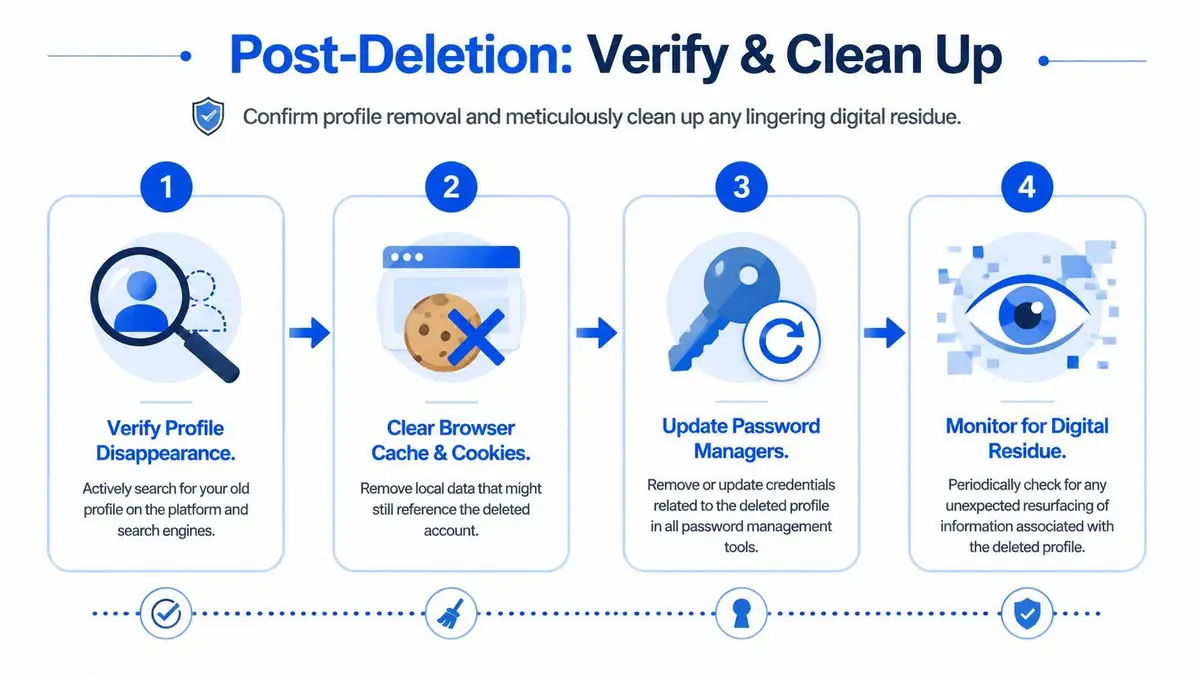
Post-Deletion Verification and Cleanup
The delete button ends the platform action. It does not end the matter.
Profiles can disappear from the account interface while still appearing in search results, browser history, device caches, old app sessions, and third-party references. That doesn’t always mean the deletion failed. It does mean you need verification.
Verify at the source first
Start with the platform itself. Log out, use a separate browser, and test the old profile URL directly. Then search the profile name, handle, and unique text fragments.
You are looking for three different states:
- Gone at source: The profile no longer resolves or is clearly marked unavailable.
- Visible through session artifacts: You still see remnants because your device stored prior data.
- Still public: The deletion did not complete, or you deleted the wrong object.
That distinction matters because people often panic at cached appearances that are local, temporary, or stale.
The right question after deletion isn’t “did I click it.” It’s “what can an outsider still see.”
Clean up local and indexed residue
After source verification, clear local traces on every device that had active access. That includes browser cache, cookies, saved logins, app sessions, and password manager entries tied to the old profile.
Then deal with search visibility. If a deleted URL still appears in search results, request removal or de-indexing through the platform or search engine process where available. If your issue is ongoing Google visibility rather than source-level account access, the practical next step is reviewing a dedicated remove yourself from Google process.
Use this post-deletion checklist:
- Search the old URL directly: See whether the platform serves an error, redirect, or live page.
- Search the handle and display name: Look for duplicates, mirrors, and indexed snippets.
- Check account recovery paths: Remove saved credentials and old recovery links.
- Review linked apps: Disconnect any remaining authorizations that reference the deleted profile.
Monitor for reappearance
The final step is monitoring. Deleted profiles can reappear in the public eye for reasons that have nothing to do with the original platform. Cached search results can linger. Data aggregators can copy stale records. Impersonators can rebuild the identity under a similar name.
That is why thorough deletion work includes a watch period after removal. Search periodically for the name, username variants, image matches, and old URLs. If the profile was central to a reputational attack, keep your evidence file active even after apparent success.
Verification is not glamorous. It is where you determine whether the operation held.
When Deletion Fails Escalation and Professional Intervention
You submit the deletion request, get a confirmation email, and assume the risk is contained. A week later, the profile is still live, or a copy appears under a slightly altered handle. That is the point where this stops being a settings problem and becomes an exposure-control problem.
Treat failed deletion as a signal, not an inconvenience. Repeating the same report flow rarely changes the outcome. It wastes time, creates inconsistent records, and can weaken your position if you later need legal or platform-level review.
Recognize the failure pattern early
A failed takedown usually shows itself fast. Watch for these indicators:
- No real deletion channel exists: The platform offers reporting tools but no workable removal path for your situation.
- You do not control the account: The profile is fake, abandoned, inherited, compromised, or tied to credentials you cannot recover.
- Platform responses conflict: Support closes one ticket, another team reopens the issue, or moderation gives generic denials without addressing the core violation.
- The profile reappears after removal: Cloned accounts, reposted media, archived pages, and lookalike handles show up after the original action.
- The stakes are rising: The profile is now tied to harassment, investor concern, employer review, client confusion, or personal safety.
Deletion failures are rarely isolated. They usually point to one of three conditions: weak evidence, the wrong escalation route, or a broader identity-abuse issue that requires a different strategy.
Escalation changes the objective
At this stage, your job is not to keep clicking. Your job is to build pressure through the right channel with a clean record.
That means organizing evidence, preserving timestamps, capturing URLs, documenting prior reports, and matching the facts to the strongest available claim. Impersonation, blackmail, doxxing, non-consensual imagery, false statements, and copyright misuse each require different framing. Get that wrong and the platform may treat a serious abuse case like a routine support request.
Speed matters, but accuracy matters more. A rushed complaint with weak documentation often delays removal because it sends the case into the wrong queue.
When professional help is justified
Professional intervention makes sense when delay increases reputational, legal, or commercial risk. That includes executives, founders, public figures, litigants, medical professionals, and anyone whose name directly affects trust or revenue.
The value is judgment under pressure. A specialist knows when to preserve evidence before contact, when to route the matter through trust and safety instead of frontline support, when to involve counsel, and when deletion alone will fail because the underlying problem is replication across platforms. ContentRemoval.com is one available option for fake account and profile-related removals across major platforms where coordinated source removal and platform escalation are needed.
Use the same standard you would apply to any sensitive disclosure process. Before sharing IDs, screenshots, or legal records with a service involved in a takedown, review how Ollo handles your data.
If the profile sits on an uncooperative site, a foreign host, or inside a copycat network, ordinary reporting is not a serious plan. A documented escalation path is.
Taking Control of Your Digital Footprint
Deletion works best when you stop treating it as a one-off task. The stronger model is Audit, Execute, Verify, Escalate.
Audit before you touch anything. Execute through the correct channel for the platform involved. Verify what the public can still see after the platform says the profile is gone. Escalate quickly when self-service tools stop working. That framework gives you control when the situation feels chaotic.
Treat privacy as an operational discipline
People with public exposure, wealth visibility, or executive responsibility shouldn’t wait for a crisis to learn how profile systems behave. They should know which identities are active, which profiles are redundant, which accounts are linked, and which platforms retain public-facing remnants after change. That level of control lowers panic because decisions become procedural instead of reactive.
Even small details matter. If you’re evaluating a service before handing over personal information during a takedown or account closure process, reviewing a clear privacy policy such as how Ollo handles your data is a useful reminder of what responsible data disclosure should look like.
The real objective isn’t deletion alone
The objective is reducing exposure without creating new exposure. Sometimes that means deletion. Sometimes it means deactivation, evidence preservation, ownership transfer, or search cleanup after the profile is gone. The people who handle this well aren’t clicking faster. They’re making fewer mistakes.
If your situation involves impersonation, legal sensitivity, executive visibility, or stubborn search residue, don’t improvise under pressure. Build the record, move carefully, and verify the outcome.
If you need a confidential plan for removing a profile, fake account, cached result, or reputation-damaging digital residue, ContentRemoval.com can assess the situation discreetly and map the fastest defensible path to source removal, de-indexing, and ongoing monitoring.
Frequently asked questions
What is the difference between deleting a profile and deleting an account?
A profile is often the presentation layer while the account is the underlying identity that holds access, billing and data. Google, for example, states that deleting a public profile does not delete the Google Account, and Windows separates removing a user profile from removing the user account. Decide which one you mean before acting.
Why does a deleted profile still show up in Google?
Search engines and caches update unevenly, so a removed page can remain indexed for a while, and local browser data can show stale remnants. Test the old URL logged out in a separate browser; if it no longer resolves but the listing persists, request removal or de-indexing through the search engine’s outdated content process.
Can I delete a fake profile that uses my name?
Not directly, since you do not control the account. Preserve screenshots, URLs and timestamps first, then report it under the platform’s impersonation policy with an identity comparison. If reports are denied or the profile reappears under a new handle, escalation through trust and safety, legal notices or a specialist becomes the workable route.