Hacked account recovery starts on a clean trusted device, not the compromised one. Preserve screenshots of unauthorized changes, then secure the primary email, change the password, revoke all sessions, remove unknown recovery emails and phone numbers, delete forwarding rules and strip third-party app access. Attackers target the recovery system rather than the password, so persistence checks matter most.
Key facts
- A study of 760 web services found 92.5% reset passwords by email, so one inbox can unlock an identity stack.
- Attackers add forwarding rules and hidden inbox filters to keep receiving mail after a password change.
- A 2025 roundup put average social account recovery at 17 days for users and 14 for corporate accounts.
- Keep dates, times, case numbers and representative names from every support contact for later escalation.
Where ContentRemoval.com comes in. ContentRemoval.com picks up the part of a hack that platform support closes out: impersonation profiles spun up in your name, leaked screenshots or messages posted from the account, fake accounts that keep reappearing, and exposed data surfacing in search or dark web channels. Executives, creators and their security advisers usually make contact while the platform appeal is still stalled. A free 15-minute Exposure Scan maps what is removable and the report is yours to keep. Get a Free, Confidential Exposure Scan or read how our content removal work is done.
Your inbox is open, your phone is buzzing, and the account that carries your name, your deals, or your audience has suddenly started behaving like someone else owns it. That’s the crisis. Don’t waste time debating what happened first. Treat this as a recovery-system incident, because that’s where the breach usually lives, and that’s where the damage keeps spreading if you move slowly.
A hacked account recovery event is rarely a simple password reset. In practice, it’s a race against mailbox persistence, recovery-channel hijacking, and the attacker’s effort to lock in control before you can get a clean foothold back. The U.K. National Cyber Security Centre’s first move is blunt for a reason, go to the provider’s own help or support pages, because recovery paths differ by service, and the wrong path costs time NCSC recovery guidance. That’s the right mindset for executives, public figures, and anyone whose account loss can become a reputational event within minutes.
Immediate Triage and Evidence Preservation
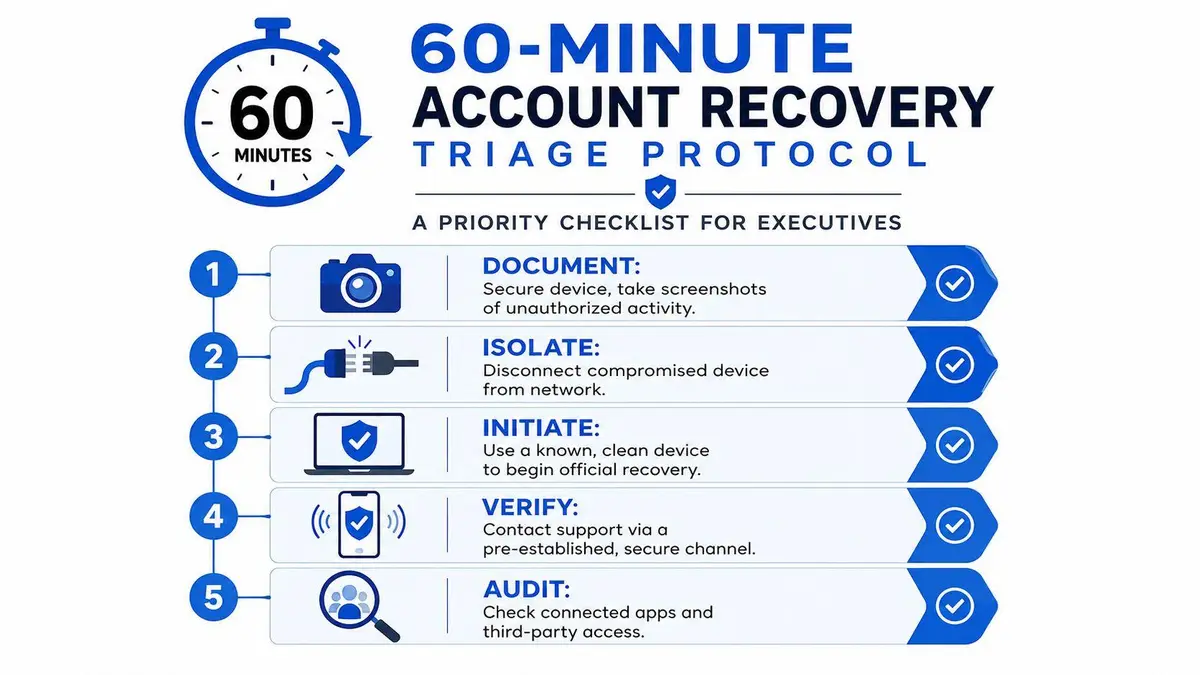
The first hour matters because the attacker is using the same clock you are. If you’re still logged in anywhere, move from the cleanest trusted device you control and stop treating the compromised device as reliable. A recovery flow works only if you can keep the breach from spreading into email, contacts, ads, or connected services. The U.K. National Cyber Security Centre tells users to start on the provider’s own support pages, change any reused passwords, and warn contacts that recent messages may be suspicious NCSC recovery guidance.
Lock the perimeter first
Take screenshots of unauthorized posts, profile edits, recovery-email changes, unfamiliar logins, and any message the platform sent about account changes. Keep a running note with times, device names, and anything you saw before the attacker can delete it. Microsoft’s hacked-account guidance is explicit that you should keep a record of all support communications, including dates, times, and the names of representatives, because that record matters if the case needs escalation Microsoft account recovery notes.
Practical rule: preserve before you pursue. If you can still see evidence, capture it now, because the attacker can erase it faster than support can reconstruct it.
Then isolate the device you suspect was exposed. Disconnect it from the network if you think there’s any chance the attacker still has a session on it or can keep syncing changes through browser cookies, stored passwords, or a malicious extension. Don’t do recovery work from that device. Use a separate trusted machine, one that hasn’t been signed into the compromised account and doesn’t auto-fill credentials from the same browser profile.
Start documentation like a case file
Write down the sequence in plain language, not in emotional shorthand. The goal is to create a credible timeline you can hand to platform support, legal counsel, or a reputation team without having to reconstruct it later under pressure. If you later need to escalate to a platform review or outside counsel, clean notes beat frantic memory every time.
Use the incident note to record what changed, what still works, and which channels you still control. If you still have access to the primary email or phone, say so clearly. If you’ve lost both, that’s a different class of incident and needs a tighter escalation path.
If the breach is already spilling into search results or exposed personal data, route that problem in parallel. A useful starting point is this guide to removing personal information from Google after a data breach, because account loss often becomes a public-visibility problem before recovery is finished.
The Recovery System as the Primary Attack Surface
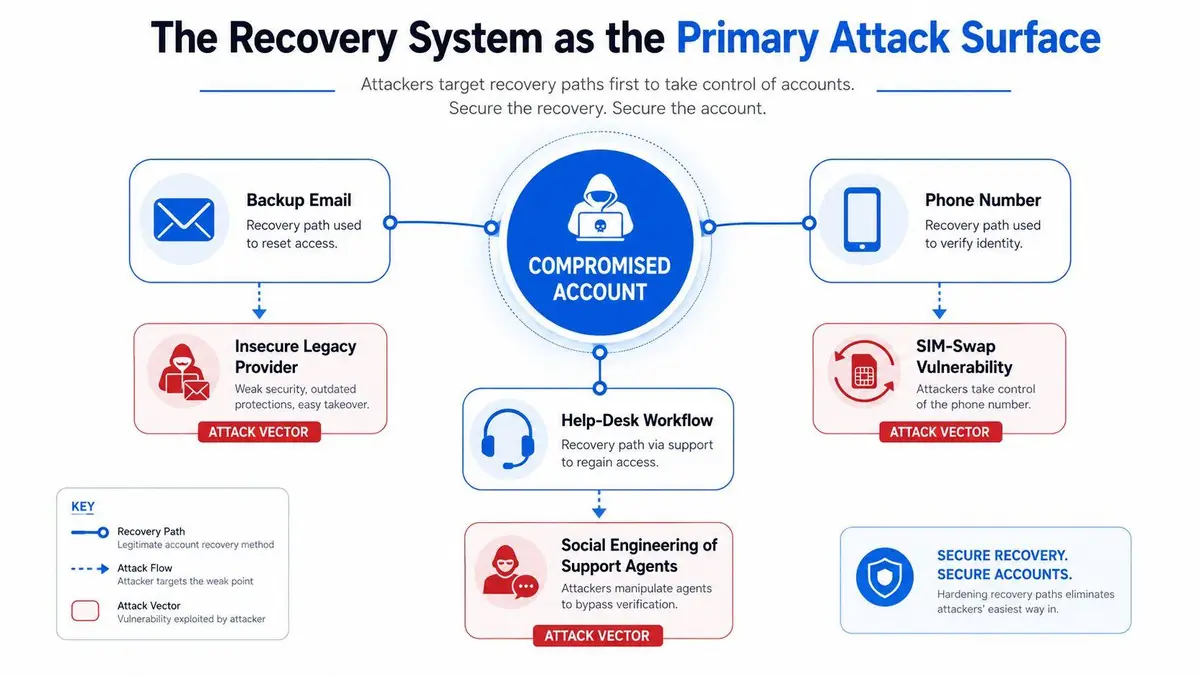
Attackers often overlook the password itself. Instead, they target the recovery system, because that’s the actual control plane. In a study of 760 popular web services, researchers found that 92.5% used email to reset passwords, and 81.1% of the websites’ accounts could be compromised by attacking the registered email account alone email recovery study. That’s why one inbox can become a gateway to a whole identity stack.
Why the inbox is the real prize
If the attacker controls the recovery email, they don’t need to guess your password forever. They can trigger reset flows, intercept notices, and use that access to move into connected accounts. The same study showed how broadly email-based recovery is enabled across major services, which means the compromise of a single mailbox can cascade into multiple takeovers email recovery study. For an executive or public figure, that is not a convenience issue. It’s an impersonation risk, a fraud risk, and a reputation risk.
That’s also why many “I changed the password, but they got back in” cases keep failing. The password changed, but the attacker left themselves another path back through a backup email, phone recovery, delegated access, or a help-desk flow that trusted the wrong signal. The core problem isn’t only entry. It’s persistence.
A strong recovery mindset treats the account as contaminated until you’ve checked every path that could hand control back to the attacker. That means backup email, phone-based reset, and every support channel the platform exposes. If any one of those remains compromised, the attacker can return after the reset and reopen the incident.
Persistence is the part people miss
Persistence is what turns a short-lived hack into a drawn-out crisis. Attackers can alter recovery settings, hide forwarding behavior, and wait for the owner to assume the problem is over. ESET warns that attackers often set up email forwarding rules, then keep receiving copies of incoming mail even after the victim thinks the inbox is clean ESET recovery guidance.
That’s why the recovery system itself is the attack surface. The password is just one door. The recovery channels are the keys under the mat.
Technical Reclamation and Persistence Audits
Once you’re on a trusted device, work in a fixed order. Don’t hop around between settings screens and support forms. First secure the primary email, then change the password, then revoke active sessions, then remove unknown recovery entries, then strip out untrusted third-party access. Guidance from Microsoft and ESET both point to the same sequence, because recovery is a chain, not a single click Microsoft account recovery notes ESET recovery guidance.
Clean the mailbox before you trust the account
Start with the email account tied to the hacked service. Audit forwarding rules, inbox filters, delegated access, connected apps, and automatic replies. Microsoft explicitly calls out those mailbox persistence checks, along with rotating reused passwords across other accounts, because lingering rules and old credentials can let an attacker back in after you’ve already changed the main password Microsoft account recovery notes.
If you find forwarding that you didn’t create, remove it and assume copies of sensitive messages have already left the inbox. If you see inbox rules that hide security alerts or move them to archive, treat that as an active defense-evasion tactic. Don’t just delete the rule, check whether the attacker also added a new recovery email or a phone number you don’t recognize.
Non-negotiable: if the mailbox is dirty, the account is still dirty.
The same applies to connected apps. Revoke anything unfamiliar, and don’t keep third-party integrations alive “just in case.” Attackers use those sessions to retain access after the headline password changes. If there’s an app you don’t actively need, remove it now and reauthorize later from a known-clean state.
Revoke sessions, then verify the silence
Terminate all active sessions across every device. Do it even if you think the attacker only had one login. If the platform lets you sign out of all devices, use it. Then check whether the account is still producing alerts, message sends, or profile edits you didn’t authorize. If the attacker is still visible anywhere, one session survived.
ESET’s guidance is useful here because it reflects what real incident responders see, hidden forwarding, backup-code exposure, and connected services are common persistence points ESET recovery guidance. Recovery only becomes credible once those are gone. Anything less is a temporary pause.
For broader post-breach exposure, especially if your identity data has leaked into the open web or hidden marketplaces, a parallel monitoring and takedown effort belongs on the table. If that’s the situation, dark web monitoring is part of the containment plan, not a luxury.
Platform-Specific Recovery Nuances and Escalations
Every platform claims to have a recovery flow. In practice, they behave very differently under stress. The safest assumption is that automated recovery will stall when the attacker already changed the recovery channel, especially on accounts that are tied to a public identity or a business presence. The provider’s own support pages are still the correct first stop, but the escalation route matters just as much as the reset form NCSC recovery guidance.
Google, Meta, X, and Apple do not fail the same way
Google tends to lean heavily on email and device trust, which is efficient when you still control a familiar device and inbox. Meta’s ecosystem can require you to show ownership through a business context or support channel, and those flows can feel like loops when the account was personal but the fallout is public. X and Apple each have their own verification bottlenecks, and the core problem is often not the password prompt, it’s proving identity after the attacker already rewired the recovery path.
For executives and creators, the practical question is not which platform is “easy.” It’s which platform still gives you a human escalation path when the automation has already failed. If you can access a support route through a business account, verified channel, or preexisting account management relationship, use it. If not, document the stall and move the case upward with evidence.
Comparison of recovery posture
| Platform | Average Recovery Time | Escalation Path |
|---|---|---|
| Social media accounts in general | 17 days for average users, and 14 days for corporate social accounts, based on a 2025 recovery roundup social media hacking statistics roundup | Use the provider’s own help pages first, then escalate with documented proof of ownership and preserved evidence |
| Not stated in verified data | Clean-device recovery, account help flow, and support escalation if recovery signals are blocked | |
| Meta | Not stated in verified data | Business or advertising support channels may be the only practical human path when automated review stalls |
| X | Not stated in verified data | Support form, identity proof, and repeated escalation with timeline documentation |
| Apple | Not stated in verified data | Trusted-device and account-recovery workflow, then support escalation if recovery key or trusted number is compromised |
The point of the table isn’t to pretend every platform publishes the same recovery data. It’s to show the reality you’re dealing with. Delays are normal, and the average user isn’t recovering instantly social media hacking statistics roundup.
Escalate like a claimant, not a customer
When you contact support, send a concise record, not a story. Include the account identifier, the first sign of compromise, what you still control, what you’ve already revoked, and what evidence you’ve preserved. If the case involves a public figure, a company page, or a shared business identity, say that clearly. Support teams triage based on impact as much as on ownership.
If your account is tied to a broader reputational event, the recovery path may intersect with impersonation or fake-account issues. In those cases, a specialized takedown or suppression process can matter alongside the platform appeal, which is where reputation management after a data breach becomes relevant to the overall response.
Legal Options and Professional Reputation Management
If the account has been used to impersonate you, publish leaked material, or spread harmful messages, stop thinking of this as a platform ticket. It’s now an evidence, legal, and reputation problem. Microsoft’s guidance to keep detailed records of support communications is useful here because lawyers, investigators, and platform escalations all benefit from a clean timeline Microsoft account recovery notes.
What to preserve for legal escalation
Keep screenshots of the compromise, the unauthorized messages, the account changes, and every support reply. Save timestamps, case numbers, and the names of anyone who handled the matter. If law enforcement or counsel gets involved, those records help show the sequence of control loss and the point at which the attacker started using the account to cause harm.
If there’s impersonation, a fake profile, or a spun-up account using your name after the hack, you’re dealing with more than recovery. You’re dealing with identity abuse. That’s where a targeted takedown approach belongs, and a firm like ContentRemoval.com fits naturally into that response because it handles impersonation and fake-account removal, along with monitoring that watches for the material coming back.
Why professional intervention makes sense
There are moments when the platform’s own workflow is too slow, too automated, or too narrow to protect the client. A public figure doesn’t just need access restored, they need the surface area of the attack reduced. That can mean legal notices, source removal, suppression work, and continuous monitoring so the same content doesn’t keep reappearing under a different handle.
For investors and executives thinking about downstream consequences, the legal side can matter beyond reputation alone. If a breach becomes part of a broader corporate incident or disclosure question, a resource like how data breach lawsuits help investors is worth reviewing because the financial fallout can extend well beyond the account itself.
The hard truth is that recovery support often closes once the account is technically back. Your exposure doesn’t. If leaked screenshots, impersonation pages, or defamatory content are still live, they need separate treatment.
Long-Term Hardening and Strategic Prevention
Recovery is the first battle. Hardening is the one that keeps you from fighting the same fire again next month. Start by assuming your primary email and recovery channels are high-value assets, not convenience tools. Then reduce how much your public identity depends on a single mailbox, a single phone number, or one provider’s recovery logic.
Build recovery like you expect abuse
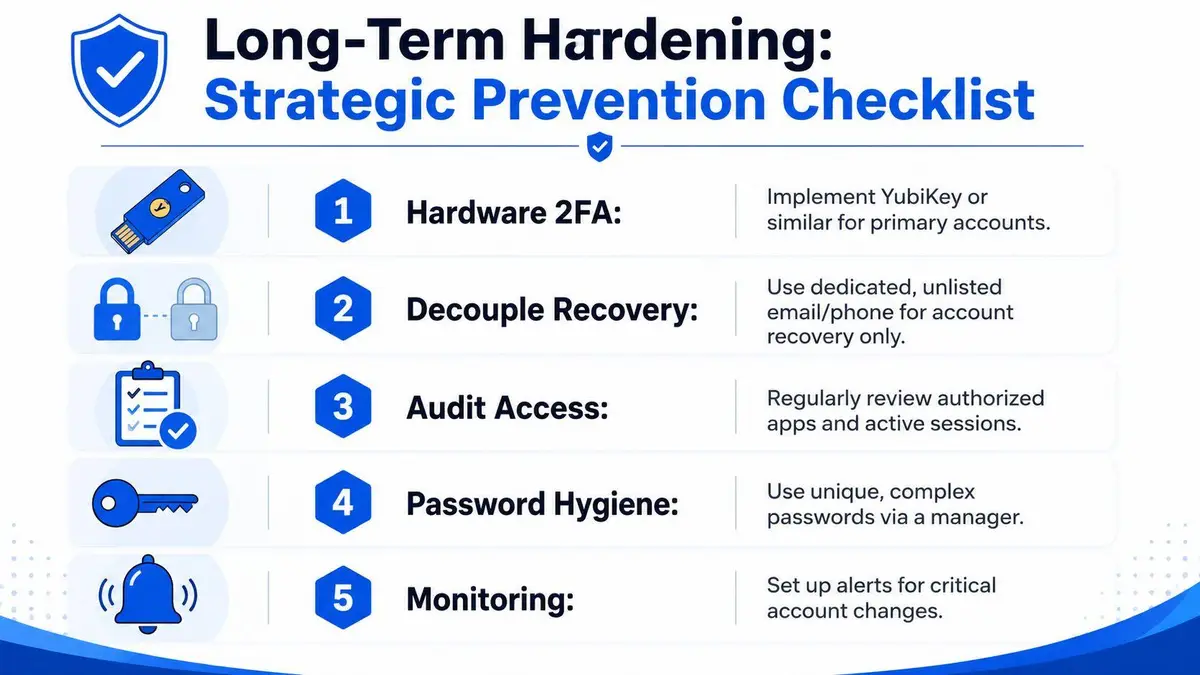
Use hardware-based 2FA such as a YubiKey for your most critical accounts. Decouple recovery from your everyday inbox by using a dedicated recovery email that isn’t public and isn’t reused for normal communications. Review authorized apps and active sessions on a schedule, not only after a breach. Rotate to unique passwords through a manager, and set alerts for security changes so you hear about a takeover attempt early.
ESET’s warning about silent forwarding rules matters here too, because it shows why inbox hygiene is not optional ESET recovery guidance. If someone can watch your mail undetected, they can keep pace with your resets. That’s why hardening the recovery channel is as important as hardening the login page.
Make the account less attractive to hijackers
Alias-based email systems help hide the primary address you use for sensitive accounts. That doesn’t make you invisible, but it does reduce the blast radius when one service leaks or one inbox gets targeted. Pair that with continuous monitoring for account changes, impersonation, and exposed credentials so you’re not learning about a problem from a follower, a client, or the press.
ContentRemoval.com supports this kind of post-incident resilience through impersonation takedowns, monitoring, and reputation protection. If your name, brand, or executive profile has already been used in a hack or fake account campaign, get the response moving before the story becomes permanent.
If you’re dealing with a compromised account, stolen recovery access, or impersonation fallout, don’t wait for the platform to sort it out on its own. Visit ContentRemoval.com and ask for a confidential assessment, because the right recovery plan is faster, cleaner, and far less damaging than improvising under pressure.
Frequently asked questions
Why does a hacker keep getting back into my account after I change the password?
Because the password was only one door. The attacker usually left a path back through a backup email, a phone recovery number, an inbox forwarding rule, a delegated access setting or a connected third-party app. Audit and remove every one of those, revoke all sessions, then watch for any further unauthorized activity.
What should I do first when my account is hacked?
Move to a trusted device that has not been signed into the account, capture screenshots of unauthorized posts, profile edits and recovery changes, and write a plain timeline. Then go to the provider’s own support pages, secure the primary email before anything else, and warn contacts that recent messages may be suspicious.
How long does it take to recover a hacked social media account?
Longer than people expect. A 2025 roundup put the average at 17 days for ordinary users and 14 days for corporate accounts, and automated recovery often stalls when the attacker has already changed the recovery channel. Business or verified support routes and a documented evidence package are what move a stalled case.