A compromised account is any account an unauthorized party can access or use, whether through a stolen password, a hijacked session, a stolen token, MFA fatigue or a malicious app approval. For an executive, the working definition is loss of exclusivity, trust and containment: someone else can read, send, approve or publish under your name, even if your password works.
Key facts
- Many compromises now happen without password theft, through session hijacking, token theft or malicious OAuth consent.
- The article cites that 65 percent of people reuse passwords, which lets one leak cascade across accounts.
- Recovery order: primary email first, then identity and SSO, financial systems, public profiles, secondary apps.
- A password reset does not remove forwarding rules, connected apps or OAuth tokens an attacker left behind.
Where ContentRemoval.com comes in. When a compromised account has already been used to impersonate you, post false content or leak private messages, the cleanup extends beyond IT. ContentRemoval.com coordinates the public side: impersonation takedowns, removal of leaked material, de-indexing of anything search has picked up and monitoring for reposts. Executives, their chiefs of staff and security leads usually make contact. A free 15-minute Exposure Scan maps what is removable, and the report is yours to keep. Get a Free, Confidential Exposure Scan or read how our content removal work is done.
You usually find out in the least convenient way possible. A board member forwards a strange message that appears to come from you. Your assistant notices calendar changes nobody approved. A client asks whether you really requested revised wire instructions. Or you open your social account and see posts you didn’t publish.
At that point, the question isn’t academic. You aren’t trying to define compromised account for a glossary. You’re trying to determine whether someone else has control over a business asset tied directly to your name, your authority, and your legal exposure.
Executives often treat this as a technical nuisance. That’s a mistake. A compromised account is a control failure. If the account is your primary email, cloud workspace, financial login, or public-facing social profile, the issue isn’t just access. It’s impersonation, surveillance, data exposure, and the risk that someone uses your identity before you can stop them.
What Is a Compromised Account
A compromised account is any account an unauthorized party can access or use. That includes cases where your password was stolen, guessed, leaked, or reused. It also includes situations where the attacker never touched your password at all.
For an executive, that definition needs to be stricter than the consumer version. If someone can read your inbox, send from your domain, approve connected apps, view internal files, or message investors from your profile, the account is compromised whether or not you can still log in.
The popular shorthand, “someone hacked my password,” is too narrow. A compromised account is evidence that an attacker may already be operating inside email, cloud, social, financial, or work systems, not just trying to get in. One industry survey cited that 65% of people reuse passwords across sites, which helps explain why one exposed login can trigger a chain reaction across multiple accounts, as noted in Enzoic’s password reuse analysis.
Why this matters at the leadership level
When you hold a senior role, your accounts carry delegated trust. Staff obey your messages. Banks react to your instructions. Journalists treat your communications as authoritative. A compromise of that identity can create contractual confusion, disclosure issues, and reputational harm before anyone realizes the messages were fraudulent.
That’s why I advise clients to stop asking whether the incident is “serious enough” and start asking a harder question: What can this account authorize, influence, or expose?
Practical rule: If an account can move money, direct employees, access confidential information, or publish under your name, treat compromise as a crisis event, not a help-desk ticket.
The real definition that matters
Here is the only definition worth using in practice:
- Loss of exclusivity: You no longer have sole control over the account.
- Loss of trust: Other people can no longer assume communications from that account are authentic.
- Loss of containment: The attacker may have used the account to reach other systems, contacts, or platforms.
That is what clients need to understand when they search for “define compromised account.” The issue isn’t merely whether credentials were exposed. The issue is whether your digital identity has become an attack platform.
How Account Compromises Actually Happen
The common understanding still pictures one path. A weak password gets guessed, the attacker logs in, and the problem is solved by a reset. Real incidents aren’t that tidy.
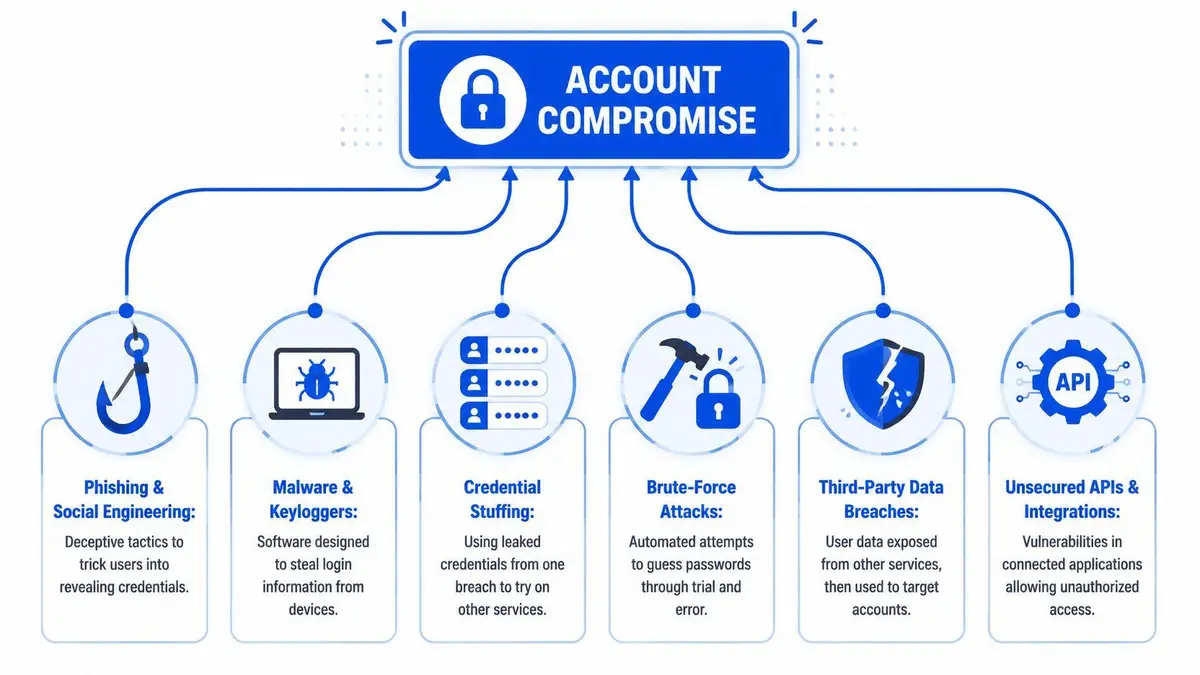
Attackers usually get in through one of three channels. The first is persuasion. The second is automation. The third is session abuse and delegated access.
Social engineering still works because trust works
High-level targets rarely fall for crude phishing emails. They do fall for well-timed requests that look operationally normal. A fake document share, a travel update, a board packet, a payment confirmation, or an urgent login prompt during a busy day is often enough.
Spear-phishing works because the attacker studies context. They don’t need to outsmart you. They need one moment where speed beats caution.
This category also includes phone-based manipulation, fake support calls, and approval fatigue. If your phone lights up with repeated authentication prompts, an attacker may be trying to pressure you into accepting one just to stop the noise.
Automated credential attacks exploit repetition
The second family of attacks is less personal and often more scalable. Credential stuffing uses previously leaked username and password combinations to test other services. Brute-force and password spraying attempt common or weak credentials at scale. Third-party breaches feed these attacks because one old password from an unrelated service can still gain access to current systems if you reused it.
This is one reason a compromise often appears “random.” The attacker may have no prior interest in you at all. They may be testing a large dataset until a valid combination opens a valuable account.
The modern problem is access without password theft
The most misunderstood category is the one that bypasses the old logic entirely. Many real-world compromises now happen without a password being stolen at all. Attackers increasingly rely on session hijacking, token theft, MFA fatigue, or malicious OAuth app consent to act as the user even when the password remains unchanged, as described in Cycognito’s guidance on compromised accounts.
That matters because victims often say, “But my password still works, so maybe it wasn’t a breach.” Wrong. If an attacker steals an active session, abuses a trusted device state, or tricks you into approving a malicious app, they can operate as you while leaving the core password untouched.
Sophisticated compromise often looks ordinary. The attacker avoids obvious disruption because stealth preserves the value of the account.
What executives miss
Executives tend to secure the front door and ignore the side entrances. They focus on password complexity and overlook:
- Browser sessions: A stolen session cookie can preserve access after the login event.
- Connected applications: An approved app may have authority to read mail, files, contacts, or calendars.
- Delegated assistants and shared workflows: Convenience expands the number of trust paths an attacker can exploit.
- Personal and corporate overlap: One infected personal device can expose professional access.
If you want to define compromised account accurately, define it by unauthorized capability, not just by a stolen password.
The Warning Signs You Cannot Ignore
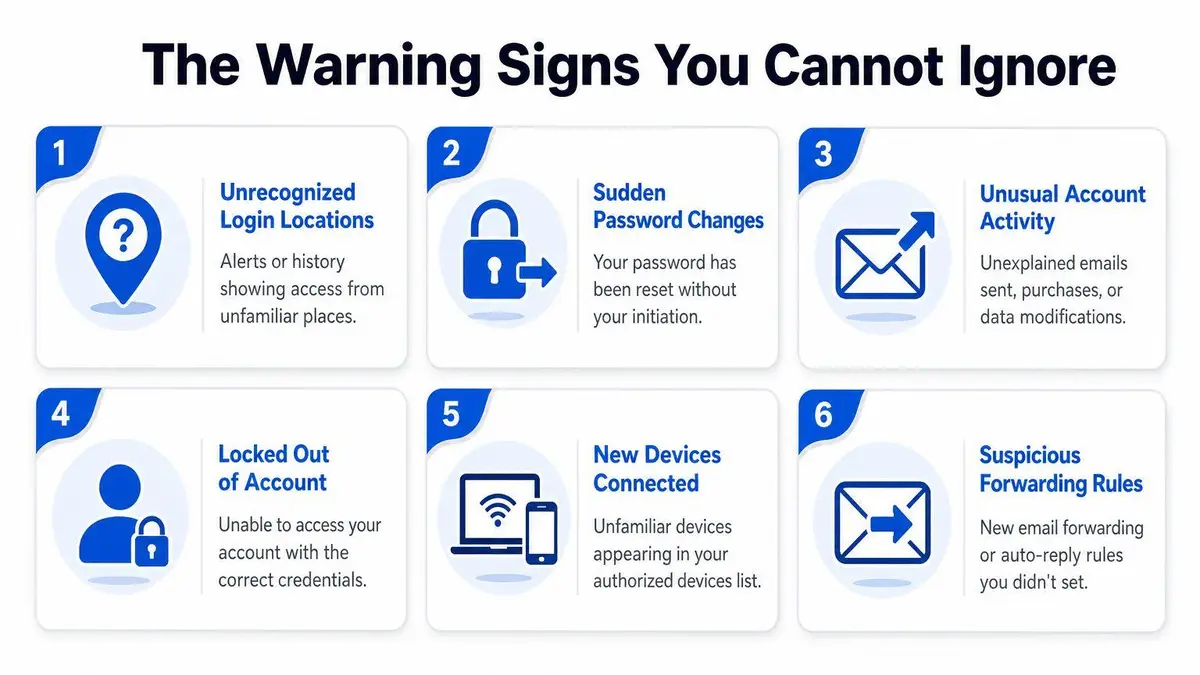
The obvious signs are well known. You receive a password reset you didn’t request. You get locked out. Someone sends messages from your account. Those are late-stage indicators.
The more useful signs are subtler. Attackers who want persistence try not to announce themselves.
Watch for configuration drift
A compromise often reveals itself through small setting changes that don’t look urgent on their own. Recovery email updated. A new trusted device appears. A fresh app authorization shows up in the security panel. Mailbox rules change. Notification settings go quiet.
That is why experienced responders don’t just ask, “Did someone log in?” They ask, “What changed after login?”
In enterprise environments, a single compromised identity can be reused for lateral movement across email, file shares, databases, and cloud services, and security guidance emphasizes monitoring logins and anomaly patterns tied to time, volume, and behavior because compromise often becomes visible only after access starts behaving strangely, as explained in ManageEngine’s account compromise guidance.
Signals that deserve immediate review
Use this as a quick executive filter:
- Unfamiliar geography: A login alert from a place you’ve never worked from, especially if it appears as a lone test login.
- Unusual outbound activity: Messages sent, files shared, or data exports you didn’t authorize.
- Fresh authorizations: New third-party app permissions, API access, or linked services.
- Silent rerouting: New forwarding rules, archive rules, or auto-replies.
- Behavior that doesn’t fit your routine: Access at odd hours, repeated login attempts, or sudden spikes in activity.
If you’re responsible for a public profile or a senior corporate identity, pair these checks with ongoing reputation monitoring. The technical event and the public fallout often unfold at the same time.
An attacker’s first successful move is rarely theft. It’s often reconnaissance. They read, observe, and map your relationships before acting.
The sign many people miss
One unexplained event is enough. Clients often dismiss a single strange login because it “didn’t happen again.” That may have been the test. Skilled attackers validate access discreetly, then return later from a cleaner path.
Treat isolated anomalies with more seriousness than repeated noise. Repeated noise may be a failed attack. A single successful, low-friction event can be much worse.
Your First 60 Minutes A Crisis Response Plan
At 8:10 a.m., your executive email sends messages you did not approve. By 8:25, a client replies. By 8:40, legal wants facts, not guesses. That is what a compromised account looks like in practice. It is an operational problem, a liability problem, and a reputation problem at the same time.
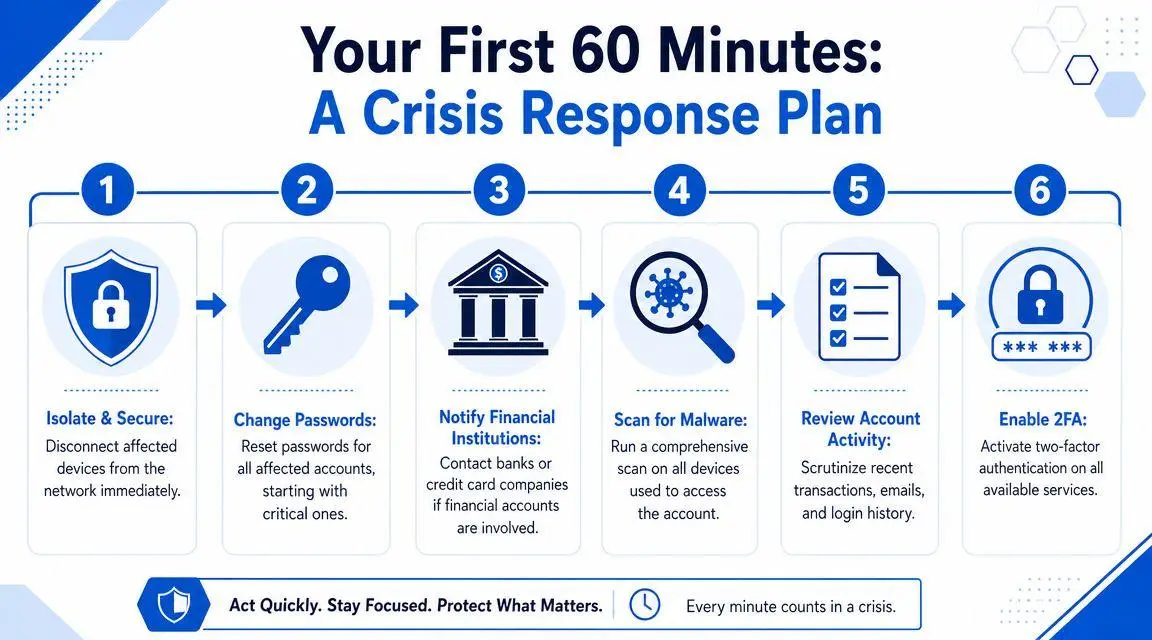
The first hour decides whether this stays a contained incident or turns into a reportable crisis. Act in order. Protect evidence. Restore control. Limit public fallout.
Minute 0 to 15 contain first
Use a clean channel immediately. Do not message colleagues from the affected account, and do not keep working from a device you suspect may be compromised.
Your job in this window is simple. Stop the spread and preserve the record.
- Isolate the device used to access the account if malware, browser theft, or session hijacking is plausible.
- Capture evidence such as login alerts, strange messages, changed settings, and timestamps.
- Identify the highest-risk accounts first. Start with primary email, identity platforms, finance access, and executive-facing public profiles.
- Limit unnecessary communication until you know what was accessed, sent, or changed.
A careless first move creates two problems. It gives the attacker more time, and it weakens your internal record if the matter reaches HR, counsel, insurers, regulators, or the board.
Minute 15 to 30 re-establish control
Now restore control from a trusted device. Start with the account that governs resets, recovery, or shared access across other systems.
Use this order:
| Priority | Account type | Why it comes first |
|---|---|---|
| 1 | Primary email | It controls resets, notices, and downstream recovery |
| 2 | Identity and SSO accounts | One login can grant access across multiple systems |
| 3 | Financial and payment systems | Fraud exposure rises fast |
| 4 | Public-facing profiles | Impersonation can damage trust within minutes |
| 5 | Secondary tools and apps | Residual access often sits here |
Revoke active sessions where the platform allows it. Confirm recovery details have not been changed. Assign one person to own decisions and one person to document them. In a real incident, split responsibility prevents confusion and keeps the response defensible.
A short explainer may help your internal team stay disciplined:
Minute 30 to 60 investigate scope
This is the point where weak responses fail. Teams often rush to “fix” the account and miss the business impact. You need to know what the intruder saw, touched, sent, or redirected.
Review recent logins, device history, connected applications, delegated access, recovery changes, and outbound communications. Note any signs that the account was used to contact clients, employees, vendors, journalists, or investors. Those details determine whether you are dealing with an IT incident or a broader corporate event.
Keep a written incident log with time, account, action, and result. That record matters if you later need to show reasonable response, support an insurance claim, brief counsel, or explain decisions to leadership.
If your organization does not already have one, adapt a formal Crisis Management Plan. Under pressure, disciplined process protects more than systems. It protects judgment, accountability, and credibility.
Operational advice: Contain first, verify second, communicate third. Premature outreach creates confusion, increases legal exposure, and can intensify reputational damage.
Why Changing Your Password Is Not Enough
A password reset is necessary. It is not sufficient.
The reason is persistence. Once an attacker gets into an account, they often create alternate ways back in or alternate routes for extracting value. If you change the password without finding those mechanisms, you may feel secure while the attacker continues to read messages, monitor activity, or re-enter later.
The persistence problem
A compromised account can remain valuable to attackers even after a password change because of forwarding rules, third-party app authorizations, and OAuth tokens. Microsoft notes that attackers may create mail rules or forwarding settings so they continue receiving copied messages after the original takeover appears to be resolved, as described in Microsoft’s compromised account guidance.
That means the actual remediation checklist is broader than many anticipate.
What you need to audit
Focus on the account surfaces that survive a credential reset:
- Mailbox rules and forwarding: Look for hidden or unfamiliar rules that copy, redirect, archive, or delete messages.
- Connected apps: Review every authorized third-party application. Remove anything you don’t fully recognize.
- Recovery settings: Check backup email addresses, phone numbers, and account recovery methods.
- Trusted devices and active sessions: Sign out of all sessions where possible and inspect the device list.
- Delegated permissions: Verify that assistants, agencies, contractors, and legacy admins still need their current level of access.
If the attacker changed settings once, assume they changed more than one setting. Audit the environment, not just the password.
The business consequence of incomplete cleanup
Incomplete remediation creates a false narrative inside a company. Leadership tells staff the issue is resolved. Finance resumes normal approvals. Sensitive discussions return to the compromised channel. Meanwhile the attacker still receives copied messages or retains delegated app access.
That is how a technical incident becomes a governance failure.
A strong response asks a blunt question after every reset: What else still trusts this account besides the password? Keep auditing until you have a complete answer.
Building a Defensible Digital Footprint
Most executives have convenience-based digital habits. One browser for everything. One phone for personal and board communications. One primary email tied to every account. That setup is easy to manage and easy to compromise.
A defensible digital footprint is built on separation, reduction, and verification.
Segment your digital life
High-profile individuals should stop treating all identities as interchangeable. Your public-facing social accounts, private family communications, financial systems, and executive work tools should not all rely on the same device behavior, the same browser profile, or the same recovery paths.
That doesn’t require paranoia. It requires architecture.
Consider these practical controls:
- Separate contexts: Use distinct browser profiles or devices for executive work, personal use, and public posting.
- Reduce app sprawl: Fewer integrations mean fewer trust relationships to audit.
- Use stronger authentication: Hardware security keys are a better option than relying solely on text-message codes.
- Limit exposed personal data: Public breadcrumbs help attackers tailor pretexts and recovery attempts.
Governance matters as much as security
Executives often focus on unauthorized access and ignore lawful overexposure. The more personal and operational data your organization scatters across platforms, the easier it becomes to impersonate you convincingly, answer recovery prompts, or craft pressure campaigns after a breach.
That’s one reason privacy and compliance hygiene belong in the same conversation. If you need a practical benchmark for how organizations should review data-handling obligations, DynamicsHub’s GDPR compliance checklist is a useful planning reference.
Your own public exposure also deserves review. A structured digital footprint cleanup reduces the amount of personal, corporate, and contextual data attackers can weaponize.
Build habits that survive stress
Security controls fail when they depend on perfect attention. Build a system that still works on a rushed travel day or during earnings week.
Use named, deliberate routines. Monthly app review. Quarterly recovery check. Separate approval paths for sensitive transactions. Clean offboarding for advisors and assistants. If a workflow is too messy to audit, it’s too risky to keep.
The objective isn’t to eliminate risk. It’s to make compromise harder, detection faster, and impersonation less believable.
When to Escalate to Professional Services
Some incidents can be handled internally. Others can’t. The dividing line is simple: if the account compromise threatens money, legal position, operational continuity, or public trust, self-remediation becomes a gamble.
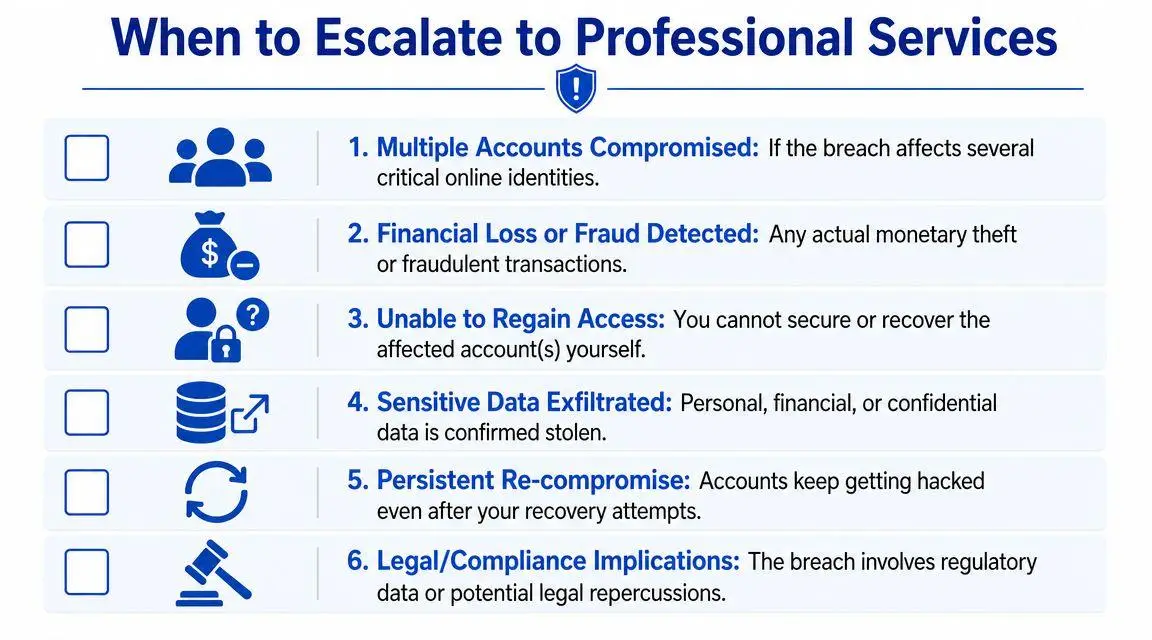
For executives, public figures, and brands, a compromised account can quickly become a reputation event as attackers impersonate the owner, post false content, or access private messages before detection. IBM-linked reporting cited an average breach cost of $4.62 million when stolen credentials are involved, which is one reason a professional response is often financially justified, as noted in Varonis’s data breach analysis.
Escalate immediately when these conditions exist
You should bring in outside specialists if any of the following is true:
- Primary email is affected: That account usually controls resets, archives, and sensitive correspondence.
- Multiple accounts are involved: This suggests broader credential reuse, malware, or identity compromise.
- Financial or legal exposure exists: Fraud, wire risk, confidential deal material, regulated data, or litigation-sensitive communications raise the stakes.
- Public impersonation has started: Fake posts, media outreach, investor messages, or customer communications can outpace internal cleanup.
- The compromise returns after recovery: Re-compromise usually means persistence, device infection, or overlooked trust paths.
Why escalation protects reputation
Technical remediation and reputation management need to move together when the account belongs to a visible person or a trusted brand. If false content is circulating, if search results are starting to index harmful material, or if screenshots of the breach are spreading, containment must include takedown strategy, platform escalation, and communications discipline.
That’s especially true when the compromise traces back to avoidable infrastructure weaknesses. Even a practical resource like an IT manager’s office wi-fi setup guide can help leadership understand how ordinary environmental decisions shape security exposure. Seemingly mundane setup choices often sit behind very expensive incidents.
If the event is already affecting how people perceive your integrity, your judgment, or your organization’s controls, consult a specialist framework for handling reputational damage from a data breach. At that point, the issue is no longer just unauthorized access. It is market trust.
The right question isn’t whether you can recover the login. It’s whether you can still control the narrative, the evidence, and the damage without outside help.
If you’re dealing with a compromised account tied to your name, company, family office, or public profile, ContentRemoval.com can assess the exposure confidentially and help coordinate containment, content removal, impersonation response, and reputation protection. The first priority is regaining control. The second is making sure the incident doesn’t define you publicly.
Frequently asked questions
What are the signs that my account has been compromised?
Late-stage signs are unrequested password resets, lockouts and messages you did not send. The earlier signs are configuration drift: a changed recovery email, a new trusted device, an unfamiliar app authorization, new mailbox forwarding rules or a single login from an unusual location. One unexplained event deserves review, since attackers often test access quietly before returning.
Is changing my password enough after an account is hacked?
No. Attackers build persistence through forwarding rules, third-party app authorizations, OAuth tokens, altered recovery details and active sessions that survive a reset. Audit each of those surfaces, sign out all sessions and review delegated access for assistants and contractors before declaring the incident resolved.
When should I bring in professional help for a compromised account?
Escalate when primary email is affected, multiple accounts are involved, there is financial or legal exposure, public impersonation has begun or the compromise returns after recovery. At that point the problem is control of the narrative and the evidence, not just the login.