

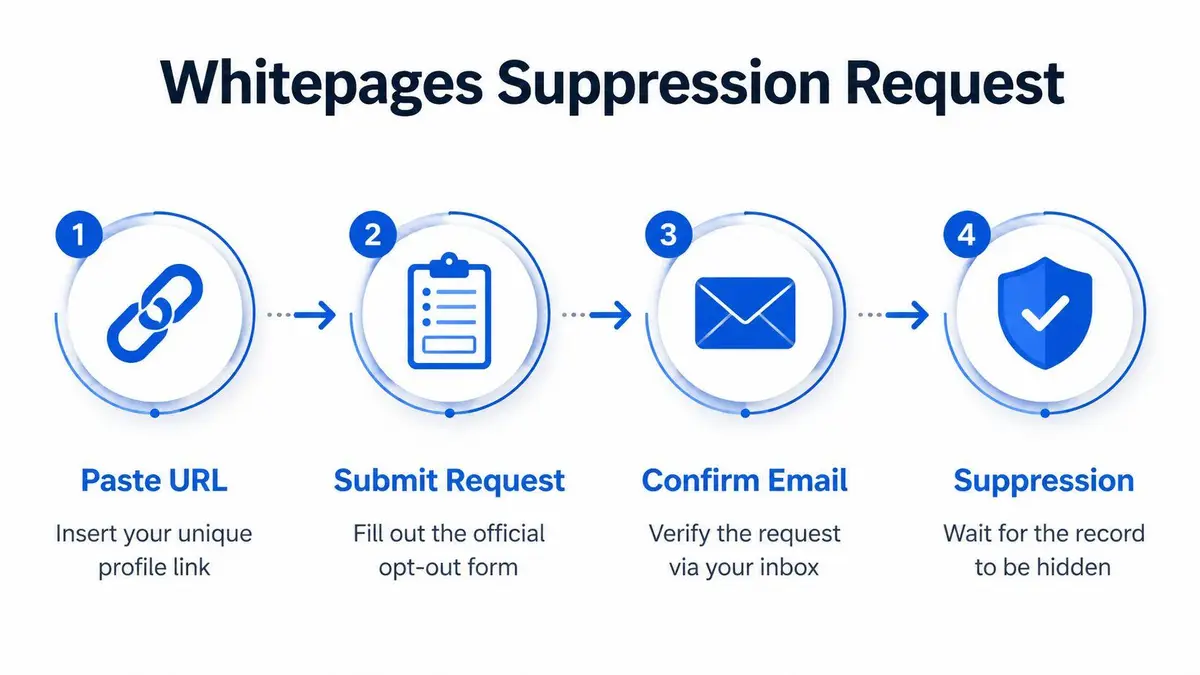
The Whitepages opt-out page is the site’s official manual suppression form. To use it, locate the exact public profile URL reached through View Details, submit one URL per request with the removal reason that fits, complete the automated phone verification, then re-run your original searches to confirm the listing is gone. It removes one visible record, not the upstream data.
Key facts
- Submit the public listing URL, not a search results page or the paywalled View Full Report.
- Phone verification fails when unknown-call blocking, assistant-routed lines or missed call windows get in the way.
- An analysis of over 1,000 opt-outs found 68% of profiles resurfaced within six months without monitoring.
- Premium listings behind the View Full Report fee wall evade free opt-outs 72% of the time.
Where ContentRemoval.com comes in. ContentRemoval.com takes over when one form submission is not enough: duplicate Whitepages entries under aliases and prior cities, linked relatives, premium and affiliate copies, and the other brokers reusing the same identity trail, all logged and re-checked as records resurface. An executive assistant or family office manager is usually the first to reach out. A free 15-minute Exposure Scan maps every listing and what can be removed, and the report is yours to keep. Get a Free, Confidential Exposure Scan or read how our data broker removal work is done.
Your Whitepages listing isn’t a nuisance. It’s an exposure point.
If you’re an executive, investor, public-facing founder, attorney, or family office principal, the problem isn’t just that your name appears online. It’s that your address history, phone numbers, and relational data can be stitched together by anyone with a browser. That creates a direct path to harassment, social engineering, unwanted contact, and reputational pressure.
The white pages opt out page is the first move. It isn’t the whole strategy.
The Reality of Your Data on Whitepages
A client sees their home address tied to their name, relatives, and past phone numbers on Whitepages at 11:40 p.m. By midnight, the question is no longer whether the listing is annoying. The question is who can use it by morning.
Whitepages exists to compile and publish identity-linked records. For a high-profile person, that creates a usable profile for strangers, researchers, hostile counterparties, and anyone running a fast social engineering check. The risk is not limited to a single address. The listing can expose patterns: prior residences, household connections, phone history, and enough context to confirm that other records online belong to you.
That is why a Whitepages profile deserves immediate attention.
A public listing gives an outsider a starting point and a confidence boost. Once they match your name to one correct data point, they can use that record to validate information from other people-search sites, breach data, public filings, and scraped directories. If you are an executive, investor, attorney, or public-facing founder, that cross-referencing is a major threat. One profile rarely stays isolated.
Practical rule: Submit the opt-out. Then assume duplicate records, linked profiles, and future reappearances still need active management.
Whitepages does offer a manual suppression process through its official opt-out page, and that process is worth using. It is still only a first move. Manual removal does not erase the upstream sources that fed the listing, and it does not stop the same data from resurfacing after broker refreshes, record merges, or new public-record ingests.
That distinction matters. A successful request can remove one visible listing while leaving the underlying exposure intact.
If you want the broader executive-level playbook, review this guide on removing content from people search sites for executives.
Treat Whitepages as one node in a larger broker network. The right response starts with removing the exposed profile, then checking for duplicate entries, mapped relatives, old addresses, and the other sites that reuse the same identity trail.
Locating Your Exact Profile URL for Removal
A rushed search is where high-profile clients lose time. They find a name match, copy the first link they see, submit it, and assume the record is on its way down. Then the wrong page gets rejected, the visible listing stays up, and the data remains searchable.
The white pages opt out page is strict about the URL it accepts. You need the exact public profile page tied to the exposed record. A search-results page, a premium report page, or an outdated cached link can stall the request before Whitepages reviews it.
Identify the public listing page Whitepages will actually process
Search your full name on Whitepages.com and narrow by city or state if the name is common. Open only listings that align with known identifiers such as a current address, a prior residence, a phone fragment, an age range, or a relative. The target is the public detail page typically reached from a standard listing result like “View Details.”
Skip the paywalled “View Full Report” path for this step. Whitepages’ manual suppression flow is built around the public-facing listing URL. Security.org’s Whitepages opt-out walkthrough explains the manual process and reflects a common failure point. People submit the wrong page.
That mistake is predictable. Whitepages has multiple page types for the same person, and only one of them is useful for a standard opt-out request.
Audit for duplicate records before you submit anything
Prominent individuals rarely have one clean listing. Prior residences, LLC filings, office addresses, alternate spellings, family associations, and merged broker records often create multiple Whitepages entries tied to the same person. If you submit one URL and stop, you leave the rest exposed.
Treat this like a records audit, not a quick form fill.
- Search your full legal name with each state, metro area, and known prior location.
- Search common name variations, shortened versions, and any professional aliases.
- Open every plausible match in a separate tab.
- Verify each listing against address history, phone fragments, relatives, or age band.
- Copy each exact public profile URL into a tracking document before you file any request.
A short tracking table prevents preventable errors:
| Record check | What to log |
|---|---|
| Public detail page | Exact URL copied from browser |
| Identity match | Why you believe it’s your record |
| Duplicate risk | Similar address, alias, or phone fragment |
| Submission status | Not started, submitted, verified, removed |
Do not rely on memory here.
If you are exposed across several cities or have a long public footprint, this step usually reveals more than one listing. That is the point. Manual suppression works best when you first identify the full set of pages that can still identify you, your household, or your movement history. Precision here reduces failed submissions and makes later verification much cleaner.
Executing the Whitepages Suppression Request
A single missed step here keeps the listing live. For a high-profile person, that means your home history, household links, or contact trail can stay exposed while you assume the problem is handled.
Go to Whitepages’ official suppression form and submit one exact profile URL at a time. Do not paste a search results page. Do not submit a broad name query. Use the saved public listing URL you already verified in the prior step, then choose the removal reason that best matches the risk.
Choose the reason that matches the exposure
Treat the reason field as an operational choice, not a place to tell your whole story.
If the listing is driving unwanted outreach, select the spam calls or junk mail option. If the record creates a real personal safety issue, use the harassment or stalking option. If the listing is accurate enough to identify you but the main issue is public exposure, privacy preferences is usually the cleanest fit. If the page is plainly wrong, choose incorrect profile information.
Keep your submission tight. Extra explanation rarely helps a standardized review flow.
A disciplined request usually follows three rules:
- Use a phone number you control directly: Avoid shared office lines, assistant-routed numbers, or any device with aggressive spam filtering.
- Submit each profile separately: One URL per request keeps the record trail clear and reduces preventable mistakes.
- Log every submission: Record the URL, reason selected, phone number used, submission date, and any confirmation details.
Whitepages may connect records behind the scenes, but you should not assume one request cleans up every variation tied to your name. High-profile individuals often have fragmented records built from separate broker feeds, older address files, and household associations. Submit every confirmed listing you found. Anything less leaves room for another exposed page to remain searchable.
Prepare for phone verification before you submit
Phone verification is the failure point that trips up otherwise careful requests. If your device blocks unknown callers, if your number routes through an assistant, or if you miss the call window, the request can stall without fixing the listing.
Set the conditions first. Turn off unknown-call blocking on the device you plan to use. Stay available after submission. Use a number that reaches you, not your office front desk or a shared family line.
This walkthrough may help if you’re following the process in real time:
> Submit the request only when you can complete verification promptly. A half-finished opt-out is not a privacy strategy.The form is simple. The risk is assuming simple means reliable. Manual suppression is only the first pass, and it works only if each request is executed with precision.
Verifying Removal and Troubleshooting Failures
Your assistant says the opt-out was submitted. Two days later, your Whitepages profile still appears in search. An investor, journalist, or hostile stranger does not care that the request is “in process.” They see an address, a phone number, and household associations. That is the exposure you need to test for.

How to confirm the listing is actually suppressed
Wait for Whitepages’ stated processing period. Then run the same searches that exposed the record in the first place. Use the same name, city, state, and any middle initial or age marker that helped surface the listing. After that, open the exact profile URL you saved before submission.
Check for these outcomes:
| Outcome | What it means | What to do |
|---|---|---|
| Listing is gone from search and the saved URL no longer resolves | The public profile was likely suppressed | Save screenshots and add the profile to a monitoring list |
| Search result still appears but the page content changed | The listing may be partially updated, cached, or replaced by a related record | Review every field before you submit again |
| Original profile still loads with your identity data visible | The request failed, stalled, or covered the wrong record | Audit the failure point before retrying |
A changed title is not proof of removal. A thinner profile is not proof either. Verify that your name, address history, phone numbers, relatives, and age markers are no longer public.
Where the process usually breaks
Whitepages failures are usually operational, not mysterious. High-profile clients get tripped up by the same small errors repeatedly.
- Verification never completed. The automated call was blocked, missed, screened by staff, or routed to the wrong device.
- The wrong page was submitted. The URL pointed to a stale record, a duplicate variation, or a profile that was not the live public listing.
- Search indexing lag created a false read. The profile was suppressed, but a cached result or alternate record still made it look active.
- A linked record stayed exposed. One profile disappeared while a second listing tied to a prior address, alias, or household member remained searchable.
Do not rush into a second submission. Repeating the same request with the same bad input wastes time and leaves the record exposed longer.
Start with evidence. Reopen your notes, confirmation details, screenshots, and saved URLs. Confirm which phone number received the verification step, who answered it, and whether the public profile you submitted matches the live page now indexed. If you need a tighter workflow, use this executive guide to removing yourself from data broker lists to standardize documentation across brokers, not just Whitepages.
For a public-facing client, this is the point where DIY usually stops being efficient. One unresolved listing often means there are other exposed records behind it, and each failed check gives you a false sense of closure.
The Inherent Limits of a One-Time Opt-Out
The manual Whitepages suppression flow can remove a public listing. It cannot solve the larger exposure model.
That distinction matters because many basic tutorials leave readers with the wrong conclusion. They treat removal as an endpoint. For a high-profile person, it’s only a temporary containment step.

Premium and partner exposure doesn’t disappear with the standard form
A standard U.S. opt-out doesn’t necessarily clear every layer tied to your identity. Tutorials regularly ignore Whitepages Premium and global affiliate persistence. According to Incogni’s Whitepages opt-out guide, premium listings accessed through “View Full Report” evade free opt-outs 72% of the time because of fee walls, and only 31% of cross-border removal requests for EU users are successful.
That creates a false sense of closure. You remove one visible listing, but a deeper or mirrored record remains accessible elsewhere.
For international executives, dual residents, and public figures with cross-border visibility, this gap is serious. U.S. suppression isn’t global suppression.
Reappearance is the structural problem
Even if the first suppression works, Whitepages continues sourcing data from public records and other channels. That means your information can return. A one-time removal treats the symptom, not the collection system.
If you’re serious about executive privacy, read this guide on removing yourself from data broker lists. It reflects the right strategic mindset. One broker, one form, one afternoon of cleanup won’t hold if the underlying records continue feeding the ecosystem.
Consider what that means in practice:
- Address updates can create fresh records: A move, property transaction, or public filing can trigger new exposure.
- Alias matching can recreate fragmented profiles: A nickname, middle initial, or prior city may produce a separate listing.
- Partner ecosystems complicate suppression: Removal on one surface doesn’t guarantee removal across related data channels.
“Permanent removal” is the wrong mental model for data brokers. The more accurate model is repeated suppression against repeated collection.
That’s the core weakness of the white pages opt out page. It is reactive by design. For ordinary consumers, that may be tolerable. For someone with visibility, wealth, or adversarial exposure, it isn’t.
Establishing a Proactive Digital Privacy Strategy
If your profile can resurface, your defense has to outlast the listing.
A 2025 analysis of more than 1,000 opt-outs found that 68% of Whitepages profiles resurfaced within 6 months without ongoing monitoring, as the site continued to rescrape public records, according to this analysis of Whitepages reappearance risk. That’s the clearest reason a one-time opt-out isn’t a strategy.
What a serious privacy posture looks like
Manual spot-checking works only if your risk is low and your exposure is simple. That isn’t the profile of most executives or public figures.
A real privacy program includes three layers:
- Continuous monitoring of data broker listings, name variants, and location-linked records.
- Repeat suppression workflows triggered as soon as new or resurfaced profiles appear.
- Documentation and audit trails so legal, security, or family office teams can track what was removed, what reappeared, and what still requires escalation.
The shift is from reactive cleanup to operational control.
Who should stop handling this manually
If any of these apply, DIY monitoring is the wrong tool:
- You have a public profile: Media mentions, board roles, speaking appearances, or investor visibility increase searchability.
- You maintain multiple residences: More addresses usually mean more record permutations.
- Your family members also face exposure: Relative-linking can undermine your own suppression efforts.
- You already removed one listing and found another: That pattern won’t fix itself.
For that level of risk, use a broader framework like this guide on removing personal data from websites strategically. The right objective isn’t to win one form submission. It’s to keep your identity data from rebuilding across the open web.
Whitepages is only one broker. But the way you handle it says a lot about whether your privacy approach is tactical or naive.
If your Whitepages listing exposes your home address, phone number, family links, or historical records, treat it as a live security issue, not a housekeeping task. ContentRemoval.com helps executives, public figures, legal teams, and family offices remove exposed personal data, monitor for reappearances, and build a durable privacy strategy under strict confidentiality. Start with a confidential assessment and get a precise action plan.
Frequently asked questions
Which Whitepages URL do I submit to the opt-out form?
The public detail page for your record, normally reached by clicking View Details from a standard listing. A search results page, a premium report page or a cached link stalls the request. Audit for duplicate listings under prior cities, aliases and family associations before you submit anything.
Why did my Whitepages opt-out not work?
The usual causes are operational: the verification call was blocked, missed or screened by staff, the wrong page was submitted, a cached search result created a false read, or a linked record tied to a prior address or household member stayed live. Check your notes and saved URLs before resubmitting the same request.
Is a Whitepages removal permanent?
No. Whitepages keeps sourcing public records and other channels, so a move, property transaction, nickname or middle initial can create a fresh listing. The article frames the accurate model as repeated suppression against repeated collection, backed by monitoring and documentation.
