
Phishing prevention for leaders works as a layered system, not a warning to users. The controls that matter are SPF, DKIM and DMARC email authentication, hardware security keys for multi-factor authentication, machine learning email filtering with sandboxing, measured awareness training, endpoint detection, credential and dark web monitoring, privileged access management, a written response protocol, secure messaging and live threat intelligence.
Key facts
- A DMARC policy set to reject stops attackers sending mail that appears to come from your domain.
- FIDO2 and U2F hardware keys resist fake login pages in a way SMS codes cannot.
- KnowBe4 reports a 12-month training program cut phish-prone rates from 33.1% to 4.1%.
- The FTC directs phishing emails to reportphishing@apwg.org and texts to SPAM (7726).
Where ContentRemoval.com comes in. ContentRemoval.com handles what happens after a phishing incident turns into public exposure: leaked correspondence indexed in search, impersonation accounts using an executive’s name, or private files circulating on forums and file hosts. Security teams, general counsel and chiefs of staff usually reach out once containment is done. A free, confidential 15-minute Exposure Scan maps what is removable and what needs monitoring, and the report is yours to keep. Get a Free, Confidential Exposure Scan or read how our content removal work is done.
A single wrong click from an executive’s inbox can expose board materials, wire instructions, private correspondence, or client records before anyone notices. Phishing now moves across email, SMS, QR codes, and direct messages, and the attack is usually designed to look routine, urgent, and safe. For leaders, family offices, and legal-sensitive teams, the question isn’t whether someone will receive a phishing attempt, it’s whether the organization has the controls to stop the attempt before it becomes a breach. For a broader defensive framework, review these strategies to stop data breaches.
1. Email Authentication Protocols
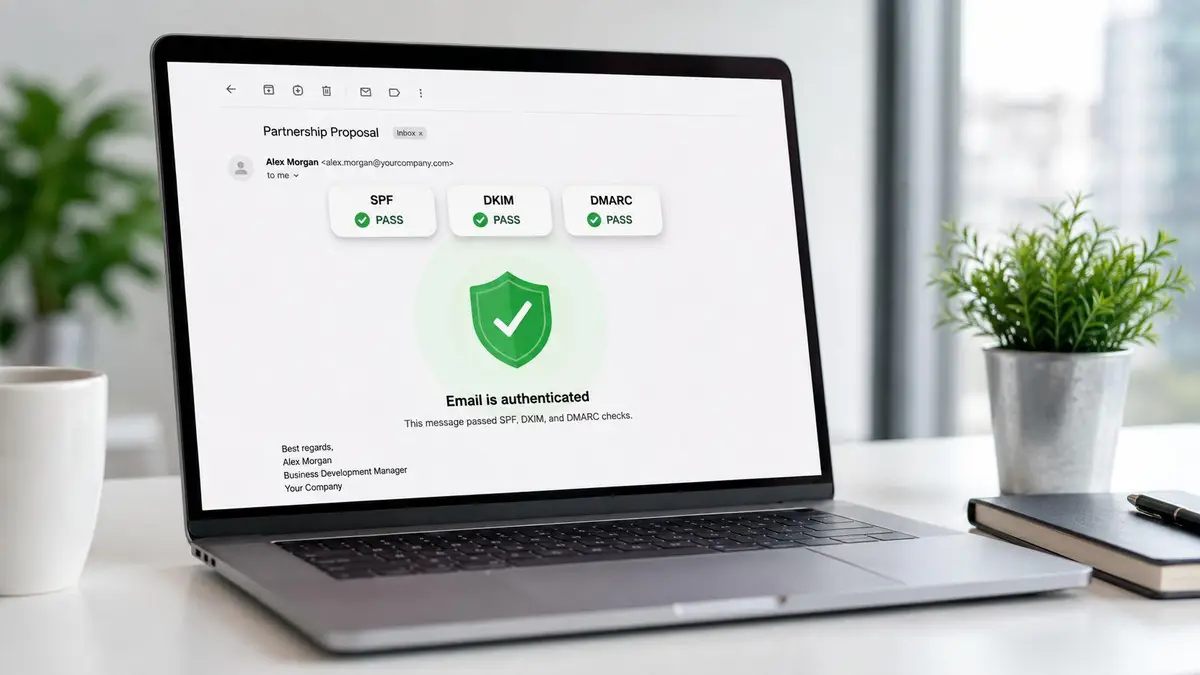
Email authentication is the first hard barrier against impersonation. SPF authorizes which mail servers can send for your domain, DKIM signs messages so recipients can verify they haven’t been altered, and DMARC tells receiving systems how to handle mail that fails those checks. For executives and brand accounts, this matters because phishing often starts with a convincing fake “From” line, not a broken link.
What strong implementation looks like
A properly configured DMARC policy with reject enforcement stops attackers from sending mail that appears to come from your domain. That’s not a cosmetic control, it’s an anti-impersonation system that helps protect wire-transfer workflows, finance teams, and public-facing executives. The value is operational, too, because DMARC reporting gives security teams visibility into failed authentication attempts and spoofing activity.
- SPF: Keep the sending list tight and current so only approved infrastructure can send mail for the domain.
- DKIM: Sign outbound messages so recipients can verify message authenticity.
- DMARC: Enforce policy and monitor aggregate and forensic reports for abuse patterns.
- Alignment checking: Make sure the visible sender domain matches the authenticated domain.
The tradeoff is configuration discipline. Missteps can block legitimate mail, and email authentication won’t stop a convincing scam that comes from a real account. Even so, it’s the baseline control that keeps domain spoofing from becoming an easy win for attackers. For organizations with executive impersonation risk, this is not optional.
2. Multi-Factor Authentication with Hardware Keys
If an attacker gets a password, the account is still not yours to lose if a hardware key is required. FIDO2 and U2F security keys use cryptographic authentication that resists phishing and man-in-the-middle attacks, which makes them stronger than SMS codes or app-based prompts that can be intercepted or socially engineered. That’s why they belong on the accounts that matter most, email, finance, board portals, and identity systems.
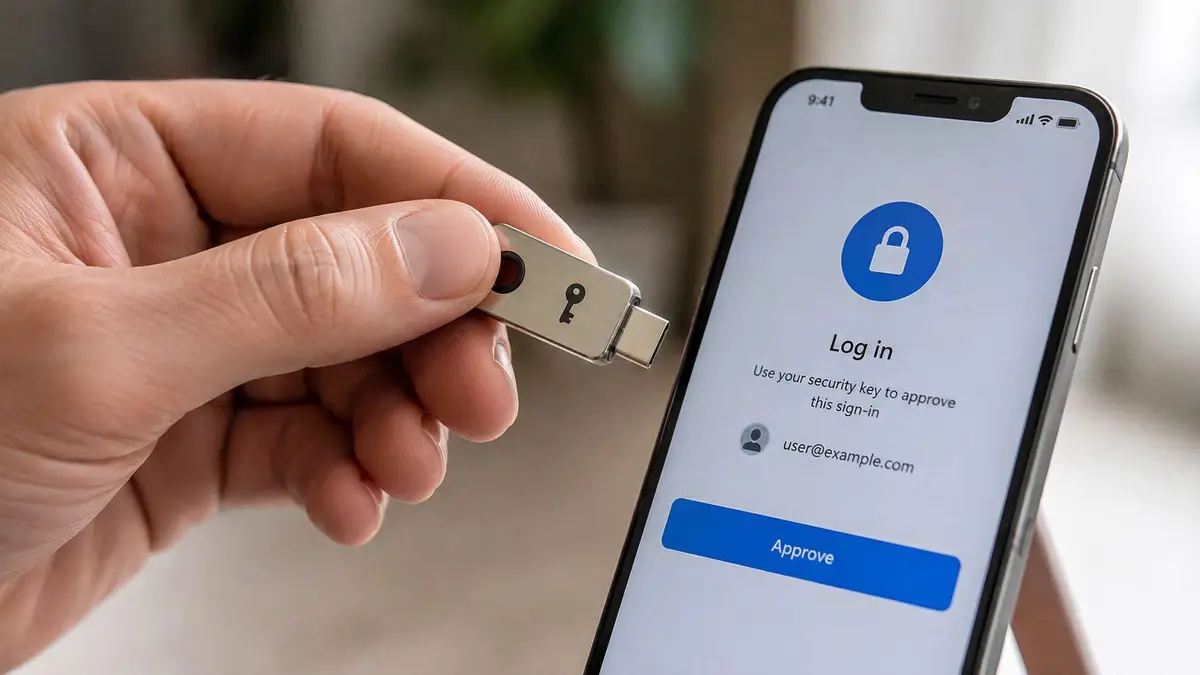
The advantage is simple. A fake login page can steal a password, but it can’t complete the cryptographic challenge tied to the physical key. That closes off a common escalation path after phishing, especially when the target is a high-profile executive or an assistant with access to sensitive systems.
A practical deployment plan starts with the highest-risk accounts first.
Practical rule: issue primary and backup keys before you remove weaker MFA methods. Recovery planning has to happen before the first device is lost.
- USB, NFC, or Bluetooth keys: Use FIDO2/U2F devices that fit the user’s devices and travel patterns.
- Phishing resistance: Prefer hardware over SMS, since text-based codes are easier to intercept or redirect.
- Multi-account support: One key can secure many services, which makes adoption cleaner across the leadership stack.
- Offline functionality: No internet dependency is needed for the authentication step.
The costs are predictable, the physical devices are manageable, and the risk reduction is direct. For executives, boards, and family offices, this is one of the clearest phishing prevention tips because it removes the attacker’s easiest success condition.
Account takeover prevention guidance
3. Advanced Email Filtering with Machine Learning and Threat Sandbox Analysis
Traditional spam filters are too shallow for targeted phishing. Enterprise-grade filtering needs machine learning, threat intelligence, and sandboxing that detonates suspicious links and attachments in isolation before delivery. That matters when attackers tailor messages to a specific executive, transaction, or vendor relationship instead of blasting out obvious junk.

Where the filter earns its keep
These systems don’t just inspect words. They analyze sender reputation, domain age, URL structure, attachment behavior, and message anomalies, then compare that data against current threat feeds. That makes them more effective against personalized lures, malicious attachments, and zero-day-style delivery patterns that bypass signature-based tools.
For high-stakes organizations, the primary benefit is early intervention. A suspicious invoice can be held for analysis, a malicious link can be detonated in a sandbox, and a cloned login page can be flagged before someone clicks it in a live mailbox. The downside is cost and tuning. False positives happen, delivery may slow, and the system only performs as well as its models and threat data.
- Machine learning models: Detect patterns that fixed rules miss.
- URL and attachment detonation: Test payloads before they reach users.
- Sender reputation analysis: Review domain age and trust signals.
- Behavioral analysis: Flag unusual communication patterns that fit phishing.
- Threat intelligence integration: Compare messages against known malicious infrastructure.
For organizations that handle confidential deal flow or personal data, email filtering is a control layer, not a finish line. It reduces exposure, but it should sit beside authentication, training, and response planning.
4. Comprehensive Security Awareness Training with Behavioral Metrics
Training fails when it’s treated as compliance theater. Real awareness programs change behavior, measure reporting, and use simulated phishing to show where executives and staff still click. KnowBe4 reports that a 12-month program reduced the global phish-prone rate from 33.1% to 4.1%, an 86% drop KnowBe4 benchmark data. That’s the kind of result leaders should demand from any training budget.
The point is not to shame users. It’s to make the organization faster at recognition and reporting. Attackers rely on urgency, authority, and routine process pressure, so training has to address those triggers directly, especially for finance, legal, executive assistants, and board support staff.
The best training programs make the suspicious message feel familiar before the real one arrives.
A useful program has structure, not slogans.
- Simulated phishing campaigns: Use realistic scenarios tied to the company’s own workflows.
- Role-based modules: Separate content for executives, finance, HR, and technical teams.
- Behavioral metrics: Track click-through rates, reporting rates, and time-to-report.
- Microlearning cadence: Deliver short lessons regularly instead of one annual event.
- Incident-response integration: Route suspicious reports into the security workflow immediately.
This is one of the few controls where human behavior becomes measurable, and that matters for high-value targets. If remote teams are involved, pair the training with disciplined communication habits and clear reporting channels, because distributed work multiplies the number of places a phish can land. Remote team communication best practices belong in the same operational playbook.
5. Endpoint Detection and Response with Behavioral Analysis
Phishing doesn’t end at the inbox. Once a user clicks, the attacker often pivots to credential theft, lateral movement, or data exfiltration, and that’s where EDR has to take over. It watches endpoints in real time for process anomalies, file activity, unusual authentication behavior, and suspicious network connections that follow successful compromise.
The value for executives and sensitive teams is timing. EDR can catch the damage after a phishing click but before the account is used to spread laterally or stage encryption and theft. That’s a major advantage over tools that only inspect email. It also gives investigators a forensic timeline, which matters for legal response and internal containment.
A high-functioning deployment focuses on behavior, not just malware signatures.
- Process monitoring: Watch what launches, not just what arrives.
- File system analysis: Flag unusual writes, drops, or encryption behavior.
- Lateral movement detection: Catch privilege escalation and account hopping.
- Automated isolation: Quarantine a compromised device fast.
- Forensic reconstruction: Preserve the timeline for incident response and counsel.
Practical rule: if an executive’s mailbox shows odd login behavior, the endpoint tied to that account should be inspected immediately, not after the next scheduled review.
The downside is operational load. EDR produces alerts, and someone has to triage them. But for organizations that cannot afford a silent compromise, the cost of visibility is far lower than the cost of discovery after the attacker has already moved.
6. Credential Monitoring and Dark Web Intelligence
By the time credentials show up in a dump, the attacker may already be testing them. That’s why credential monitoring matters. It gives security teams an early warning when executive email addresses, usernames, or organizational domains appear in breach data or dark web marketplaces, which can trigger immediate password resets, session revocation, and deeper investigation.
A monitoring program doesn’t prevent the original phish. It catches the aftermath quickly enough to matter. For high-profile individuals, that can also mean spotting leaked communications or personal identifiers before the exposure becomes public. The response window is the point, not the alert itself.
What a serious monitoring program includes
- Dark web marketplace scans: Track forums and credential dumps continuously.
- Breach database coverage: Check whether known accounts have surfaced in new disclosures.
- Specific identity alerts: Monitor named emails, usernames, and domains.
- Credential age review: Determine whether exposure is recent or stale.
- Attack correlation: Connect appearance dates to likely phishing or compromise events.
The service still needs a response plan behind it. Alerts without action are noise, and false positives are common enough to require verification. Even so, for executives and family offices, this control gives you speed, which is the difference between containment and account takeover.
7. Privileged Access Management and Zero Trust Architecture
Phishing becomes catastrophic when stolen credentials open too much. PAM and Zero Trust fix that by shrinking standing privileges and forcing continuous verification for sensitive access. If an attacker lands in a mailbox or on a laptop, they still shouldn’t be able to reach finance systems, admin consoles, or sensitive repositories without extra checks.
This is the right architecture for organizations where executives, assistants, and IT staff all touch privileged systems. Temporary access, detailed logs, and network segmentation make it harder for one compromised account to become a full-scale incident. It also gives you a clean audit trail if legal or regulatory review follows.
The implementation has to be deliberate.
- Just-in-time access: Grant elevation only when it’s needed.
- Continuous re-authentication: Don’t trust one login for long.
- Session monitoring: Record privileged activity for review.
- MFA for sensitive systems: Require strong second factors at the top end.
- Network segmentation: Separate critical systems from general access.
The friction is real. Legacy systems, user inconvenience, and access review overhead can slow deployment. But the alternative is a flat environment where one phished account becomes a full-bore breach. For high-value targets, that’s an unacceptable design choice.
8. Organizational Phishing Response Protocol and Incident Escalation
When a phish lands, speed and consistency matter more than debate. Organizations without a written response protocol waste time deciding who owns the incident, how to preserve evidence, and whether legal or leadership should be involved. A proper escalation model turns a chaotic inbox event into a managed process.
The FTC recommends reporting phishing email to reportphishing@apwg.org, phishing texts to SPAM (7726), and fraud attempts to ReportFraud.ftc.gov FTC phishing guidance. CISA also advises organizations to verify high-risk requests through a second channel instead of replying to the email itself CISA counter-phishing guidance. Those are the kinds of concrete workflow decisions that shorten the damage window.
A strong protocol should define the following clearly.
- Single reporting path: One inbox, hotline, or ticketing system.
- Triage criteria: Separate nuisance mail from active compromise.
- Escalation chain: IT, security, management, legal, then law enforcement when needed.
- Evidence preservation: Capture headers, screenshots, logs, and artifacts.
- Post-incident review: Document what happened and what changed.
Don’t let people improvise under pressure. A phishing response should be rehearsed before the first executive gets targeted.
This control doesn’t stop the initial lure, but it prevents disorganization from becoming a second breach. For legal-sensitive roles, the audit trail is as important as the containment.
How to report phishing websites
9. Executive Communication Security and Secure Messaging Channels
Executives should not discuss sensitive matters in standard email if they can avoid it. Email is too exposed to phishing, misdelivery, and account takeover, which is why secure messaging and encrypted collaboration platforms belong in the leadership stack. For family offices, public figures, and legal teams, the communication channel itself is part of the security perimeter.
A secure channel reduces the chance that an attacker can intercept a decision, spoof an instruction, or harvest context for a later phish. It also limits how much sensitive material lives in places that are easy to search, forward, or compromise. That matters when a request for funds, a contract change, or a private matter is too sensitive to leave in a standard inbox.
A practical implementation usually combines several tools.
- End-to-end encrypted messaging: Use systems such as Signal, Wire, or Wickr where appropriate.
- Device-specific access: Tie access to biometrics or hardware authentication.
- Disappearing messages: Reduce long-term exposure where retention is not required.
- Secure file sharing: Use encrypted collaboration platforms for documents.
- Minimal email dependence: Keep sensitive conversations out of the default mailbox.
The tradeoff is adoption. People fall back to email when the workflow is inconvenient, and then the control erodes. But for high-stakes communication, convenience is a weak reason to accept exposure.
10. Continuous Threat Intelligence Integration and Organizational Benchmarking
Phishing is more adaptive than most internal security programs. Threat intelligence keeps your controls aligned with current attacker infrastructure, current lures, and current targets. It gives defenders the context to block malicious domains, tune email filters, and watch for campaigns that match your industry or supply chain.
Mature organizations separate themselves from reactive ones through proactive threat intelligence. Intelligence feeds can surface malicious URLs, domains, IPs, and attacker techniques before those indicators hit your users. They also help security teams decide whether a spike in suspicious mail is random noise or a campaign aimed at leadership, finance, or external counsel.
A good program should connect intelligence to action.
- IOC ingestion: Pull malicious URLs, domains, and IPs into security tools.
- Campaign analysis: Look for patterns in targets and delivery methods.
- MITRE ATT&CK mapping: Translate attacker behavior into internal detection logic.
- Partner and supply-chain reporting: Watch for exposure beyond your own perimeter.
- Automated blocking: Feed the intel into filters, firewalls, and EDR.
The main weakness is analyst dependency. Intelligence that no one interprets becomes clutter. But when it’s integrated well, it raises the quality of every other control on this list. That’s the difference between knowing phishing exists and knowing what’s coming next.
10-Point Phishing Prevention Comparison
| Solution | Implementation complexity | Resource requirements | Expected outcomes | Ideal use cases | Key advantages |
|---|---|---|---|---|---|
| Email Authentication Protocols (SPF, DKIM, DMARC) | Low-Moderate, DNS and policy configuration, ongoing monitoring | Low, admin time, reporting tools | Prevents domain spoofing; reduces BEC from your domain | Organizations with branded domains, executives, marketing senders | Protocol-level spoofing prevention; forensic reports and measurable ROI |
| Multi-Factor Authentication (MFA) with Hardware Keys | Low-Moderate, provisioning, user onboarding | Moderate, purchase keys, support, backup keys | Strongly prevents phishing-based account takeover | Executives, administrators, high-value accounts | Phishing-resistant cryptographic auth; offline, cross-platform |
| Advanced Email Filtering (ML + Sandbox) | Moderate-High, integration, tuning, sandbox management | High, licenses, infrastructure, analyst time | Detects sophisticated and zero-day phishing; fewer false negatives | Large enterprises, high-value targets, industries facing targeted attacks | ML-driven detection, attachment/URL detonation, detailed threat analytics |
| Security Awareness Training with Behavioral Metrics | Moderate, program design, continuous delivery | Low-Moderate, platform/subscriptions, training time | Measured behavior change; reduced click rates and faster reporting | All organizations, especially finance, legal, executives | Measurable reduction in human risk; targeted remediation of high-risk users |
| Endpoint Detection and Response (EDR) with Behavioral Analysis | High, agent deployment, SOC integration, tuning | High, licensing, skilled analysts, infrastructure | Detects post-compromise activity; shortens dwell time dramatically | Organizations handling sensitive data, executive endpoints | Real-time behavioral detection, automated response, forensic timelines |
| Credential Monitoring and Dark Web Intelligence | Low-Moderate, service setup, triage playbooks | Moderate, subscription fees, incident response actions | Early detection of exposed credentials; enables rapid remediation | Executives, high-net-worth individuals, broad employee monitoring | Fast breach visibility from external sources; actionable alerts |
| Privileged Access Management (PAM) & Zero Trust | Very High, architecture redesign, system integration | Very High, enterprise tooling, admin overhead, process change | Limits lateral movement and privileged abuse; strong auditability | Financial institutions, legal firms, critical infrastructure | Just-in-time privileges, continuous verification, comprehensive auditing |
| Organizational Phishing Response Protocol & Escalation | Moderate, process documentation and drills | Low-Moderate, staff time, communication channels, playbooks | Faster, consistent incident handling; preserved legal/forensic evidence | Any org; critical for exec-targeted incidents and regulated entities | Clear escalation, evidence preservation, reduced incident impact |
| Executive Communication Security & Secure Messaging | Low-Moderate, policy, secure app deployment, device controls | Low-Moderate, app subscriptions, secure devices | Reduces interception and leakage of sensitive communications | Boards, executives, family offices, public figures | End-to-end encryption, device-authenticated access, privacy protection |
| Continuous Threat Intelligence & Organizational Benchmarking | Moderate-High, feed integration, analyst workflows | Moderate-High, subscriptions, analyst time, tool integration | Proactive detection of targeted campaigns; informed defenses | Industry-targeted organizations, supply-chain dependent firms | Contextualized IoCs/TTPS, automated blocking when integrated with tools |
From Defense to Dominance Owning Your Digital Security
These phishing prevention tips work because they treat phishing as a systems problem, not a user problem. A strong program combines authentication, phishing-resistant MFA, advanced filtering, training with metrics, endpoint detection, access control, incident response, secure communication channels, and live threat intelligence. Taken together, those layers reduce the chance that one deceptive message becomes a reputational event, a financial loss, or a legal problem.
The organizations that get this right don’t rely on instinct. They build controls around the way attacks happen, through spoofed domains, stolen credentials, executive impersonation, and cross-channel deception. That approach is especially important for leaders, because a phishing event aimed at one inbox can compromise an entire operating structure. The cost of hesitation is not theoretical. It shows up as exposure, interruption, and cleanup.
Some incidents still go beyond prevention. When sensitive material has already been leaked, impersonated, indexed, or distributed, the response shifts from security hardening to remediation. In those cases, confidentiality, evidence preservation, and rapid content removal become part of the recovery plan. ContentRemoval.com is one option for organizations and individuals that need monitoring, takedown coordination, and reputation-focused response after exposure.
ContentRemoval.com helps leaders respond when phishing turns into public exposure, impersonation, or leaked material. If your inbox, brand, or private communications have already been affected, visit ContentRemoval.com for a confidential assessment and a focused remediation plan.
Frequently asked questions
Why are hardware security keys better than SMS codes for executives?
A fake login page can capture a password and an SMS code, but it cannot complete the cryptographic challenge tied to a physical FIDO2 or U2F key. Put keys on email, finance, board portals and identity systems first, and issue backup keys before removing weaker methods.
What should an executive do after clicking a phishing link?
Report it through the organization’s single reporting path immediately, preserve headers and screenshots, and have the endpoint tied to that account inspected rather than waiting for a scheduled review. Verify any high-risk request through a second channel, and escalate to security, legal and law enforcement as the protocol defines.
Does email authentication stop all executive impersonation?
No. SPF, DKIM and DMARC prevent attackers from spoofing your own domain, but they cannot stop a convincing scam sent from a real compromised account or a lookalike domain. That is why authentication needs to sit beside filtering, hardware MFA, training and a rehearsed response plan.
