Executive account takeover prevention means treating a compromised executive account as a live business event, not an IT ticket. The strongest defenses are hardware security keys on every critical account, centralized identity through SSO, continuous post-login monitoring for forwarding rules and recovery changes, strict vendor access limits, and a rehearsed response playbook: verify, contain, preserve, communicate, recover.
Key facts
- Hardware FIDO2 keys such as YubiKey are materially stronger than SMS codes or app prompts for executives.
- Credential stuffing, spear-phishing, MFA fatigue and session hijacking are the main routes into executive accounts.
- Forwarding rule changes, recovery detail edits and bulk exports are post-login signals that need a named owner.
- Vendor contracts should require breach notice, sub-processor disclosure and immediate session revocation support.
Where ContentRemoval.com comes in. When a takeover turns public, the damage rarely stays inside the account. Fraudulent posts, leaked messages and impersonation profiles end up in search results and on third-party sites long after IT has restored access. ContentRemoval.com handles that outer layer for executives, usually engaged by a chief of staff, general counsel or security lead once containment is under way. A free 15-minute Exposure Scan maps what is removable, and the report is yours to keep. Get a Free, Confidential Exposure Scan or read how our content removal work is done.
If you’re reading this after an odd login alert, a sudden password reset, or a message sent from an executive account that nobody authorized, treat it as a live business event. An account takeover isn’t a minor IT issue. It’s a direct threat to authority, confidentiality, liquidity, and reputation.
For executives, the danger is amplified because a single compromised account can trigger several crises at once. Email gives an attacker access to deal flow, legal strategy, investor communication, and private family information. A cloud account can expose board materials. A social account can move markets, damage credibility, or create legal exposure in minutes. The right response isn’t generic cyber hygiene. It’s disciplined account takeover prevention built for high-value targets.
The Anatomy of an Executive Account Takeover
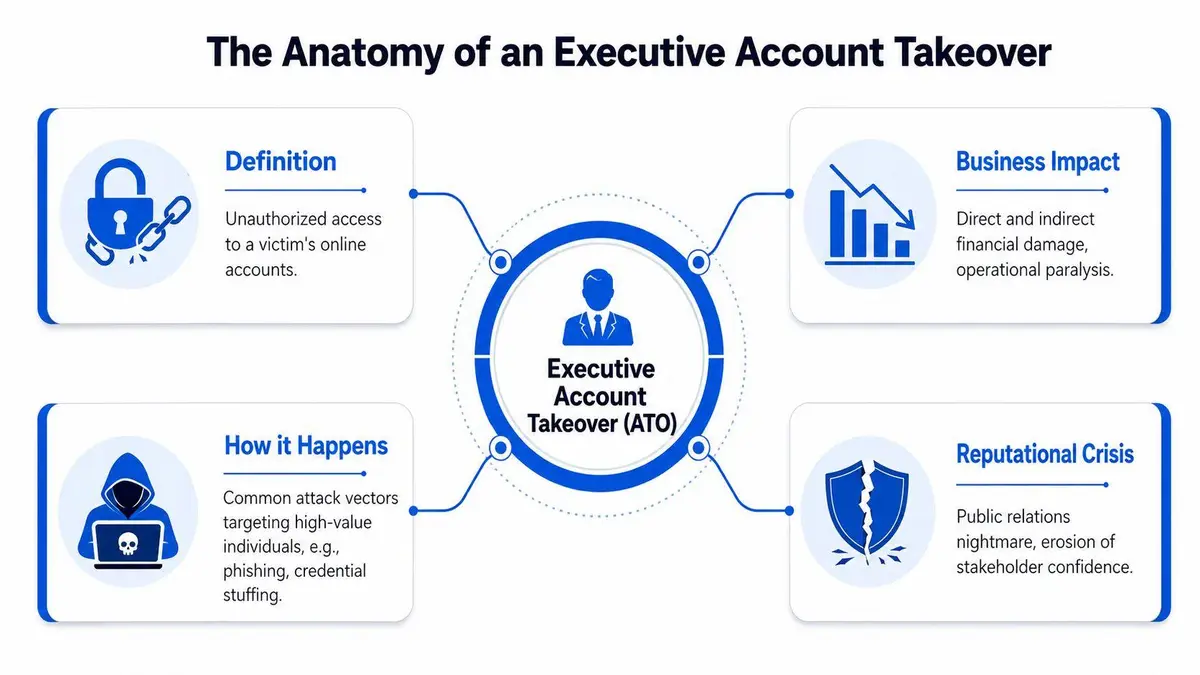
An account takeover happens when an attacker gains unauthorized access to a legitimate account and uses that access as if they were the legitimate owner. For an executive, that usually means far more than one stolen login. It means someone can impersonate your authority, read sensitive communications, change account settings, and use trusted channels to reach staff, investors, vendors, or the public.
This is why account takeover prevention belongs in the boardroom. The threat is broad and accelerating. Account takeover attacks increased 24% year-over-year in 2024, and 29% of U.S. adults, about 77 million people, experienced ATO fraud, according to DataDome’s overview of account takeover attacks. The same source identifies credential stuffing and brute-force bot attacks as the dominant patterns.
What makes executive accounts different
A routine user account might let an attacker steal data. An executive account lets them steer decisions.
They can send payment instructions that appear legitimate. They can monitor legal or M&A conversations. They can alter inbox rules to hide warnings and stealthily maintain access. They can use one trusted account to compromise several others by resetting passwords, approving sign-ins, or harvesting internal contacts.
That is the practical difference between a generic breach and an executive takeover. A breach exposes information. A takeover hands the attacker a seat at the table.
How attackers actually get in
Credential stuffing is the industrial version of theft. Attackers buy or reuse leaked usernames and passwords, then test them across multiple services because people reuse credentials. If an executive used a password years ago on a low-value service and reused a variation later, attackers will find it.
Spear-phishing is more personal. The attacker studies travel plans, deal announcements, assistants, and recent media coverage. Then they send a message that feels routine: a board document for review, a revised wire instruction, a legal signature request, an urgent login approval. The point isn’t technical elegance. The point is timing and credibility.
MFA fatigue is harassment disguised as authentication. An attacker already has the password and floods the target with approval prompts until the target accepts one out of confusion, exhaustion, or misplaced urgency.
Session hijacking is the most misunderstood route. The attacker doesn’t always need your password if they can steal a valid session through phishing, malware, or a compromised device. That bypasses many assumptions executives have about “being protected because MFA is enabled.”
Executive accounts fail at the intersection of trust and speed. Attackers know senior people move quickly, delegate heavily, and operate across many devices and services.
The executive scenario nobody wants
The common pattern is simple. The attacker gains access unnoticed, makes small changes that don’t trigger attention, then uses the account for something consequential. That may be an inbox forwarding rule, a change to recovery details, or a discreet review of sensitive threads before a fraudulent instruction is sent.
By the time the victim sees something obvious, the attacker has often moved beyond login. That’s why serious account takeover prevention can’t stop at the sign-in page.
Layer One Defensive Controls
The first layer is about denying the attacker easy entry. Most organizations still tolerate weak methods because they’re convenient. That is a governance failure, not a technical limitation.
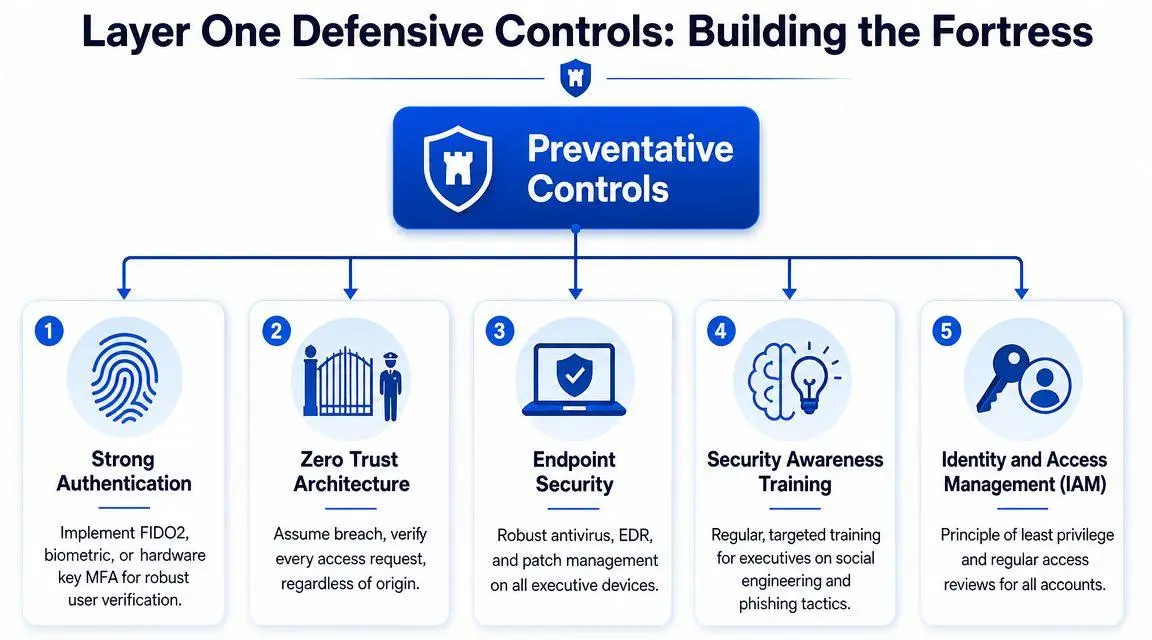
Start with authentication. Hardware security keys should be the standard for executive accounts, not a nice-to-have. YubiKey and other FIDO2-compatible keys are materially stronger than SMS codes and generally stronger than app prompts for high-risk users. SMS can be intercepted or redirected. Push prompts can be abused through fatigue attacks. A physical key is harder to phish and harder to approve by mistake.
What to deploy first
If you’re prioritizing controls for executives, the order matters.
- Hardware-based MFA for every critical account: Cover corporate email, cloud identity, banking portals, document platforms, social media, and any personal account used for business recovery or approvals.
- Centralized identity through IAM and SSO: Put access behind a single control plane wherever possible. Microsoft Entra ID, Okta, and Google Workspace all allow stronger policy enforcement than scattered standalone logins.
- Managed executive devices: High-risk users should not run sensitive operations from unmanaged laptops and phones. Use EDR, mobile device management, and disciplined patching.
- Least-privilege access reviews: Remove standing access that no longer serves a specific business purpose.
A short video overview can help frame these controls for non-technical stakeholders.
Why centralized identity matters
Without centralized identity and access management, your attack surface sprawls. Executives often have overlapping accounts across investor relations platforms, private aviation portals, wealth systems, travel services, legal workspaces, and personal assistants’ delegated tools. Every disconnected login weakens control.
SSO and IAM don’t just simplify sign-in. They create enforceable policy. You can require strong MFA, restrict logins from unmanaged devices, enforce step-up authentication for sensitive actions, and revoke access quickly from one place. That’s what control looks like in practice.
Role design matters just as much as technology. Teams that want a practical framework should review Pebb’s role-based security insights, especially where executive assistants, chiefs of staff, and outside advisors need narrowly scoped access without inheriting full account authority.
Controls that boards should demand
A board shouldn’t ask whether MFA exists. It should ask what type, where, and with which exceptions. It should ask whether executive accounts are excluded from consumer-grade recovery methods. It should ask whether legacy protocols remain enabled. It should ask whether personal email is still being used as a fallback for sensitive business systems.
Practical rule: If a critical executive account can still be recovered by a weak secondary channel, your strongest front-door control is partly cosmetic.
There is also a personal dimension. Senior leaders need a unified approach across corporate and personal exposure, because attackers don’t respect that boundary. A practical reference for that broader posture is this strategic framework for protecting your online identity as an executive.
Layer Two Detection and Monitoring
Most account takeover programs are built around one moment: login. That isn’t enough. If an attacker gets through with a stolen session, a phished approval, or valid credentials, the real question becomes whether you can identify abuse after authentication.
The strongest detection layer is risk-based, real-time inspection. According to Feedzai’s guide to account takeover detection and prevention, the most effective systems combine device fingerprinting and behavioral biometrics, monitor anomalies such as an unfamiliar device, a new geolocation, or proxy use, and only increase friction when the risk score changes materially. That’s the right model because static rules create noise, while adaptive signals create decisions.
Login is a checkpoint, not proof of safety
A successful login only proves that one event looked acceptable at one point in time. It doesn’t prove the person behind the session remains legitimate.
An executive account should be monitored for behavior that is unusual in context. That includes odd timing, unusual device changes, impossible travel patterns, abrupt privilege use, and account modifications that don’t fit established behavior. The right systems don’t just challenge on entry. They reassess continuously.
A useful distinction is below.
| Control model | What it does well | Where it fails |
|---|---|---|
| Static login rules | Blocks obvious low-grade attacks | Misses stolen sessions and subtle abuse after login |
| Risk-based monitoring | Adapts to context and user behavior | Requires tuning and governance |
| Continuous session monitoring | Detects active compromise after access is granted | Demands mature alert handling |
Post-login signals that deserve immediate attention
Many teams underinvest here because these events look operational, not malicious. That is a mistake.
- Inbox or forwarding rule changes: Attackers use these to watch covertly and suppress warning emails.
- Bulk export or unusual download behavior: Especially relevant for finance, legal, M&A, and HR data.
- Recovery detail changes: A new phone number, backup email, or trusted device often signals an attempt to entrench access.
- Delegation or new user additions: Fraudsters may create persistence through permissions rather than passwords.
- Unusual admin actions from ordinary users: The behavior matters as much as the account role.
The best executive protections generate high-fidelity alerts for these actions and route them to someone who can act immediately. Not a generic queue. A named owner.
Continuous authentication is the mature posture
For boards and general counsel, the takeaway is straightforward. Authentication should be treated as a continuous process, not a single gate. If your controls become blind after login, attackers only need to win once.
A secure login does not equal a secure session.
That shift in mindset changes architecture. It favors adaptive access, session analytics, rapid step-up verification for sensitive changes, and disciplined alerting around account modifications. That’s what real account takeover prevention looks like once you assume a determined attacker may get past the front door.
The Human Element in Account Security
The compromise often starts with a person who is busy, trusted, and trying to be efficient. For executives, that usually means the principal, the executive assistant, the chief of staff, or an outside advisor. Attackers know exactly where to apply pressure.
One common scenario is mundane on purpose. An assistant receives a polished note that appears to come from a known lawyer or investor. The message asks for a quick review of a secure file, or requests approval of a login after a travel disruption. Nothing about it looks dramatic. The attacker wins because the request fits the rhythm of executive work.
Another scenario is more manipulative. A leader is boarding a flight, receives repeated authentication prompts, and approves one to stop the noise. That single moment can be enough if the attacker already has the password.

The numbers explain the pressure on people
The threat isn’t driven only by elite manual attacks. It’s industrial. Transmit Security’s review of the rise of account takeovers reports that account takeover attacks caused more than $16 billion in losses and represented a 300% jump in 2020. The same reporting notes that 75% to 85% of all login attempts in the second half of 2020 were malicious, which shows how much of the pressure now comes from automation.
That matters because automation exploits human-created weaknesses. Password reuse, habitual approvals, overbroad delegation, and informal recovery practices become force multipliers for attackers.
What resilient executive teams do differently
They don’t rely on annual training slides. They build operating habits.
- They verify sensitive requests out of band: If a message concerns payment, credentials, legal documents, or account recovery, they confirm through a separate channel.
- They limit delegated access: Assistants and advisors get the minimum capability needed, not full mailbox or admin control by default.
- They normalize fast reporting: People are encouraged to report a mistaken click or suspicious approval immediately, without fear of blame.
- They rehearse high-pressure scenarios: Travel, urgent filings, media crises, and deal closings are exactly when judgment gets rushed.
A no-blame reporting culture is one of the few controls that improves both speed and accuracy. When people hide mistakes, attackers gain time. When they report fast, defenders still have options.
The right message from leadership
Executives set the tone. If the CEO circumvents controls for convenience, everyone notices. If the principal shares passwords with staff because it’s “faster,” the entire program loses credibility.
Security discipline from senior leadership is contagious. So is carelessness.
Good security culture for high-risk individuals isn’t about paranoia. It’s about professional skepticism. Staff should know that a realistic-looking request can still be fraudulent, and that pausing to verify is part of the job, not an obstacle to it.
Mitigating Third-Party and Vendor Risk
Executive exposure doesn’t stop at the company perimeter. It extends into travel agencies, concierge platforms, investor portals, law firms, PR firms, family office software, wealth managers, collaboration suites, and specialized vendors that often hold some combination of credentials, data, or delegated access.
That ecosystem creates a quiet but serious account takeover risk. An attacker doesn’t always need to target the executive directly. Sometimes it’s easier to compromise a vendor with weaker controls and then use that trust relationship to move inward.
A practical due diligence standard
Before any vendor receives sensitive executive data or privileged access, ask direct questions and expect direct answers.
| Due diligence area | What to ask | Why it matters |
|---|---|---|
| Authentication | Do you require strong MFA for privileged and client-facing accounts? | Weak vendor authentication becomes your exposure |
| Access control | How do you enforce least privilege and review access changes? | Overbroad vendor access creates hidden persistence |
| Monitoring | Do you alert on unusual account changes, exports, or logins? | You need confidence beyond the login page |
| Incident response | What is your notification process if an account or dataset is compromised? | Delay magnifies legal and reputational damage |
| Delegation model | Can access be scoped by task, user, and time? | Permanent access is unnecessary risk |
If you’re evaluating external development or technical partners, this broader guide to Web3 and AI IT outsourcing is useful because it highlights the complexity that emerges when external teams manage sensitive systems and identities. The lesson is the same even outside Web3. Outsourced capability without strict access governance becomes outsourced risk.
Contract clauses that shouldn’t be optional
Many organizations assess security during procurement and then fail to lock obligations into the contract. That is negligent.
Require clear breach notification language. Require prompt notice of suspected unauthorized access, not just confirmed incidents. Require disclosure of sub-processors where executive data or access may flow. Require immediate support for session revocation, credential rotation, log preservation, and forensics cooperation. If the vendor resists these terms, treat that as a signal.
A vendor should also support practical least privilege. If a service can only grant broad administrative access, that service is poorly designed for high-risk users.
Reduce the executive data footprint vendors can exploit
The cleanest control is restraint. Many vendors don’t need full executive profile data, direct mailbox access, or standing permissions. They need a narrow slice of information for a defined purpose.
That matters beyond authentication. Executive privacy exposure often begins with excessive data spread across external platforms. This strategic guide to what data brokers are and why executives should care is useful because the more widely your information is distributed, the easier it becomes for attackers to build convincing impersonation and takeover campaigns.
The governing principle is simple. If a vendor doesn’t need it, don’t provide it. If access isn’t used, remove it. If a relationship ends, revoke it immediately.
The Executive Account Takeover Response Playbook
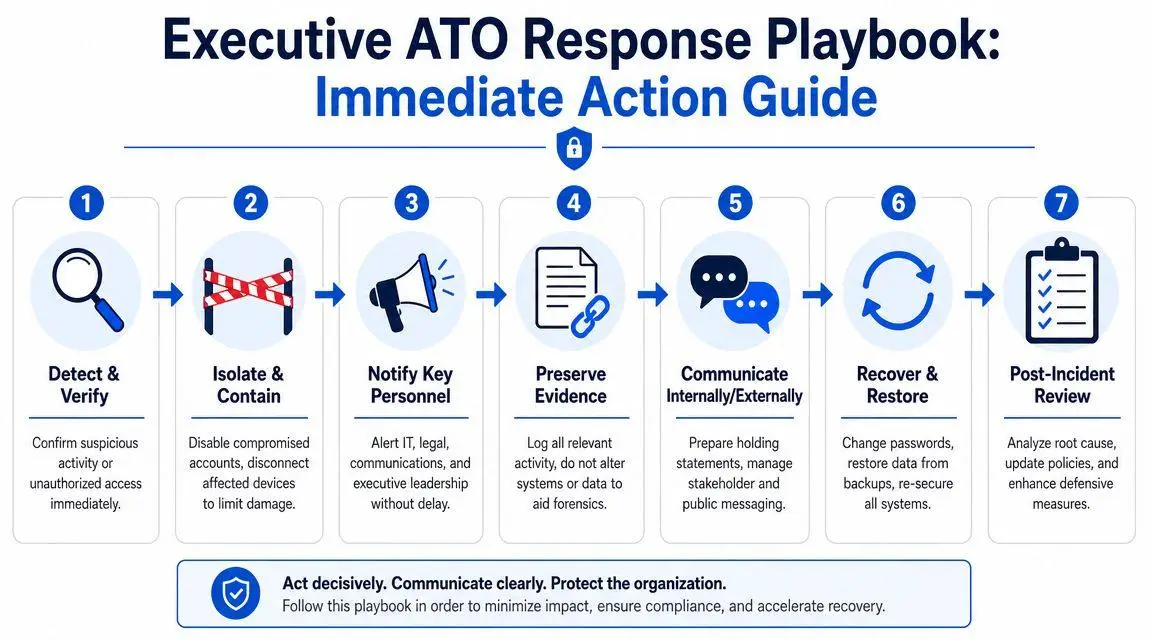
When an executive account may be compromised, speed matters. So does discipline. A panicked response can destroy evidence, spread the problem, and create inconsistent public statements. The right playbook is sequential: verify, contain, preserve, communicate, recover.
Detect and verify
Start by assuming the event is real until proven otherwise. Trigger events include unrecognized login alerts, changed recovery details, missing emails, new forwarding rules, unexplained MFA prompts, sent messages nobody authorized, or reports from third parties that “you” contacted them unexpectedly.
Many organizations still center their response on password reset alone. That is too narrow. Proofpoint’s account takeover fraud guidance notes that many public guides neglect post-login account takeover prevention, even though attackers who are already inside often create forwarding rules or perform bulk data access. The implication is clear: if you only secure the login after the fact, you may miss what the attacker already changed.
Isolate and contain
Take immediate action to stop ongoing use of the compromised account and any linked sessions.
- Force sign-outs and revoke active sessions. Do this at the identity provider and within critical apps.
- Reset credentials from a trusted device. Don’t use the potentially compromised endpoint to perform recovery if you can avoid it.
- Re-enroll MFA if there is any doubt about integrity. Replace app-based methods with hardware keys where possible.
- Disable suspicious forwarding rules, delegates, and recovery changes.
- Temporarily restrict high-risk actions. Payment approval, public posting, and external file sharing should be paused until integrity is restored.
If the suspected compromise touches a device, isolate the device from business workflows and preserve it for review. Do not casually wipe it first. That may destroy useful evidence.
Notify the right people in the right order
Executive incidents are never purely technical. They create legal, fiduciary, operational, and reputational consequences.
Use a defined notification chain. That typically includes the security lead or managed incident team, internal or external counsel, the executive’s chief of staff, communications leadership, and any owner of exposed business functions such as finance or investor relations. If the account was used to contact outside parties, identify who may need direct warning before the attacker can exploit trust further.
This is also the point to align messaging. One inaccurate internal statement can become a discoverable problem later. One delayed external warning can create avoidable loss.
Preserve decision discipline. One person should coordinate the timeline, owners, and approved communications.
Preserve evidence before the trail goes cold
Collect logs, alerts, screenshots, message headers, account setting changes, and records of suspicious actions. Preserve timestamps. Preserve copies of malicious messages and phishing pages if they were involved. Document who observed what and when.
Do not let well-meaning staff “clean things up” before you understand the scope. Evidence supports forensics, insurance claims, legal strategy, and any future dispute about what happened.
Recover with a wider scope than the compromised account
Attackers rarely stop at one account if they can pivot. Review linked systems, trusted devices, delegated users, personal accounts used for recovery, and recent sensitive transactions or communications.
Focus on these areas:
- Email controls: forwarding rules, mailbox delegates, hidden folders, deleted warnings
- Identity settings: recovery methods, trusted devices, app consents, session tokens
- Sensitive workflows: finance approvals, legal document systems, payroll, cloud storage, social media, investor communications
- External trust relationships: assistants, advisors, banks, family office staff, and vendors who may act on executive instructions
If impersonation, false statements, or fraudulent outreach occurred during the incident, prepare for parallel remediation. That may include takedown requests, notice to platforms, preservation of defamatory or fraudulent content, and direct warnings to affected stakeholders. If that’s part of your scenario, this executive guide on what to do if someone is impersonating you online is a useful companion.
Review and harden
A serious response ends with control changes, not just restored access.
Ask blunt questions. Why did the attacker succeed? Which control failed first? Which alert was missed? Which exception should no longer exist? Which executive or assistant still has access they don’t need? Which vendor can still touch sensitive systems with broad permissions?
Then change the architecture. Move more accounts under centralized identity. Replace weaker MFA methods. Tighten post-login monitoring. Reduce delegated access. Remove insecure recovery paths. Rehearse the next incident before it happens.
The board-level point is simple: account takeover prevention isn’t just about stopping entry. It’s about limiting authority abuse after access is gained, and reducing the blast radius if a compromise occurs anyway.
If an executive account has already been compromised, or if you need discreet protection against impersonation, leaks, harmful search results, and reputational fallout, ContentRemoval.com provides confidential assessment and rapid action for high-risk individuals, brands, and legal teams. When a takeover turns public, technical recovery alone isn’t enough. You need containment across search, social, websites, and the broader digital record.
Frequently asked questions
What should an executive do first if their account has been taken over?
Assume the event is real, force sign-outs and revoke active sessions at the identity provider, then reset credentials from a trusted device rather than the possibly compromised one. Re-enroll MFA, disable suspicious forwarding rules and delegates, and pause payment approvals and public posting until integrity is restored.
Is MFA enough to stop an executive account takeover?
Not on its own. Attackers use MFA fatigue prompts and stolen session tokens to get past app-based approvals, so the article recommends hardware keys plus continuous monitoring after login. A secure login does not equal a secure session.
How do attackers usually stay inside an executive account without being noticed?
They make small changes that look operational: a hidden inbox forwarding rule, a new recovery phone number, or an added delegate. Those changes let them watch sensitive threads and suppress warning emails before sending a fraudulent instruction.