⚡ Found something damaging online? Get a FREE Confidential Exposure Scan → · Urgent? Response within 1 hour →

HomeGuidesHow to Report Phishing Websites and Get Them Taken Down

Guides

How to Report Phishing Websites and Get Them Taken Down

How to Report Phishing Websites and Get Them Taken Down

Reporting a phishing website means preserving the full URL, screenshots and delivery message first, then sending a short factual complaint to the channel that can act: the hosting provider or registrar abuse desk for suspension, Google Safe Browsing for browser warnings, and national fraud authorities for the record. If credentials or money were entered, run the fraud response in parallel.

Key facts

  • Hosting provider and registrar abuse desks are the only channels that can suspend a phishing domain quickly.
  • Google Safe Browsing reports need the full URL and feed blocklists rather than delivering a fast takedown.
  • In the UK, suspicious emails go to report@phishing.gov.uk and SMS phishing to 7726.
  • The FTC directs phishing emails to reportphishing@apwg.org and consumer losses to ReportFraud.ftc.gov.

Where ContentRemoval.com comes in. ContentRemoval.com takes down phishing and lookalike sites that impersonate an executive, a brand or a firm’s client communications, and keeps watch for the clones that follow. The security lead, general counsel or communications head usually makes contact once an abuse report has stalled or the site has returned under a new domain. A free 15-minute Exposure Scan maps every impersonating asset and its host, and the report is yours to keep. Get a Free, Confidential Exposure Scan or read how our content removal work is done.

You found the kind of phishing site that doesn’t just waste time, it actively puts a brand, a person, or a payment stream at risk. The lookalike domain is live, the page is harvesting credentials, and the clock is already working against you. At that point, the wrong move is to panic and spray complaints everywhere. The right move is to treat this like a takedown operation, because how to report phishing websites is really a question of influence, evidence, and escalation.

If this is your name, your company, or your clients being impersonated, start with calm triage. Preserve the page, identify the host, and send the complaint to the channel most likely to move the domain, not the one that feels most familiar. For broader brand response, this strategic guide for executives on online impersonation is the right companion reading, but your immediate job is simpler. Don’t click, don’t reply, don’t test forms with real credentials, and don’t assume a browser report alone will solve it.

The Moment You Find a Phishing Site

A high-profile phishing discovery usually starts the same way. Someone on your team spots a lookalike domain, or a client forwards a message that looks close enough to your brand to fool a tired executive on a phone. The site is already asking for logins, card data, or account recovery details, and the instinct is to move fast in every direction at once. That’s exactly how people lose evidence.

Urgency without panic

Start by separating containment from cleanup. Containment means stop further interaction, preserve the page, and alert the people who can prevent damage to accounts or funds. Cleanup means filing the reports that can get the site labeled, blocked, suspended, or documented for enforcement. Those are related, but they are not the same action.

The biggest mistake is treating phishing like a simple web complaint. Official UK guidance, browser reporting flows, and agency instructions all point to different intake paths depending on whether the attack arrived by email, text, or a malicious site. Google’s Safe Browsing pages are built to feed warning systems, not just to satisfy a single victim’s complaint. Google’s reporting workflow shows why the exact URL matters.

Practical rule: if the page is live, speed beats perfection, but only if you keep the evidence intact before you report.

What to do in the first pass

The first pass is narrow. Save the URL, save the screenshots, identify who is being impersonated, and decide whether money or account access is already compromised. If a login was entered, or a payment went through, reporting the site alone is too slow. You need parallel escalation.

The point is simple. A phishing site can be removed, blocked, or copied elsewhere. Your job is to make it expensive to keep running and easy for the right desks to act on your complaint. That starts with evidence, not noise.

Preserving Evidence Without Tipping Off the Attacker

Evidence is what separates a report that gets read from a report that gets parked. Abuse desks do not want a story written for a board meeting. They want enough material to verify the site, match it to a host or registrar, and move it into triage. The cleaner the package, the faster the response.

Build the record before you submit anything

Capture the full URL, not just the domain. Include the path and query string if they’re present, because phishing pages often hide distinct payloads behind similar-looking addresses. Take screenshots of the page itself, any warnings, and the message that delivered the link. Record the timestamp and your time zone, because investigators use timing to connect the page, the message, and the hosting trail.

If the link came by email or text, preserve the original message. For email, that means the body plus headers. For a browser session, note the browser and the page behavior you saw. Kaspersky’s checklist is blunt about the minimum package, and it’s the right standard to follow, because it requires the website address, screenshots, dates and times, the harmful conduct, and the site owner or hosting provider where possible. Kaspersky’s reporting checklist is one of the few public guides that gets the documentation side right.

Here’s the structure I’d use for every case:

  • Target URL: exact full URL, not a trimmed version.
  • Evidence images: screenshots of the page, warnings, and message source.
  • Delivery path: email, SMS, social post, or ad click.
  • Timing: date, time, and time zone.
  • Impact: what the page asked for and whether any data was entered.
  • Ownership trail: WHOIS and registrar details, if available.
  • Preservation note: any reply from the site owner or abuse contact.

Preserve communications with the site owner if there’s any contact at all. That creates a record that you tried to resolve the abuse before escalation.

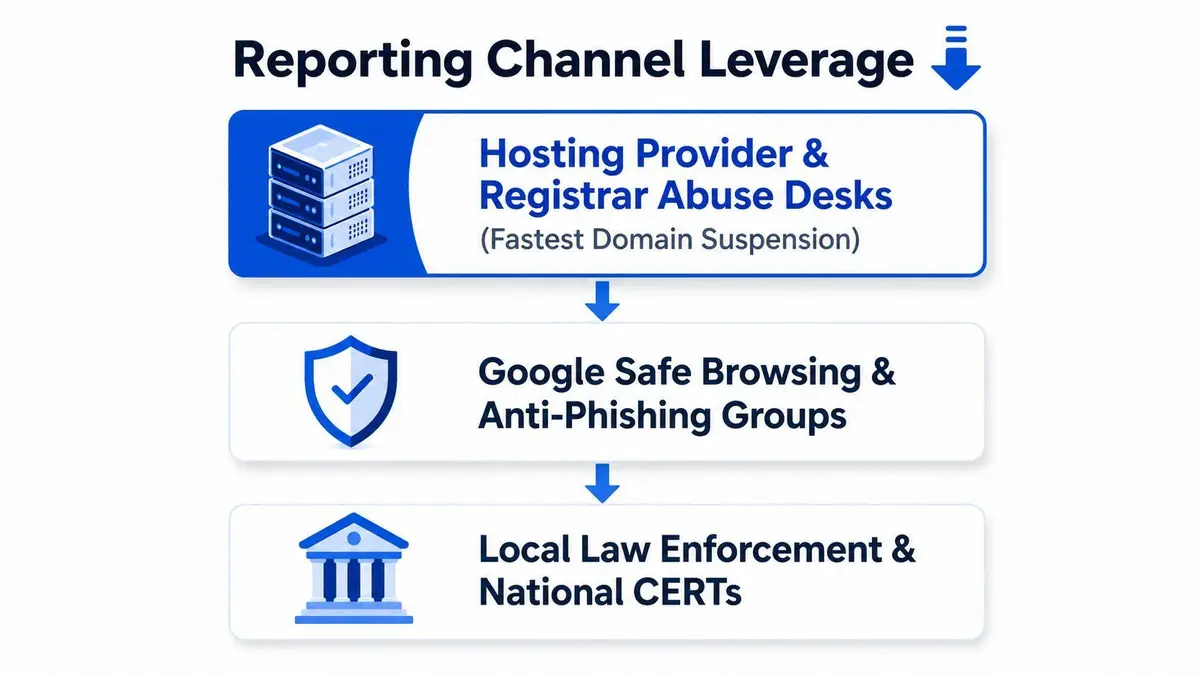
A diagram illustrating the three main channels for reporting phishing websites to minimize online security risks.

The reason this discipline matters is operational, not academic. Many phishing pages are short-lived. If you wait to assemble your evidence after you start filing complaints, the site may already be gone or copied onto another host. A complete package gives you something reusable for every follow-up report, which is why a one-page template is worth keeping ready long before the next incident.

Ranking the Reporting Channels by Leverage

Not every report has the same chance of producing action. Some channels document the abuse, some trigger broad warnings, and some can get a site suspended. If you’re serious about takedown, rank the channels by influence instead of sending the same complaint to every inbox you can find. The wrong sequence wastes time and usually weakens your message.

Start where suspension can happen

The most effective route is usually the hosting provider and registrar abuse desk. Norton’s guidance is clear that many scam sites need to go through the host’s abuse channel, and that the correct procedure depends on the host’s own instructions rather than a universal form. Norton’s reporting guidance is valuable because it reflects how takedown works. The entity controlling the server, or the registration, is often the only one that can suspend the domain or remove the content quickly.

Next comes Google Safe Browsing and similar browser-integrated tools. These reports matter because they feed blocklists and warning systems used across products, not just for one victim. Google’s own reporting workflow asks for the full URL so the malicious site can be processed for broader warning systems rather than just one account. That’s a strategic play, but it’s not the fastest path to removal. It’s the fastest path to reducing exposure at scale.

Then come national CERTs, law enforcement, and fraud authorities. Their value is recordkeeping, cross-border coordination, and escalation when a case involves identity theft, payments, or impersonation. These channels matter most when you need a paper trail that supports a larger fraud or impersonation response. They’re not usually the first desk that pulls a phishing page offline.

Finally, industry mailboxes like the APWG intake path help aggregate intelligence across vendors, ISPs, and financial institutions. The FTC directs phishing emails to reportphishing@apwg.org and consumer fraud reports to ReportFraud.ftc.gov, which shows the split between shared industry intake and consumer fraud reporting. FTC phishing guidance is useful because it separates the message path from the consumer loss path.

How to submit a Google legal request is relevant only if your problem expands beyond takedown and into search visibility or legal escalation. Don’t skip the host and registrar just because Google is easier to find. Easier is not the same as more effective.

A hierarchical pyramid diagram ranking five reporting channels from most to least leverage, including executive and operational levels.

Use the right channel for the right problem

Use the registrar or host when your goal is removal or suspension. Use browser reporting when your goal is broad protection for other users. Use law enforcement and national agencies when you need a record tied to fraud, impersonation, or account compromise. Don’t confuse these jobs.

The mistake I see most often is people treating every portal like a universal complaint desk. It isn’t. A well-aimed abuse report beats five unfocused submissions every time.

Writing the Report That Actually Gets Actioned

Abuse teams scan for structure first and emotion last. If your complaint opens with outrage, legal threats, or a long brand story, you’ve already lost time. If it opens with the exact URL, the harm, and the evidence, you’re speaking the language of triage.

What the desk needs at a glance

A registrar or host wants to know four things immediately. Who is reporting, what exact asset is abusive, what the site is doing, and why it violates policy or law. That means your report should be compact, factual, and easy to verify. No marketing tone, no speculation, no drama.

Use this format:

  • Reporter identity: name, role, company, and contact details.
  • Abusive asset: full URL, plus any subpages or variants.
  • Time evidence: date, time, and time zone.
  • Harm description: credential theft, impersonation, payment collection, or malware delivery.
  • Proof: screenshots, message source, and any preservation details.
  • Request: suspension, removal, or review under the host’s abuse policy.

Here’s the style that works. “We are reporting the full URL below because it impersonates our brand and collects login credentials. Screenshots are attached. The message was received at the time listed. Please review under your abuse policy and suspend the asset if it violates your terms.” That is plain, readable, and actionable.

Keep the tone short and operational

Do not write like a cease-and-desist letter unless counsel wants that. Don’t threaten criminal charges in the first paragraph. Don’t send a rambling narrative about reputation damage. Abuse desks look for facts they can validate fast, and short sentences help them do that.

If you have the hosting provider’s form, use its fields exactly as intended. If it asks for evidence attachments, attach them. If it asks for the offending URL only, put the exact URL there and keep the narrative in the body. That’s how you avoid getting bounced for formatting instead of substance.

A strong report often looks boring on purpose. That’s a good sign. Boring is what triage teams can process quickly.

A professional desk workspace featuring a laptop, notebook, pen, and report on how to write effective reports.

A usable example

If the registrar abuse form has a free-text box, keep it tight:

“Reporting the phishing site at the full URL provided. The page impersonates our organization and requests credentials from visitors. Attached are screenshots, the timestamp, and the original delivery message. Please review under your abuse process and route this to the correct host or registrar contact for suspension.”

That’s enough to get reviewed on first pass in many cases because it gives the reviewer the asset, the harm, and the proof without making them hunt for the point.

Escalating When Money or Accounts Are Already at Risk

Once someone has entered credentials or made a payment, reporting the site is only one part of the response. At that point, speed across channels matters more than neatness. You’re no longer just asking for takedown, you’re trying to stop account access, card abuse, and downstream impersonation before the damage spreads.

Parallel escalation is the only sensible move

If a bank account, card, or platform login was exposed, contact the institution directly and use its fraud or account-security pathway. Freeze what you can, replace what you need to replace, and tell the platform whose login was phished before the attacker turns one stolen session into a larger compromise. If the victim used a work account, the internal security team should be alerted immediately so they can invalidate sessions and reset tokens.

The national reporting split matters here. In the UK, suspicious email goes to report@phishing.gov.uk, SMS phishing goes to 7726, and financial loss goes to Report Fraud by online form or at 0300 123 2040. That structure reflects the fact that phishing isn’t just one category. It can be an email issue, a telecom issue, or a financial crime issue, and the response should match the harm. UK phishing reporting guidance makes that channel separation explicit.

The U.S. approach is also split by function. The FTC directs phishing emails to reportphishing@apwg.org while consumer fraud reports go to ReportFraud.ftc.gov. FTC guidance is useful because it tells you exactly when you’re feeding the industry intake path and when you’re filing the consumer fraud complaint. That distinction matters if money is already moving.

Reporting Channels by Attack VectorPrimary ChannelBackup Channel
Email phishingNational phishing mailbox or industry intake pathBrowser reporting or fraud authority
SMS phishingShort code reporting systemCarrier abuse or fraud authority
Money lossFraud reporting portal or phone lineBank, card issuer, or law enforcement
Malicious websiteHost or registrar abuse deskSafe Browsing or CERT

If money is at risk, do not wait for a takedown before you start the fraud response. Those two tracks should run at the same time.

The cleanest way to think about it is this. A phishing report can reduce future exposure, but a fraud report can help stop the immediate loss from compounding. You need both when the attacker has already crossed from attempted phishing into actual compromise.

When the Report Stalls or the Site Returns

A stalled report usually has a simple cause. The URL was incomplete, the complaint went to the wrong inbox, the evidence was written for a human audience instead of a triage reviewer, or the registrar sits in a jurisdiction where enforcement is slow. None of that means the case is dead. It means the first pass didn’t hit the right nerve.

Follow the trail, not just the form

If the first complaint gets no traction, send a polite second notice with the case number and the exact URL again. Then escalate upstream. That means the hosting provider if you only contacted a registrar, or the registrar if you only contacted a host. A lot of cases stall because people assume one complaint reaches the whole chain. It doesn’t.

If the site returns after removal, treat it as a reappearance problem, not a surprise. Re-check the URL, confirm whether the host changed, and submit the new evidence package. Google Safe Browsing’s reporting path is built to process the full URL for broader warning systems, so it’s useful even when the page is already gone, because the value can be in the blocklist and intelligence layer rather than the takedown itself. Google’s reporting workflow is worth using even after a page disappears.

What to do when a website won’t remove your information becomes relevant when the abuse stops being a single-domain issue and turns into a repeat publication problem. At that point, outside counsel or a takedown specialist may be the most efficient path, especially for executives whose name, image, or brand is being reused across multiple sites.

Know when to stop handling it internally

If the complaint has crossed borders, if the host hides behind proxy registration, or if the site keeps coming back under new variations, internal effort can turn into wasted motion. That’s where a professional escalation makes sense, not because the problem is mysterious, but because repeated follow-up across registrars, hosts, and search systems takes discipline and time.

The wrong instinct is to keep sending the same message and hope someone finally reacts. The right instinct is to repackage the evidence, shift channels, and keep pressure on the entities most likely to act.

Building a Continuous Defense After the First Report

A single takedown rarely ends the campaign. If the impersonation is valuable, the attacker will test new domains, clone the page, or recycle the content elsewhere. That’s why the primary defense is continuous monitoring, not one-off reporting.

Defensive lookalike domains, brand monitoring, and Safe Browsing alerts help you see the next copy faster. Periodic checks of known indicators matter because reappearance is common enough to assume, not hope away. Keep a standing evidence template ready, keep the relevant abuse contacts organized, and re-check the URLs you already reported.

The best response to phishing is not a heroic one-time cleanup. It’s a boring, repeatable system that makes reuploads harder and faster to catch.

If the impersonation is now spreading across search, social, and email at the same time, get a confidential assessment before the problem outgrows your internal team. A small, disciplined response beats a noisy scramble every time.

Pin this next to the incident runbook, then use it without improvising. Preserve evidence. Rank the channels by usefulness. Escalate fraud separately when money is exposed. Re-check for reappearance.


A CTA for ContentRemoval.com. If you’re dealing with a phishing site that impersonates your name, brand, or business, start with a confidential assessment and let a specialist team map the fastest takedown path, the right escalation sequence, and the monitoring needed to stop it from coming back.

Frequently asked questions

Who do I report a phishing website to first?

The hosting provider or domain registrar abuse desk, because they control the server or the registration and can suspend the site. Browser reports to Google Safe Browsing protect other users at scale but are slower for removal, and law enforcement or CERT reports create the paper trail for fraud and impersonation cases.

What should a phishing abuse report include?

Your name and role, the exact full URL with path and query string, the date, time and time zone, a one-line description of the harm such as credential theft or brand impersonation, screenshots and the original delivery message, and a specific request for suspension or review under the host’s abuse policy. Keep it short and factual, without legal threats.

What do I do if my abuse report is ignored or the phishing site comes back?

Send a polite second notice with the case number and URL, then escalate upstream to the host if you only contacted the registrar, or the reverse. If the site reappears, check whether the host changed and submit a fresh evidence package. Repeated reappearance across borders or proxy-registered domains is the point to hand it to a specialist.

Dealing with this right now?

Get an honest, confidential read on your situation, free, with no obligation.

How we can help →

Start with a free, confidential Exposure Scan

We'll scan your digital footprint, show you exactly what's exposed, and recommend the fastest path to remove it, or tell you honestly if you don't need us.

Book Your Assessment
Free · Confidential · 15 minutes