
A malware removal service for executives, public figures and family offices is incident response rather than computer repair. It runs through triage and scoping, isolation of devices and accounts, eradication of malicious files and persistence mechanisms, recovery with written validation, then credential resets, session revocation, email rule inspection, forensics on what was accessed, and monitoring for re-entry and leaks.
Key facts
- Warning signs include unauthorized forwarding rules, unfamiliar MFA prompts and confidential material surfacing in negotiations.
- Proper remediation removes startup hooks and scheduled tasks and repairs changed settings, not just the payload.
- Do not change passwords from the suspect device; that can hand the attacker fresh credentials.
- Verizon’s 2025 DBIR, as cited, found the human element in 60 percent of breaches.
Where ContentRemoval.com comes in. ContentRemoval.com handles the exposure that follows a compromise for executives, public figures, family offices and their legal teams: assessing whether private data has surfaced, removing leaked material and impersonation accounts, and monitoring search and platforms for the attacker’s second move. The chief of staff or outside counsel usually gets in touch once a device has been cleaned but the leak has started. A free 15-minute Exposure Scan maps what is removable, and the report is yours to keep. Get a Free, Confidential Exposure Scan or read how our content removal work is done.
The message usually arrives in a form that looks almost trivial. A bank alert for a login you don’t recognize. An assistant forwarding an email you never sent. A journalist asking for comment on documents that should exist only inside a private deal room. Sometimes it’s worse. A family member’s cloud account starts surfacing odd password prompts, and within hours someone is impersonating you or probing your business contacts.
At that point, you’re not dealing with a “computer issue.” You’re dealing with a possible security incident with legal, financial, and reputational consequences. For executives, public figures, and family offices, the true danger usually isn’t a frozen laptop or an annoying pop-up. It’s silent access. It’s copied correspondence, stolen credentials, surveillance, extortion material, and the slow conversion of private information into public damage.
A proper malware removal service for a high-stakes client has to be judged by that reality. If the provider thinks the job ends when a scanner says “no threats found,” they’re not solving your problem. They’re documenting a false sense of closure.
Initial Diagnosis When Discretion is Paramount
A high-profile client rarely calls because a machine is “running slow.” They call because something feels wrong in ways that are difficult to explain and impossible to ignore.
One common pattern starts with communications. An executive notices that a sensitive email thread appears to have been anticipated by the other side before it should have been. A public figure sees private travel details turn up in online chatter. A family office receives irregular authentication prompts across multiple accounts after one household device displays a fake update screen or behaves oddly for a few minutes and then appears normal again.

The signs that matter
Consumer advice focuses on lag, crashes, and browser pop-ups. That’s amateur-hour screening. In a high-stakes environment, the signals worth taking seriously look more like this:
- Compromised communications: messages sent from your account, calendar changes you didn’t make, forwarding rules you didn’t authorize
- Financial irregularities: unusual approval requests, suspicious vendor changes, strange sign-in alerts around banking or treasury workflows
- Privacy failures: confidential material surfacing in negotiations, litigation, media inquiries, or harassment campaigns
- Identity anomalies: repeated MFA prompts, app reauthorizations, locked accounts, or unfamiliar devices tied to your profile
Those indicators often point to a wider incident. The infected laptop may only be the entry point. The ultimate target could be your email, cloud storage, messaging history, assistant’s account, or your personal network of trust.
Why instinct matters
Careful victims often delay action because they don’t want to overreact. That’s a mistake. If you hold sensitive information, your instincts are usually picking up on a pattern before the evidence is obvious. Attackers don’t need dramatic disruption. They need quiet access for long enough to copy, watch, and monetize.
Practical rule: If the anomaly touches communications, credentials, confidential files, or financial approvals, treat it as an incident first and a device problem second.
Discretion matters immediately. Don’t start emailing your whole team from a possibly compromised account. Don’t send screenshots of suspicious activity through the same channels that may already be exposed. Don’t let an internal generalist “have a quick look” if the device could contain privileged material, litigation strategy, unpublished media, investor communications, or family records.
Instead, narrow exposure. Move sensitive coordination to a known-clean channel and preserve the situation long enough for competent review. If the incident overlaps with harassment, exposure of personal details, or coordinated abuse, a strategic response to doxxing and personal exposure becomes part of the same containment decision.
The right first question
The wrong question is, “Can someone clean this computer?”
The right question is, “What has been accessed, what remains exposed, and who else could be affected if we handle this badly?”
That shift matters. It changes the response from casual IT support to controlled incident management. For a public company leader, a celebrity, a founder in a transaction, or counsel managing a sensitive matter, that distinction can determine whether the issue stays private or becomes a reportable, litigated, and reputational event.
Understanding the Modern Threat Landscape
The word malware is often used as if it describes one thing. It doesn’t. For high-stakes clients, malware is better understood as a delivery mechanism for specific harms. The label matters less than the attacker’s objective.

The scale alone should end any belief that this is a niche problem. AV-TEST malware statistics report over 450,000 new malicious programs and potentially unwanted applications every day, which translates to over 1.6 million per week. At that volume, no serious malware removal service can rely on simple file deletion. It needs detection, quarantine, cleanup, and prevention of reinfection across the client’s wider digital footprint.
Threats grouped by consequence
Here is the framing I give clients.
| Threat type | What the attacker wants | Why high-profile clients should care |
|---|---|---|
| Spyware | Visibility into messages, files, calls, and behavior | Blackmail, leverage in negotiations, reputational sabotage, stalking |
| Info-stealers | Credentials, session tokens, browser data, wallet or payment details | Account takeover, impersonation, financial fraud, silent re-entry |
| Ransomware | Encryption, extortion, disruption | Operational paralysis, leaked archives, pressure tactics during crisis |
| Browser hijackers and adware | Traffic manipulation and monetization | Redirects, fake logins, data harvesting, reputational embarrassment |
| Persistence tools | Long-term access after the first compromise | Repeated intrusion after “cleanup,” surveillance, privileged footholds |
This is why executives get misled by the wrong benchmark. They assume the threat is the malicious file itself. Often it isn’t. The file is just the opening move. The actual injury is what follows: copied mailbox content, stolen tokens, altered authentication settings, or access sold onward.
Why consumer cleanup fails
A home-user mindset asks whether antivirus found a virus. A high-risk assessment asks whether an adversary gained durable access to assets that matter.
That requires understanding how attackers operate. They often combine malware with account compromise, browser manipulation, fake update prompts, malicious attachments, and credential capture. Workplace habits also matter. Teams that move quickly, reuse familiar collaboration channels, and approve requests under time pressure create the openings attackers want. For a useful management-side perspective, TekRecruiter cyber security insights are worth reviewing because they connect staff behavior and operational routine to real exposure.
Some incidents are best understood not as “infection” but as access conversion. A target clicks once. The attacker harvests enough information to move from device compromise into email, cloud apps, and identity systems. At that point, removal on one endpoint is necessary but incomplete.
A short primer can help frame that escalation clearly:
If the outcome includes leaked messages, impersonation, or public speculation, the cyber event quickly becomes a reputational event. The response then has to address both security and public-facing harm. That’s where a guide to handling reputational damage after a data breach becomes relevant, because technical containment alone won’t neutralize downstream fallout.
Malware aimed at a high-profile person is usually trying to reach money, influence, leverage, or attention. The machine is rarely the final objective.
The Professional Remediation and Containment Process
A serious malware removal service should operate like hazardous-material response, not neighborhood computer repair. The work has phases. Each phase has a purpose. If the provider can’t explain that sequence clearly, they probably don’t have one.
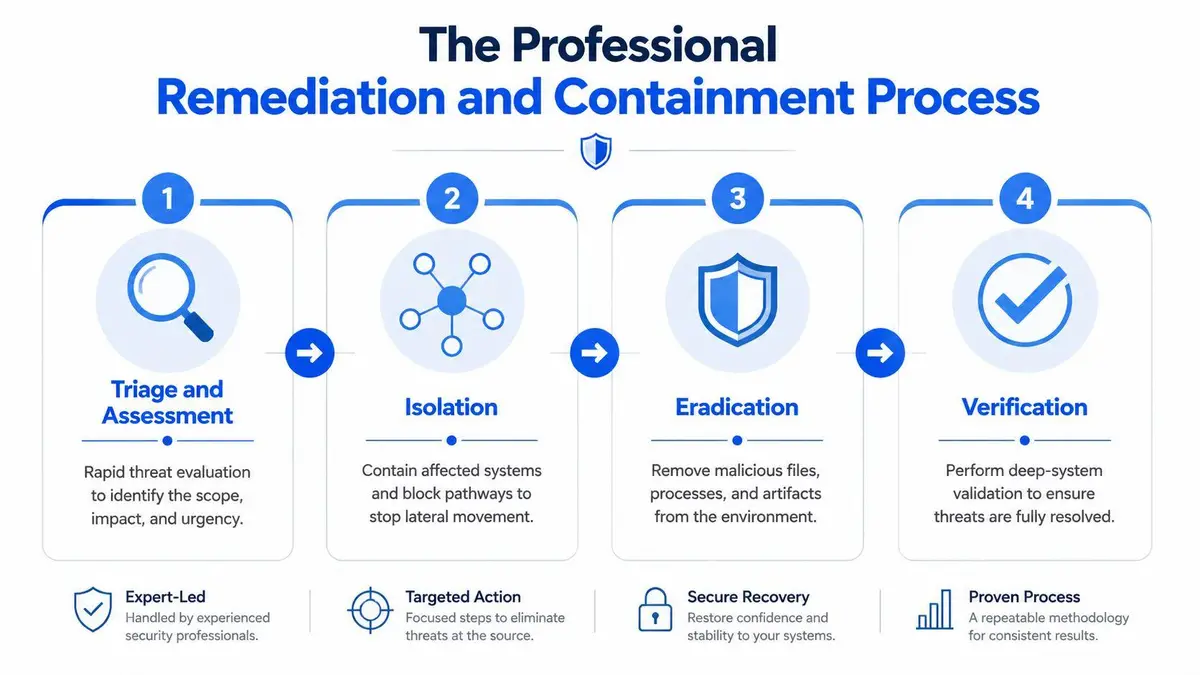
Professional malware remediation guidance makes the core point plainly. Effective malware removal is not just deletion. Proper remediation includes isolating the endpoint, removing malicious binaries and persistence mechanisms such as startup hooks or scheduled tasks, repairing changed system settings, and restoring altered files. If you only delete the payload, reinfection or continued access can follow.
Triage and assessment
The first task is to establish scope without creating more damage. Which devices are affected. Which accounts were used from those devices. What communications and cloud services intersect with them. Whether there are signs of persistence, lateral movement, or data access.
This isn’t the stage for broad experimentation. It’s the stage for evidence-led judgment. A disciplined provider preserves what matters, limits who touches the environment, and identifies whether the incident is isolated or connected to a wider compromise.
Isolation and containment
The infected endpoint gets separated before the attacker can move further or maintain active control. In a household office, that may mean one laptop and linked accounts. In a family office or executive environment, it may include assistants’ devices, shared drives, synced folders, collaboration tools, and mobile endpoints.
A concise way to judge this phase is whether the firm treats isolation as a business decision, not just a technical one.
- Device isolation: stop further communication from the affected machine
- Account containment: review sessions, device trust, and active sign-ins tied to the user
- Communications control: shift sensitive activity to a known-clean channel
- Privilege review: identify whether admin or delegated access widened the blast radius
Eradication and neutralization
This is the part people imagine when they hear “malware removal service,” but it’s only one stage. The provider removes malicious files, terminates hostile processes, strips persistence, checks browser tampering, and repairs the system changes the malware made to survive.
What matters here is thoroughness. A quick scan is not remediation. A professional engagement should account for hidden persistence and the practical ways malware reappears after superficial cleanup.
What you want to hear from a provider: “We’ll identify what stayed behind, what changed, and what has to be reversed.”
Recovery and validation
The final phase is where weak providers declare victory too early. Real recovery means the system functions properly, the changes made by the attacker have been reversed, and the client has a defensible basis for trusting the environment again.
That process should include validation, not just optimism. If you want a benchmark for what a structured, client-facing remediation workflow looks like, review a documented incident handling process. The principle is simple. Method beats improvisation.
Selection Criteria for a High-Stakes Service
Choosing a malware removal service for a public figure or senior executive is closer to selecting outside counsel than hiring IT support. Confidentiality, judgment, and coordination discipline matter as much as technical competence. Sometimes more.

A provider’s methodology is the first filter. This overview of modern virus removal services correctly notes that strong services combine signature-based detection with behavior monitoring and real-time threat intelligence. That matters because signature-only scanning misses new variants, packed payloads, and fileless activity. For a high-risk client, the provider must be able to terminate active compromise, not just identify known bad files.
What separates a premium service from ordinary support
Use this test.
| Criterion | Weak provider | Strong provider |
|---|---|---|
| Confidentiality | Casual intake, email-heavy communication | Secure channels, controlled disclosure, formal confidentiality discipline |
| Scope | “We’ll clean the computer” | “We’ll assess devices, accounts, cloud access, and persistence risk” |
| Legal coordination | No concept of privilege or evidence handling | Can work alongside counsel and adapt to sensitive matters |
| Decision quality | Tool-driven | Case-driven, with clear explanation of trade-offs |
| Aftercare | Scan complete, case closed | Verification, reset guidance, monitoring, re-entry checks |
The confidentiality point is not cosmetic. If you’re exposed to extortion, litigation, insider issues, or media scrutiny, sloppy handling by the service provider becomes its own liability. I’d expect secure communications from the start, disciplined note handling, and a team that understands when not to circulate names, screenshots, and allegations internally.
Ask harder questions
Don’t ask, “How fast can you remove malware?” Every vendor has an answer for that. Ask questions that reveal whether they understand high-consequence incidents.
- Who sees my case details? If the answer is vague, walk away.
- How do you handle legally sensitive material? You need a provider that won’t trample over evidence or confidentiality.
- Do you assess cloud accounts and identity exposure, or only the endpoint? If they only treat the device, you’re buying an incomplete service.
- What does success look like in writing? You want validation criteria, not reassurance.
A firm that has only handled generic consumer infections may still be useful for narrow website cleanup. For instance, if the problem is specifically a compromised content system, a technical guide on cleaning a hacked WordPress site can be relevant background. But that’s a specialized website problem. It is not a substitute for executive-grade incident handling when the risk touches identity, communications, extortion, or reputation.
One-time response versus ongoing cover
Some clients need a contained incident response. Others need continuous oversight after the event because they remain attractive targets. That’s the difference between a one-time cleanup and a retained detection-and-response posture.
If your profile attracts repeat probing, public hostility, financial targeting, or persistent impersonation attempts, don’t assume a single engagement solves the strategic problem. It may solve the immediate one.
Beyond Removal Forensics and Proactive Monitoring
Most malware removal services stop at the wrong finish line. They remove the visible threat and hand the client back a device that appears functional. That isn’t resolution. It’s only the point where the difficult questions begin.
The first question is what the attacker accessed. The second is how they could get back in.
Verification is the real test
A major gap in this market is post-remediation proof. This analysis of malware cleanup gaps highlights why that matters. Verizon’s 2025 Data Breach Investigations Report found the human element in 60% of breaches, with credential abuse a leading access method. That means a cleanup that removes malware but ignores stolen credentials or persistent access tokens may leave the attacker free to return immediately.
That’s why a serious post-incident workflow has to include verification tasks that many providers barely mention.
- Credential reset discipline: passwords changed in a controlled order, starting with the most sensitive accounts
- Session and token review: revoke trusted sessions, device access, and app connections that could preserve access
- Email rule inspection: check forwarding, delegation, recovery options, and quiet persistence inside communications systems
- Browser and extension review: remove hijackers, malicious extensions, and unauthorized saved sessions
Removal without credential and access review is incomplete. In many executive incidents, it’s barely the midpoint.
Forensics tells you what happened
Forensics is not a luxury for public-facing clients. It’s how you establish whether the issue was nuisance-level malware or the beginning of a disclosure, extortion, or impersonation campaign.
Sometimes the answer changes your legal posture. If the attacker touched confidential negotiations, regulated information, unpublished media, or privileged documents, counsel may need facts quickly. If the compromise affected assistants, household staff, or delegated access, the scope may be wider than any single user realized.
That’s also where visibility outside the endpoint matters. Public damage often appears after the technical event, not during it. Monitoring how your name, brand, or sensitive data is surfacing across search and AI-generated discovery environments can become part of containment. For a helpful perspective on that layer, AI visibility strategies are worth reviewing because they address how emerging search surfaces can amplify harmful material after a breach.
Monitoring after the “all clear”
The phrase “all clear” should make you skeptical. Attackers revisit prior footholds. They reuse captured intelligence. They exploit the fact that clients relax once the obvious problem disappears.
A better standard is sustained observation for signs of re-entry, misuse, or delayed disclosure. That may include watching for account anomalies, impersonation attempts, suspicious resets, leaked files, or coordinated contact from extortionists and opportunists. Especially for executives and public figures, the attacker’s second move can be more damaging than the first.
Your Strategic Next Steps for Digital Security
If you suspect malware and your profile carries money, visibility, or influence, stop treating the matter as a housekeeping issue. The incident may already extend beyond one machine.
That broader scope is no longer hypothetical. This discussion of modern malware incident scope notes that ransomware was present in 44% of breaches in the 2025 DBIR and argues that real remediation has to address business continuity, data loss triage, and identity-based attacks across email rules, mobile devices, and synced cloud drives. That is the correct frame. One infected laptop can be the visible fragment of a much larger compromise.
What to do right now
Start with restraint. Don’t continue sensitive communications on the suspect device. Don’t approve transactions, exchange confidential files, or discuss strategy through accounts that may have been accessed. Move to a known-clean channel under tight control.
Then make two decisions quickly:
- Freeze risky behavior. That means no casual browsing on the suspect system, no reactive password changes from the infected endpoint, and no broad internal chatter that creates confusion or contaminates evidence.
- Engage a professional service for confidential assessment. Not a retail repair desk. Not a generic helpdesk. A provider that understands containment, identity exposure, legal sensitivity, and reputational fallout.
What not to do
DIY cleanup is tempting because it feels immediate. It is also how clients lose time, evidence, and strategic advantage.
Avoid these errors:
- Running random tools from internet searches: you may worsen the problem or destroy useful artifacts
- Changing every password from the suspect device: that can hand the attacker fresh credentials
- Treating the issue as isolated to one endpoint: high-value attacks often aren’t
- Assuming silence means safety: many compromises stay quiet until the attacker chooses to monetize
The real cost of delay isn’t technical. It’s what the attacker does while you’re still deciding whether the situation is serious.
The leadership decision
For a senior client, the correct response is not panic. It’s disciplined escalation. You contain first, investigate properly, and close every route back in. You also prepare for the fact that the threat may express itself publicly through leaks, impersonation, extortion, or search visibility after the technical work is done.
That’s why a high-stakes malware removal service should be viewed as a protective decision, not an IT expense. You’re buying controlled resolution, evidence-backed judgment, and a reduction in legal and reputational exposure. Anything less is false economy.
If you need discreet help containing a malware-related incident, assessing whether private data has been exposed, or managing the reputational fallout that often follows, ContentRemoval.com offers confidential assessments for executives, public figures, family offices, and legal teams. The goal is simple: contain the damage, remove harmful exposure, and restore control quickly and unobtrusively.
Frequently asked questions
How do I know if my laptop or phone has been hacked rather than just running slowly?
Look at communications, credentials, confidential files and financial approvals rather than performance. Messages sent from your account, calendar changes or forwarding rules you did not make, repeated MFA prompts, unfamiliar devices on your profile, and private details appearing in negotiations or media inquiries all point to an incident rather than a device fault.
What should I do first if I think my device is infected?
Stop sensitive communications on the suspect device and move coordination to a known-clean channel. Do not approve transactions, exchange confidential files, run random cleanup tools or change every password from the infected endpoint, and do not let a generalist take a quick look if the device holds privileged material. Engage a provider that assesses accounts and cloud access, not only the endpoint.
Is antivirus cleanup enough after a malware infection?
No. Deleting the payload leaves persistence mechanisms, stolen credentials and active session tokens in place. Recovery needs controlled credential resets, revocation of trusted sessions and app connections, inspection of email forwarding and delegation rules, browser extension review, and forensics to establish what was accessed.
