
Removing cached pages from Google now means controlling what Google can still index, since the cache feature ended in 2024. Fix the source first: return a 410 or 404 for pages that should be gone, apply noindex for pages that must stay reachable. Then file a Temporary Removal or an Outdated Content request.
Key facts
- Google removed cache links from snippets and retired the cache: operator, phasing the feature out by 2024.
- A 410 or 404 status signals a page is gone; noindex keeps access while removing search visibility.
- Temporary Removals suppress quickly; the Outdated Content process corrects a stale index entry.
- Robots.txt limits crawling but does not remove the page from public access.
Where ContentRemoval.com comes in. ContentRemoval.com steps in when the stale result sits on a site the client does not control, when the same content is syndicated across several domains, or when an archive copy outlives the original page. General counsel, communications leads and family office staff usually make contact after a Search Console request has been filed and the result keeps returning. A free, confidential 15-minute Exposure Scan maps each copy and which are removable, and the report is yours to keep. Get a Free, Confidential Exposure Scan or read how our search result removal work is done.
You found a damaging page in Google results. It may be outdated, misleading, already deleted from the website, or still live under a URL you thought no one would see. What matters is simpler than most guides suggest. You need control, and you need it fast.
Many individuals begin in the wrong place. They look for a button that says “remove cache.” That mindset is obsolete. If you’re trying to protect a company, a personal brand, or a legal position, the issue isn’t the old Google click path. The issue is whether Google can still surface the page, whether another archive can still preserve it, and whether the source remains exposed.
If you’re asking how to remove cached pages from Google, treat it as a risk containment exercise. Temporary concealment has value in a crisis. Permanent removal requires source control, correct de-indexing signals, verification, and follow-through. Anything less is delay disguised as action.
The Modern Reality of Google’s Cache
The phrase “remove cached pages from Google” no longer describes the actual problem.
Google’s cached-page feature was fully phased out by 2024, after removing cache links from search-result snippets and retiring the cache: operator from its documentation. Users were effectively pushed toward the Internet Archive and similar services as the practical way to view older page copies, as summarized in SE Ranking’s coverage of Google’s cache phase-out. The consequence is strategic, not cosmetic. In many cases, there is now less native Google cache to remove, so the main task is controlling whether the live page remains indexable and whether archived copies persist elsewhere.
That changes the operating model.
A client will often say, “Google is showing an old cached version.” Sometimes that’s true in a loose sense. More often, one of three things is happening:
| What you are seeing | What it usually means | Correct response |
|---|---|---|
| An outdated search result | Google still associates the URL with prior content | Update index eligibility and submit the right request |
| A live page with stale perception | The page is still accessible and still indexable | Fix the source first |
| A historical copy in an archive | A third party preserved the page | Handle archive and source as separate workstreams |
The real issue is index control
If the URL is still available and indexable, Google can keep showing it in one form or another. If the URL has been properly retired or excluded, Google can update its records. That’s why advanced removal work now centers on de-indexing, canonicalization, robots directives, and source removal, not nostalgia for a cache link that no longer meaningfully exists.
For executives under pressure, this distinction matters because it dictates the order of operations. Don’t ask, “How do I delete Google’s copy?” Ask, “What is Google still allowed to show, and why?”
Practical rule: If the source remains exposed, your Google request is usually a temporary cosmetic fix, not a durable solution.
If you need a deeper foundation on the mechanics of search visibility control, review this guide on URL de-indexing and search visibility. It frames the issue correctly. Visibility is governed, not wished away.
Gaining Control at the Source
A removal request filed before the source is fixed gives you optics, not control. If the page is still live, still indexable, or still reachable through alternate URLs, the exposure remains. Treat this stage as risk containment at the origin.
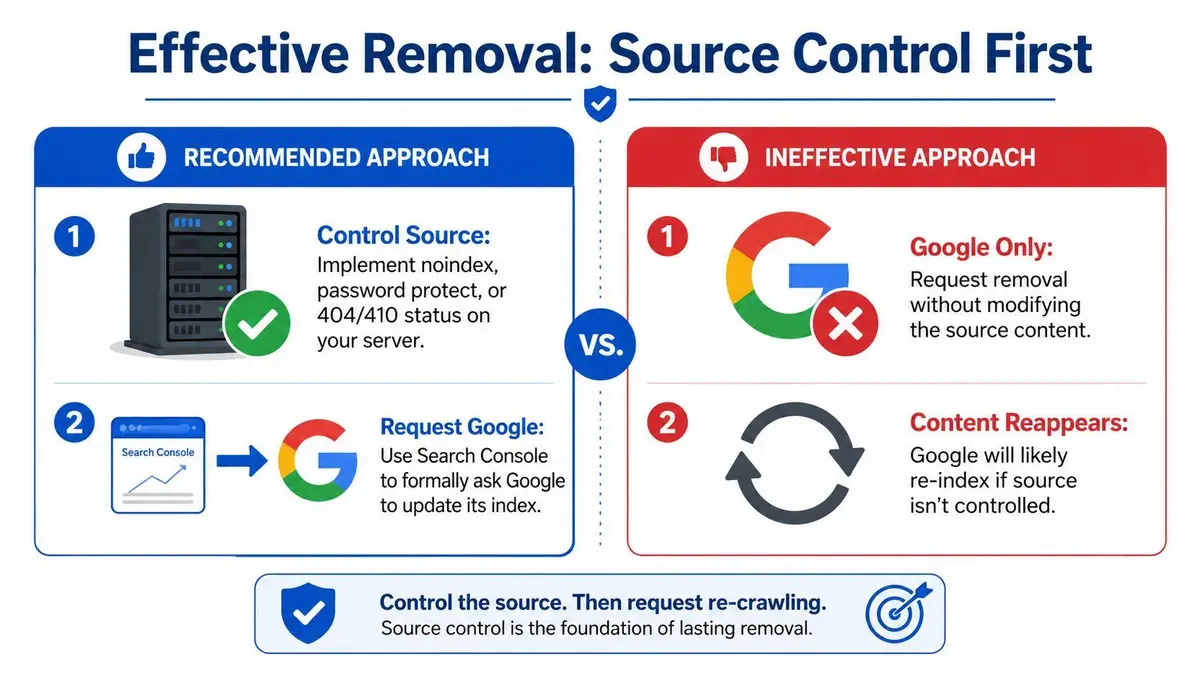
The key decision is simple. Decide whether the content must disappear from the web entirely or remain available without search visibility. That choice determines the signal you send to Google and the permanence of the outcome.
Choose the signal that matches your objective
A technical change only works if it matches the business goal.
- Permanent removal from the public web path
Return a 410 Gone or 404 Not Found status when the page should no longer exist. Use this when the material creates legal, reputational, or compliance exposure and there is no valid business reason to keep it public. - Access retained, search visibility removed
Apply a noindex directive when the page must stay reachable for a limited audience but should not appear in search results. This fits internal notices, legacy files, settlement materials, and other pages with a narrow operational purpose. - Crawler access restricted
Use robots.txt with caution. It can limit crawling, but it does not remove the underlying page from public access. In reputation matters, that makes it a weak primary control.
Set the order of operations correctly
Strong removal work is disciplined. Legal judgment comes first. Technical execution follows. Documentation supports both.
- Classify the exposure. Decide whether this is a reputational nuisance, a compliance issue, a legal risk, or a combination.
- Apply the source-side control that fits that classification. Use status codes, noindex, access controls, or full deletion based on the actual objective.
- Test the live result. Check the HTTP response, page source, and any alternate versions of the URL.
- Map every affected asset. Include parameter URLs, mirrored pages, cached file paths, PDFs, image attachments, and subdomains.
Many organizations fail at this point. One visible page gets removed, while duplicate assets remain accessible through old campaign links, document libraries, staging folders, or regional subdirectories. Google did not create that risk. Poor source governance did.
A Google removal request should confirm a source decision already made and already implemented.
If your team controls the site but cannot get legal, IT, and communications aligned, use a framework built for executive decision-making. This guide on how to remove content from a website strategically covers the governance side of source removal.
Match the action to the risk
| Situation | Recommended source action | Why |
|---|---|---|
| Defunct or harmful page with no continuing business use | 410 or 404 | Tells search engines the content is gone and should be retired |
| Page must remain available to a limited audience | noindex | Preserves access while removing search visibility |
| Short-term crawl management issue | robots.txt | Limited containment tool, not a durable reputation fix |
The principle is blunt. Control the source first. Everything else is cleanup.
Executing the Removal Request with Google
A removal request is a containment move. It reduces public exposure while Google catches up to the source change you already made.
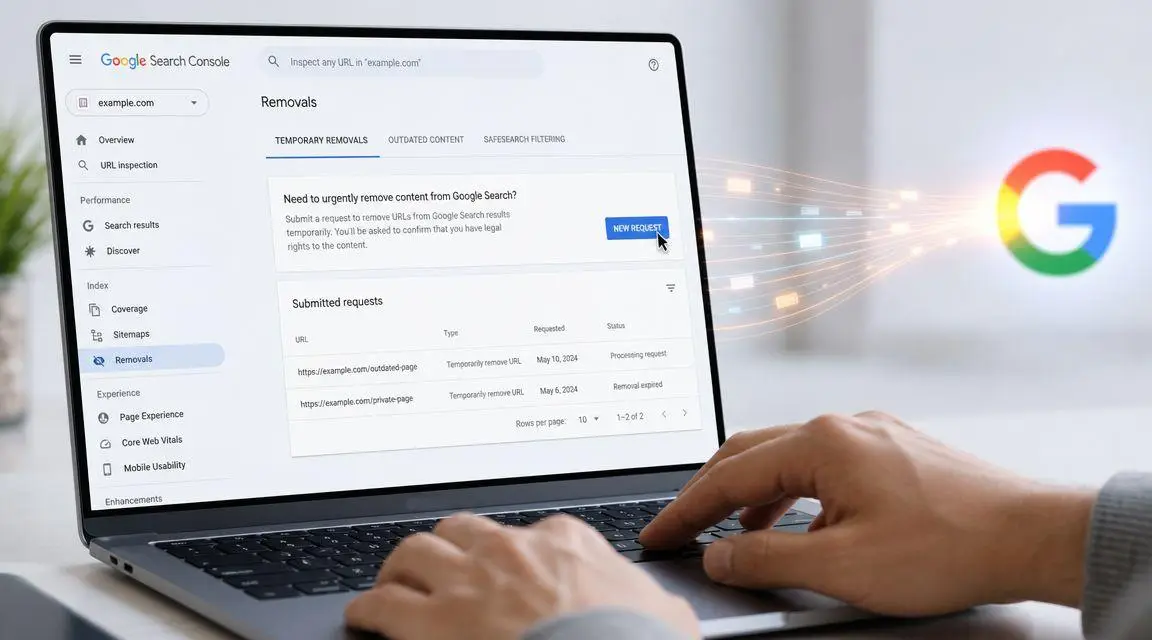
Treat Google as the distribution layer, not the decision-maker. Your team already decided the content must disappear from search, be refreshed, or be suppressed during a live issue. The request to Google should reflect that decision with precision. If the wrong request goes in, you lose time, create false confidence, and leave a reputational problem exposed.
Use the right request for the right problem
Google offers different paths because the underlying risks are different.
| Scenario | Best fit inside Google | Strategic use |
|---|---|---|
| You need rapid suppression while the source has already been addressed | Removals tool | Fast containment |
| The page has changed or disappeared and Google needs to refresh what it shows | Outdated content process | Index correction |
| The content is still fully live and public | Neither will solve the problem | Source control first |
The Temporary Removals path is for speed. Use it when a page, file, or snippet needs to stop surfacing while Google processes the underlying change. It buys time. It does not end the matter.
The Outdated Content path is for stale search results. Use it when Google is still showing old text, an old cached copy, or a URL that no longer reflects the live page. That is an index correction issue, not a dispute over whether the content should exist.
If your team keeps confusing those two tracks, the failure is operational, not technical. This guide to Google’s Outdated Content Removal tool helps teams choose the correct request before they waste a review cycle.
Execute with inventory discipline
A rushed submission creates blind spots. One URL gets filed. Three variants remain searchable. The executive team hears that the request was “submitted,” but the public still finds the material through a PDF path, a parameterized version, or an image attachment.
Run the request like a records process.
- Separate URLs by status
Keep deleted URLs apart from noindexed pages, blocked assets, and items still awaiting internal approval. - Batch related URLs deliberately
Group by incident, directory, or source condition so your team can verify outcomes without guessing what changed. - Track exact submissions
Log the URL, request type, submission time, and responsible owner. If the result stays live, you need an audit trail, not internal debate. - Include alternate surfaces
Submit mirrored paths, file URLs, and other versions that can still appear independently in search.
This short walkthrough is also useful for teams that need to align legal, communications, and web operations around one process.
> A Google request only works when it matches the actual state of the content and the actual scope of the exposure.Handle the submission with that standard. In a low-stakes cleanup, that discipline saves time. In a high-stakes reputational event, it limits avoidable damage and gives counsel, communications, and leadership a defensible record of action.
Verification, Timelines, and Preventing Recurrence
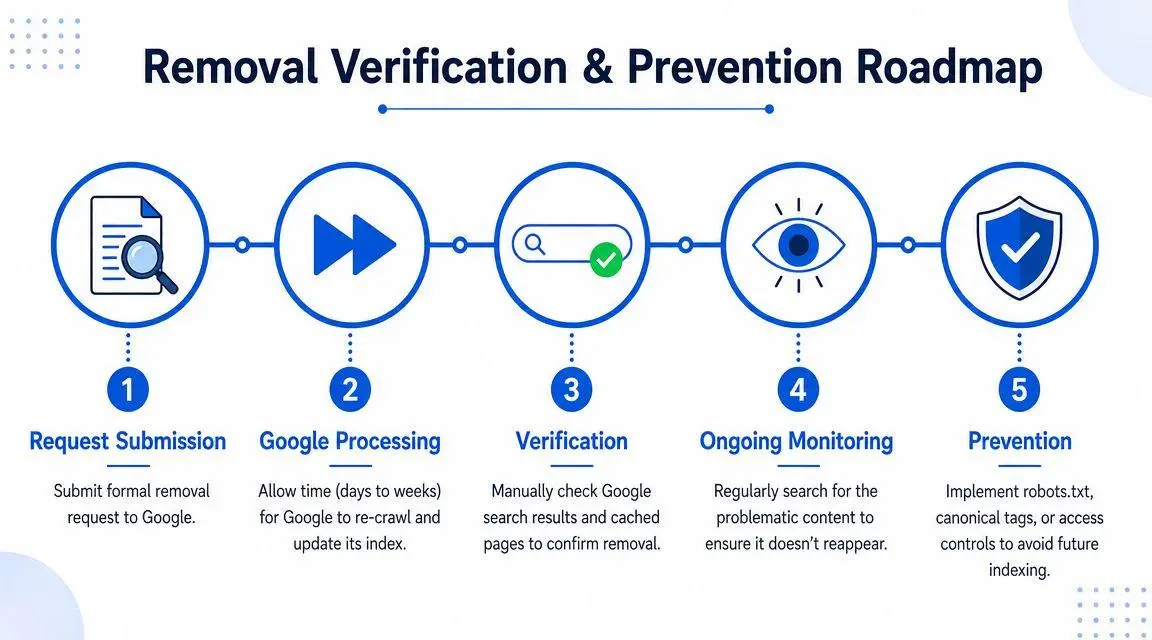
A submitted request is not a resolved matter. It is an instruction entering a queue.
Clients often make the same mistake after filing. They search once, don’t see the result immediately, assume the issue is over, and stop watching. Then the page reappears under a variant query, a different URL path, or an archive. The correct posture is audit discipline.
Verify with intent
Use targeted searches, not casual checking. Search the exact URL where appropriate. Search brand terms, executive names, document titles, and any unique phrases users would type. Use site: queries to inspect whether the domain or path still surfaces in Google.
This work needs a log. Note what query was used, what appeared, and whether the result is a live page, a stale snippet, or a third-party copy. Without that record, teams repeat checks without generating any operational insight.
- Check the precise URL to confirm whether it still appears directly.
- Check branded and name-based queries because many crises are discovered through entity searches, not URL searches.
- Check alternate paths and duplicates if the content may have existed in more than one location.
Expect movement, not instant closure
Google can process some changes quickly, but not every case resolves on the same timetable. Some updates appear within hours. Others take days, especially when the issue involves source ambiguity, duplicate URLs, or broader site changes. The right expectation is not “instant deletion.” It’s “progressive index correction.”
Search removal work is finished only when repeated verification shows the result is absent across the queries that matter.
That standard protects against false closure.
Prevent the page from coming back
Recurrence usually comes from one of three failures. The page was never fully controlled at the source. A duplicate or syndicated copy remained live. Or someone inside the organization republished the content without realizing the original risk.
A durable prevention protocol should include:
| Risk | Prevention measure |
|---|---|
| Internal republication | Content governance and approval rules |
| Duplicate pages | Canonicalization and URL discipline |
| Residual public access | Access controls or definitive removal |
| Ongoing discoverability | Continued search monitoring |
If the matter is sensitive, assign one owner. Not a committee. One operator should hold responsibility for query monitoring, source validation, and escalation. That’s how one-time remediation becomes durable control.
Troubleshooting Failed Removals and Complex Scenarios
A failed removal request is usually diagnostic. It tells you where your strategy broke.
One common scenario goes like this. A company deletes a paragraph from a page, submits a request, and waits. Google doesn’t remove the result. The team concludes Google is being difficult. In reality, the page still returns normally, remains materially indexable, or survives at a nearby URL. The request failed because the content wasn’t resolved.
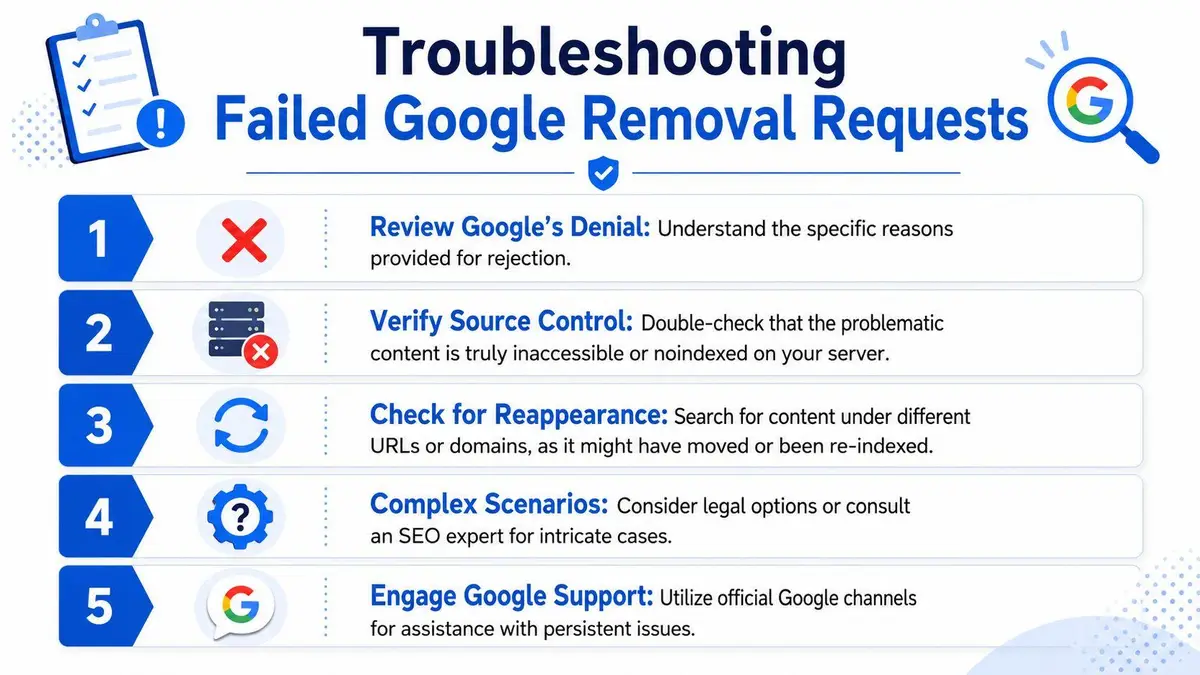
Failure pattern one
The request was filed while the source still behaved like a standard live page.
This is the classic false start. The team assumed editing was enough. It often isn’t. If the problematic material remains available, or if the page still presents as an ordinary public URL, Google has little reason to treat it as removed.
Correct response:
- Recheck the source condition and confirm whether the page is deleted, noindexed, or blocked as intended.
- Inspect duplicate URLs because many sites expose the same content through alternate paths.
- Resubmit only after the source is settled.
Failure pattern two
The team confuses browser cache with Google search visibility.
This wastes time in urgent situations. Chrome lets users clear cache and cookies locally. Google’s own help documentation explains that Chrome stores website information in cache and cookies, offers multiple time ranges for deletion on Android including 15 minutes by default, and warns that clearing this data can sign users out and slow page loading while assets reload, as described in Google’s Chrome help documentation. That action affects one browser on one device. It does not remove a page from Google’s index or from public web archives.
Clearing your browser can fix what you see. It cannot fix what the public sees.
That distinction should be obvious, but in live crises it’s routinely blurred by internal teams under pressure.
Failure pattern three
You don’t control the website.
At this point, self-service methods stop being reliable. Suppose a third-party blog, forum, or data broker hosts the content. You can’t change the source. That means you can’t deploy the strongest removal signals yourself. Your options shift to outreach, platform complaint processes, rights-based takedowns, and, where justified, legal pressure.
A more difficult version is syndication. One article, profile, or accusation appears across multiple domains. In that situation, Google removal at the URL level becomes a moving target. Each copy may require separate source engagement. Search suppression without source remediation becomes expensive and unstable.
Failure pattern four
Archive copies outlive the original page.
This is now more prominent because historical viewing has shifted away from native Google cache and toward web archives. A page can disappear from the source site and still remain visible through archival services or mirrored captures. That requires a parallel strategy. Remove or restrict the source, de-index where possible, and address the archive independently if the archive exposes material that creates ongoing harm.
A sensible diagnostic sequence is simple:
- Identify what still exists. Live page, snippet, archive, duplicate, or all of them.
- Confirm who controls each layer.
- Match the response to that control reality.
- Escalate if the hostile party or archive won’t cooperate.
When removals fail, the right response isn’t frustration. It’s better attribution of the problem.
When to Escalate to Professional Content Removal
If you control the website and the issue is limited to a small set of URLs, you can often handle the mechanics internally. That is the outer boundary of DIY usefulness.
Escalate when the matter involves defamation, impersonation, leaked sensitive material, copyright infringement, extortionate content, hostile third-party publishers, or broad syndication. At that point, the problem stops being a webmaster task and becomes a reputation, legal, and containment problem. The technical layer still matters, but it no longer carries the outcome by itself.
Executives often wait too long because they assume professional intervention is only necessary after they have exhausted every self-service option. That’s the wrong sequencing for high-stakes matters. Delay creates more indexing, more copying, more internal exposure, and more screenshotted evidence circulating beyond your control.
A disciplined outside team earns its value in three areas:
- Speed under pressure
They coordinate source action, search removal, platform escalation, and documentation in parallel. - Discretion
Sensitive matters require fewer internal touchpoints, not more. - Judgment
They know when to push for de-indexing, when to pursue source takedown, when to address archives, and when legal claims affect the advantage.
For leaders weighing reputation defense more broadly, VIP TECH CONSULTING’s reputation strategies offer useful context on how organizations think about visibility risk and response patterns across different scenarios. That broader perspective matters because a search result is rarely an isolated event. It usually sits inside a larger pattern of discoverability, narrative control, and digital exposure.
If you need execution support, one practical option is ContentRemoval.com, which handles source removal, de-indexing, and related reputation workflows for cases where harmful material extends beyond a simple Google update request. That’s particularly relevant when multiple websites, search visibility, and persistent republication are all in play.
The core decision point is straightforward. If the content threatens revenue, deal flow, litigation posture, hiring, investor confidence, or personal safety, treat professional intervention as the default. The cost of a slow or partial response is usually far greater than the cost of handling it properly from the start.
If a harmful page, stale result, or archived copy is affecting you or your company, ContentRemoval.com can assess the exposure confidentially and advise on the fastest path to source removal, de-indexing, and ongoing monitoring.
Frequently asked questions
Why was my Google removal request denied?
Most often because the source page still behaves like an ordinary live page. Editing a paragraph is not enough if the URL still returns normally, remains indexable, or survives at a nearby address. Confirm the page is deleted, noindexed or blocked as intended, check duplicate URLs, and resubmit only once the source is settled.
Should I use noindex or delete the page to get it out of Google?
Match the signal to the objective. Delete the page and return a 410 or 404 when there is no business reason for it to exist. Use noindex when a limited audience still needs access, such as legacy files or settlement materials. Robots.txt alone is a weak control for reputation matters.
How do I know a cached page is really gone from Google?
Verify with intent rather than a single casual search. Check the exact URL, run branded and name-based queries, use site: searches on the domain and path, and log each result. The article treats the work as finished only when repeated checks show the result absent across the queries that matter.
