
Removing a cached page depends on where the stale copy lives. A browser cache is cleared locally with a keyboard shortcut. Search engine copies are handled through Search Console or Bing Webmaster Tools after the source is fixed. CDN copies need a purge, social previews a metadata refresh, and scraped or archived copies require a third-party request or legal basis.
Key facts
- Clearing a browser cache never removes a page from search results, and the reverse is also true.
- Bing removals require submitting the exact indexed URL in Bing Webmaster Tools; near matches fail.
- Temporary search removal hides a result while systems update; permanent removal needs the source page to change.
- Web archives retain content by design, so ordinary deletion requests often fail without a stronger legal basis.
Where ContentRemoval.com comes in. ContentRemoval.com handles cached and stale copies that sit outside the client’s control: the scraper that republished the page, the archive snapshot, the social card still showing the old headline, and the CDN fronting content under someone else’s account. Communications leads, general counsel and family office staff usually make contact once an updated page keeps resurfacing in its old form. A free, confidential 15-minute Exposure Scan maps each copy and which are removable, and the report is yours to keep. Get a Free, Confidential Exposure Scan or read how our search result removal work is done.
You removed the page. You updated the site. You opened the browser again, and the old version is still there.
That moment causes more confusion than it should, especially when the content is sensitive, commercially damaging, or personally invasive. Cached pages are often treated as a minor technical nuisance. That’s a mistake. A stale page can keep false, outdated, or confidential material visible long after you thought it was gone, and the right response depends entirely on where that stale copy lives.
If you’re trying to work out how to remove cached pages, start with discipline, not guesswork. Browser cache, search engine cache, social previews, CDN edge copies, archived snapshots, and scraped republications are different problems. They require different authority, different procedures, and different escalation paths.
Diagnosing the Cache Problem Correctly
The first error is usually conceptual. People say “cached page” as if it means one thing. It doesn’t.
A stale page may be coming from your own browser, from a search engine index, from a CDN serving an older asset, or from a third-party platform that copied the page and never refreshed it. If you misidentify the layer, you’ll waste time and create a false sense of progress.

The three questions that matter first
Before you touch any setting, answer these:
- Is the live page already fixed or removed?
- Are you seeing the stale version only on your device, or in public search results?
- Do you control the source website, or is the content hosted elsewhere?
Those questions determine jurisdiction over the problem. Your browser is under your control. A search engine’s index is not. A third-party site is outside your direct authority entirely.
Practical rule: If the stale content appears only in your browser after the live site has changed, treat it as a local cache issue first. If it appears in search results, clearing your browser won’t solve it.
One of the most common failures in cached-page removal is confusing browser cache with search-engine cached or indexed copies. Microsoft Q&A guidance tied to Bing shows that removal from Bing depends on submitting the exact indexed URL in Bing Webmaster Tools, while browser support materials for Chrome and Firefox address only local cache and cookies. Clearing a browser cache does not remove a page from search results, and removing a page from search results does not clear what your own browser stored locally, as reflected in Microsoft’s Bing removal discussion.
Why executives get trapped here
High-visibility situations distort judgment. An executive sees an outdated search snippet and assumes the website is still publishing it. A legal team clears browser history on one machine and assumes the public issue is resolved. A communications team updates the page but never checks whether external systems are still serving older versions.
Use a simple diagnostic model:
| Layer | Who controls it | Correct response |
|---|---|---|
| Local browser cache | User or device admin | Clear cached files and site data |
| Search engine result or cached listing | Site owner or verified webmaster | Use search engine removal and reprocessing tools |
| Third-party platform or CDN | Platform operator or host | Use platform process, support channel, or formal escalation |
That distinction isn’t academic. It’s the difference between a two-minute fix and a multi-week removal campaign.
Immediate Triage Your Browser and Local Cache
If the live page is already corrected, your first move is to eliminate local interference. Don’t debate it. Clear the cache, then verify in a clean session.
The standard browser-side method is straightforward: clear cached images/files and cookies/site data from privacy or history settings, usually by pressing Ctrl+Shift+Del on Windows or Command+Shift+Delete on Mac, then choosing a time range such as All time, as documented in the University of Iowa browser cache guidance. That is the right first step when your device is serving an old local copy.
Use the fast route first
For most professionals, the fastest sequence is this:
- Open the affected browser only. Don’t work across multiple synced sessions at once.
- Use the privacy shortcut. Press Ctrl+Shift+Del or Command+Shift+Delete.
- Select cached content and site data. Prioritize cached images/files and cookies or site data.
- Choose a broad enough time range. If the stale copy has persisted, use All time.
- Close the browser completely. Then reopen and check again.
If the page now shows the current version, the issue was local. If not, you likely aren’t dealing with a browser cache alone.
Don’t clear everything unless you need to
Broad cache deletion is effective, but it’s disruptive. It can sign you out of services, reset sessions, and create unnecessary friction during a sensitive review.
Mainstream browsers now support both full-cache clearing and site-specific cache clearing. Chrome’s support guidance indicates that the standard clear-browsing-data process removes cached files for all sites, while site-level controls let users remove data for an individual domain. Firefox support likewise provides website-level removal with a search field for a specific domain, as reflected in Chrome’s discussion of specific-site cache deletion.
That matters when one domain is stale but the rest of your working environment is fine.
The operational risk people miss
Clearing cookies can create side effects, and in a sensitive matter those side effects can cause their own problems.
Google notes that removing cookies while signed in may refresh Google cookies to keep you signed in, and Microsoft notes that synced browsers may clear data across devices unless you sign out first, according to Google’s account cookie guidance. If you’re reviewing a reputational issue, work in a controlled session, then verify the page in a private or incognito window after reauthentication.
Clear cache in a contained session, then confirm the result in a private window. That gives you a cleaner read on whether the stale copy was local or external.
Browser-specific judgment
Different browsers label these settings differently, but the operating principle is the same.
- Chrome tends to present this under browsing data and site settings.
- Edge places it under privacy controls for clearing browsing data.
- Firefox gives you stronger website-level search and removal controls.
- Safari often requires a mix of history, website data, and developer-oriented refresh behavior.
If you’re under pressure, don’t chase menus from memory. Use the keyboard shortcut, clear the target data, and test again in a private window. That’s the shortest path to a reliable answer.
Strategic Removal from Search Engine Caches
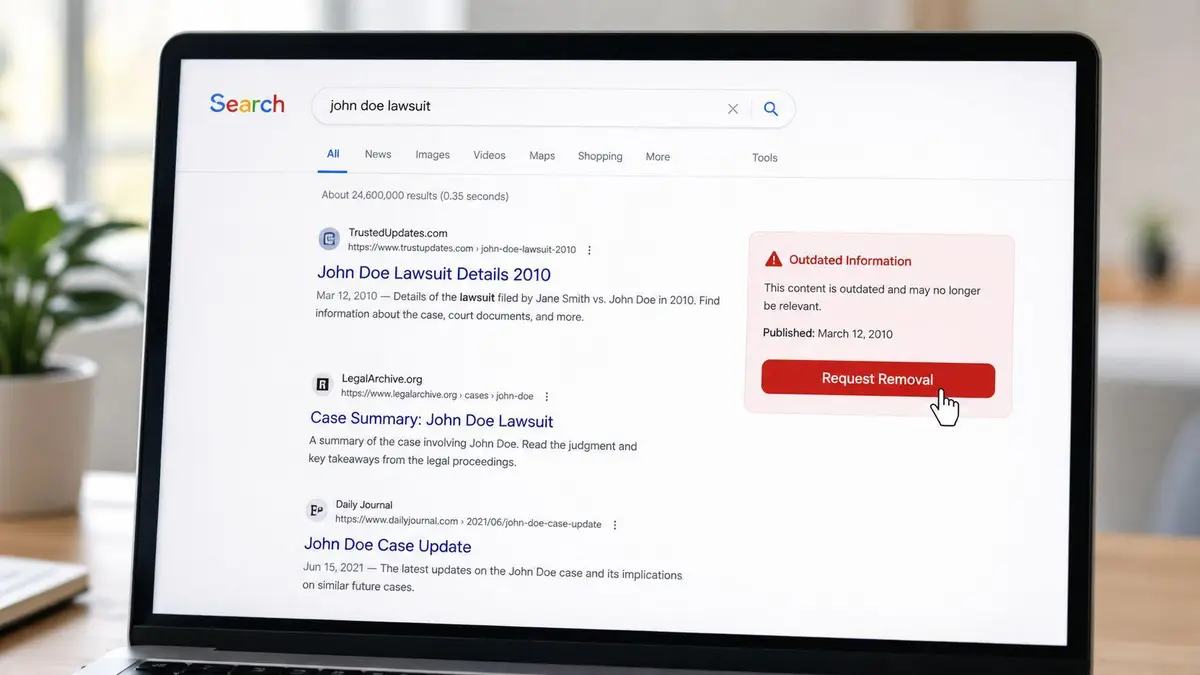
Once the problem appears in public search results, you’ve left the browser layer behind. At that point, this is no longer a local hygiene task. It’s an index management issue.
Search engines maintain their own understanding of the web. If a result is still visible after the source page changed or disappeared, you need to act through webmaster tooling or make the underlying page return the right status or directives so the search engine updates its records.
What site owners should do first
If you control the website, start with the source page itself. Make sure the page is removed, restricted, or updated in a way that supports the outcome you want. If the content should vanish permanently, a cosmetic edit isn’t enough. The source must clearly signal that the old content shouldn’t remain in search.
Then use the relevant webmaster platform.
For Google properties, the operational playbook is usually a combination of source-level changes and Search Console actions. If your concern is stale search visibility rather than browser display, the practical next step is to review a focused workflow like this guide on strategic methods to remove outdated content from Google search.
Temporary suppression versus lasting removal
Many internal teams often get the strategy wrong. Search removal tools are often used as if they create permanent deletion on their own. They usually don’t.
You need to distinguish between two different objectives:
| Objective | What it does | When to use it |
|---|---|---|
| Temporary removal request | Hides visibility while systems update | Urgent reputational containment |
| Permanent de-indexing path | Removes long-term eligibility for indexing | When the content should not return |
A temporary removal is useful when harmful or outdated material is visible now and needs immediate suppression while deeper changes propagate. It buys time. It does not resolve the underlying issue if the page remains indexable.
Permanent removal requires the source to support that outcome. If the page still exists and still invites indexing, temporary suppression can expire and the result can return. That isn’t a search-engine failure. It’s a strategy failure.
Bing requires exactness
Bing is less forgiving than many assume. If you’re removing a page from Bing’s systems, precision matters.
Microsoft’s guidance tied to Bing removals indicates that the process depends on submitting the exact indexed URL in Bing Webmaster Tools. Near matches aren’t good enough. Variant URLs, old paths, alternate parameters, and protocol differences can all disrupt the request if you target the wrong version.
That’s why URL inventory matters. Before filing a removal request, confirm:
- The exact URL shown in search
- Whether there are duplicate indexed variants
- Whether the page still resolves, redirects, or has been replaced
- Whether the snippet reflects old content from a page that is still live
Search result removal is a governance issue
In high-stakes matters, search removal work shouldn’t be handled as a casual webmaster chore. It touches legal review, communications control, evidence preservation, and timing.
If the page affects litigation, employment, investor confidence, or personal safety, capture the visible result and underlying URL state before you trigger removals. You may need that record later.
This is also where ownership problems emerge. If the content sits on a corporate site but the search consoles are controlled by a departed agency, former employee, or unrelated business unit, removal authority becomes an internal access problem before it becomes a search-engine problem.
For executives and family offices, that’s often the bottleneck. The technical step is easy. The governance around who can take it is not.
Addressing Caches Beyond Your Control
The most difficult cases sit outside your infrastructure. You don’t own the server. You don’t control the cache policy. You don’t have platform admin rights. Yet the stale or damaging content is still visible.
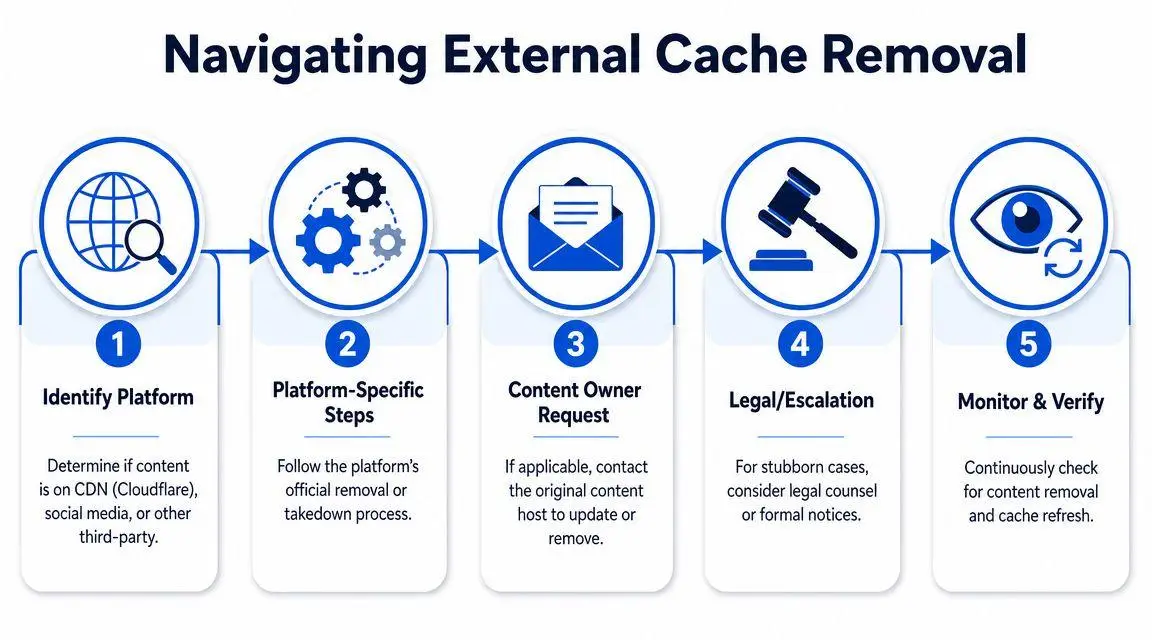
That’s where generic advice breaks down. Third-party caches aren’t one category. They include CDN edge copies, social media link previews, syndication layers, and scraped reproductions on websites that have no incentive to cooperate.
CDN caches require a host-level response
A CDN can continue serving old assets or HTML even after the origin has changed. If you control the site, purge requests usually need to happen through the CDN account or the hosting layer that manages it. If you don’t control the account, your influence is limited.
Many organizations optimise content delivery with a CDN for performance and resilience, but they don’t build disciplined cache invalidation into their incident response process. The result is predictable. The site owner says the page is fixed, while users in different regions still see inconsistent versions.
Use this sequence when you suspect a CDN:
- Confirm the source page is updated. Don’t blame the edge network for an origin problem.
- Identify who manages the CDN relationship. That may be IT, a hosting vendor, a web agency, or a platform provider.
- Request a targeted purge first. A precise asset or page purge is cleaner than broad invalidation.
- Retest from a private window and a separate network. Device-level testing alone is weak evidence.
- Preserve screenshots and timestamps. If the issue escalates, you’ll need a record of persistence.
Social media previews are their own cache layer
A page can be gone from your site and still display old headlines, descriptions, or images when someone shares the URL on a social platform. That isn’t the same as a search result, and it isn’t the same as a browser cache.
Platforms generate previews from cached metadata. Some offer re-scrape or refresh tools. Some update after a waiting period. Some are inconsistent across desktop, mobile, and logged-in states. In practical terms, you need to force a metadata refresh where the platform permits it, then verify the result from a neutral account.
This is one of the most common executive-facing problems because the old preview often carries the most damaging framing. Even after the article is corrected or removed, the stale social card can keep amplifying the original version.
Scraped copies are a legal and tactical problem
When another site copied your content, there may be no technical “clear cache” mechanism available to you at all. You are now dealing with a third-party publisher, whether legitimate, negligent, or predatory.
The quality of your first contact matters. A weak email asking politely for help often gets ignored. A strong request is concise, specific, and framed around a recognizable basis for action.
Use a request structure like this:
| Element | What to include |
|---|---|
| Exact identification | The copied page URL and the original source URL |
| Basis for removal | Inaccuracy, unauthorized copying, privacy issue, copyright claim, or legal risk |
| Requested action | Remove the page, update it, or block indexing |
| Deadline | A reasonable but firm response window |
| Escalation notice | Platform complaint, counsel review, or formal notice if ignored |
Most third-party cache problems aren’t solved by technical competence alone. They’re solved by knowing who has authority, what obligation they recognize, and what pressure changes their behavior.
Know when self-service has ended
You can often fix a local cache issue alone. You can often handle your own search index updates if you control the property. Third-party persistence is different.
If a scraper ignores your notices, if a social platform won’t refresh a damaging preview, if a CDN is fronting content under someone else’s account, or if the host sits in a difficult jurisdiction, this becomes a coordinated removal matter. That usually means evidence logging, rights analysis, host and registrar escalation, search suppression, and follow-up monitoring across multiple environments.
That’s the point where solo troubleshooting turns into delay.
Advanced Takedowns Web Archives and Legal Escalation
Some material doesn’t just linger. It gets institutionalized.
Web archives, mirror sites, and protected intermediaries create a different class of problem because they were built to preserve or distribute content, not to make removal easy. If sensitive material has reached those systems, the right response has to be both technically informed and legally grounded.
Archives don’t behave like search engines
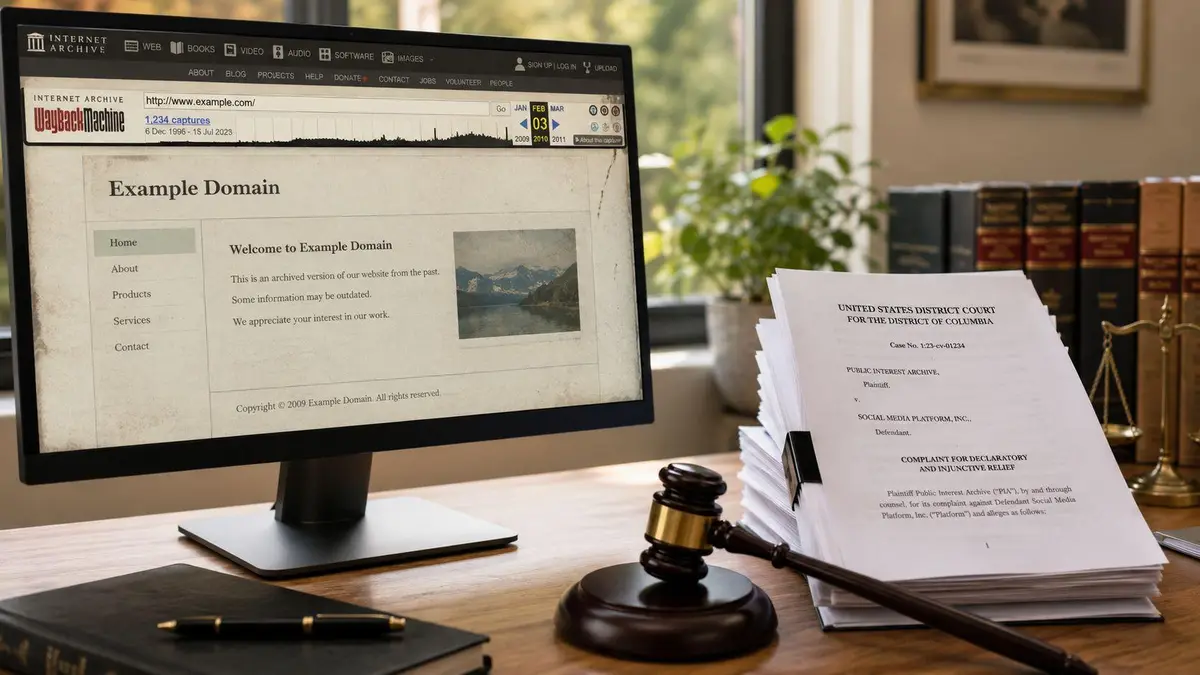
A search engine may update its view of a page after a re-crawl or a removal request. An archive is different. Its purpose is historical retention. That means ordinary deletion requests often fail unless they fit the archive’s internal rules or are backed by a stronger legal basis.
That’s why executives are often shocked when they discover a page removed from a live site still exists as an archived snapshot. The intuitive response is to send the same request everywhere. That rarely works.
The real escalation paths
When archived or persistent copies remain online, the route depends on the rights involved.
- Copyright infringement may support a DMCA-style takedown where copied material was used without authorization.
- Defamation or false statements may require a court order or a jurisdiction-specific legal determination before an intermediary acts.
- Privacy-based claims may depend on local law, platform rules, and whether the material identifies a private person or public figure.
- Right-to-be-forgotten requests can apply in jurisdictions such as the EU and UK, but they are jurisdiction-sensitive and fact-specific.
None of those routes is interchangeable. A copyright notice won’t fix a defamation issue unless copyrighted material is also involved. A privacy complaint won’t necessarily move a host that is waiting for a judicial finding. A search de-indexing request may hide visibility without removing the source.
Jurisdiction controls leverage
Standard guides fail completely. They treat removal as if every platform answers to the same legal framework. They don’t.
The location of the subject, the host, the operator, and the audience can all affect which claims are available and which notices carry force. A harmful article hosted in one country, indexed globally, archived elsewhere, and republished on social platforms creates a multi-forum problem. If you send the wrong notice to the wrong entity under the wrong legal theory, you lose time and credibility.
That’s one reason complex matters should be evaluated with counsel or specialist support from the outset. If your issue touches reputational falsehoods, extortion, impersonation, leaked material, or archived content that won’t disappear through ordinary channels, a specialist legal strategy becomes necessary. A useful starting point is this resource on internet defamation attorney consultation for executives.
Archive removal and legal takedown work reward precision. Broad complaints fail. Tight claims, supported by evidence and sent to the correct decision-maker, have a chance.
Why professional intervention is justified here
At this level, the objective isn’t just deletion. It’s risk containment across systems that don’t share the same rules.
A professional team can separate what should be removed at the source, what should be de-indexed, what should be challenged as unlawful, and what should be monitored because immediate removal isn’t realistic. That division matters. It prevents wasted effort and preserves stronger remedies for the channels where they actually work.
If the content is sitting in archives, mirrored elsewhere, or entangled with legal rights, this is no longer a browser problem. Treating it like one only extends exposure.
Proactive Monitoring and When to Engage Professionals
Removing a cached page is reactive. Mature reputation protection is preventative.
If you operate a high-visibility profile, put monitoring around the problem. Track branded search results, priority URLs, and known harmful references. Review whether your own pages use directives and headers that discourage compliant systems from retaining stale versions. For search-facing content, your legal, communications, and technical teams should agree in advance on what happens if a page must be updated, hidden, or removed under pressure.
For practical monitoring workflows, an external reference like this expert guide to website monitoring is useful because it helps teams think in terms of ongoing detection rather than one-off cleanup.
The threshold for escalation
Bring in specialists when any of these conditions appears:
- The content reappears after you believed it was removed.
- A third party controls the platform and ignores direct requests.
- Archived, scraped, or syndicated copies keep circulating.
- The issue involves defamation, privacy, copyright, impersonation, or extortion.
- Internal ownership is fragmented and nobody controls the full removal path.
If you need external support, evaluate firms the same way you’d evaluate outside counsel. Ask about search de-indexing, source removal, platform escalation, evidence preservation, and multi-jurisdiction handling. This guide to evaluating professional content removal services for executives is a sensible starting point.
One provider in this category is ContentRemoval.com, which handles search de-indexing, source removal, platform takedowns, and monitoring workflows for sensitive online content matters. The right time to engage a firm like that is before the issue spreads across more systems, not after.
If outdated, harmful, or sensitive cached content is still visible and the normal steps haven’t worked, ContentRemoval.com can assess the exposure, identify the controlling platform, and build a discreet removal strategy across search engines, websites, archives, and social channels. For executives, public figures, and family offices, speed matters, but precision matters more.
Frequently asked questions
Why does a page I deleted still show in Google?
Because Google’s index updates on its own schedule and a temporary removal only hides the result while systems catch up. If the page still exists and still invites indexing, the result can return when the suppression expires. The source must be removed, restricted or set to block indexing, then a removal request filed.
How do I fix an old preview when I share a link on social media?
Social platforms generate previews from cached metadata, separate from search or browser caches. Use the platform’s re-scrape or refresh tool where one exists, wait out its refresh period where it does not, and verify the result from a neutral account across desktop and mobile.
Can I get a page removed from the Wayback Machine or other web archives?
Sometimes, but not with a standard deletion request. Archives exist to retain history, so removal usually depends on fitting the archive’s own rules or on a legal basis such as copyright infringement, a court finding of defamation, a privacy claim, or a right-to-be-forgotten request in jurisdictions like the EU and UK.
