
Browser history removal clears the visible record on one device, but for anyone under legal or reputational pressure it is only the first layer. Synced accounts can repopulate history on other devices, deleted data can remain forensically recoverable, and servers, ISPs and corporate networks keep their own logs. Clear locally, check sync, verify elsewhere, then escalate if needed.
Key facts
- In Chrome use More, Delete browsing data, and select All time; Edge is under Settings, Privacy, search, and services.
- Microsoft notes Edge data may be cleared only on the device in use unless sync is turned off.
- Clear cookies, cached files and download history as well as the history list itself.
- Website server logs, ISP records and managed network logs are untouched by any local deletion.
Where ContentRemoval.com comes in. ContentRemoval.com takes over where browser cleanup ends: when the concern has moved into search results, cached pages, leaked material, impersonation or third-party records that no device setting can reach. Executives, lawyers and family office principals usually make contact after realizing the browser was only a symptom of a wider exposure. A free 15-minute Exposure Scan maps what is removable, and the report is yours to keep. Get a Free, Confidential Exposure Scan or read how our content removal work is done.
You searched for something sensitive. Maybe it involved a dispute, a health concern, a competitor, a journalist, a regulator, or a person you should never have searched from a work device. Now you want it gone.
Your first instinct is usually correct but incomplete. Open the browser. Clear history. Close the tab. Breathe. That solves the visible problem on one device. It does not solve the actual exposure.
For ordinary housekeeping, browser history removal is enough. For an executive, public figure, founder, lawyer, family office principal, or anyone facing reputational or legal pressure, it isn’t. You are dealing with a trail, not a list. One part sits in the browser. Other parts may sit in synced accounts, on other devices, in network logs, in website server records, and in systems you don’t control. Given the potential for significant consequences, treat this as a containment exercise, not a cleanup chore.
The Illusion of a Clean Slate
The panic usually starts the same way. A spouse picks up the wrong laptop. An assistant borrows an iPad before a flight. An internal IT team asks for a device during an incident review. A journalist calls with a question that suggests they already know what you were researching. The browser becomes the obvious place to start because it shows a neat history panel and a delete button.
That button is useful. It is not a clean slate.
Official guidance from police and support organizations already treats browser history removal as a digital safety step, not a convenience feature. Avon and Somerset Police publishes practical instructions for clearing browser history across Chrome, Safari, Internet Explorer, and Firefox, which reflects how mainstream and urgent this issue has become for people trying to reduce exposure after sensitive activity or unsafe circumstances (Avon and Somerset Police browser history guidance).
Practical rule: If you feel urgency, assume the browser is only one layer of the problem.
That distinction matters. Casual privacy means hiding what another person might see when they open your browser. Serious privacy means asking a harder set of questions. Was the account signed in? Did another device sync the record? Did the site itself log the visit? Did a corporate network capture the session? Was anything downloaded, cached, autofilled, or preserved elsewhere?
The common practice under pressure is to skip straight to deletion and stop there. That’s how exposure survives. If you need a broader response, start thinking in terms of digital footprint cleanup, not just browser hygiene.
Executing the Standard Procedure Local Browser Deletion
Clear the local browser first. Do it fast, and do it thoroughly.
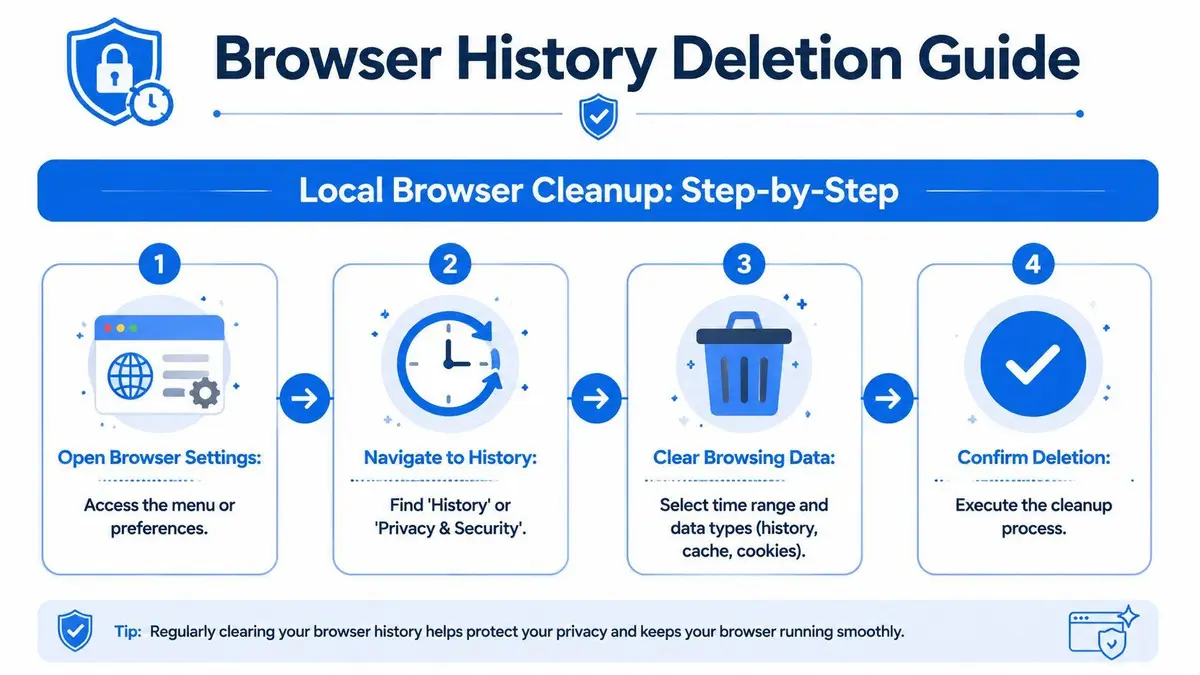
A visible history trail is the easiest thing for another person to check. If your concern is immediate exposure on a shared, monitored, or borrowed device, local deletion removes the obvious record. It does not solve the wider problem, but it is still the first action to take.
Chrome and Edge
For Chrome, Google documents a clear process: More > Delete browsing data > select a time range, including “All time” for a full purge > tick browsing history and related categories > Delete data. Google also allows item-level deletion from History, but that is a poor choice for high-risk situations. Selective cleanup leaves patterns behind. Use the broadest time range unless you have a specific reason not to (Chrome desktop deletion steps).
For Edge, open Settings and more > Settings > Privacy, search, and services > Clear browsing data > Choose what to clear > select categories > Clear now. Edge also allows selected data to be cleared whenever the browser closes. Use that setting if sensitive browsing is part of your routine. It reduces the chance that a visible record remains on the device after the session ends.
A short operational summary helps:
| Browser | Core path | What to choose |
|---|---|---|
| Chrome | More > Delete browsing data | Use All time for a full local purge |
| Edge | Settings > Privacy, search, and services > Clear browsing data | Choose categories deliberately, then Clear now |
If your risk goes beyond a single device, pair this step with a broader online privacy service for account and exposure review.
Safari and mobile reality
Safari offers deletion windows such as the last hour, today, and all history. That design invites a mistake. People under pressure often delete only the last session and assume the issue is contained. If the concern involves repeated visits, recurring searches, or a pattern that could be inferred from older activity, choose the widest available range.
Chrome on Android follows the same logic. Google explains that users can remove history across different time ranges, including All time, and notes that some history-clearing actions may default to a shorter window in certain contexts (Chrome Android help).
This video gives a simple visual walkthrough of the basic process:
What to clear and what not to assume
Do not clear only the history list and stop there. In any sensitive matter, remove the surrounding artifacts too:
- Browsing history to erase the visible record inside the browser.
- Cookies and site data to end active sessions and remove saved recognition data.
- Cached images and files because page remnants may still sit on the device.
- Download history if the browser tracks files connected to the activity.
Deleting the list is not the same as deleting the traces.
Handle local deletion yourself. It is straightforward, and delaying it creates unnecessary exposure.
Handle the rest with more discipline. Local deletion does nothing to confirm what exists in synced accounts, other devices, retained downloads, or outside logs. That is why browser history removal, by itself, gives many readers a false sense of closure.
Beyond the Browser The Synced Data Problem
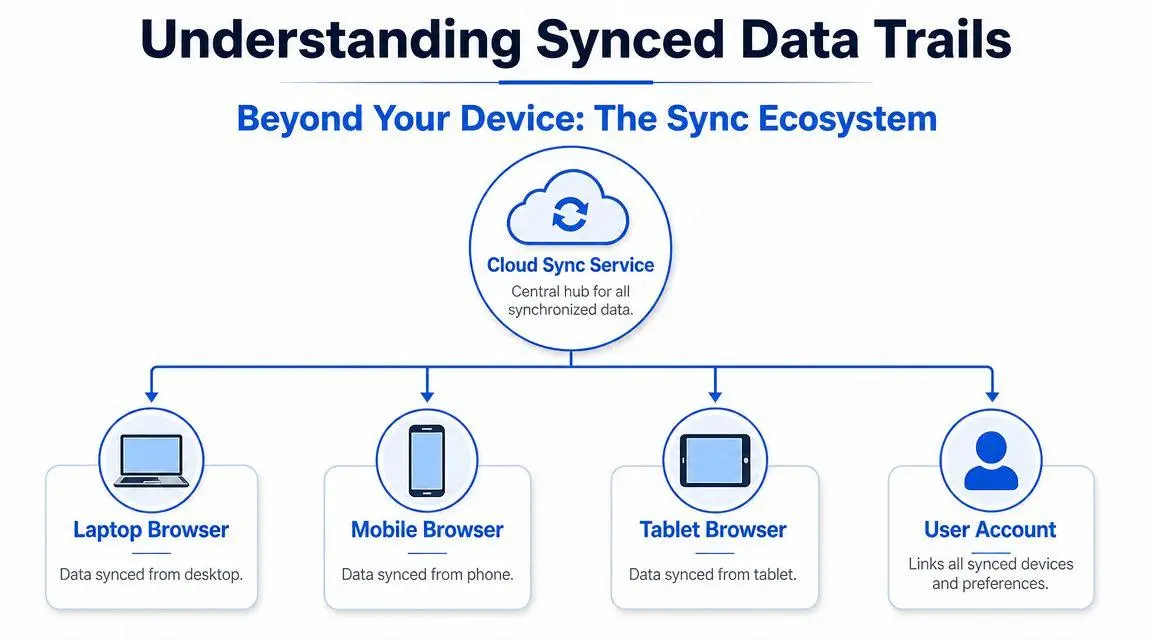
A modern browser is rarely just a browser. It is usually a front end for an account ecosystem.
That means the history you cleared on one machine may still exist on another laptop, a phone, a tablet, or a secondary work profile. For people who move between home, office, travel, and assistant-managed devices, this is the point where standard browser history removal fails.
Why local deletion doesn’t govern the whole account
Microsoft states this plainly for Edge: browsing data may be cleared only on the device you’re using unless sync is turned off, and users need to decide whether they are deleting locally or across synced devices (Microsoft support on Edge history and sync). That single point exposes the weakness in most consumer guides.
If you clear a browser on your phone but your laptop remains signed in and syncing, you may only be hiding one copy. The same problem appears when a work machine, family tablet, or old travel device still carries an authenticated profile. One surviving endpoint can still repopulate your visibility problem.
What high-risk users should do next
If the browser was signed into an account, stop thinking device-first and start thinking account-first. Review every browser profile and every device attached to that profile. Look for personal accounts, work accounts, shared household profiles, and old devices you forgot were still connected.
Use this checklist:
- Identify active profiles across Chrome, Edge, Safari-linked ecosystems, and any work-managed browser profile.
- Turn off sync where appropriate before assuming deletion is complete.
- Verify on another device rather than trusting the first one you cleared.
- Check account activity areas where the provider may hold a broader record than the browser UI shows.
This isn’t just a consumer nuisance. It is a governance problem for executives. One assistant’s desktop, one retained consultant’s laptop, or one family-shared tablet can undo your assumptions.
If multiple devices touch the same account, browser history removal is an ecosystem problem, not a local settings problem.
There is also a second-order issue. Synced accounts often sit beside a wider profiling economy. Even when browser records are handled properly, your personal information may still circulate elsewhere. That’s why many privacy teams pair account hygiene with wider exposure reduction, including removing yourself from data broker lists.
Verification matters more than deletion
Deletion without verification is optimism. After clearing, check another signed-in device. Open the browser history panel. Search for the same terms. Confirm whether prior activity still appears or whether suggestions and grouped results remain.
If this sounds excessive, it isn’t. High-stakes privacy failures rarely come from not clicking the right menu. They come from assuming one successful deletion on one screen solved the whole problem.
Preventing Forensic Recovery of Deleted Data
A more uncomfortable truth sits behind all of this. Deleted doesn’t always mean unrecoverable.
Standard browser history removal is usually a user-interface action. It removes the visible record from the browser environment. Security-oriented guidance warns that deleted history can still be recoverable and may require additional privacy software for secure wiping (analysis of why clearing history doesn’t fully protect privacy).

The difference between convenience deletion and defensible sanitization
For normal users, the difference may never matter. For someone facing litigation, internal investigation, blackmail, a board dispute, or a hostile counterpart with technical resources, it matters immediately.
The browser’s delete function is designed for convenience and user privacy inside the product. It is not a formal forensic sanitization tool. Residual traces can survive in caches, temporary storage, local artifacts, or other recoverable remnants. The exact technical route varies by system and circumstance, but the strategic conclusion is straightforward: if an adversary cares enough to preserve or recover evidence, your standard deletion step is not the end of the analysis.
A useful way to think about it is this:
| Situation | Your likely objective | Is browser deletion enough |
|---|---|---|
| Shared household device | Remove visible browsing record | Often, as a first response |
| Corporate review or legal dispute | Reduce recoverable local traces | No |
| Device sale, disposal, or seizure risk | Sanitize stored artifacts | No |
| Sensitive executive research | Limit broad discoverability | No |
What you can handle yourself
You can handle routine cleanup if the problem is limited to local visibility. Clear history, cookies, cache, download records, and review active sessions. If the concern is a borrowed laptop or family computer, those steps may be enough to solve the immediate issue.
You can also improve your judgment by understanding how security professionals think about residual risk. A strong starting point is this Study guide for IT security professionals, which frames the broader concepts that matter when data recovery, access control, and evidence preservation are in play.
What requires professional intervention
Once the issue crosses into forensic risk, self-help becomes dangerous. People often make two mistakes. They either assume deletion solved the problem, or they start improvising with random wiping tools and create a worse legal record. Both are avoidable.
Escalate when any of these conditions apply:
- Litigation is possible and device handling may later be scrutinized.
- A company device is involved and internal policies or legal holds may exist.
- A third party already has partial knowledge of the activity and may try to corroborate it.
- The device may be examined by law enforcement, corporate investigators, opposing counsel, or digital forensics consultants.
Browser history removal is a privacy action. Forensic sanitization is a separate discipline.
If you are in the second category, stop clicking around and get advice before you alter more evidence. The right move may involve legal counsel, incident response professionals, or specialists who understand both reputation harm and preservation obligations.
The Data That Always Remains Server and ISP Logs
You delete the browser history, reopen the device, and see nothing. That visual clean-up misleads people. The record often still exists in places you do not control, and those outside records are the ones that matter when scrutiny comes from an employer, a platform, an investigator, or anyone with access to network logs.

What remains outside your device
The missing piece is simple. Browser deletion only affects the copy stored on that browser profile or device.
Separate records may still exist in several places:
- Website server logs that record requests, timestamps, IP addresses, session identifiers, and account activity
- Platform account records that tie your actions to a signed-in profile
- Internet service provider logs that may retain connection metadata under their own policies and legal duties
- Corporate, school, hotel, or managed network logs that track traffic as a routine security measure
- Third-party analytics, authentication, and fraud-prevention systems that receive parallel event data during the same visit
That is the hard line readers need to understand. Clearing local history does not reach any of those systems.
What you can still control
Use browser settings to limit what gets stored locally and reduce future exposure. As noted earlier, some browsers let you clear selected data automatically on close. That helps with device-level privacy. It does not erase records already created on websites, identity systems, or networks.
If your concern involves travel, restricted networks, or reducing what intermediaries can observe in transit, use a VPN before the activity occurs, not after. The Throughwire VPN for China guide is a practical reference for that narrower problem. A VPN may reduce visibility for some network operators. It does not wipe server-side logs, and it does not remove activity tied to an account you signed into directly.
A deleted browser history is one edited copy of events, not the full record.
The legal and practical limit
You cannot delete another company’s logs from your laptop. You cannot assume your ISP discarded connection records because your browser now looks empty. You cannot treat a clean local history as proof that the event is gone.
Once the footprint exists on external systems, the problem changes category. It becomes an account-access issue, a platform-record issue, a network-retention issue, or a legal issue. Handle your own device settings yourself. For third-party logs, account records, subpoenas, employer systems, or formal takedown requests, get professional advice before you make the situation worse.
When to Escalate to Professional Takedown Services
You can manage your own browser history removal when the issue is narrow, recent, and local. If the risk is a spouse seeing a search, a colleague opening the wrong browser profile, or an old session remaining visible on a personal device, do the cleanup yourself and verify it.
Stop there only if the consequences stop there.
Escalate when the exposure involves search engines, websites, platforms, leaked material, impersonation, copied content, cached pages, or third-party records affecting reputation. Escalate when your browser activity is only one symptom of a larger problem, such as a story spreading online, confidential information surfacing in search results, or a malicious actor using your digital footprint to build pressure.
Professional intervention also makes sense when your own actions could create legal complications. If litigation is threatened, if corporate devices are involved, if an employer or regulator may inspect systems, or if a hostile party may already be preserving evidence, casual deletion is not a strategy. It is a gamble.
The practical dividing line is simple:
- Handle local cleanup yourself.
- Get help for third-party content, platform records, search visibility, reputational fallout, and high-risk evidence issues.
In those higher-stakes cases, one option is ContentRemoval.com, which works on content removal, de-indexing, impersonation takedowns, leaked material response, and broader digital reputation protection. That is different from browser cleanup. It addresses the parts of the problem that sit beyond your device and outside your direct control.
If you need certainty, speed, and discretion, stop treating this like a browser settings issue. Treat it like a containment matter with legal and reputational dimensions.
If your situation goes beyond a local browser and into search results, leaked material, impersonation, cached pages, or third-party records, contact ContentRemoval.com for a confidential assessment. They can help define what you can safely handle yourself, what should be preserved, and what can be removed through technical, legal, and platform-level action.
Frequently asked questions
Does clearing my browser history delete it everywhere?
No. If the browser was signed into an account with sync enabled, the history may still exist on your other devices and in the provider’s account activity areas. Review every profile and device attached to the account, turn off sync where appropriate, and verify on a second device.
Can deleted browser history be recovered?
Often yes. The delete function is a user-interface action rather than forensic sanitization, and traces can survive in caches, temporary storage and local artifacts. If litigation, a corporate review or device examination is possible, get advice before altering more evidence.
When should I get professional help instead of clearing history myself?
Handle local cleanup yourself when the risk is a shared or borrowed device. Escalate when the exposure involves search engines, websites, leaked material, impersonation, cached pages or third-party records, or when a company device, legal hold or hostile party preserving evidence is involved.
