
Scams on Skype targeting executives rely on familiarity: executive spoofing for payments or documents, fake internal escalations for credentials, counterparty impersonation with new banking details, hostile file delivery, fake crypto apps and recruitment traps. Detection depends on behavior, not grammar, and the response is containment, out-of-band verification, evidence preservation and parallel reporting before the incident spills into public impersonation.
Key facts
- Singapore Police data cited: 35% of phishing now occurs on messaging platforms, with a 21-second median time to click.
- Behavioral red flags: pressure to change channels, deflecting verification questions, manufactured confidentiality, borrowed authority.
- Verify payment or credential requests outside Skype and treat file installs as prohibited unless security-approved.
- Preserve the conversation before confronting the sender, because fraudsters delete, edit or move channels once noticed.
Where ContentRemoval.com comes in. ContentRemoval.com takes over once a Skype scam has escalated into public impersonation profiles, leaked conversations, defamatory posts or search-visible abuse, combining source removal, de-indexing, impersonation takedowns and monitoring for reappearance across platforms. Executive assistants, security leads and general counsel usually make contact after platform reporting has produced a ticket number and nothing else. A free 15-minute Exposure Scan maps what is removable, and the report is yours to keep. Get a Free, Confidential Exposure Scan or read how our content removal work is done.
A message lands in Skype before your first meeting. The sender uses the right name, the right tone, and a plausible reason for urgency. It might be a board member asking for a revised document, a recruiter setting up a confidential conversation, or a “vendor” following up on a payment issue. Nothing about it looks amateur.
That’s why scams on Skype are dangerous for executives. They don’t need to look sloppy. They need to look familiar.
For a senior leader, a Skype scam isn’t just a personal security lapse. It can trigger unauthorized payments, expose privileged discussions, compromise linked Microsoft accounts, and create a reputational problem that quickly outgrows the original incident. If your name, title, or company carries authority, attackers will use that authority against you and, if they can, impersonate you against everyone else.
The Executive Threat Vector in Plain Sight
The pattern is usually simple. A message arrives from someone who appears to belong in your workflow. The request is routine enough to lower your guard, but urgent enough to accelerate a decision. An executive assistant receives a file. A founder gets a “quick confirmation” request. A legal adviser is pulled into a supposed off-channel discussion.
The attack works because messaging platforms compress judgment. People reply fast, approve fast, and click fast. According to the Singapore Police scam trends data, 35% of all phishing attacks now occur on messaging platforms, and the median time to click a malicious link is 21 seconds. That same environment contributed to $1.03 trillion in global scam losses in the last year.
That figure matters, but the speed matters more for executives. Twenty-one seconds is shorter than the time it takes to verify a sender through another channel. Attackers count on that.
Why boards should care
This isn’t an IT hygiene issue buried in the help desk queue. It’s a strategic exposure point where identity, trust, and operational authority intersect.
A Skype compromise can become:
- A payment fraud event if finance receives instructions from a spoofed executive
- A confidentiality breach if deal discussions or legal communications are exposed
- A reputational attack if the attacker uses your identity to approach staff, clients, journalists, or investors
Practical rule: If a Skype message carries urgency, secrecy, or authority, treat it as a business-risk event until verified.
Senior people often underestimate this category because Skype feels older, familiar, and less chaotic than newer platforms. That’s precisely why it still works as a channel for deception. Legacy trust is an asset for real businesses and a weapon for fraudsters.
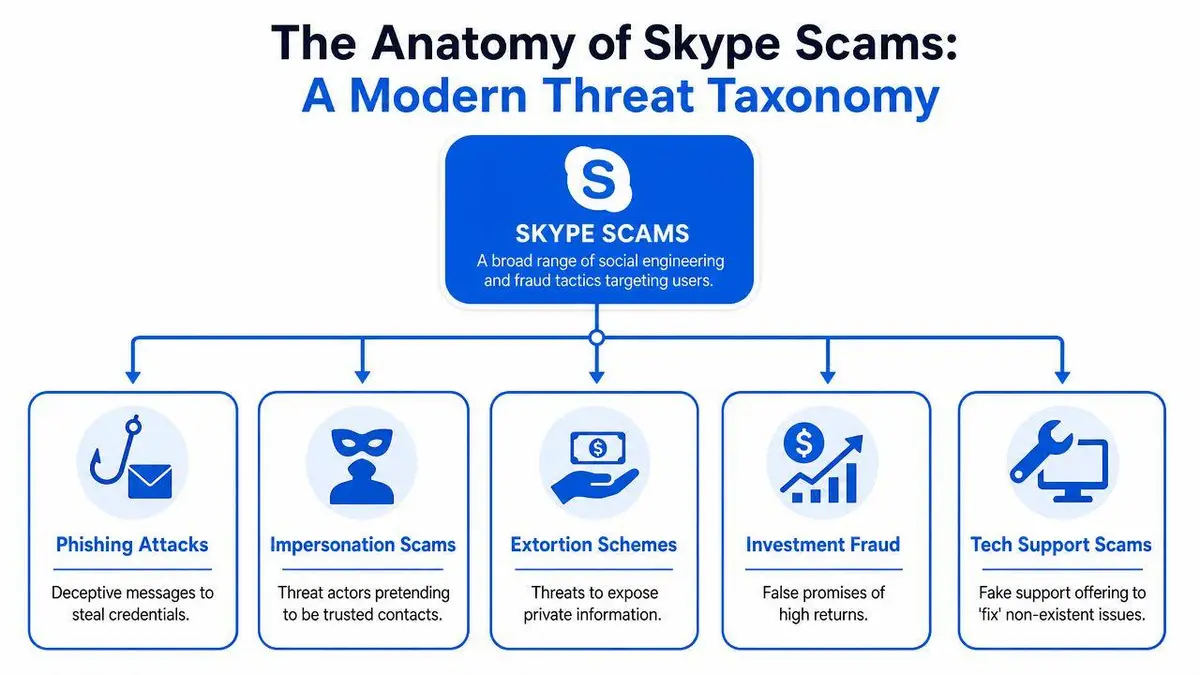
A Taxonomy of Modern Skype Scams
The common perception of scams on Skype is that they are random spam. That’s outdated. The current threat environment is more structured, more targeted, and often more technical than basic “click this link” fraud.
Executive impersonation and spear phishing
The most effective Skype scams begin with social context. Attackers pose as colleagues, clients, advisers, or counterparties who naturally belong in the target’s orbit. They don’t need broad reach. They need credibility with a narrow audience.
An impersonation attempt usually aims at one of four outcomes:
| Scam type | What the attacker wants | Why it works on Skype |
|---|---|---|
| Executive spoofing | Payment approval or sensitive documents | Informal chat lowers verification standards |
| Fake internal escalation | Credentials or access tokens | Staff assume the sender already has authority |
| Counterparty impersonation | Updated banking details or contract files | Ongoing transactions create cover |
| Confidential outreach | Personal phone numbers, travel details, or side-channel migration | “Private” conversations feel normal in deal flow |
The damage isn’t limited to the first victim. Once attackers learn how your organization speaks, they can reuse that language elsewhere.
Malware, fake updates, and hostile file delivery
Skype has long been used for file sharing and direct installs. That makes it useful for attackers who want the target to open a document, run a tool, or install a “required update.” A malicious file can deliver spyware, credential theft, or remote access capability. A fake technical support interaction can do the same thing with more theater and less code.
The executive mistake is treating platform familiarity as proof of file legitimacy. It isn’t. If someone sends software through Skype, assume the transfer is hostile until your security team clears it.
A believable sender is not proof of a safe file. On Skype, identity is cheap to fake and urgency is easy to manufacture.
Cryptocurrency and investment fraud
Some Skype scams are highly engineered. A documented campaign described by KnowBe4’s report on a fake Skype crypto app involved Chinese cybercriminals distributing an outdated fake Skype app, version 8.87.0.403, designed to steal cryptocurrency. The malicious app intercepted and altered network traffic to redirect wallet transfer destinations to attacker-controlled accounts.
That matters because it shows the level of intent. This wasn’t generic spam. It was a targeted fraud mechanism built to manipulate financial transactions after installation.
Recruitment scams and interview traps
Executives also need to watch the hiring perimeter. Fraudsters use Skype interviews to collect identity documents, payment details, and system access under the cover of “onboarding,” “equipment setup,” or “background checks.” A fake recruiter can become a data-exfiltration channel in a single call.
This category is especially dangerous for brands because it damages both the applicant and the employer’s reputation. If candidates believe your company runs fraudulent interviews on Skype, the trust damage spreads fast.
Quantifying the Executive and Brand Risk Exposure
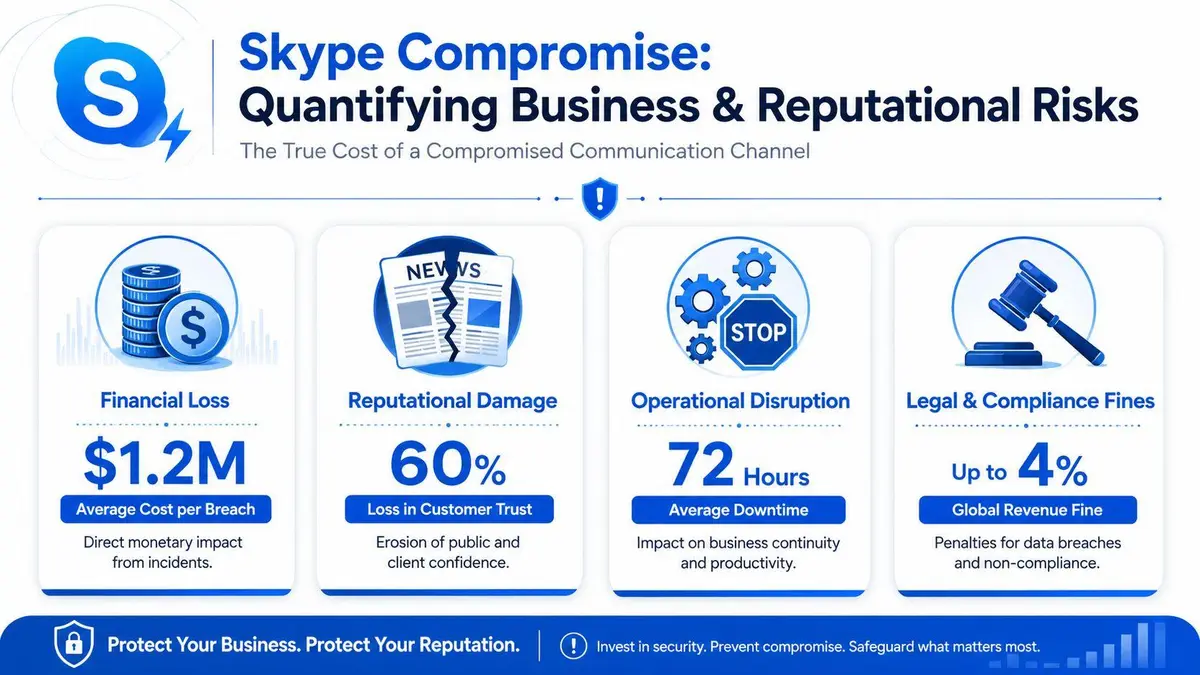
The wrong way to view scams on Skype is as an isolated chat problem. The right way is to see them as a compound business risk with financial, operational, reputational, and legal consequences.
Direct loss is only the first line item
The financial case is already severe. According to the Global State of Scams report summary from GASA and Feedzai, scammers extracted over $1.03 trillion globally in the past year. The same source notes that imposter scams are a leading category of fraud, and job scam losses rose from $90 million in 2020 to $501 million in 2024.
That should reset how boards classify these incidents. A fake payment instruction, false interview, or executive spoof isn’t edge-case fraud. It sits inside a large, expanding financial threat category.
The harder losses don’t sit on the general ledger
A Skype compromise can also expose draft agreements, investor conversations, litigation strategy, internal politics, and customer issues. That information has value even when attackers never ask for a payment.
Here’s where executive teams often miss the wider control problem:
- Operational trust breaks down when staff no longer trust messages that appear to come from leadership
- Deal execution slows because counterparties start verifying everything manually
- Reputational harm spreads if attackers use your name or brand in outreach to third parties
For teams that are tightening broader digital defenses, ZenChange’s guide on website protection is a useful companion read because messaging fraud and website compromise often become part of the same reputational event.
Why public visibility changes the severity
Once an impersonation campaign spills beyond Skype, the issue becomes discoverable. Search results, fake profiles, copied content, and false allegations can turn a contained fraud attempt into a brand narrative.
That’s why continuous observation matters. Executive teams dealing with impersonation risk should maintain active reputation monitoring for emerging abuse signals, especially when an attacker may pivot from private messaging into public-facing platforms.
A private Skype scam becomes a public corporate problem the moment your name is used to deceive someone else.
The central point is simple. Financial theft hurts. Public misuse of executive identity can hurt longer.
Detecting Sophisticated Social Engineering Attacks
The old advice is weak. Checking for spelling mistakes won’t save anyone from a modern Skype attack. The better attackers write clearly, understand context, and know how to sound busy rather than suspicious.

Watch behavior, not grammar
Advanced social engineering reveals itself in the pattern of interaction. The sender often avoids direct answers, redirects simple verification questions, and pushes the conversation toward urgency or isolation. They want you off standard process.
Red flags that matter more than wording include:
- Pressure to move channels when there’s no legitimate reason to leave approved communication paths
- Topic deflection after you ask a specific verification question
- Manufactured confidentiality such as “keep this between us for now”
- Authority borrowing through references to the CEO, legal counsel, or an unnamed stakeholder who “needs this immediately”
A real colleague usually answers the direct question you ask. A fraudster answers the question that keeps control of the conversation.
AI bots now imitate human pacing
Attackers are also using automation more intelligently. According to Emsisoft’s analysis of a Skype spam bot, emerging AI scam bots can wait exactly 30 seconds between replies and mimic realistic pauses to appear human. That detail matters because many executives still assume bots reveal themselves through speed, repetition, or obvious scripting.
They don’t always.
What works better is interruption. Ask a context-specific question only that individual would know. Change the subject abruptly. Require an out-of-band confirmation by phone or through a known corporate channel. Bots and human operators both degrade when they lose the script.
If the sender resists verification more than the task itself justifies, you’re looking at a hostile interaction.
This broader shift is changing corporate risk assumptions well beyond Skype. ELECTE’s analysis of deepfakes rewriting business rules is worth reading because the same deception logic now applies across voice, video, and executive identity fraud.
A short briefing on real-world manipulation tactics is useful here:
Verification has to be procedural
Detection improves when the organization removes discretion from high-risk moments. Don’t leave identity checks to instinct.
Use a simple internal rule set:
- Verify payment or credential requests outside Skype
- Treat file installs and software updates as prohibited unless security-approved
- Escalate any message invoking secrecy, executive authority, or deadline pressure
- Preserve the conversation before confronting the sender
That last point matters. Once a fraudster knows they’ve been noticed, they often delete, edit, or shift channels.
Immediate Incident Response Protocol
If you think you’ve been compromised on Skype, speed matters. So does order. Many individuals waste the first hour doing the wrong things in the wrong sequence.
First moves in the first hour
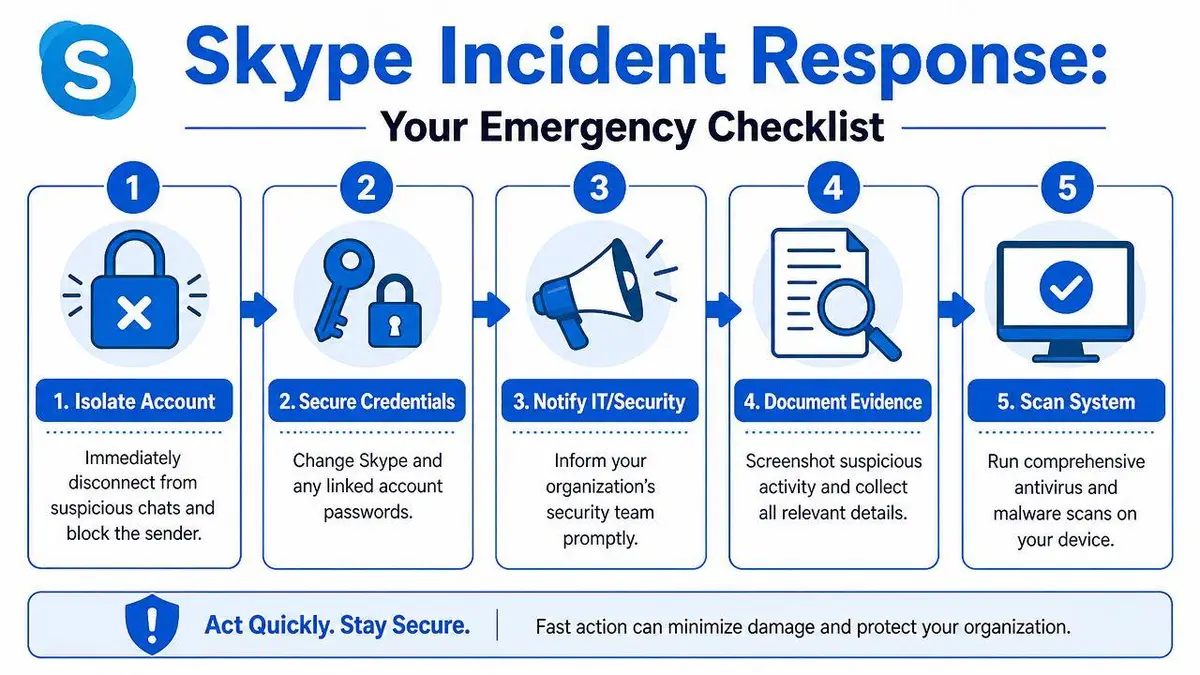
Start with containment. If you clicked a suspicious link, opened a hostile file, or granted access, stop using the affected device for normal work. Disconnect it from active networks if your security team instructs you to do so, and don’t continue “checking things” on the same machine.
Then secure identity layers immediately:
- Change passwords for Skype and linked Microsoft accounts from a clean device
- Enable or review multifactor authentication
- Terminate suspicious sessions if your account tools show unfamiliar activity
- Alert internal security or IT before the attacker gets more time inside the environment
Don’t start by arguing with the scammer. Don’t announce that you know. Preserve control first.
Preserve evidence before cleanup
Take screenshots of the profile, chat, files, usernames, timestamps, and any payment or credential requests. Save copies of emails or notifications connected to the event. Document what you clicked, what you downloaded, and what happened afterward.
If the scam involved your identity being copied or misused, a more detailed response framework for what to do if someone is impersonating you online can help structure escalation.
Don’t optimize for emotional relief. Optimize for evidence, containment, and recoverability.
Address the fear of deleted data directly
Many victims panic because they think the scammer has wiped everything. That fear isn’t irrational. User reports show that after Skype-related scams, critical data in associated Microsoft accounts such as Outlook can appear to be deleted, yet the Microsoft community discussion on post-scam account deletion concerns shows how unclear the cause often is. It may involve account hijacking, remote access malware, or another account-level action.
The practical response is to stop guessing and scope the compromise. Check account recovery paths, mailbox rules, deleted items, forwarding settings, sign-in history, and any changes to authentication methods. What looks like destruction may be concealment, redirection, or unauthorized cleanup rather than irreversible loss.
That distinction affects both technical recovery and legal strategy.
Reporting Frameworks and Digital Evidence
A Skype incident that threatens money, identity, or reputation needs a formal record. Not because the platform will solve it for you, but because unstructured reporting weakens every later remedy.
Build an evidence file that can survive scrutiny
Create one central incident file. Include screenshots, exported chats if available, profile names, associated usernames, linked phone numbers or emails, payment details requested, file names, and a concise timeline. Keep the original files untouched and work from copies when sharing internally.
A useful evidence file answers five questions:
| Evidence element | Why it matters |
|---|---|
| Who contacted whom | Establishes the impersonation path |
| What was requested | Shows fraud intent or coercion |
| When each event occurred | Supports timeline reconstruction |
| Which accounts or devices were involved | Helps scope compromise |
| What public traces exist | Supports takedown and reputation work |
If legal counsel becomes involved, chain of custody starts to matter. Sloppy forwarding, edited screenshots, and incomplete notes make a clean case harder to build.
Report in parallel, not in sequence
File platform reports with Microsoft or Skype, but don’t confuse platform reporting with remediation. It’s one record, not the whole response. If money, extortion, identity misuse, or business compromise is involved, report the matter to the relevant law enforcement channels in your jurisdiction, including cybercrime reporting frameworks such as the FBI’s IC3 where appropriate.
Use consistent language across all reports. If the event involved executive impersonation, say that clearly. If there was a request for payment, credential capture, or installation of software, spell it out directly.
The purpose of reporting is not punishment first. It’s documentation, traceability, and preserving your options.
That record becomes essential if the attacker republishes content, creates fake accounts elsewhere, approaches journalists, or starts contacting clients under your name.
When to Engage Professional Remediation Services
Self-help has a narrow lane. It works when the event is contained, no public content exists, and the attacker hasn’t moved beyond a single account. Outside that lane, delay gets expensive.
Clear triggers for escalation
Professional remediation becomes necessary when any of the following is true:
- The attacker has gone public by posting defamatory content, leaking conversations, or creating impersonation profiles
- The campaign spans multiple platforms and simple reporting isn’t stopping the spread
- The incident involves executives, investors, family offices, or public figures whose names carry independent reputational value
- There’s meaningful financial, legal, or intellectual property exposure
- Search visibility is now part of the problem because harmful pages, copied profiles, or false narratives are surfacing in results
At that point, the issue is no longer “a Skype scam.” It’s a cross-platform identity and content problem.
What specialist remediation actually does
Strong remediation work combines source removal, de-indexing strategy, impersonation takedowns, evidence packaging, and monitoring for reappearance. Those functions matter because attackers rarely stay in one place. They move from Skype to email, from private chats to social profiles, and from direct targeting to search-visible abuse.
A specialist team should be able to do three things well. First, shut down the harmful material at the source where possible. Second, reduce its discoverability when source removal is slow or contested. Third, watch for reposts, mirrors, and derivative abuse so the same incident doesn’t keep returning under new URLs or accounts.
Executives dealing with recurring impersonation or public fallout should also understand the broader playbook for protecting executive online reputation in high-stakes environments. The core lesson is simple. Digital attacks don’t stay compartmentalized just because they started in a messaging app.
Why waiting is usually the expensive choice
By the time a board or founder asks whether outside help is warranted, the answer often came earlier. Once false content indexes, once a journalist receives spoofed outreach, or once clients start asking whether a message really came from leadership, the cleanup becomes harder.
Attackers understand asymmetry. They need one convincing message. You need a documented, coordinated response across technical, legal, and reputational fronts.
That’s why mature organizations don’t treat scams on Skype as minor nuisances. They treat them as early-stage indicators of identity abuse, fraud risk, and brand exposure.
If a Skype scam has escalated into impersonation, leaked content, search-visible abuse, or reputational damage, ContentRemoval.com can assess the situation confidentially and build a focused removal and protection strategy. Their work is designed for executives, public figures, family offices, and brands that need speed, discretion, and a plan that goes beyond platform reporting.
Frequently asked questions
How can I tell if a Skype message from a colleague is a scam?
Watch the pattern rather than the spelling. A fraudster avoids direct answers, pushes you off approved channels, invokes secrecy or executive authority and resists verification more than the task justifies. Ask a context-specific question only that person would know, or confirm by phone through a known corporate number.
What should I do immediately after falling for a Skype scam?
Stop using the affected device for normal work, change passwords for Skype and linked Microsoft accounts from a clean device, enable multifactor authentication, terminate unfamiliar sessions and alert internal security. Take screenshots of the profile, chat, files and timestamps before any cleanup, and do not confront the scammer.
Does reporting a scam to Skype or Microsoft get the damage removed?
Platform reporting creates a record but is not remediation. Report in parallel to law enforcement channels such as the FBI’s IC3 where money, extortion or identity misuse is involved, and if the attacker has gone public with fake profiles or defamatory content, specialist removal and de-indexing work is what addresses the spread.
