
Ransomware removal tools are a category, not a single product, and none replace an incident response. Detection tools like EDR buy decision time, decryptors work only when the strain is identified and a public key exists, rescue utilities eradicate payloads after containment, and validated clean backups are usually the decisive layer. The executive job in the first hour is control.
Key facts
- No More Ransom offers decryptors for families including LockBit 3.0, BlackBasta, Bianlian and Phobos, but not all strains.
- Nearly half of ransomware decryption tools fail to satisfactorily recover compromised data.
- Isolate hosts from every network path before any recovery; restoring too early can restart the incident.
- Strain identification tools such as Crypto Sheriff show whether a public decryptor might exist.
Where ContentRemoval.com comes in. ContentRemoval.com takes on the publication side of a ransomware crisis: leaked board materials, executive communications and customer records that attackers push onto leak sites, forums and search results after encryption. The CEO’s office, general counsel or the incident leader usually reaches out while systems are still being restored. A free, confidential 15-minute Exposure Scan maps what has been published and what is removable, and the report is yours to keep. Get a Free, Confidential Exposure Scan or read how our content removal work is done.
Your phone lights up before sunrise. The CFO says shared drives are inaccessible. The head of IT says endpoints are dropping ransom notes. Someone in operations wants to shut everything down. Someone else wants to run a free decryptor they found online. Legal hasn’t been called. Your cyber insurer hasn’t been notified. Employees are messaging each other on internal chat, which may already be compromised.
At that moment, the phrase ransomware removal tools sounds comforting. It suggests there’s a product you can deploy, a scan you can run, a button you can press. For a CEO, that’s the wrong mental model. A ransomware event is not a software problem first. It’s a business continuity crisis, an evidence preservation problem, a legal risk event, and a reputational exposure that can become public before your team has even identified the strain.
That’s why executives get into trouble early. They let the discussion collapse into tools before they’ve controlled communications, isolated affected systems, and put counsel at the center of decision-making. The market for these tools is real and large. Industry research valued the ransomware removal tool market at USD 21.0 billion in 2024, with a projection to USD 36.08 billion by 2032 and USD 22.5 billion in 2025, reflecting how mainstream post-infection recovery has become in enterprise security budgets (Intel Market Research on the ransomware removal tool market). But market growth doesn’t change the executive reality. Tools support a response. They don’t replace one.
The First Decisions After a Ransomware Alert
The first hour decides whether this remains a contained incident or becomes a broader operational and reputational failure. I’ve seen leadership teams lose control because they treated the first alert as an IT escalation rather than a board-level crisis. The pattern is predictable. Someone tries to remediate too quickly, someone reboots infected systems, someone reconnects a machine to “check whether it’s fixed,” and someone sends a company-wide message before facts are stable.
What the CEO should do first
Your immediate job is to impose order.
That means naming one incident leader, routing decisions through counsel, and limiting internal commentary to need-to-know participants. If there’s any possibility of extortion, leaked data, or executive targeting, the issue stops being only technical. It becomes adjacent to coercion and reputational abuse, which is why executives dealing with parallel threats often need a broader strategy for online blackmail response for executives.
Use this decision sequence in the opening phase:
- Stop uncontrolled communication: Freeze speculative internal messaging. Staff should not discuss attribution, ransom demands, or customer impact casually on standard channels.
- Separate containment from cleanup: Tell IT and security that no one begins “cleaning” systems until infected hosts are isolated and evidence is preserved.
- Engage counsel early: Counsel should guide privilege, regulatory analysis, breach notification timing, and insurer communications.
- Assume scrutiny: If data was taken before encryption, your response may later be judged by regulators, insurers, counterparties, and plaintiffs’ lawyers.
Practical rule: The first bad decision in a ransomware event is usually made by someone trying to be helpful too quickly.
What not to do
Don’t let a vendor salesperson, a panicked internal admin, or a well-meaning executive define success as “getting machines back online fast.” That standard is too narrow. The true questions are harder. What was accessed? What moved laterally? Were credentials stolen? Are backups clean? Did anyone preserve logs and artifacts that your insurer or outside investigators will later need?
A short executive triage table helps clarify priorities:
| Executive concern | Wrong instinct | Better decision |
|---|---|---|
| Operations freeze | Restore immediately | Contain first, then restore only from validated clean sources |
| Public pressure | Reassure everyone quickly | Verify scope before external statements |
| Tool selection | Search for a miracle decryptor | Identify the strain, preserve evidence, then choose the right response path |
| Legal exposure | Call counsel later | Put counsel in the loop at the start |
If you remember one thing, remember this: the first decisions aren’t about software. They’re about control.
Categorizing Ransomware Response Tools
Most executives hear “removal tool” and picture antivirus with a stronger label. That’s inaccurate. Think of incident response the way you’d think about a trauma team. One group identifies the injury, one stops the bleeding, one removes what’s dangerous, and another handles rehabilitation. No serious hospital hands all of that to one person. No serious company should expect one application to do it all.
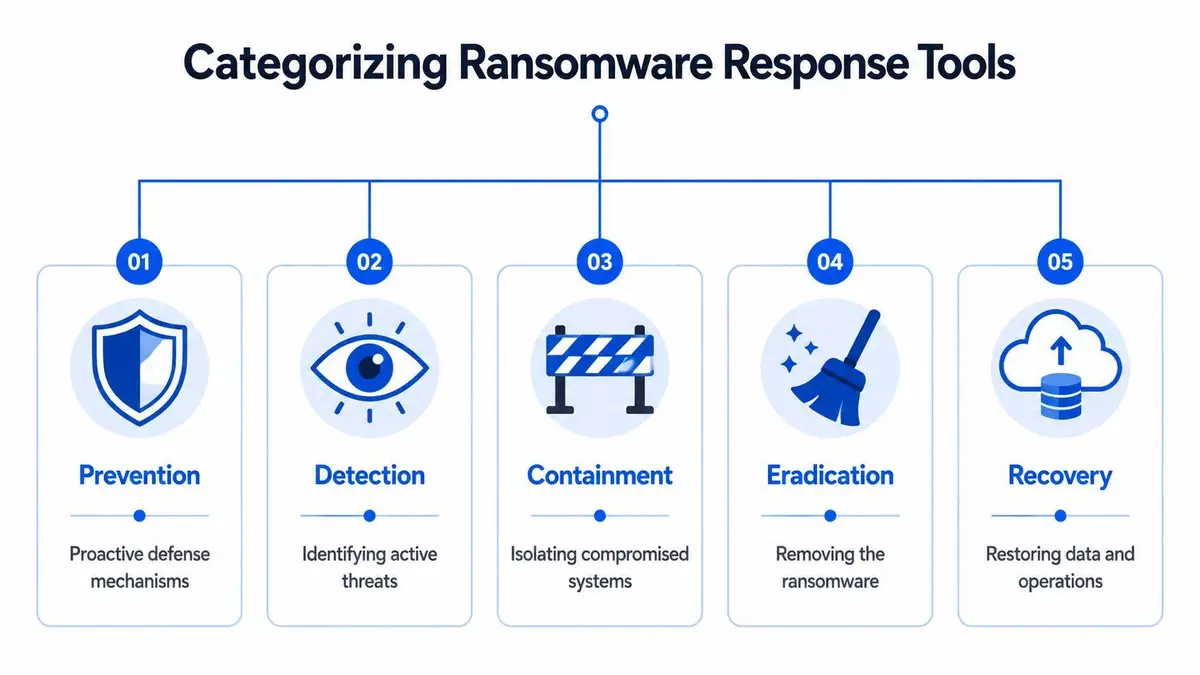
Independent guidance is clear that effective response requires a stack of controls combining EDR/SIEM, malware-removal utilities, and validated backups because decryptors are family-specific and not always available. In other words, removal is a process, not a single tool (SecurityScorecard’s guidance on ransomware recovery tools and techniques).
Detection tools
Detection tools exist to tell you something abnormal is happening before encryption finishes everywhere. In practice that means endpoint detection and response platforms, SIEM workflows, and related monitoring that flags rapid file changes, ransom-note creation, unusual outbound transfers, or command-and-control behavior.
For a CEO, the strategic point is simple. Detection tools buy decision time. They don’t restore your files, but they can reduce the blast radius if your team uses them properly.
Decryption tools
Decryption tools get the most attention because they sound like a clean ending. Sometimes they matter. Often they don’t.
They only work when your responders correctly identify the ransomware family and a matching decryptor exists. If either condition fails, the tool is irrelevant. That’s why decryption belongs in a narrow lane. It is not your primary recovery strategy.
The right question isn’t “What’s the best ransomware removal tool?” It’s “Which tool class fits the incident we actually have?”
Rescue and eradication utilities
Some malware-removal utilities and bootable rescue environments help responders examine an inert system, remove payloads, and check for persistence. These tools are useful when standard operating conditions can’t be trusted. They can support eradication, but they are not a substitute for forensic judgment.
A good responder uses them to answer practical questions. Is the payload still active? Are there scheduled tasks, scripts, or registry-based persistence mechanisms? Was the host altered in ways that will survive a simple reboot?
Backup and recovery platforms
Backups are not glamorous, but they are usually the decisive layer. If your organization has immutable or air-gapped backups that are validated as clean, the negotiation pressure changes. If you don’t, your options narrow fast.
Here is the tool taxonomy executives should use:
- Detection stack: EDR, SIEM, and alerting that tell you where the incident is active.
- Identification support: Strain-identification tools such as Crypto Sheriff that help determine whether a public decryptor might exist.
- Eradication utilities: Malware-removal and rescue tools used after containment to remove active components and check persistence.
- Recovery systems: Clean, validated backups that restore operations without reintroducing the threat.
Consumer tools may be enough for a home machine. They are not an enterprise incident strategy.
The Uncomfortable Reality of Decryption Tools
Executives often ask the same question in the first call: “Can’t we just get a decryptor?” Sometimes, yes. Usually, that question arrives too early and carries too much hope.
The No More Ransom project is one of the most valuable public milestones in this space. It provides decryption support for multiple ransomware families, including LockBit 3.0, BlackBasta, Bianlian, and Phobos / 8base, and it openly states that decryption solutions exist for some, not all, ransomware families (No More Ransom’s decryption portal). That honesty matters.
Why public decryptors disappoint
Public decryptors fail for reasons that are structural, not accidental. Many ransomware families use victim-specific key material. Some operators make implementation mistakes and create openings for defenders. Many don’t. Even when a decryptor exists, it may lag behind newer variants or fail to recover data cleanly.
An academic finding makes the limitation impossible to ignore. Nearly half of ransomware decryption tools fail to satisfactorily recover compromised data. That should end any fantasy that public decryption is a dependable executive recovery plan.
The strategic risk of false hope
The worst outcome isn’t just “the decryptor didn’t work.” The worse outcome is that your team wastes irreplaceable hours chasing a low-probability option while attackers still have persistence, compromised credentials remain active, and leadership delays the harder decisions around containment, legal notice, and clean restoration.
Use this reality check:
| Executive assumption | Reality |
|---|---|
| A decryptor probably exists | It may not exist for your strain |
| If it exists, it will work | It may fail to recover data satisfactorily |
| Decryption solves the incident | It doesn’t prove the environment is clean |
| Removal ends the crisis | You may still face extortion, disclosure, and regulatory exposure |
If your company is waiting for a decryptor before it isolates systems and validates backups, it is losing time it won’t get back.
The disciplined approach is narrower. Identify the strain. Check whether a legitimate decryptor exists through trusted repositories. If there is a match, evaluate it carefully. If there isn’t, stop pretending there’s a shortcut and shift the organization to controlled recovery.
A Framework for Controlled Incident Response
A ransomware event needs sequence discipline. Not activity. Not noise. Sequence. If your team restores before confirming eradication, restored files can be encrypted again. If backups aren’t validated as clean, recovery can reintroduce the threat. Guidance on reliable removal workflows stresses exactly that order: isolate the host from all networks before recovery, then remove the payload or restore from a known-clean backup, because restoring too early can restart the incident (Cynet’s ransomware removal and protection guidance).
Start with the visual model below, then enforce it operationally.
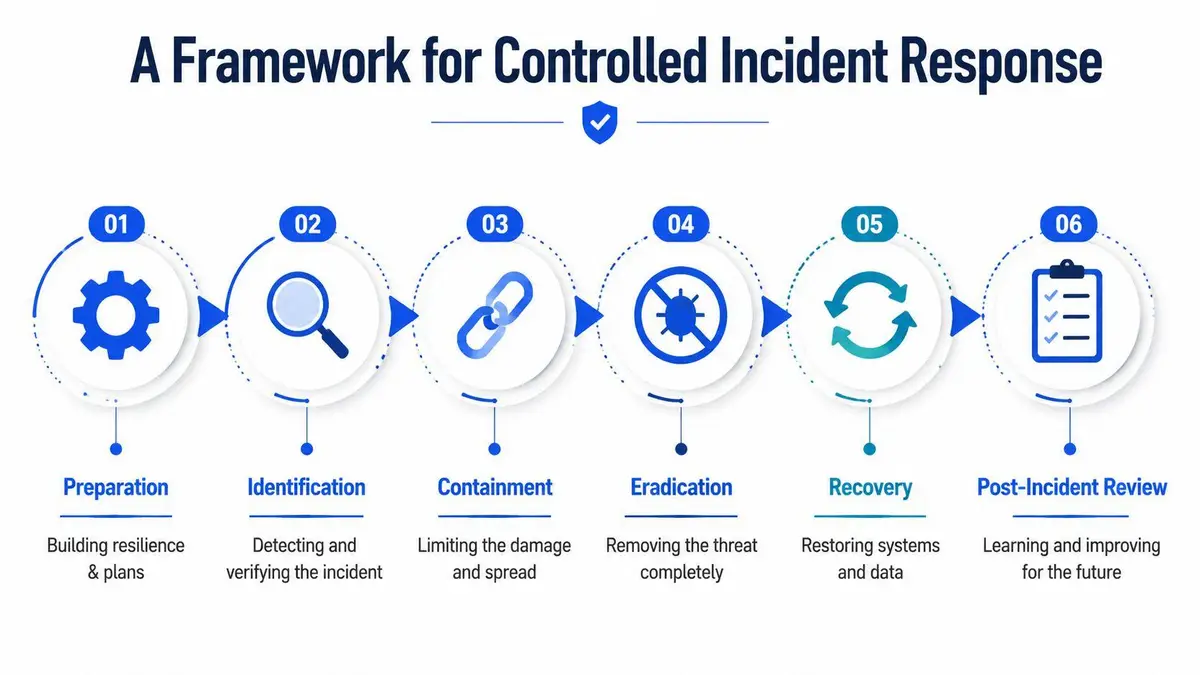
Isolate and contain
Physically and logically isolate affected hosts from wired and wireless networks. Disable VPN, RDP, and shared-drive access tied to affected systems. If you have reason to believe account compromise occurred, disable or reset the relevant credentials under supervision from your security and identity teams.
This is the executive checkpoint where you decide whether to prioritize narrow containment or broader operational shutdown. Many CEOs hesitate here because isolation hurts productivity. That hesitation can be expensive. If lateral movement is active, delay widens the incident.
- Network isolation: Remove infected systems from network reach immediately.
- Access control: Disable pathways attackers use to move, including remote access and shared drives.
- Command discipline: Require approval for any reconnection, reboot, or restore action.
Preserve and analyze
Do not let your team destroy evidence while trying to be efficient. Preserve logs, notes, artifacts, and system images where appropriate. Your legal team and insurer may later need a defensible record of what happened, when it was detected, and what actions were taken.
This is also the moment to think beyond machines. If sensitive documents, board materials, customer records, or executive communications may have been exposed, your crisis may evolve into an online leak and publication problem. That’s where a separate plan for removing leaked business documents from the internet becomes part of the response, not an afterthought.
Leadership checkpoint: If evidence disappears because someone wiped systems too early, you may weaken your insurance position and complicate any later litigation or regulatory inquiry.
For teams that need a clear operational explainer, this walkthrough is useful to brief non-technical stakeholders:
Assess and identify
At this point, your technical responders should determine what strain you’re facing, where it spread, what systems were affected, and whether there are signs of data theft or persistence. This phase answers business questions, not just technical ones. Can payroll run? Are regulated systems involved? Are customer commitments at risk? Do you need to prepare for disclosure?
The CEO should ask for a short written brief, not a stream of jargon. It should cover scope, likely access path, critical dependencies, and the current recommendation on restoration versus further containment.
Eradicate and recover
Only after containment and assessment should eradication and recovery proceed. Remove active malware components. Scan for persistence. Validate backups as clean before any production restore. Reset credentials that may have been exposed. Confirm systems are clean before reconnecting them.
A simple operating table helps keep teams honest:
| Phase | Question leadership must ask |
|---|---|
| Containment | Are affected systems isolated from every network path that matters? |
| Preservation | Have we retained the evidence needed for counsel, insurer, and investigators? |
| Assessment | Do we know the strain, the scope, and whether data left the environment? |
| Eradication | Have responders checked for persistence and compromised accounts? |
| Recovery | Are backups validated as clean before restoration? |
Don’t let “back online” become the only success metric. A rushed recovery that leaves stolen credentials in place or restores tainted backups isn’t recovery. It’s a pause before the next impact.
Evaluating Tools and Professional Response Providers
By the time executives start comparing vendors, they’re often already under pressure from insurers, internal teams, and possibly customers. That pressure leads to sloppy procurement. The answer isn’t to buy more software faster. The answer is to distinguish between a tool and a response capability.

Guidance on solution selection is blunt. The right choice depends on context. Consumer-grade tools may be enough for a single laptop, while enterprise incidents require a layered stack that addresses lateral movement and credential theft through EDR, threat intelligence, and backup validation (Kaspersky’s No Ransom guidance and recovery context).
How to evaluate software
If someone proposes a tool, ask four questions.
- Is it relevant to the identified strain: A family-specific decryptor is useless if the family is wrong.
- Does it address more than the visible symptom: Removing a payload isn’t enough if persistence and credential compromise remain.
- Can the team validate the result: You need evidence that the system is clean before restoration.
- Does it fit the environment you run: A consumer anti-ransomware product won’t manage a multi-region enterprise with identity, cloud, and vendor exposure.
How to evaluate a response firm
Software doesn’t negotiate with counsel, preserve privilege, brief the board, or prepare clean reporting for insurers. A response firm does. That means your diligence questions should be operational and legal, not just technical.
Ask for clarity on incident leadership, forensic reporting, insurer coordination, credential reset planning, and whether the firm has a process for handling leaked or extortion-related content if stolen data appears online. One factual option in that broader category is ContentRemoval.com, which offers malware removal services and content removal support for high-stakes clients dealing with leaks, impersonation, and reputational exposure.
A cheap tool can be perfectly adequate for one infected laptop. It is the wrong answer when your problem includes stolen credentials, exposed documents, and a board demanding legal defensibility by noon.
A provider is worth retaining when they can turn confusion into a documented chain of decisions. That’s what insurers, regulators, and courts respect later.
Executive Next Steps and Strategic Recovery
Once the immediate crisis stabilizes, most companies make a damaging mistake. They treat recovery as an IT clean-up project and move on. That guarantees the organization learns too little from an event that exposed its real weaknesses.
Your strategic recovery plan should do three things. First, formalize the decision sequence your team used, not the one sitting untouched in a policy binder. Second, put outside counsel and an incident response partner on retainer before the next event. Third, investigate root cause with enough honesty to address identity gaps, backup validation failures, and communication breakdowns.
For boards and leadership teams reviewing resilience at the regional operations level, practical guidance on protecting your data in Sheffield can help frame local data security discipline inside a wider governance program. That kind of operational hardening matters because ransomware recovery is rarely isolated to one bad click or one infected endpoint. It usually exposes a chain of neglected controls.
The reputational side also needs its own workstream. If attackers leaked files, named executives, or pushed stolen material into search results and social channels, your post-incident plan should include a post-crisis online reputation repair checklist for executives. Technical eradication doesn’t remove public traces, copies, commentary, or defamatory framing that follows a breach.
The final recommendation is simple. Stop asking whether ransomware removal tools are enough. They aren’t. They are one component of a disciplined response that must protect evidence, preserve legal options, restore operations safely, and contain reputational fallout before it compounds.
If you’re dealing with a live ransomware event, leaked files, extortion pressure, or public reputational damage connected to the incident, ContentRemoval.com can assess the exposure confidentially and help coordinate a focused remediation plan across malware removal, leaked-content response, and online reputation containment.
Frequently asked questions
Can I just use a free decryptor to recover from ransomware?
Only if responders correctly identify the strain and a matching decryptor exists in a trusted repository such as No More Ransom. Even then it may fail on newer variants or recover data poorly, and it does nothing about persistence, stolen credentials or extortion, so it belongs in a narrow lane, not as the primary plan.
What is the first thing a CEO should do after a ransomware alert?
Impose order. Name one incident leader, route decisions through counsel, freeze speculative internal messaging, and tell IT that no one cleans or reboots systems until infected hosts are isolated and evidence is preserved. The first bad decision is usually made by someone trying to help too quickly.
Why is restoring from backup risky after a ransomware attack?
Because backups may already have been touched by the attacker or may reintroduce the payload. Restore only after containment and eradication, validate the backup as clean, reset exposed credentials and confirm systems are clean before reconnecting them.
