Privacy and email for a high-profile individual is an operational discipline, not a provider choice. The inbox is the master key that resets passwords and carries legal drafts, so protection means SPF, DKIM and DMARC at reject, hardware security keys, encryption your staff can use, compartmentalized addresses, a rehearsed breach playbook and takedown capability for anything that leaks.
Key facts
- DMARC set to p=reject is the point where your domain stops being easy to spoof; monitoring-only does nothing.
- Delegated inboxes, assistant accounts and shared legal mailboxes are the soft entry points attackers prefer.
- Even encrypted mail can expose sender, recipient, timestamp, subject line and message size.
- After a breach, work from a clean device: isolate, reset, revoke sessions, then lock recovery settings.
Where ContentRemoval.com comes in. ContentRemoval.com handles the public aftermath of an email compromise: leaked threads mirrored on forums, attachments cached in search, impersonation accounts and extortion material. General counsel, security teams and chiefs of staff usually reach out once containment is under way and the material has started to spread. A free, confidential 15-minute Exposure Scan maps what is removable across the platforms involved, and the report is yours to keep. Get a Free, Confidential Exposure Scan or read how our personal data removal work is done.
Your inbox is probably carrying more risk than your phone, your laptop, or your social accounts. For a high-profile individual, email is the master key. It resets passwords, receives deal documents, carries legal drafts, stores travel plans, exposes family details, and gives attackers a credible way to impersonate you.
Most advice on privacy and email is too narrow. It tells you to pick a secure provider, turn on a few settings, and feel reassured. That’s amateur thinking. Email privacy fails in operations, not marketing copy. Exposure primarily comes from weak domain controls, careless recovery channels, poor compartmentalization, metadata leakage, and slow response when something goes wrong.
The scale of the channel explains why attackers keep pressing on it. Email is projected to reach 4.73 billion users in 2026 globally, with about 376.4 billion emails sent and received every day worldwide, according to Porch Group Media’s email statistics summary. If you’re wealthy, visible, litigious, or controversial, assume your email is already on target lists.
Fortifying Your Email Infrastructure
If your email foundation is weak, privacy settings are cosmetic. Start with the controls that stop impersonation, lock down access, and make your environment hostile to routine attacks.
Build the baseline correctly
The essential stack is straightforward. Enforce SPF, DKIM, and DMARC with a reject policy. Require phishing-resistant MFA. Add behavioral filtering for abnormal sending patterns. Encrypt mail in transit with TLS and at rest with S/MIME or equivalent. That layered model is the practical baseline described in this email privacy security guidance.
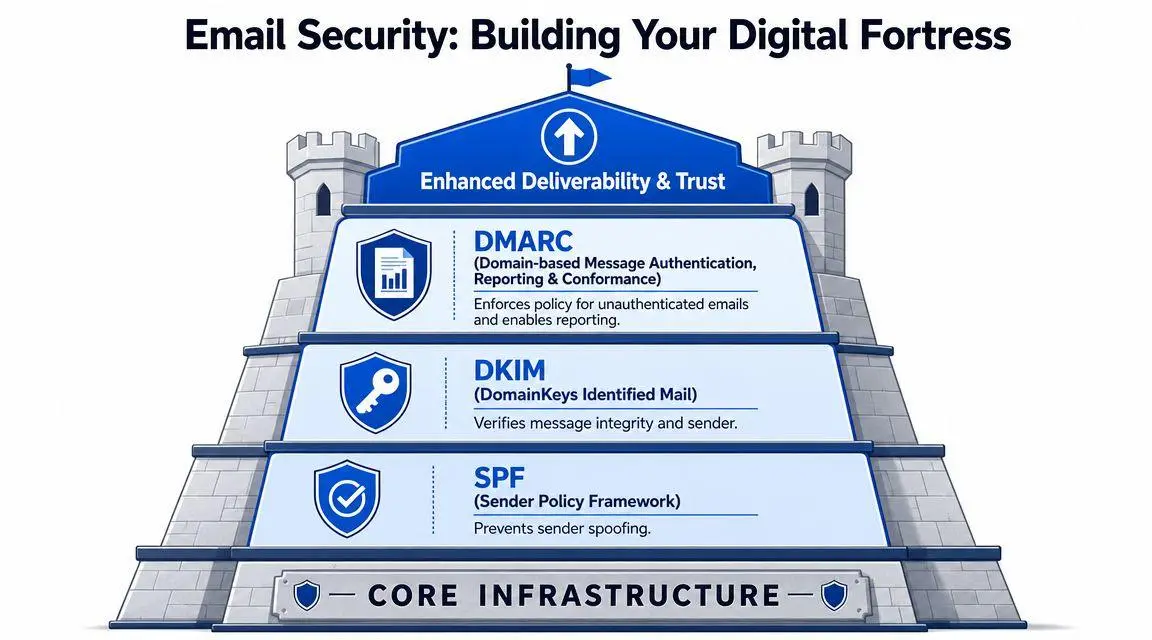
A high-profile target should care most about DMARC at p=reject. Monitoring-only policies don’t stop spoofing. Quarantine is better than nothing, but it still leaves room for abuse and inconsistent enforcement. Reject is the point where your domain stops being easy to weaponize against your board, your assistants, your investors, and your family office.
Stop relying on weak second factors
SMS codes are not enough. App-based codes are better, but they still leave too much room for token theft, social engineering, or device compromise. If your reputation or assets matter, use hardware security keys for primary accounts and for every administrator who can access your mail environment.
Practical rule: If an attacker can socially engineer your assistant, intercept a text, or phish a login page, your MFA wasn’t strong enough.
Many executive environments frequently fail in a specific area. The principal account gets decent protection, but delegated inboxes, executive assistant accounts, shared legal mailboxes, and domain admin access remain soft. Attackers know this. They don’t always come through the front door.
Treat hosting as a risk decision
Provider selection still matters, but only after the baseline is in place. You need stable business hosting, disciplined administrative controls, and clear mail handling practices. If you’re reviewing infrastructure options for reliability and management considerations, REDCHIP IT email hosting insights are a useful reference point for how hosting choices affect control, continuity, and support.
A secure setup also needs role-based access control. Don’t give broad mailbox access because it’s convenient. Separate executive correspondence, legal communication, investor relations, and personal accounts. Limit who can search, export, forward, or delegate access.
For a broader governance lens, ContentRemoval’s guidance on data security risk management is worth treating as part of the same problem. Privacy and email are not separate disciplines. They’re one operational surface.
What privacy settings do not solve
Client-side privacy toggles don’t neutralize the full threat. They don’t hide metadata. They don’t stop account takeover. They don’t fix weak authentication, and they don’t eliminate tracking or data sharing on their own.
Here’s the uncomfortable truth: even when message content is protected, sender, recipient, timestamp, subject line, and message size can still remain exposed in ordinary email operations. If your team thinks “private mode” in a mail app means the matter is handled, you have a governance problem, not a technology problem.
Deploying Advanced Encryption Protocols
Encryption decisions should match the kind of pressure you’re under. Don’t ask which option is “best.” Ask which one your people will use correctly, under stress, without exposing keys, forwarding plaintext copies, or creating recovery chaos.
S/MIME versus PGP
For most executives, the choice is between S/MIME and PGP, or between self-managed encryption and a provider that bakes secure messaging directly into the platform.
| Factor | S/MIME | PGP |
|---|---|---|
| Key model | Centralized certificates | Decentralized key management |
| Operational fit | Better for enterprise environments | Better for technically capable individuals |
| Client support | Often native in business mail clients | Often needs plugins or extra tooling |
| Administrative burden | Easier to standardize in managed organizations | Easier to misuse if discipline is poor |
S/MIME usually makes more sense for a CEO, family office principal, or legal executive working inside a managed business environment. It aligns better with enterprise workflows, certificate administration, and recipient expectations in regulated contexts.
PGP gives more control, but it also creates more room for user failure. That matters. A privacy tool that your counterpart can’t open, verify, or manage consistently becomes a delivery problem, then a behavior problem, then a security problem.
Choose based on relationship, not ideology
Use self-managed encryption when you control the workflow and can enforce standards. Use an integrated encrypted provider when convenience, speed, and recipient usability matter more than customization.
A CEO communicating with a board and outside counsel usually benefits from a managed, standardized setup. An investigative journalist speaking with a sensitive source may accept more friction in exchange for tighter personal control. Those are different threat models. They deserve different tools.
Encryption that nobody can operate correctly is not protection. It’s theater.
This walkthrough gives a useful visual overview before you choose a route:
Don’t outsource judgment to branding
Secure-email providers can reduce complexity, especially for users who need encrypted messaging without managing certificates manually. That’s often sensible. But don’t confuse “zero-knowledge” branding with complete privacy. A provider can improve content protection while leaving traffic patterns, account events, and legal exposure untouched.
For privacy and email decisions at the executive level, I recommend a blunt framework:
- Use managed S/MIME if your environment is corporate, regulated, and administratively mature.
- Use PGP only if you or your counterpart can handle keys competently and consistently.
- Use integrated encrypted providers when usability and fast adoption matter more than granular control.
- Avoid mixed improvisation where some users encrypt, others forward plaintext, and assistants export mail to unprotected systems.
The mistake is not choosing the “wrong” protocol. The mistake is deploying one that your staff, counterparties, or family office won’t follow correctly.
Mastering Proactive Account Hygiene
A breach rarely starts with complex tradecraft. It starts with routine sloppiness. One reused password. One exposed recovery address. One assistant auto-forwarding sensitive threads to a personal inbox. One public-facing email tied to banking alerts, legal notices, and travel confirmations.
For high-stakes individuals, email hygiene is not housekeeping. It is risk compartmentalization. The goal is to reduce blast radius, detect exposure early, and keep a single mistake from turning into a full personal, legal, or reputational crisis.
Compartmentalize your identity
Run separate email identities by function. Use one address for banking and wealth management, one for legal matters, one for private correspondence, one for public registrations, and one or more aliases for low-trust signups.
That structure gives you two advantages. First, it contains fallout when one address leaks. Second, it gives you attribution. If phishing attempts hit an address used only for board work or family office communication, you have a narrower list of likely exposure points and counterparties to review.
Do not let assistants, relatives, or vendors collapse these channels for convenience. Convenience is how sensitive traffic gets exposed.
Harden the daily habits
Behavior controls matter more than adding another app. Set rules and enforce them.
- Use a password vault: Every email account needs a unique, high-entropy password stored in a reputable password manager, not a notes app, browser profile you do not manage, or an assistant’s spreadsheet.
- Lock down recovery paths: Backup email addresses and phone numbers need the same protection as the primary account. Keep them isolated and limit who knows them.
- Audit forwarding and mailbox rules: Silent forwarding is one of the attacker’s favorite persistence methods because it avoids obvious disruption.
- Restrict device use: Sensitive mail belongs on devices with disciplined software hygiene, minimal extensions, and no shared family or casual-use profiles.
- Cut delegated access aggressively: If someone no longer needs inbox access, remove it immediately. Former staff, temporary consultants, and outside advisors should not linger in permissions.
The safer account has fewer dependencies, fewer recovery paths, and fewer human touchpoints.
Prepare for endpoint compromise
Inbox security fails fast when the device itself is infected. If malware has access to an active session, good password discipline will not protect the messages already open on screen or the tokens stored in the browser.
Build a standing endpoint response rule for yourself and anyone handling your communications. If a device shows signs of compromise, stop using it for email at once, isolate it, and move account recovery to a clean machine. For staff or family office support who need a practical reference, CTF’s guide to virus removal is a useful baseline for immediate device-level cleanup.
Put hygiene on a schedule
High-risk inboxes degrade over time. Permissions accumulate. Old devices stay trusted. Recovery options sprawl. People forget what is connected.
Use a fixed review cadence:
- Weekly: Check active sessions, mailbox rules, connected apps, and recovery settings.
- Monthly: Remove stale devices and revoke access for former staff, old counsel, and temporary vendors.
- Quarterly: Review each email address and decide whether it still serves a real operational purpose or has become an unnecessary liability.
Treat inbox hygiene like executive security, not personal productivity. If an address no longer needs to exist, retire it. If a person no longer needs access, remove them. High-profile people get targeted through accumulated exceptions, not just dramatic technical failures.
The Immediate Compromise Response Playbook
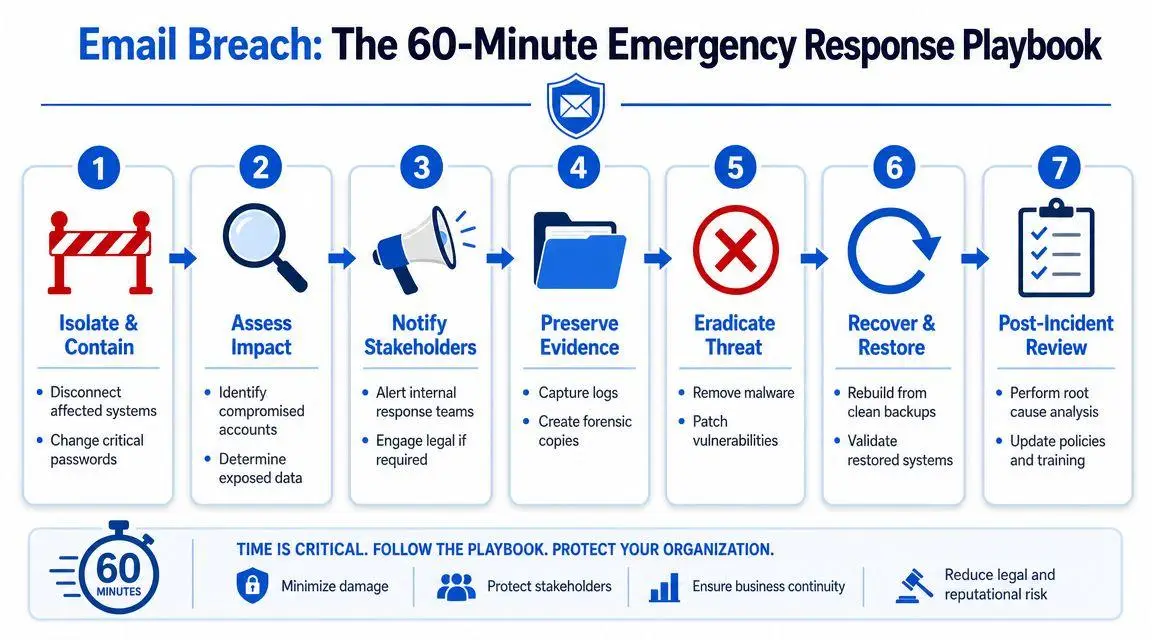
When an email account is breached, speed matters more than elegance. You are trying to contain access, preserve evidence, and stop expansion into banking, legal, payroll, travel, and social platforms. Don’t improvise.
The first moves
Start from a clean, separate device. Not the one you suspect is compromised.
- Isolate the affected device. Disconnect it from networks. Don’t keep working from it.
- Reset the compromised email password immediately. Then move to linked accounts that use that inbox for recovery or alerts.
- Revoke active sessions and connected applications. Kill every token you can.
- Lock down recovery settings. If an attacker changed backup channels, you need to reverse that before they regain entry.
These actions are not investigative. They are containment. Do them first.
Determine scope fast
After initial containment, identify what the attacker likely touched. Review sent items, deleted items, filters, forwarding rules, and login history. Check whether messages were exported, whether impersonation emails were sent, and whether financial or legal contacts received unusual instructions.
Use this quick triage table:
| Priority area | What to look for |
|---|---|
| Persistence | Forwarding rules, delegated access, connected apps |
| Impersonation | Messages sent to finance, staff, counsel, media, family |
| Data exposure | Attachments opened, archives downloaded, mailbox searches |
| Escalation | Password resets on banking, cloud, payroll, social accounts |
If finance, legal, or family-office contacts received unusual instructions, assume the incident has moved from privacy failure to active fraud risk.
Preserve evidence before people overwrite it
Executives often make the same mistake. They call everyone, everyone logs in, settings get changed repeatedly, and useful evidence disappears. Limit access to the response team. Record what was found, when it was found, and who touched the account.
Preserve screenshots, logs, timestamps, malicious messages, and any notice from the provider about unusual logins or policy actions. If litigation, extortion, insider misconduct, or public disclosure is possible, this documentation will matter.
Escalate in the right order
Once the account is contained, bring in the people who can prevent secondary damage:
- Technical response: To secure endpoints, identity systems, and mail settings.
- Legal counsel: To assess notification obligations, evidentiary handling, and exposure.
- Executive communications: To prepare tightly controlled outreach if counterparties or staff were targeted.
- Financial controls: To halt wire fraud or invoice redirection attempts.
A breach is rarely just an IT event. In a high-stakes environment, it becomes legal, reputational, and sometimes adversarial within minutes.
Erasing Leaked Data and Executing Takedowns
Containment is only half the job. Once emails, attachments, or contact data leak into the open, the next problem is public persistence. Search engines cache pages. Forums mirror them. Scraper sites replicate them. Gossip accounts repost them. If you wait, the leak hardens.
Email is now treated as a high-risk data channel for good reason. By early 2025, more than 20 U.S. states had enacted extensive consumer privacy legislation, and GDPR fines had exceeded €4 billion since May 2018, according to Usercentrics’ privacy statistics overview. The same source says €2.1 billion in GDPR fines were imposed in 2024, the average global cost of a data breach reached $4.62 million, up 12%, and personal customer information, including email addresses, appears in 44% of data breaches. If your email data is exposed, you’re not dealing with a niche embarrassment. You’re dealing with a recognized compliance and reputation risk.
Removal is not one action
People say they want content “taken down” as if that were a single button. It isn’t. There are separate tracks:
- Source removal from the website or platform hosting the material
- Search de-indexing so the material stops appearing prominently in search results
- Cache suppression for stale indexed copies
- Repeat-upload monitoring so the same files don’t reappear under slightly altered URLs
Those are different problems with different points of influence.
Use the right legal and practical levers
If the leaked material includes your original written content, attachments, or authored documents, copyright arguments may become relevant. If personal data appears in contexts covered by privacy laws, jurisdiction-specific privacy rights may apply. In some cases, direct negotiation with a webmaster is faster than formal legal process. In others, direct contact just alerts a hostile publisher.
At this juncture, knowledgeable readers refrain from attempting to DIY the entire matter. The work is part legal analysis, part evidence preservation, part platform process, and part search suppression strategy.
For a concrete look at what full removal work can involve, ContentRemoval offers online content removal options covering source takedowns, search de-indexing, and ongoing monitoring. That kind of service is relevant when a leak is already public and replication has begun.
Set realistic expectations
De-indexing from Google is not the same as deleting the source. Deleting one source does not erase mirrored copies. Removing a page today doesn’t mean screenshots disappear tomorrow. This is why privacy and email strategy has to include post-breach reputation management, not just technical cleanup.
Public exposure rewards speed. The first decisive response often determines whether a leak becomes a brief incident or a lasting search problem.
If the leak involves extortion, impersonation, intimate material, confidential deal documents, or false contextualization, bring in counsel and takedown specialists early. Delay gives third parties time to syndicate the material and convert a contained breach into a long-term reputation event.
Ongoing Vigilance and Strategic Realities
Even strong encryption doesn’t solve the full problem. Most consumer guidance treats privacy and email as a shopping exercise. Pick a secure provider. Turn on a few settings. Move on. That ignores the part skilled adversaries exploit.
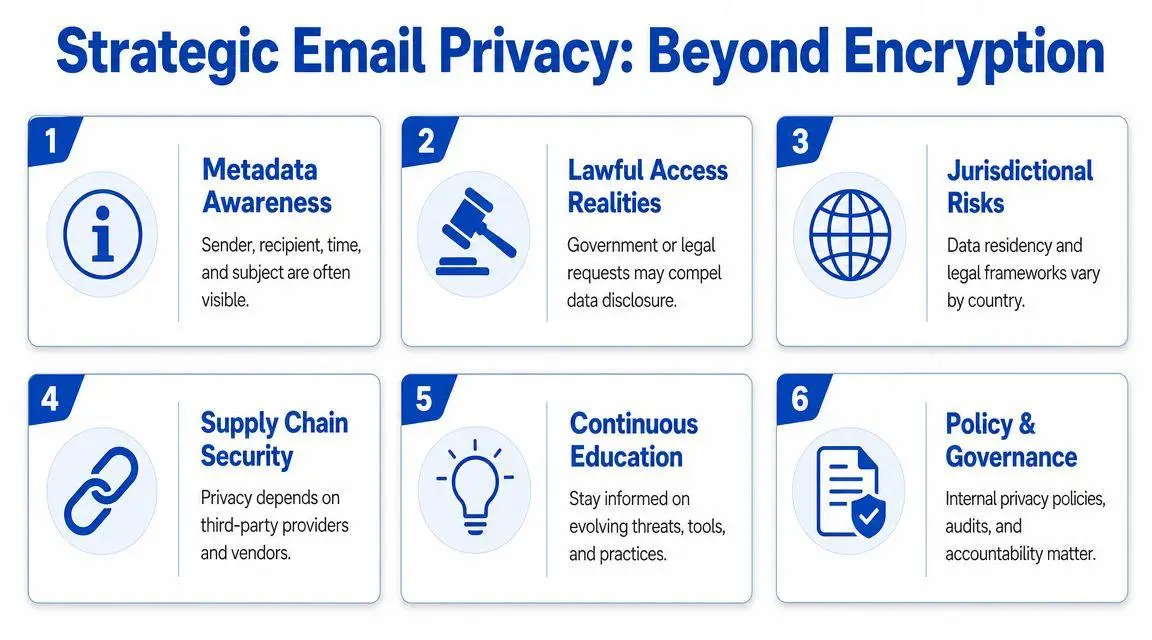
Email privacy is often less about who can read the body of a message and more about who can identify the relationship, compel provider disclosure, or analyze the communication pattern. As noted in this discussion of metadata and government access risks, the bigger gap is metadata and law-enforcement access. It points out that ECPA creates different access standards depending on how long email is stored, and that National Security Letters can compel subscriber data without judicial authorization.
Accept what remains visible
Content encryption does not automatically hide who contacted whom, when they contacted them, what subject line was used, or how often communication occurred. For executives, litigants, public figures, and cross-border families, that can be enough to create advantage, narrative, or investigative pressure.
This is why jurisdiction matters. Provider location matters. Data retention matters. Storage duration matters. Internal policy matters.
For organizations operating across regions, the compliance burden becomes more complex. A useful framing appears in this discussion of the critical business imperative for dual-compliance, which highlights how cross-jurisdiction privacy obligations can shape governance choices beyond the inbox itself.
Monitor continuously
Ongoing vigilance means looking beyond the mailbox. Track for leaked documents, spoofed accounts, search-result changes, dark-web mentions, and fresh references to your email addresses or domains in breach chatter. Watch executives, assistants, spouses, family-office personnel, and corporate aliases, not just the principal account.
That’s where reputation monitoring systems become operationally useful. They help identify when a private problem is becoming a searchable one, or when an impersonation campaign starts spreading before the target notices.
Run email as a standing risk program
Treat email the way serious security teams treat travel, physical access, and insider risk. That means written policy, delegated authority, audit routines, and rehearsed breach response. It also means knowing when convenience creates exposure.
Use a simple strategic lens:
- Infrastructure controls stop cheap attacks and impersonation.
- Encryption choices protect content only if the workflow is usable.
- Account hygiene reduces avoidable entry points.
- Incident response limits spread and preserves options.
- Takedown capability controls public fallout.
- Monitoring and legal awareness address what technical controls can’t hide.
Privacy and email never reach a finished state. They move between stable, exposed, and crisis conditions depending on how you operate.
If your inbox, leaked emails, impersonation issues, or exposed personal data have already become a reputational threat, ContentRemoval.com can assess the exposure confidentially and map a takedown, de-indexing, and monitoring strategy that fits the jurisdictions and platforms involved. For high-profile clients, the value isn’t generic advice. It’s fast containment, evidence-aware action, and a plan that reduces both visibility and reappearance.
Frequently asked questions
Is S/MIME or PGP better for an executive?
S/MIME usually suits a CEO, family office principal or legal executive inside a managed business environment because it fits enterprise certificate administration and recipient expectations. PGP gives more control but more room for user error, so choose based on what your staff and counterparties will operate correctly rather than on ideology.
What should I do first if my email account is hacked?
Start from a clean, separate device. Isolate the suspect device, reset the compromised password, revoke every active session and connected app, then reverse any changes to recovery settings. Only after containment should you review sent items, forwarding rules and login history to judge what was touched.
Can leaked emails be removed from the internet?
Often in part, but it is several tracks rather than one action: source removal from the hosting site, search de-indexing, cache suppression and repeat-upload monitoring. Copyright and jurisdiction-specific privacy rights can help, and speed matters because forums and scraper sites replicate leaks quickly.