Removing yourself from LinkedIn covers three separate problems. Content you control is deleted post by post from the Activity page, or wiped by closing the account under Settings and Privacy. Content posted by others can only be reported under a policy category such as impersonation or harassment. After closure, stale Google results are cleared with the Remove Outdated Content tool.
Key facts
- LinkedIn has no bulk delete for posts and comments; the only all-in removal path is account closure.
- Hibernation preserves the account and its data; only closure starts deletion, generally within 30 days.
- Company Page posts can be deleted only by a super administrator or content admin.
- Google’s outdated content request only works once the LinkedIn URL no longer resolves publicly.
Where ContentRemoval.com comes in. ContentRemoval.com handles the LinkedIn problems that sit outside your own settings: the impersonation account, the leaked document, the defamatory post LinkedIn declined to act on, and the closed profile that keeps ranking in Google months later. Executives, founders and their communications or legal advisers usually make contact after a report has been rejected. A free, confidential 15-minute Exposure Scan maps what is removable and by which route, and the report is yours to keep. Get a Free, Confidential Exposure Scan or read how our LinkedIn content removal work is done.
You search your name, and the LinkedIn result is still there. Maybe it’s an old profile. Maybe it’s a current one exposing more than you intended. Maybe someone else posted something that pulls your name into a mess you didn’t create. When the stakes are professional, legal, or personal, casual advice is worthless. You need a removal strategy that matches the threat.
Individuals asking how to remove from LinkedIn are dealing with one of three problems. They want to erase content they control. They need harmful third-party content taken down. Or they need their profile and related traces removed not just from LinkedIn, but from Google and connected systems that keep resurrecting old data. Those are different problems. Treating them as one is how executives waste days and leave the genuine exposure untouched.
Assessing the Damage and Defining Your Objective
Panic produces bad decisions. A board member sees a damaging comment. A founder discovers a dormant profile ranking in Google. A family office principal finds personal contact details more visible than expected. The instinct is to start deleting at random. That usually strips away evidence, preserves the wrong assets, and leaves search results intact.
Start with a harder question. What exactly are you trying to remove? The answer determines whether you should delete, report, de-index, or escalate.
Three distinct removal problems
A useful framework looks like this:
| Situation | What you can control directly | What requires outside action |
|---|---|---|
| Your own profile, posts, and media | Edit, delete, close account, adjust visibility | Search engine cache removal, app permission cleanup |
| Someone else’s post about you | Very little | LinkedIn reporting, legal pressure, platform escalation |
| Fake profile or impersonation | None at the source level | LinkedIn trust and safety review, evidence package, possible legal action |
If your goal is total invisibility, deleting a few posts won’t solve it. If your goal is removing one defamatory post, closing your account may be a dramatic and counterproductive move. If the threat actor is an impersonator, tweaking privacy settings is cosmetic.
Practical rule: Define the end state before touching the account. “I want this post gone” and “I want my name out of search results” are not the same assignment.
Many high-profile people misjudge the situation. They confuse platform cleanup with reputation protection. The first is mechanical. The second is strategic. If your concern extends beyond LinkedIn’s interface and into public perception, search visibility, or professional fallout, it helps to think in terms of mastering your brand reputation rather than chasing isolated symptoms.
The objective decides the method
Use this decision logic:
- Remove a specific asset you own if the issue is a post, article, comment, or media file you published.
- Close the account if you want your entire LinkedIn footprint removed and you’re willing to lose the account itself.
- Report and document if the content belongs to someone else.
- Pursue de-indexing if Google still displays a deleted or outdated LinkedIn result.
- Escalate legally if the content causes material harm and the platform won’t act.
That distinction is the difference between a clean outcome and a public mess that lingers.
Immediate Actions for Content You Control
If you control the content, act immediately. LinkedIn gives you direct tools for posts and account closure, but it does not give you elegant, bulk removal controls. That means speed matters, and precision matters more.
Remove posts and account assets first
For content you personally authored on a LinkedIn profile, the platform’s process is straightforward. To permanently remove a post, go to your Activity page, open the Posts tab, find the post, click the More icon, and choose Delete post before confirming permanent removal, as LinkedIn explains in its post deletion instructions.
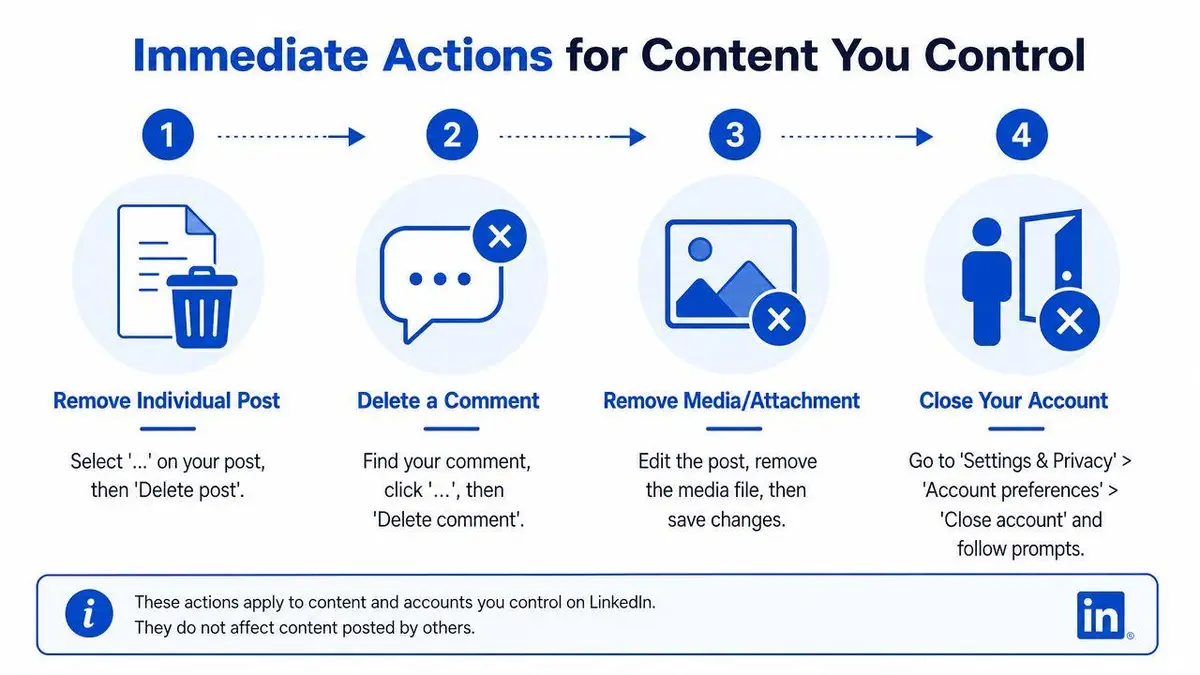
That solves one asset at a time. It doesn’t solve the account.
If you want a complete wipe, LinkedIn’s own account management path is the decisive option. The platform does not offer a bulk-delete feature for all comments and posts while preserving the account. The only all-in removal path is account closure, which LinkedIn describes in its account closure guidance.
Closing a personal profile the right way
The personal-profile closure workflow is not complicated, but people still botch it. The deletion sequence requires seven actions: log in, go from the Me icon to Settings and Privacy, select Account Preferences, click Close Account, confirm, choose a reason, and re-enter your password to finalize the deletion. According to this LinkedIn account removal walkthrough, the process is irreversible within 24 hours.
The step that matters most is the last one. If you don’t complete the password re-entry, the closure can fail.
Don’t assume that getting to the final screen means the account is gone. Verify the closure was completed.
If you need a separate strategic framework for shutting down old digital accounts more broadly, this account removal resource gives the subject the seriousness it deserves.
Hibernation is not removal
LinkedIn distinguishes between hibernating and closing an account. Hibernation preserves the account and its data. Closing the account starts deletion. If your instruction to your team is “remove me from LinkedIn,” hibernation is the wrong move.
LinkedIn states in its privacy help documentation that data is generally deleted within 30 days of account closure, subject to specific retention exceptions. That’s the operative timeline for actual removal from the platform, not for cosmetic invisibility.
Company Pages are a different problem
Personal profiles and LinkedIn Pages should never be treated as the same asset class. For Pages, administrative roles control what can be deleted. LinkedIn states in its Page post deletion guidance that only a Page super administrator or content admin can remove Page posts.
For the Page itself, the public-facing option is Deactivate Page inside Page Admin View. That removes visibility, but strategic review is essential before anyone clicks it because business history, followers, and brand continuity are involved. Don’t let a rushed junior admin “clean up” a company asset without authority and a documented decision.
Removing Third-Party Content and Malicious Profiles
The rules change the moment the content isn’t yours. You can’t delete someone else’s post because it harms you. LinkedIn won’t give you that power, and it shouldn’t. Your influence comes from reporting, evidence, and alignment with platform policy.
What LinkedIn actually lets you do
For content posted by another user, the available action is to report it. LinkedIn’s process requires you to click the More icon on the content and select Report, which triggers internal review based on community reporting volume and policy violations, as described in this reporting example on LinkedIn.
That means one thing: your report must be built like a case file, not a complaint.
A vague report saying “this is damaging” is weak. A report that identifies impersonation, privacy exposure, harassment, or unauthorized use of intellectual property is far stronger because it maps to a policy category LinkedIn can act on.
Build the report before you click submit
Collect the evidence first. Preserve screenshots. Copy the profile URL. Save timestamps. Note whether the content reveals confidential information, copies your identity markers, or uses your company name or headshot in a misleading way.
Use a simple evidence standard:
- Identity proof if the issue is impersonation. Government-issued identification is often handled outside the platform, but internal reports still benefit from matching name, role, photo, and official web presence.
- Ownership proof if someone copied your original material.
- Context proof if the content is defamatory or misleading. LinkedIn reviewers respond better to clear contradiction than emotional argument.
- Harm statement that explains what the content causes professionally. Keep it factual.
If someone is impersonating you or an executive in your organization, a more detailed response plan is necessary. This strategic guide for handling impersonation online is the right frame for that problem.
The strongest report is the one that makes the reviewer’s job easy. Show the violation. Don’t narrate your outrage.
Manage expectations
LinkedIn’s reporting system is a gatekeeping mechanism, not a concierge service. Some valid reports are rejected. Some are delayed. Some harmful posts stay live longer than they should because the issue is framed poorly or the evidence package is thin.
That is why executives should separate platform remedy from final remedy. Platform remedy means LinkedIn might act. Final remedy means the content is neutralized across search, screenshots, reposts, and related accounts. Those are different thresholds.
When the issue involves a fake account, a leaked confidential document, or a coordinated smear, don’t confuse the “Report” button with an enforcement system strong enough to solve everything. It’s an opening move, not a complete strategy.
The De-Indexing Imperative for Lingering Profiles
Deleting a LinkedIn account is not the end of the problem. It’s the beginning of a second problem that most advice ignores.
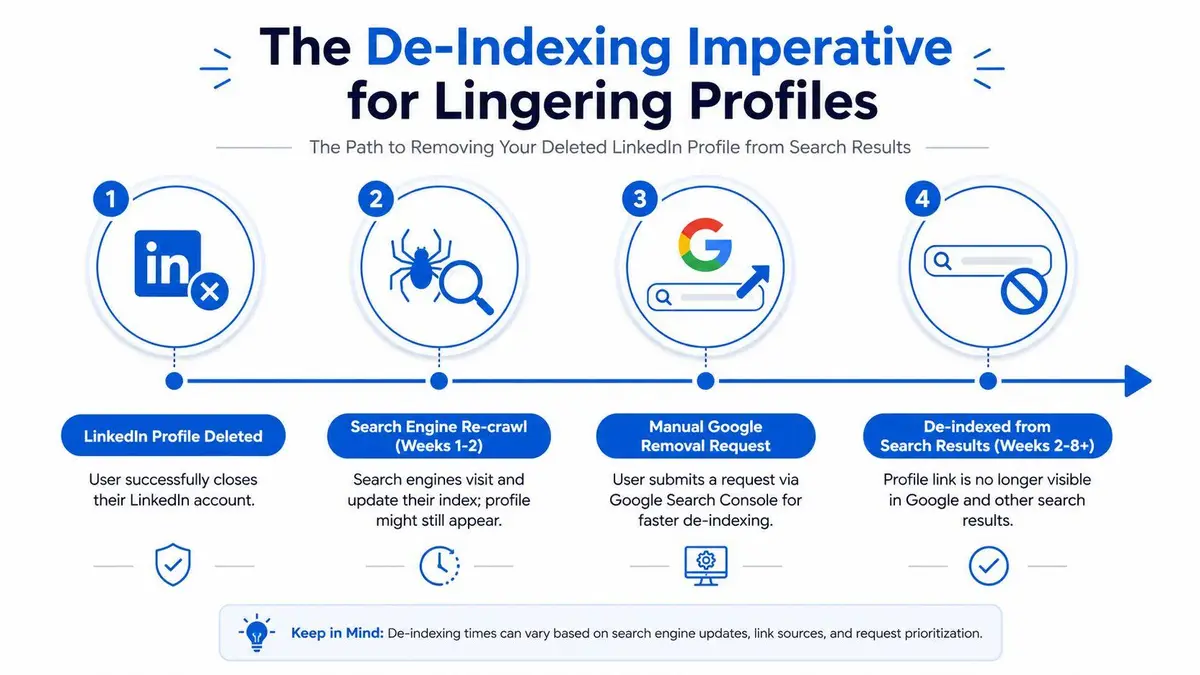
Google and other search engines don’t instantly forget what LinkedIn has already shown them. They cache. They re-crawl on their own schedule. They keep stale result pages alive long after a user believes the source is gone. For a public-facing executive, that lag can be the difference between successful cleanup and an embarrassing false impression that keeps surfacing in investor, media, or client searches.
Why deleted doesn’t mean invisible
This is the blind spot. Google’s own removal tool data shows that 70% of outdated LinkedIn profiles remain indexed for 6 to 12 months post-deletion, according to this Google support thread on removing LinkedIn profiles from search.
If your objective is privacy, reputation recovery, or discreet withdrawal from public view, that persistence matters more than the account closure itself. Your old profile may be gone at the source and still visible where decision-makers search.
Here is a practical explainer on the search-side issue:
What to do after deleting the profile
Use Google’s Remove Outdated Content process if search results still show the old LinkedIn page or cached snippet. The request only works when the content has changed or disappeared at the source, which is why account closure must happen first.
A disciplined process looks like this:
- Confirm the LinkedIn URL is dead by checking whether the profile no longer resolves publicly.
- Copy the exact outdated search result URL as it appears in Google.
- Submit a removal request through Google’s outdated content tool and follow the status prompts.
- Monitor the result over time because one removal request doesn’t guarantee every cached variant disappears at once.
If de-indexing is new territory for your team, this strategic guide to de-indexing explains the difference between source removal and search result removal clearly.
Search engines are not archival footnotes. They are the public front door to your reputation.
Watch the timeline, not just the platform
Even after the source is removed, search engines may take time to refresh. That delay is why experienced reputation advisors treat LinkedIn removal as a two-part operation. First, remove or close at the source. Second, de-index what lingers.
If you skip the second half, you haven’t finished the job. You’ve only made yourself feel better inside the dashboard.
Advanced Removal and Legal Escalation Pathways
Some LinkedIn problems are not platform problems. They are legal problems appearing on a platform.
If the issue involves stolen content, extortion, impersonation tied to fraud, confidential corporate material, or statements that create measurable professional harm, self-service tools stop being adequate. You need escalation. Not because it sounds aggressive, but because weak action teaches bad actors that you’re easy to ignore.
When reporting fails
A failed report doesn’t mean the claim lacks merit. It often means the platform doesn’t want to adjudicate nuance, or the violation sits in a category where the burden shifts back to the injured party.
That’s where legal instruments matter.
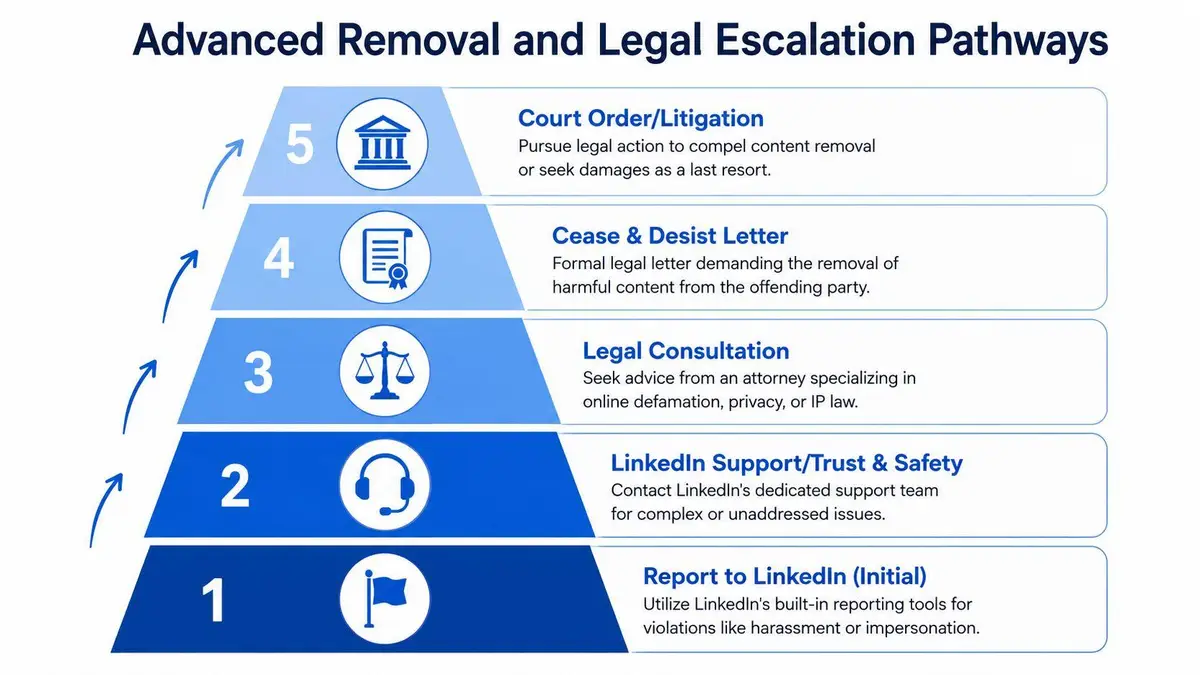
A practical escalation ladder looks like this:
- Platform report first. Build the policy-aligned complaint and preserve records.
- Trust and safety follow-up. Where available, escalate with a more formal evidence package.
- Copyright route. If someone reposted material you own, a DMCA-style takedown path may be stronger than a general abuse report.
- Cease-and-desist letter. Use this when a person or entity is identifiable and the conduct is ongoing.
- Court order. This becomes relevant when the harm is severe, the facts are strong, and voluntary removal is unlikely.
The hidden persistence problem
Even after account closure, connected systems can keep parts of your footprint alive. One of the most overlooked examples involves Microsoft account connections. According to Microsoft-linked guidance, 45% of LinkedIn users unknowingly leave data-sharing permissions active with Microsoft after closing their account, which can contribute to profiles reappearing in search results, as discussed in Microsoft’s account disconnection instructions.
That issue changes the strategy. Removal isn’t just about LinkedIn’s interface. It’s also about severing the external permissions and data pathways that preserve your visibility after you think you’ve left.
If an executive profile keeps resurfacing, assume there’s a systems problem, not just a content problem.
Know when to stop doing it yourself
The wrong instinct at this stage is DIY persistence. Executives often spend too long filing repeat reports, sending emotional messages, or experimenting with half-understood legal templates. That usually creates a bigger record without producing a clean removal.
Use legal counsel or specialized reputation professionals when any of the following are true:
| Trigger | Why self-help becomes weak |
|---|---|
| Impersonation tied to fraud or investor confusion | Identity misuse may require formal documentation and rapid escalation |
| Confidential business material is exposed | Preservation, notice, and legal positioning matter |
| Copyrighted content was copied | Ownership claims need precision |
| False statements are causing commercial harm | Platform moderation isn’t built to resolve complex defamation disputes |
At that point, speed and confidentiality matter more than experimentation.
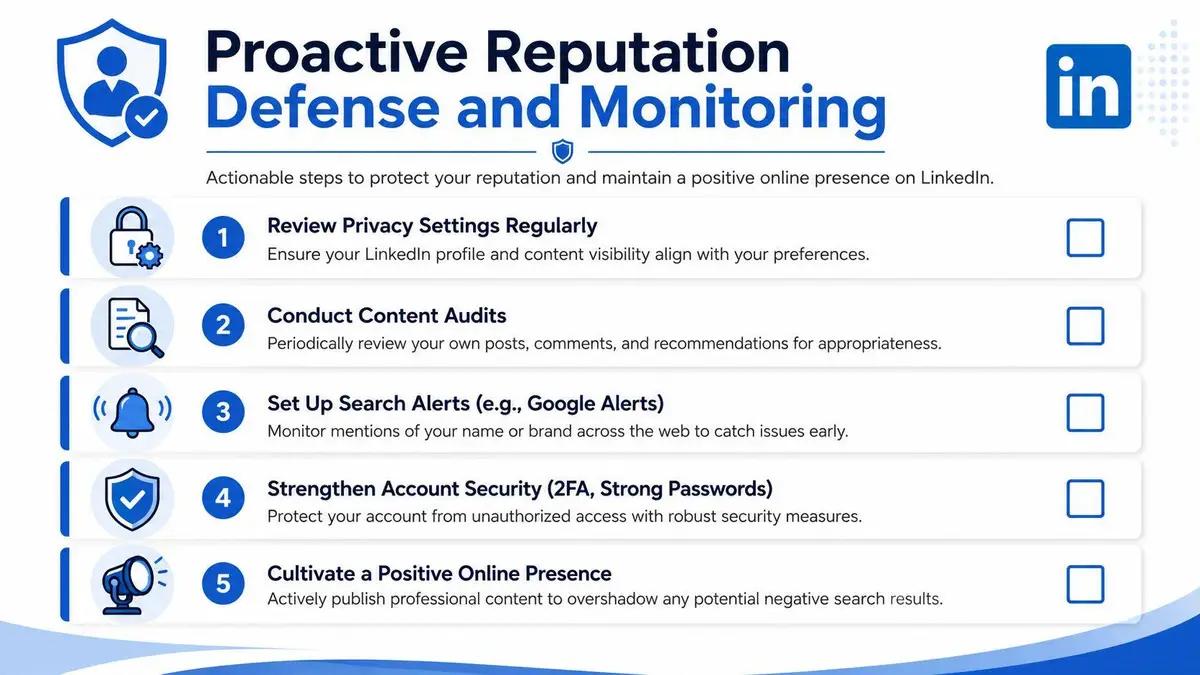
Proactive Reputation Defense and Monitoring
Removal is reactive. Serious reputation protection is preventive. Once the immediate threat is contained, your next job is reducing the chance that LinkedIn becomes a liability again.
LinkedIn’s own guidance makes the core problem clear. The platform’s default configuration makes profile information visible to everyone unless the user changes the settings, which LinkedIn itself describes as a privacy issue in its professional guidance on confidential information to exclude from profiles. If you haven’t hardened the account manually, you’re operating from a weak default.
Tighten visibility and data use settings
Start with the settings that directly reduce exposure.
- Limit profile visibility. Go into visibility controls and restrict what strangers can see.
- Strip unnecessary personal details. Remove home address, personal email, birthday, private phone numbers, and over-specific location references if they aren’t professionally necessary.
- Turn off AI training usage where available. In Data Privacy, deselect the option to use your data for training content creation AI models.
- Review job and profile materials. Old resumes, attachments, and legacy bio details often expose more than the current role requires.
These are not cosmetic edits. They shrink the attack surface.
Audit the profile like an adversary would
Most executives review a LinkedIn page as branding. They should review it as exposure. Check old recommendations, tagged media, comments left on public threads, and connections that create unnecessary visibility.
Use a recurring audit checklist:
- Past activity review. Remove old posts that no longer serve you.
- Connection discipline. A bloated network increases monitoring complexity and social engineering risk.
- Admin review for company assets. Confirm who has authority on Pages and what those permissions allow.
- Search monitoring. Watch branded searches so you catch stale results or new misuse early.
A polished profile photo also affects how your profile is perceived and reused. If you’re updating your presence after a cleanup, this guide to professional AI headshots is useful for rebuilding a controlled, professional visual identity without relying on outdated images already circulating online.
Control on LinkedIn doesn’t come from disappearing. It comes from deciding exactly what stays visible, to whom, and for how long.
Build a standing response plan
The strongest operators don’t improvise after the next incident. They maintain a response protocol. That means documented admin access, evidence preservation habits, regular profile audits, and a clear distinction between platform reports, search de-indexing, and legal escalation.
If you’re searching how to remove from LinkedIn under pressure, the actual objective isn’t just deletion. It’s control. Control over what exists, what ranks, what persists, and what can be acted on quickly when the next issue appears.
If your LinkedIn issue involves impersonation, leaked information, persistent Google indexing, or harmful content that won’t disappear through normal platform channels, ContentRemoval.com provides confidential assessments and execution-focused removal strategies for executives, public figures, and high-risk clients who need discreet, results-driven action.
Frequently asked questions
Why is my deleted LinkedIn profile still showing on Google?
Search engines cache and re-crawl on their own schedule, so a closed profile can stay indexed for months. Confirm the profile URL no longer resolves, copy the exact stale search result URL, submit it through Google’s Remove Outdated Content tool, and keep checking, since cached variants may not all disappear at once. Also disconnect any LinkedIn to Microsoft data-sharing permissions.
How do I get LinkedIn to remove a post someone else wrote about me?
You cannot delete it yourself. Click the More icon on the content and choose Report, then build the report like a case file: screenshots, profile URL, timestamps, and a clear match to a policy category such as impersonation, privacy exposure, harassment or unauthorized use of your material. Vague reports that the post is damaging are weak.
What is the difference between hibernating and closing a LinkedIn account?
Hibernation hides the account but keeps all its data on the platform. Closing the account begins deletion, which LinkedIn says is generally completed within 30 days subject to retention exceptions. If the instruction is to remove you from LinkedIn, hibernation is the wrong move.