A Google review not showing up is usually one of three problems: a moderation or indexing delay of 24 to 72 hours, an automated filter hiding the review from public view, or a profile issue such as an unverified, duplicate or recently edited listing. Diagnose it by checking whether the reviewer can still see the review while the public cannot.
Key facts
- Google removed over 170 million policy-violating reviews in 2023, and legitimate reviews can be delayed 24 to 72 hours.
- Visible to the reviewer but not the public points to filtering; invisible to everyone points to a listing problem.
- Do not edit the business name, category or address while a review is in limbo.
- Google’s own guidance is to confirm compliance, wait about 72 hours, then escalate through support.
Where ContentRemoval.com comes in. ContentRemoval.com handles review visibility problems that Google support loops cannot resolve, and the cases where missing legitimate reviews sit in the same file as persistent false or coordinated ones. We document the visibility state, audit the listing for duplicates and verification gaps, and escalate with evidence. Practice owners, marketing leads or general counsel usually make contact once the 72-hour window has passed. A free 15-minute Exposure Scan maps what is removable and the report is yours to keep. Get a Free, Confidential Exposure Scan or read how our review removal work is done.
A review was submitted. The customer saw the confirmation. Your team got the notification. Then the review never appeared on the public profile, or it vanished after briefly showing. That’s the moment most businesses make the wrong move. They panic, blame the reviewer, blame Google, or start changing the profile in ways that make the problem worse.
A missing Google review is not random. It’s a signal. The only useful response is diagnosis.
If you’re dealing with a Google review not showing up, stop treating every disappearance as the same problem. Some are ordinary moderation delays. Some are filter events. Some point to structural issues inside the Google Business Profile itself. The fix depends on which category you’re in. If you misread the symptom, you waste time, lose credibility with the reviewer, and create more instability in the listing.
Diagnosing the Disappearance of a Google Review
The pattern is usually easy to recognize. A loyal client leaves a strong review after a successful engagement. Your office checks the profile an hour later. Nothing. By the next morning, still nothing. Someone on your team suggests asking the client to post it again. Another wants to edit the profile. Both are bad instincts.
The right move is controlled diagnosis.
When businesses search for explanations, they often land on broad articles about Google reviews disappeared. That’s useful for context, but high-value situations require a narrower frame. You need to determine whether the review is delayed, filtered, or displaced by a profile issue. Those are three different problems with three different remedies.
A disciplined review-loss analysis starts with one premise. The review likely exists somewhere in Google’s system, even if it is not visible where you expect it to be. That distinction matters because the recovery path changes depending on whether the review is being processed, suppressed from public view, or tied to profile instability.
A missing review is rarely solved by improvisation. It is solved by proving where the failure occurred.
For businesses under pressure, reputation management isn’t abstract. A missing positive review can weaken trust at the exact moment prospects are comparing providers. A missing negative review can also create confusion if you were preparing a response strategy and the content suddenly goes out of sight. Both scenarios affect control.
That’s why professional online reputation work starts with evidence preservation and classification, not guesswork. If your broader concern is review visibility and brand perception, this perspective aligns with online reputation management for customer commentary. The review itself is only one asset. The profile’s credibility is the larger asset.
Initial Triage Common Causes for Review Delays
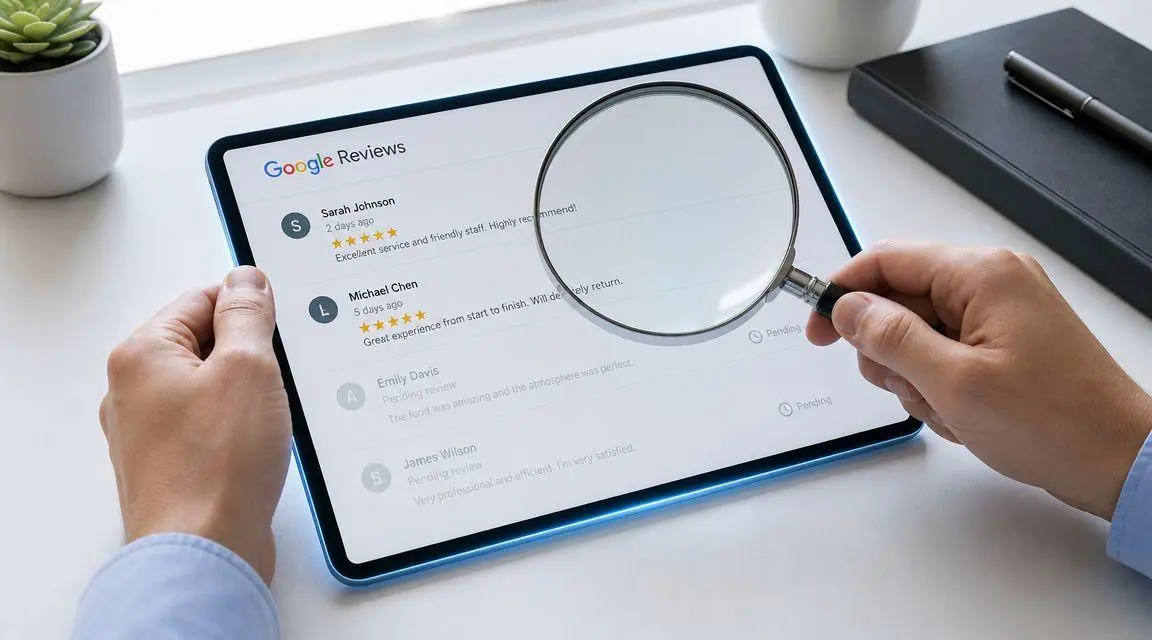
Most cases are less dramatic than they look. Before you assume removal, suppression, or sabotage, check the obvious operational reality. Google runs review moderation at massive scale. According to Local Impact’s explanation of missing Google reviews, Google removed over 170 million policy-violating reviews from Google Maps in 2023, and legitimate reviews can be delayed for 24 to 72 hours during automated moderation.
What ordinary delay looks like
A normal delay has a specific feel to it. The reviewer says they posted. The business may see a notification or dashboard count inconsistency. The public profile does not yet show the text. Nothing else about the listing appears broken.
That usually points to one of two things:
- Moderation hold. Google’s automated systems are checking the review for spam, policy issues, or suspicious signals.
- Indexing lag. The review exists, but Google has not synchronized the public-facing display yet.
Neither issue calls for aggressive intervention on day one.
What you should do in the first window
Use a short, controlled triage process:
- Confirm the posting time. If the review was submitted recently, don’t escalate immediately.
- Check public visibility manually. Look at the profile while logged out and on Google Maps, not only inside your account view.
- Avoid profile edits. Don’t change the business name, category, address, or other profile fields while a review is in limbo unless you already know there is a separate listing problem.
- Ask the reviewer for a screenshot. Not to challenge them. To establish whether the review exists in their account.
Practical rule: In the first review-delay window, your job is observation, not action.
What not to misread
A temporary delay does not prove the reviewer made an error. It does not prove the business was penalized. It also does not prove the review violated policy. Google’s anti-spam environment is broad, automated, and imperfect. Good reviews can get slowed down solely because the systems are cautious.
Use this quick triage table:
| Symptom | Likely explanation | Best immediate response |
|---|---|---|
| Reviewer says it posted, public can’t see it yet | Moderation or sync delay | Wait and monitor |
| Dashboard and public display don’t match | Display lag or profile sync issue | Check again later in public view |
| Review disappears shortly after posting | Automated filtering review cycle | Preserve evidence, don’t resubmit immediately |
If the review remains missing after that initial period, the case stops being simple. Then the next distinction becomes decisive.
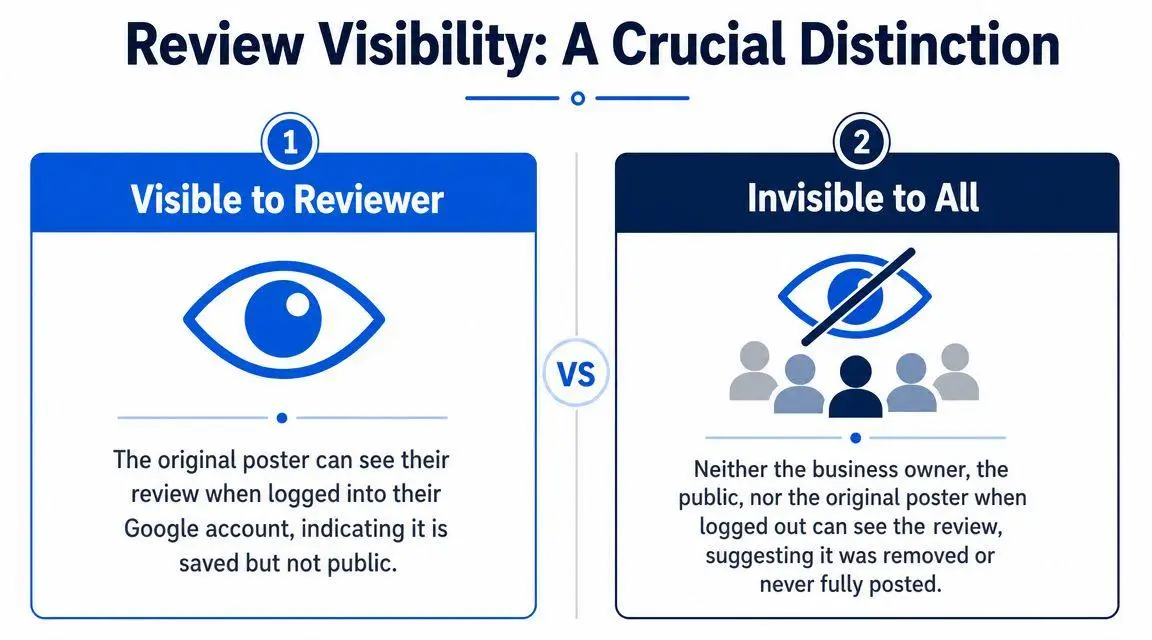
A Crucial Distinction Visible to Reviewer vs Invisible to All
This is the fork in the road. If you get this wrong, every step after it is wasted.
Visible to reviewer
When the original reviewer logs into their Google account and can still see the review, but the public cannot, the review usually exists. It has not vanished. It is being filtered from public display.
That scenario is not minor. It tells you the problem is likely on the review visibility layer, not the business profile layer. Birdeye’s breakdown of review visibility issues notes that this “visible to sender, invisible to public” pattern is a key sign of moderation or filtering rather than a duplicate-listing or verification problem, as explained in Birdeye’s review visibility analysis.
Common signs include:
- Reviewer has the review in account history
- Business never sees it publicly
- Searching in a logged-out browser shows nothing
- Other profile functions appear normal
In plain terms, Google stored the submission but did not trust it enough to show it publicly.
A short visual explanation helps if you need to align internal teams or calm a frustrated client.
Invisible to all
If the reviewer cannot see the review when logged in, and nobody else can see it either, the analysis changes. At that point, you are no longer dealing with a simple visibility filter. You may be dealing with a failed submission, wrong-business posting, profile confusion, or a listing-level problem that diverted the review.
Businesses often waste days chasing content issues when the problem is structural.
Use this comparison:
| Review state | What it usually means | Where to investigate |
|---|---|---|
| Visible to reviewer only | Review exists but is filtered or held | Review content, reviewer trust signals, moderation |
| Invisible to everyone | Review was removed, never fully published, or attached incorrectly | Listing health, duplicate profiles, submission target |
How to test it correctly
Don’t rely on one screenshot from one device. Test the review in three conditions:
- Reviewer account view. Ask the reviewer whether they can see the review while signed in.
- Public incognito view. Search the business in an incognito window and inspect the reviews.
- Google Maps view. Some display inconsistencies show more clearly there than in cached search results.
If the reviewer can see the review and the public cannot, stop diagnosing the business profile first. Diagnose the filter first.
That single distinction prevents the most common mistake in these cases: changing profile settings or opening support tickets that never address the underlying issue.
Systematic Troubleshooting for Profile-Level Errors
When the review is gone for everyone, stop scrutinizing the review text and start auditing the profile. During this audit, many businesses discover they don’t have a review problem. They have a profile integrity problem.
According to NiceJob’s guidance on reviews not showing publicly, a business should wait about 72 hours, ensure the listing is verified, and check for the review in an incognito browser window before escalating. That same guidance notes that recent name changes, merged listings, and verification issues can cause reviews to disappear from public view.
Start with profile verification and visibility checks
If the profile is not verified, or if verification was disrupted after a business edit, review visibility becomes unstable. That instability doesn’t always present as a warning banner. Sometimes the symptom is only missing reviews.
Your first audit should answer these questions:
- Is the listing verified right now
Not “was it verified last year.” Right now. - Were there recent edits
Name, address, category, phone number, and location updates can trigger review or display disruption. - Does the review appear in incognito or Maps
Internal account views are not enough.
Then hunt for duplicate or merged listings
Duplicate profiles are one of the most damaging and least understood causes of review loss. Reviews may attach to an older listing, remain stranded on a duplicate, or become less visible during a merge.
Look for:
- Old addresses
- Former business names
- Auto-generated listings
- Profiles controlled under another Google account
- Merged locations in multi-office organizations
If any of those exist, your review may not be missing. It may be sitting on the wrong version of the business.
Clean profile architecture matters more than most businesses realize. Google trusts stable entities, not messy ones.
Audit NAP consistency with discipline
Name, address, and phone consistency still matter because they affect listing trust. If the profile conflicts with your website, key directories, or prior business data, Google may struggle to treat the listing as one coherent entity.
A practical audit matrix looks like this:
| Profile issue | Why it matters | Corrective action |
|---|---|---|
| Unverified listing | Public display can be unstable | Complete or restore verification |
| Recent business edits | Google may reprocess listing data | Pause further edits and monitor |
| Duplicate listing | Reviews may attach to the wrong profile | Identify, claim, and consolidate |
| Inconsistent NAP data | Trust signals become fragmented | Align business details everywhere |
What businesses should not do
Don’t create a new profile because the old one looks unreliable. Don’t ask the customer to keep reposting the same review. Don’t keep editing categories and names to “refresh” the listing. Those moves often compound confusion.
At this stage, precision wins. One stable profile. One verified entity. One consistent identity across your digital footprint.
When to Suspect Advanced Filtering or Systemic Issues
Some cases survive every normal fix. The profile is verified. There are no obvious duplicates. The review came from a real customer. The reviewer can sometimes post, but text-based reviews fail while minimal submissions behave differently. That is when you should suspect a false positive filter event or a broader technical problem.
LocalU has discussed a pattern where Google’s review filter appears more aggressive and, at times, unstable, including situations where star-only reviews post but text reviews do not. That dynamic is outlined in LocalU’s discussion of missing and filtered reviews. This is not the same as ordinary moderation delay. It suggests the filtering layer may be overreacting to signals that are not visible to the business.
The signs that point beyond basic moderation
Watch for these patterns:
- Legitimate customer reviews remain hidden despite a clean profile
- Text-heavy reviews fail while simpler versions post
- Several reviewers report the same issue in a similar time frame
- The profile looks healthy, but review visibility is erratic
Those are not ordinary user mistakes. They are signs that Google’s trust systems may be suppressing valid submissions.
Why this matters in high-stakes settings
For a business with low review volume or a reputation-sensitive practice, one missing review can distort public perception. If the review was detailed, credible, and recent, its absence changes how prospects assess the business. In regulated professions, advisory firms, high-value service businesses, and executive-facing brands, that absence can matter more than the average local merchant realizes.
In such situations, simplistic advice becomes useless. “Ask for another review” doesn’t solve a faulty filter environment. It may generate more failed attempts and make the pattern look even stranger.
A legitimate review can be filtered without any misconduct by the customer or the business. Treat that as a systems problem, not a moral one.
If you are dealing with reviews, removals, and policy boundaries at the same time, it helps to understand Google’s removal policy framework. Not because every hidden review is removable content, but because review visibility and enforcement operate under the same trust-and-safety logic. Once you’re in that territory, clean troubleshooting gives way to platform interpretation.
Escalation Paths From Google Support to Professional Intervention
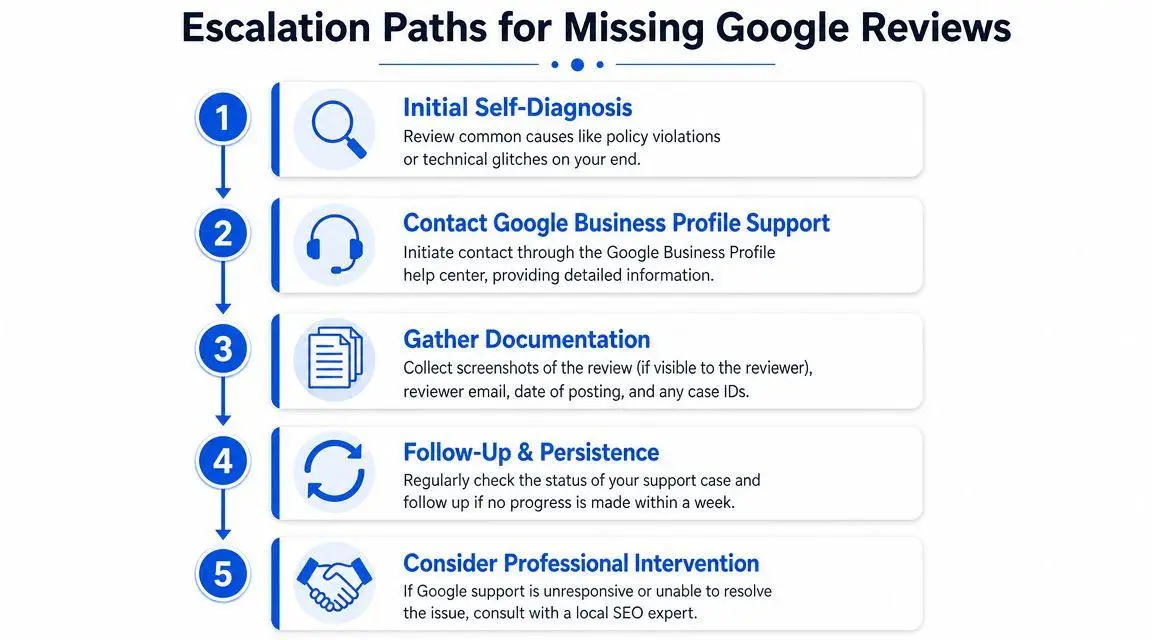
Once you have ruled out ordinary delay, confirmed the visibility state, and audited the profile, escalation becomes appropriate. But it should be done in sequence. Random outreach wastes time.
Google’s own support approach, summarized in Google Business Profile guidance on missing reviews, is straightforward: confirm policy compliance, wait for moderation delays to pass, and escalate after about 72 hours if the review still does not appear. That same guidance makes the hidden problem clear. Duplicate listings and unverified profiles often block resolution before support even reaches the missing-review issue.
What to gather before you contact Google
Support cases fail when they are vague. Prepare evidence first:
- Reviewer proof. Screenshot of the review if visible in the reviewer’s account.
- Submission details. Approximate posting date and whether the review included text, stars, or edits.
- Profile evidence. Screenshots from public view, incognito view, and Google Maps view.
- Listing history. Any recent merges, name changes, address edits, or verification events.
When self-help stops being efficient
There is a point where DIY stops being responsible. That point arrives when the missing review is tied to larger reputational risk, when multiple reviews are involved, when the profile has a history of instability, or when a negative-review dispute overlaps with a hidden-review problem.
In executive and high-value brand settings, time matters. So does precision. You may also need a broader strategy if the issue is mixed with review abuse, impersonation, defamation, or platform-level inconsistency. In that context, a tactical understanding of how to remove a review from Google Maps strategically becomes relevant because missing legitimate reviews and persistent harmful reviews often appear in the same reputation file.
The practical trigger points for professional intervention
Bring in professional help when any of these are true:
- The review loss is affecting trust at a critical business moment
- Google support loops without resolving the underlying listing issue
- You suspect coordinated review manipulation
- The case touches legal exposure or defamatory material
- You need documentation, escalation discipline, and discretion
Google support is designed for volume. High-stakes reputation work is not.
If you’re dealing with a Google review not showing up and the usual advice isn’t resolving it, ContentRemoval.com handles these matters the way high-risk reputation issues should be handled: confidentially, methodically, and with evidence. For executives, brands, and high-net-worth clients, the value isn’t generic support. It’s a confidential assessment, a clear diagnosis, and a focused action plan that addresses the underlying failure point before more reputational damage sets in.
Frequently asked questions
How long does it take for a Google review to appear?
Legitimate reviews are often delayed 24 to 72 hours while Google’s automated moderation checks them for spam and policy signals. Confirm the posting time, check the profile logged out and on Google Maps, and avoid escalating or asking the reviewer to repost within that first window.
Why can the reviewer see their Google review but nobody else can?
That pattern means the review exists but Google’s filter has withheld it from public display. It is a review visibility problem rather than a profile problem, so diagnosing the filter comes first. Attached photos, unusual posting patterns and low-trust reviewer accounts are common triggers, and star-only reviews sometimes post when text versions do not.
Can a duplicate Google Business Profile cause reviews to disappear?
Yes. Reviews can attach to an older listing, remain stranded on an auto-generated duplicate or lose visibility during a merge. Check for old addresses, former names and profiles under other Google accounts, then claim and consolidate rather than creating a new listing.