
You can no longer find Google cached pages: Google retired the cache link and the cache: operator in early 2024. The professional replacement is the Internet Archive’s Wayback Machine, searched by exact URL across multiple snapshots around the relevant date, backed by Archive.is where captures are thin, with the archive URL, visible timestamp and full-page screenshots preserved immediately.
Key facts
- Google removed the SERP Cached link in February 2024 and now points users toward the Wayback Machine.
- An archived snapshot may load live assets, so it is not automatically a sealed, self-authenticating record.
- A web archive capture is not proof of what Google indexed at a given moment.
- Site owners can use Search Console URL Inspection; everyone else must expand to mirrors, syndications and quoted fragments.
Where ContentRemoval.com comes in. ContentRemoval.com works with the archive record once it has been located: preserving it properly, assessing what it proves, then pursuing source removal, refreshing or removing outdated Google traces, and evaluating whether archive copies themselves can be limited. Counsel, an executive’s chief of staff or a crisis team usually makes contact when a page has changed or vanished mid-dispute. A free 15-minute Exposure Scan maps what is removable and the report is yours to keep. Get a Free, Confidential Exposure Scan or read how our search result removal work is done.
Google removed its public cache feature in early 2024, and the cache: operator no longer works. If you need to find Google cached pages now, the professional standard is to use the Wayback Machine and related archive workflows instead.
Most advice on this topic is already obsolete. You’ll still find articles telling you to click “Cached” in Google results or type cache:example.com into the search bar, but that guidance belongs to a retired product, not to the web as it exists now. If you’re under pressure to verify a defamatory post, capture a leaked profile, confirm what a page said before it changed, or preserve evidence before a takedown, chasing dead instructions wastes time you may not have.
The right question isn’t “how do I find Google cached pages?” The right question is: what is the fastest defensible way to retrieve a historical version of a page now that Google’s native cache is gone? That shift matters. Casual SEO users can tolerate trial and error. Lawyers, executives, family offices, and crisis teams can’t.
The End of an Era for Google Cache
The phrase find Google cached pages used to describe a simple task. It no longer does. Google’s visible cache access ended in 2024, and support discussions now reflect the reality that users “can’t access cached pages from google search results,” as summarized by CachedView’s discussion of the discontinued feature.
That change broke a habit people had built over years. For publishers, investigators, and reputation counsel, Google Cache had been a quick way to check what Google last saw. It was built into search behavior. You searched a page, opened a small menu beside the result, and checked the snapshot. That workflow disappeared almost overnight.
Why this matters in high-stakes work
If you’re dealing with a reputational attack or disputed publication, timing controls the outcome. A page can change between the moment your team spots it and the moment counsel reviews it. A client may insist content was live yesterday and gone today. A journalist may update language after receiving a complaint. In those moments, “Google probably has a copy” is no longer a workable assumption.
Practical rule: Stop treating Google Cache as a recovery method. Treat it as a retired reference point.
The useful reframing is simple. You are not trying to recover a “Google cache” anymore. You are trying to establish a historical web record from the strongest available source, then preserve that record in a way that survives scrutiny.
What professionals should do instead
A modern protocol starts with third-party archives, led by the Wayback Machine. It also requires discipline about what an archived snapshot proves, what it doesn’t prove, and how to capture it properly before the live page changes again.
For routine checks, that means searching archives directly. For legal and reputation matters, it means building an evidence trail: archived URL, capture date, visible timestamp, source archive, screenshots, and a local preservation copy. That’s the difference between curiosity and case preparation.
Understanding the Obsolete Cache Operator
If you already tried the old methods and they failed, that wasn’t user error. The tool itself is gone.
Historically, there were two standard ways to access Google’s cached copy of a page. The first was inside Google Search. You’d run a normal search, find the result, open the drop-down or three-dot menu next to it, and choose the cached snapshot. The second was direct and even faster. You’d type cache: followed by the page URL into the browser or search bar.
How the legacy workflow worked
That older process was widely documented, and it mattered because the snapshot reflected Google’s last crawl rather than the live page. D3 Digital Media’s guide to the legacy method describes the now-obsolete workflow using the cache: operator or a search-result menu to view a page from Google’s last crawl.
A simplified version looked like this:
- Search the page normally. Enter the brand name, article title, or exact URL in Google.
- Open the result menu. Use the drop-down arrow or three-dot panel associated with the result.
- Select the cached copy. Google would display the last indexed snapshot if it was available.
- Use
cache:as a shortcut. Typingcache:example.com/pageoften took you straight to the snapshot.
That process used to be valuable for one reason above all others. It let you compare what Google had indexed against what the live page currently showed. That was useful for spotting deleted text, altered headlines, missing images, or delayed index updates.
Why it failed even before retirement
Google Cache was never perfect. Some listings didn’t show the option at all. Some snapshots were incomplete. Some pages displayed with elements that did not behave like a frozen archival record. Anyone who worked with it seriously knew it was convenient, not authoritative.
A cached view was always a shortcut, not a forensic endpoint.
That distinction matters because many professionals still assume the old cache was a fully preserved copy. It wasn’t. It was a snapshot tied to Google’s crawling systems, with uneven availability and limited controls for evidence preservation.
What to take from the old method
There’s still one useful lesson in the legacy workflow. It trained people to think in terms of crawl timing. If Google had a page in cache, you could infer that Google saw it in a certain state at a certain point. That mindset remains valuable, but the tools have changed.
Use this as your line in the sand:
| Legacy method | Status now | Professional replacement |
|---|---|---|
cache: operator | Retired | Wayback Machine and other archives |
| SERP “Cached” link | Removed | Archive lookup plus local evidence capture |
| Quick index-time visual check | No longer native in Google | Archive review and, for site owners, Search Console inspection |
If your team still has internal playbooks that mention cache:, update them. If outside counsel or vendors still send those instructions, push back. They’re relying on a workflow that no longer exists.
The Current Standard for Accessing Web Archives
The operative replacement is the Internet Archive’s Wayback Machine. After removing its own cache link in February 2024, Google began surfacing the Wayback Machine as an alternative through result-detail pathways, a shift described in SE Ranking’s analysis of Google’s cache removal.
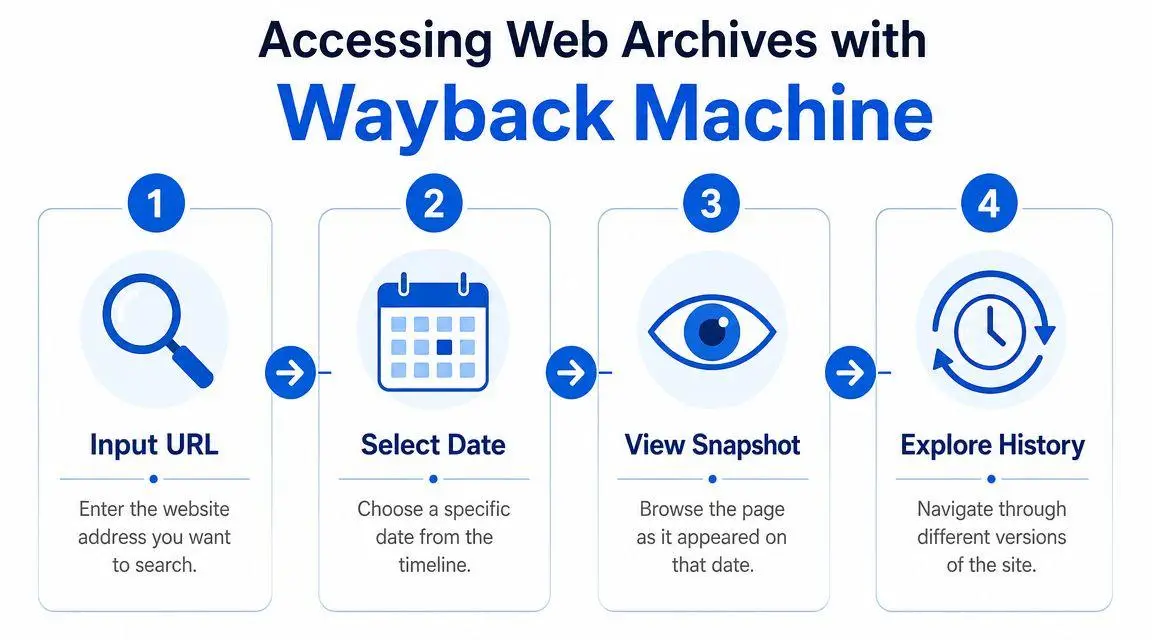
If you need to find past web content now, this is the first tool to use. Not because it’s perfect, but because it has become the default public archive for this task.
The working protocol
Use a structured process. Random searching wastes time and misses versions.
- Start with the exact URL if you have it. A direct page URL is better than a homepage, better than a brand query, and better than a page title. Archived systems index URLs, not your memory of what the page probably was.
- Search the URL in the Wayback Machine. If the page exists in the archive, you’ll see a timeline and date interface. Don’t just click the newest version. Check the period when the harmful or relevant content was likely live.
- Open multiple snapshots around the target date. One archived copy rarely tells the whole story. Look before, during, and after the date that matters. This helps you determine whether the content appeared once, stayed live, or was edited.
- Record the archive URL and visible date immediately. Save the archive link, capture screenshots, and note the date shown by the archive interface. Don’t assume you’ll be able to relocate the exact same view quickly under pressure.
For related reputation investigations, this often pairs well with a broader review of how to find archived private information, especially when the concern involves old biographies, data exposure, or stale contact details resurfacing in search.
How to search when you don’t know the exact page
In such instances, many professionals lose time. They know the article existed, or they know an impersonation page once appeared, but they don’t have the exact URL. In that situation, work backward.
- Check the domain structure first. News sites, review platforms, and directory pages often use predictable URL patterns.
- Search by headline fragments or unique phrases. Then match any located live or indexed URLs against archive records.
- Review category pages and author archives. If the target page is missing, its parent listing may still reveal the path.
- Test both HTTP and HTTPS variants where relevant. Archived systems sometimes preserve one version differently from another.
A short walkthrough can help if your staff is new to the interface.
When one archive isn’t enough
Wayback Machine should be first, not exclusive. For high-stakes matters, use a multi-archive approach. If one archive has a thin capture, another may preserve a text-heavy version, a screenshot-like render, or a different crawl date. Archive.is and similar services can sometimes fill gaps, particularly where a page was captured manually or outside normal crawl patterns.
Archive search is not a single lookup. It’s a chain of custody exercise that begins with public archives and expands only as needed.
That approach also helps when the page changed repeatedly. One archive may catch the initial publication, another the revised version, and a third the eventual removal notice. In defamation, extortion, impersonation, and leak matters, those differences often determine strategy.
Interpreting Archived Snapshots for High-Stakes Cases
Finding a snapshot is only half the job. The harder part is understanding what you’re looking at.
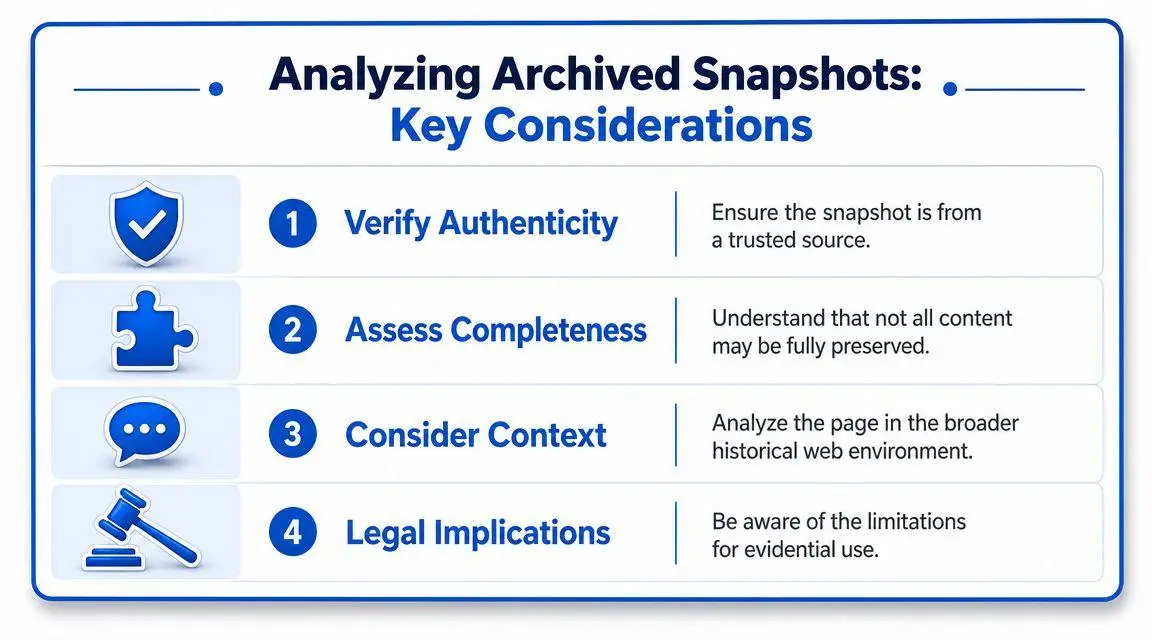
Generic tutorials treat an archived page as if it were a sealed historical object. That is a dangerous assumption. Archived pages are often hybrid views. Some elements may be preserved in the archive, while other assets may still load from the live web. The OSINT warning summarized in this discussion of archive-view limitations is the key point professionals tend to miss: the page you see may not be a perfect self-contained record.
What an archived page can prove
Used correctly, an archived snapshot can support several important conclusions:
| Question | What an archive may help show |
|---|---|
| Was this content publicly reachable? | Often yes, if the page was captured and renders visibly |
| Did this wording appear on or before a certain date? | Often yes, if the timestamp and content are clear |
| Did a site later change or remove the content? | Often yes, if multiple snapshots show the progression |
| What did Google index at that exact moment? | Not necessarily |
That last point is where people overreach. A web archive snapshot is not the same thing as a definitive statement of what Google indexed. It is evidence of an archived capture, not an automatic proxy for every search engine state.
Where legal and reputation teams get tripped up
The biggest mistake is treating a screenshot from an archive as self-authenticating proof. In a boardroom, that may be enough. In a takedown dispute, pre-litigation demand, or court-related matter, it often isn’t.
You need to ask four questions immediately:
- Was the page fully preserved? Missing images, broken CSS, and absent scripts may alter meaning.
- Did the archive load any live assets? If yes, the visible page could differ from what existed at capture time.
- Is the timestamp clear and tied to the specific page view? Ambiguous dating weakens the record.
- Do you have a preservation copy outside the archive? If not, capture one now.
That’s why matters involving reputational falsehoods, impersonation, or long-tail harassment often require counsel who understands digital evidence standards, not just search visibility. If the content crosses into actionable online attacks, the legal framework in this overview of internet defamation attorney strategy for high-stakes removals gives the right lens for escalation.
Archived evidence is strongest when you pair the public snapshot with your own contemporaneous preservation record.
A practical preservation routine
When you locate an important archived page, don’t stop at viewing it. Preserve it in layers.
- Capture full-page screenshots. Include the archive interface, visible date, and the full browser frame.
- Save the archive URL separately. Put it in your evidence log, not just in a browser tab.
- Export the page to PDF. This won’t solve every evidentiary issue, but it gives you a stable working copy.
- Note visible defects. If images are missing or some elements appear live-loaded, record that immediately.
That last step matters. Courts and counterparties dislike surprises. If a snapshot is incomplete, say so early and document why it is still useful.
Troubleshooting When No Public Archive Exists
Sometimes the archive search comes back empty. That doesn’t mean the page never existed. It means you’ve reached the limit of easy public retrieval.

Availability was never guaranteed. Google support discussions also reflect that archived or cached access can be missing, and the Wayback Machine, while extensive and maintaining snapshots dating back to 1996, isn’t exhaustive, as noted in Google Search support commentary on missing cached pages.
Why archives miss pages
A page may be absent for several reasons. It may never have drawn enough crawl attention. The site may have blocked archiving behavior. The URL may have existed briefly and disappeared before a crawler reached it. A page can also survive only in fragments, such as search-result snippets, quoted reposts, forum references, or image previews.
No single public archive solves that.
What to do next
The right next step depends on whether you control the site.
- If you own or manage the site, use Google Search Console’s URL Inspection tool to review Google’s understanding of the page. This is not a public archive, but it can help you inspect how Google tested or saw the URL.
- If you do not control the site, expand beyond public archives. Search for mirrors, syndications, quote fragments, social embeds, and media previews tied to the original URL or title.
- If the matter is legal or reputational, stop improvising after the obvious checks fail. Here, digital forensics and OSINT methods matter.
The professional threshold
There’s a point where self-service stops being efficient. If a damaging page affects litigation, investor confidence, employment, extortion exposure, or family privacy, you need a retrieval strategy built for incomplete records.
That can include comparing archived parent pages, locating references in secondary publications, reviewing index traces, and documenting absence itself where absence has evidentiary value. One practical option in removal-related matters is using services that handle outdated search traces and archived exposure. For example, ContentRemoval.com offers workflows related to removing outdated content and search-connected remnants when standard public methods don’t resolve the issue.
No archive result is still a result. It tells you which public channels failed, and that narrows the next move.
Professionals don’t treat a missing archive as the end. They treat it as the point where method matters more than tools.
Next Steps From Viewing to Removing Content
Locating the archived page is only the opening move. Once you’ve confirmed that harmful, false, private, or outdated material existed, the question becomes tactical: who controls the source, who controls the index, and which record needs to be updated, suppressed, or removed first?
That sequence matters. A live page may need direct publisher action. Search traces may need separate remediation. Archive copies create a third problem. They can preserve the same harm long after the source changes. If your team works in enterprise web environments, the broader mechanics behind cached delivery and stale content are worth understanding, particularly in technical stacks where teams optimize Sitecore & SharePoint performance and have to distinguish server, CDN, browser, and archive layers instead of lumping everything together as “cache.”
What removal strategy actually requires
A serious response usually involves three tracks:
- Source action. Remove or correct the live material at the publisher or platform level.
- Search action. Address outdated or residual search appearances where applicable.
- Archive action. Evaluate whether archive removal, exclusion, or limitation is possible and strategically necessary.
If you’re dealing specifically with stale Google traces or legacy references to removed pages, this professional guide to removing a cached page from Google is the right next read.
The mistake executives make is assuming visibility equals control. It doesn’t. Seeing the archived page proves the issue exists or existed. It does not remove it, and it does not prevent the same material from resurfacing through copies, mirrors, or index remnants. For legal teams, that means evidence preservation must happen before aggressive takedown steps. For principals and family offices, it means confidentiality and sequence matter as much as speed.
If you’ve found harmful archived content and need a confidential plan to preserve evidence, assess exposure, and pursue removal, speak with ContentRemoval.com. We’ll help you determine what the archive proves, what can be removed, and what should be done first before the record shifts again.
Frequently asked questions
Does the Google cache: operator still work?
No. Google removed the cache link from search results in early 2024 and the cache: operator was retired with it. Any playbook or vendor instruction that still relies on it is out of date and should be replaced with an archive-based workflow.
How do I find an old version of a web page after Google cache was removed?
Enter the exact URL into the Wayback Machine, open several snapshots before, during and after the date that matters, and record the archive URL and visible timestamp straight away. If the capture is thin, check Archive.is and similar services, and search headline fragments to locate the URL when you do not have it.
Can an archived snapshot be used as evidence in a takedown or defamation matter?
It can support the case but is rarely enough on its own. Archived pages can be hybrid views with missing images or live-loaded elements, and they do not prove what Google indexed. Pair the snapshot with your own contemporaneous preservation: full-page screenshots including the archive interface, a PDF export and a log of any visible defects.
