
Tracking cookies removal means clearing cookies, site data and cached files on every browser and device you use, signing out of high-value accounts first, checking browser sync, then blocking third-party cookies and auditing site permissions so the profile cannot rebuild. It is a containment step, not anonymity: fingerprinting, account-based tracking and IP correlation can still reconnect activity.
Key facts
- In Chrome, use Settings, Privacy and security, Delete browsing data, and include cookies and cached files.
- 58% of users regularly delete cookies, yet 67% click accept all on cookie pop-ups without reading.
- Comscore found cookie churn can overstate unique website visitors by a factor of about 2.5.
- Keep separate browser profiles for public activity, corporate work and sensitive personal research.
Where ContentRemoval.com comes in. Browser hardening handles what you can control on your own devices; ContentRemoval.com handles what happens when profiling spills into the public record as impersonation, doxxing, smear content or harmful search results. Executives, family office principals and their security leads usually get in touch once targeting has crossed from advertising into pressure. A free 15-minute Exposure Scan maps what is already visible and removable, and the report is theirs to keep. Get a Free, Confidential Exposure Scan or read how our content removal work is done.
You’re not dealing with a minor browser nuisance. You’re dealing with an evidence trail.
A late-night search about litigation exposure, a sequence of visits to a competitor’s product page, repeated reads of a medical article, a hotel booking before a board meeting, a click on a crisis-communications piece after an unfavorable mention. None of that stays isolated. It gets collected, matched, inferred, and retained by parties you didn’t hire and don’t control.
For an executive, investor, public figure, or family office principal, tracking cookies removal isn’t housekeeping. It’s a containment step. It reduces the quality of the profile others can build about you, and it limits how easily your digital habits can be turned into targeting, pressure, or narrative manipulation.
Your Digital Exhaust Is a Liability
A common failure pattern begins subtly. An executive notices that ads and recommendations have become oddly specific. Then the targeting sharpens. Industry content appears before a product announcement. Travel-related prompts surface before a private event. Messages arrive that seem calibrated to a current dispute, a pending transaction, or a personal vulnerability.
That isn’t paranoia. It’s aggregation.
Tracking data rarely harms someone because of a single cookie. The damage comes when many small observations are assembled into a usable profile. A browsing pattern can suggest deal activity. Repeated visits to a specialist clinic can invite intrusive inferences. Searches around departures, restructuring, disputes, or protective orders can become signals. Once those signals enter ad-tech, analytics, app ecosystems, and broker pipelines, they don’t remain private for long.
What gets weaponized
For high-profile clients, the issue isn’t personalized advertising. It’s predictability. When third parties can model your routines and interests, they can shape what reaches you, what reaches your staff, and what reaches people searching your name.
That’s why browser cleanup belongs in the same conversation as account security and data exposure review. If you’re already tightening permissions on connected services, this guide on how to restrict external app integrations is worth reviewing alongside browser controls. App access and browser tracking often reinforce each other.
The broader pattern is familiar to anyone who has studied passive data collection and its reputational consequences. Small fragments of behavior don’t stay small once they’re linked across sessions, devices, and vendors.
Practical rule: If your browsing history would be sensitive in the hands of a hostile journalist, litigant, rival, or extortionist, treat tracking cookies as a risk surface, not a convenience setting.
The executive mistake
Many internet users clear cookies only after something feels wrong. That’s late.
By the time your browser is saturated with trackers, data has already been synced, categorized, and used to shape what follows you online. Removal still matters. It cuts continuity. It invalidates some identifiers. It interrupts some profiling. But it should happen before a threat escalates, not after.
The Unseen Architecture of Digital Surveillance
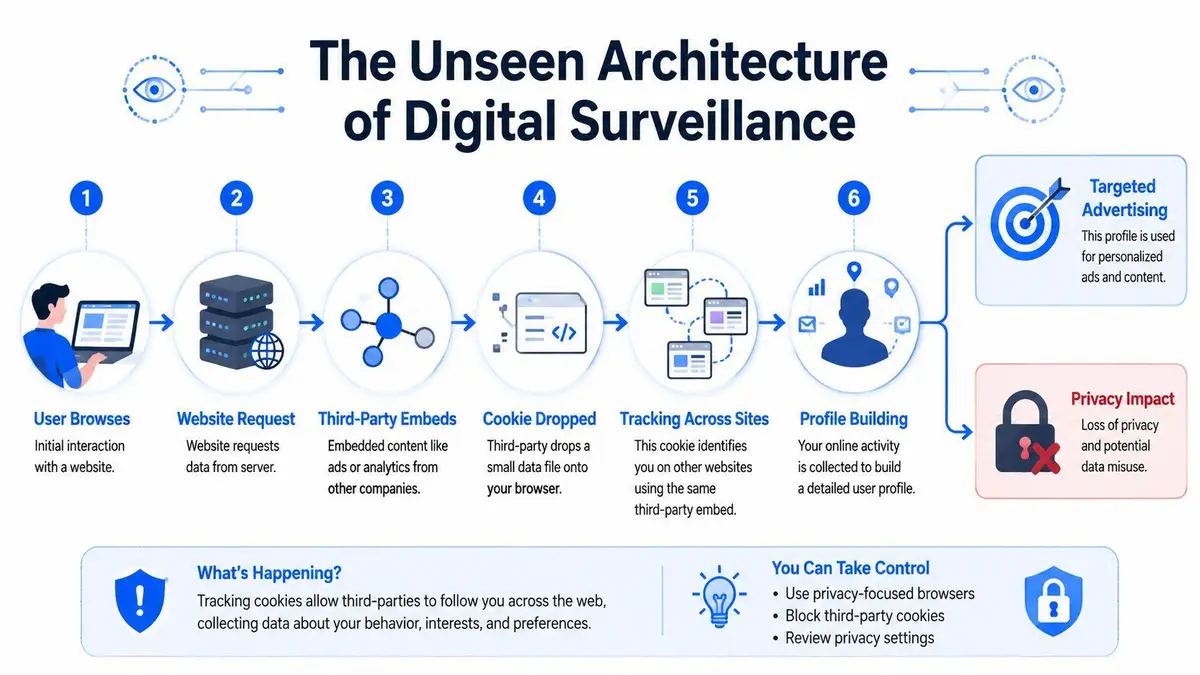
Tracking works because the web was built to remember you. A site you trust stores useful data. A third party embedded on that site stores something else. Then another site loads the same outside service, and the identifier persists. What looks like separate browsing sessions becomes a continuous record.
First-party convenience and third-party surveillance
First-party cookies often support logins, language preferences, or session continuity. Third-party cookies are different. They’re usually tied to advertising, analytics, embedded media, social widgets, and retargeting systems that operate across many sites.
For a high-value individual, the distinction matters because third-party tracking turns ordinary browsing into a cross-site dossier. That dossier can reveal timing, interest, intent, and vulnerability. It can also be combined with offline data, account activity, or purchased audience segments.
Consent banners don’t solve this. They legitimize it. In 2026, a compiled browser-usage study reported that 58% of users regularly delete cookies, yet 67% click “accept all” on cookie pop-ups without reading privacy details, which shows how easily routine consent flows override actual privacy intent (browser-usage findings).
Why this matters beyond advertising
A profile built from browsing data can affect more than the ads you see. It can shape content recommendations, search personalization, audience classification, and data broker files. For executives, that creates three direct risks:
- Narrative steering: third parties can influence what information you see during a sensitive period.
- Target selection: attackers can infer when to send phishing, impersonation, or blackmail-oriented outreach.
- Reputation forecasting: adversaries can infer pressure points before a story breaks or a dispute becomes public.
If you want a sharper view of where those profiles end up, this analysis of data brokers and executive privacy risk is the right companion to cookie controls.
The hidden weakness in casual cleanup
Clearing browser data without changing browser behavior is cosmetic. You wipe one layer, then immediately permit the same collection architecture to rebuild itself.
The right question isn’t “How do I delete cookies?” It’s “Who is still allowed to rebuild my profile tomorrow?”
That’s the strategic frame. Tracking cookies removal matters, but only if you understand what you’re interrupting and what you’re still allowing.
Executing Tactical Removal Across Your Devices
A reputation incident rarely starts on the device you remember to check. It starts on the phone in your pocket, the browser profile you use for travel, the work machine managed by IT, or the tablet used for quick logins between meetings. If you clear one browser and leave the rest untouched, the tracking profile survives and reconnects faster than is commonly expected.

Start with a clean sequence
Order matters. If one device stays active while another is being cleaned, synced sessions and account logins can restore identifiers you just removed.
- Inventory every browser and profile. Include desktop and mobile browsers, private workspaces, assistant-used profiles, and any secondary browser you keep for a specific site.
- Sign out of high-value accounts first. Email, social platforms, cloud storage, banking, travel, and collaboration tools should not stay active during a reset.
- Clear cookies, site data, and cached files on each device. A cookie-only wipe leaves too much behind.
- Close all tabs and restart the browser. Open sessions weaken the reset.
- Check synced accounts and browser sync settings. If sync remains active, one browser can reintroduce data to another.
- Review permissions before resuming normal use. Location, camera, microphone, notifications, clipboard access, and pop-ups all deserve scrutiny.
If your exposure already spans personal, family, and corporate devices, run a broader digital footprint cleanup process for high-risk individuals at the same time.
Chrome
On desktop Chrome, open Settings, then Privacy and security, then Delete browsing data. Use the widest practical time range if you are trying to break an established pattern of recognition. Select Cookies and other site data and Cached images and files, then complete the deletion.
On mobile Chrome, work through the same reset with equal discipline. A partial cleanup on desktop means little if your phone continues feeding the same account, session, and behavioral signals.
Chrome deserves close attention because it is often the browser people use for both personal convenience and sensitive business activity. That overlap creates risk. Search history, investor research, legal review, travel arrangements, and media monitoring can all feed the same profile if you treat Chrome as a catch-all browser.
Safari
On Mac, open Safari settings and review Privacy and Manage Website Data. Remove stored website data, then enable the strongest anti-tracking settings available. On iPhone and iPad, repeat the review in device settings for Safari and clear website data there as well.
Safari lowers some exposure by default, but that does not solve your problem. Existing site data, active logins, and habitual browsing patterns still provide enough continuity for profiling.
Operational advice: Treat mobile Safari as a primary risk surface. Public figures often secure laptops and neglect the device that travels with them into every meeting, car, hotel, and home.
A quick walkthrough can help if staff members are assisting with the reset:
Edge
In Microsoft Edge, go to Settings, then Privacy, search, and services, then Clear browsing data. Choose what to clear, include cookies and site data, and complete the wipe. Then review tracking prevention settings immediately after.
Edge is often the browser that holds corporate intelligence. Executives use it for board materials, legal platforms, procurement systems, investor portals, and internal dashboards. If that browser remains untouched, you leave a map of your priorities, counterparties, and timing signals in place.
What to clear and what not to forget
A serious purge covers more than the default boxes.
- Cookies and site data: Removes stored identifiers, session artifacts, and site-level tracking records.
- Cached files: Reduces the material sites can use to recognize returning visitors quickly.
- Stored permissions: Check camera, microphone, location, notification, clipboard, and pop-up permissions while you are already inside browser settings.
- Secondary profiles: Clean alternate browser profiles used by assistants, family members, or separate work contexts.
- Mobile app webviews: In-app browsers inside social media, messaging, and news apps can preserve tracking paths outside your main browser.
- Saved logins and autofill data: Review whether convenience features are exposing relationships, addresses, travel patterns, or internal domains.
Deleting cookies is a tactical reset. It is not anonymity. Fingerprinting, account-based tracking, IP correlation, and behavioral analysis can still reconnect activity across devices. That is why execution has to be disciplined. Remove what has already been stored, then reduce how easily your environment can be recognized again.
Establishing a Proactive Privacy Posture
At 6:30 a.m., before a board meeting or an acquisition call, you open a browser that still remembers yesterday’s searches, logins, permissions, and partner sites. That convenience creates a behavioral profile. For a high-visibility executive, that profile can expose intent, timing, counterparties, and vulnerabilities long before any formal disclosure.
A privacy posture starts with one rule. Do not let the browser decide what to retain about you.
Configure the browser before the browser configures you

Browser vendors have limited some third-party tracking, and the recent shift in Chrome affected a large share of web users, as noted earlier. Do not mistake that for protection. Ad tech adapts quickly, and passive defaults still favor data collection unless you change them yourself.
Set the browser to collect less and remember less.
- Block third-party cookies wherever the browser still offers that control.
- Turn on anti-tracking protections such as cross-site tracking prevention and strict privacy modes.
- Audit site permissions every month and revoke access to camera, microphone, location, notifications, clipboard, and background sync unless there is a current business need.
- Use tracker-blocking extensions carefully. Choose established tools with a clear privacy policy and a narrow purpose.
- Enable Do Not Track where available. It will not stop determined trackers, but it documents your preference and reduces passive compliance excuses.
Policy matters as much as settings. If your office uses web forms for internal listening, incident reporting, or leadership polling, choose platforms built for secure user feedback collection. A privacy failure in something as routine as executive feedback can become a legal issue, a press issue, or both.
Choose friction over exposure
Convenience is expensive. A browser that remembers every preference, persists every session, and personalizes every interaction also makes correlation easier across sites and devices.
Accept some inconvenience on purpose. Faster logouts, repeated prompts, and fewer remembered settings are a fair trade when the alternative is silent profiling. This is especially true for research tied to legal review, health matters, family issues, activist concerns, or strategic transactions.
Use separation as a standing rule, not an occasional tactic. Keep distinct browser profiles for public activity, internal corporate work, and personal matters. Better yet, reserve a separate browser for sensitive research. That will not make you invisible, but it will reduce easy linkage and lower the chance that one compromised context exposes the rest.
Use a strict test for every feature you enable. If it improves convenience by storing history, identity, preference, or behavior, assume it increases trackability until your team verifies the risk is acceptable.
Deletion clears residue. Posture prevents fresh accumulation.
Corporate and Enterprise-Level Considerations
An executive’s browser habits are never purely personal. They affect the company’s exposure, the reliability of its analytics, and the credibility of its privacy posture.
When a leadership team permits broad tracking on corporate devices while publishing polished privacy statements on the company website, the contradiction doesn’t stay internal. Regulators, litigants, reporters, and counterparties notice inconsistency faster than they notice good intentions.

The analytics problem most leadership teams miss
Cookie churn distorts reporting. Comscore reported that cookie churn can overstate unique website visitors by an average factor of 2.5, or about 150%, which means teams relying on cookie persistence can misread reach, frequency, and attribution (Comscore on cookie deletion and inflated visitor counts).
That has practical consequences:
| Corporate issue | What goes wrong |
|---|---|
| Marketing reporting | Visitor counts look larger than reality |
| Attribution models | Returning users may appear new |
| Campaign planning | Frequency controls become unreliable |
| Board reporting | Leadership receives false confidence from flawed measurement |
This isn’t only a marketing problem. It becomes a governance problem once executives make decisions on distorted data.
Site governance and staff exposure
A company should know exactly which trackers are active on its own properties, who approved them, what consent language governs them, and whether any embedded tools create unnecessary exposure. Cookie audits belong with legal, security, and communications, not just web development.
The same logic applies to user research and internal forms. If your organization gathers customer or employee sentiment, choose tools designed for privacy-sensitive environments. For teams reviewing alternatives, this overview of secure user feedback collection is useful because it frames survey infrastructure as a data-governance issue rather than a convenience purchase.
Where individual and enterprise risk meet
An executive researching an acquisition on a work device, a chief legal officer reviewing a dispute from a hotel network, a founder using personal and corporate accounts inside the same browser. Those are ordinary behaviors. They’re also data-linkage events.
In this situation, one professional option may be warranted. ContentRemoval.com handles content removal, de-indexing, and reputation protection matters that arise when digital exposure turns into search visibility, impersonation, leaks, or harmful publication. That isn’t a substitute for browser hardening. It’s what comes after the browser issue spills into the public record.
The Limits of Removal and When to Escalate
A cleared cookie jar doesn’t make you anonymous. It makes you less convenient to track.
That distinction matters because trackers don’t rely on one mechanism. They use browser fingerprinting, local storage, ETags, and forms of “evercookie” behavior that can help restore continuity after deletion. CookieHub explicitly notes that rejecting or deleting cookies doesn’t stop tracking, and that fingerprinting and other browser storage can resurrect identifiers (discussion of undeletable tracking and fingerprinting limits).
Signs deletion isn’t enough
If highly specific targeting reappears soon after a full purge, assume the issue goes beyond standard cookies. If multiple devices begin showing aligned recommendations despite separate cleanup, assume linkage at the account, network, or fingerprint level. If hostile outreach repeatedly tracks your live interests, travel, legal concerns, or family matters, stop treating it as ordinary advertising.
Escalate when you see patterns like these:
- Repeated re-identification: your browsing environment seems “known” again immediately after cleanup.
- Cross-device consistency: separate devices behave as if they belong to one profile.
- Sensitive-topic targeting: ads, content, or outreach map too closely to legal, medical, financial, or reputational pressure points.
- Public-facing consequences: profiling begins to intersect with impersonation, doxxing, smear content, or media manipulation.
Why high-risk individuals need a wider lens
The same discipline used in sectors with heavy guest, travel, and identity exposure applies here. This practical Clouddle Inc guide on hospitality security is useful because it shows how privacy failures rarely stay confined to one system. They spread across vendors, staff behavior, endpoints, and public trust.
That’s the mature view of tracking cookies removal. Delete aggressively. Configure defensively. But don’t confuse interruption with immunity.
If your exposure profile includes public scrutiny, litigation, wealth visibility, family-office risk, or active harassment, the browser is only one layer. Once persistent tracking overlaps with harmful search results, impersonation, leaks, or coordinated attacks, DIY privacy steps stop being enough.
If tracking data is feeding a broader reputational or security problem, ContentRemoval.com can assess the public-facing damage, identify what can be removed or de-indexed, and help contain the exposure discreetly. For high-profile clients, that usually starts with a confidential review of what’s already visible, what’s still spreading, and which interventions need to happen first.
Frequently asked questions
Does deleting cookies stop websites from tracking me?
It interrupts continuity and invalidates some identifiers, but it does not stop tracking. Fingerprinting, local storage, ETags and account logins can restore identifiers after deletion, which is why removal must be paired with blocking third-party cookies, strict anti-tracking settings and permission audits.
Which devices do I need to clear cookies on?
Every browser and profile you use: desktop and mobile browsers, assistant-used profiles, secondary browsers, in-app webviews inside social and news apps, and any managed work machine. Clearing one device while another stays logged in lets synced sessions reintroduce the data.
How do I know when tracking has become a security problem rather than advertising?
When specific targeting returns immediately after a full purge, separate devices behave as one profile, or ads and outreach map closely to legal, medical, financial or family pressure points. At that stage the browser is one layer and the exposure needs a wider review.
