
To remove a Google My Business profile you own, open Business Profile Manager as Primary Owner or Owner, go to Business Profile Settings, choose Remove Business Profile, then Remove profile content and managers, and check that the Permanently Closed flag is not left active. Listings you do not control are reported through Suggest an edit, then Close or remove.
Key facts
- Only a Primary Owner or Owner can remove a profile; a Manager cannot.
- A deleted profile can be restored only within a 7-day window before data is purged.
- New owners face a 7-day latency period before removal functions activate.
- Marking a business Permanently Closed keeps the listing and its reviews visible.
Where ContentRemoval.com comes in. ContentRemoval.com works with owners, counsel and family offices to decide whether a Google Business Profile should be closed, removed, de-indexed or escalated, then runs the evidence file, the takedown path and the monitoring so a fake or hostile listing does not come back. Contact often comes from the founder, their office manager or their lawyer after a dashboard attempt has failed. A free 15-minute Exposure Scan maps what is removable, and the report is yours to keep. Get a Free, Confidential Exposure Scan or read how our search result removal work is done.
You’re usually not reading about how to remove Google My Business because you’re casually cleaning up an old asset. You’re here because a profile has become a liability. Maybe the company closed and the listing still surfaces with hostile reviews. Maybe someone created a fake location tied to your name, your firm, or your home address. Maybe a former employee still controls a profile that should never have existed in the first place.
That anxiety is rational. A Google Business Profile is public evidence. It can imply operational status, physical presence, legitimacy, and customer history. For a founder, physician, investor, celebrity, or family office principal, that public record can affect reputation, deal flow, and personal security. The mistake often made is treating removal like a simple dashboard task. It isn’t. It’s a visibility decision with permanent consequences.
The Critical Decision to Erase a Digital Footprint
A client usually arrives at this point after Google has stopped being neutral. The profile isn’t just “there.” It’s now carrying the wrong narrative. A closed office still appears in branded search. A fake listing borrows a real address. An inherited entity keeps surfacing long after the transaction ended. At that point, you’re not managing a listing. You’re managing evidence.
Google’s platform is enormous. Google’s ecosystem lists over 1.5 billion active Business Profiles, and the “Remove Business Profile” action is a standard but irreversible procedure. A deleted profile can only be restored within a precise 7-day window before the data is permanently purged. That’s why accidental deletion is expensive and delayed action is worse. If you need immediate strategic guidance on broader cleanup, our work on digital footprint cleanup addresses the wider de-indexing problem that often sits behind a profile removal decision.
The first distinction you need to make is simple. Closing a profile and removing a profile are not the same act.
A “closed” listing can remain a public-facing marker of failure, dispute, or decline. A removed listing aims to sever that public record altogether.
That difference matters most when the profile carries toxic reviews, outdated allegations, or a location history you don’t want preserved. If you mark a business as closed, you may keep a digital ghost alive. If you remove it correctly, you’re pursuing de-indexing, not memorialization.
Privacy concerns often sit beside reputation concerns. If the listing exposes location data that should never remain public, review the practical standards in our privacy policy. The principles are basic but useful: minimize exposure, control who has access, and act before stale data becomes permanent.
Executing a Controlled Removal of Your Own Profile
If you own the profile, you have the cleanest route. You also have the easiest route to making a permanent mistake.
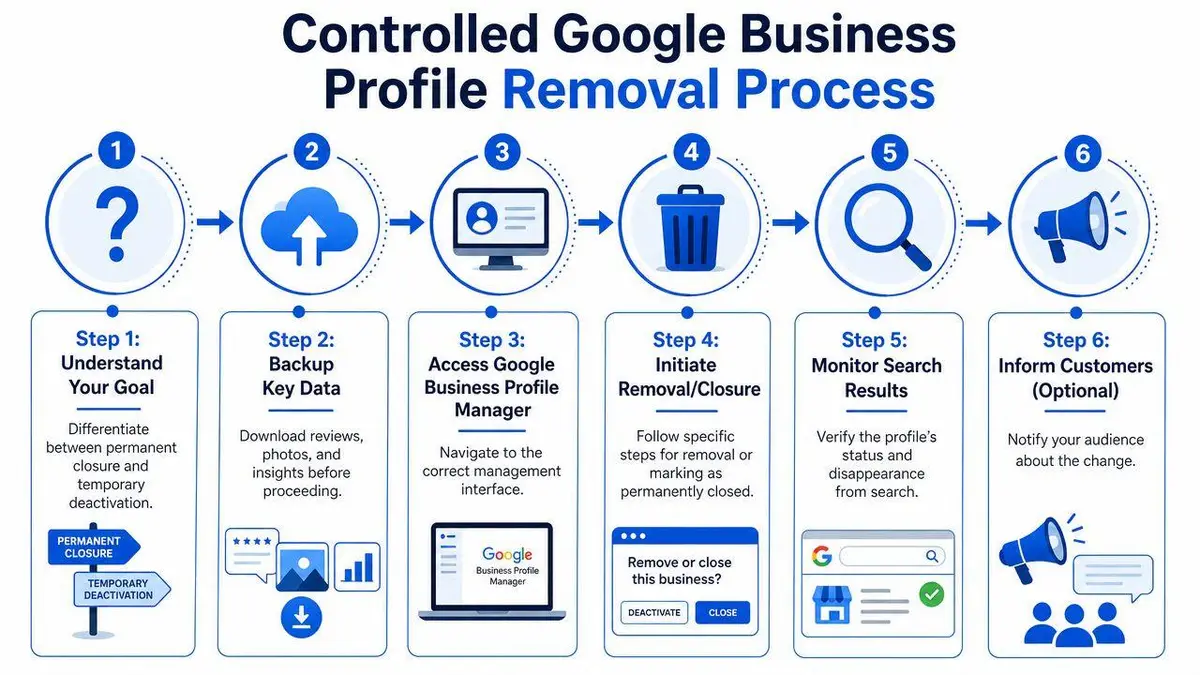
Start with the right objective
Most owners confuse three different outcomes:
- Marking the business as permanently closed
- Removing the business from their account
- Removing profile content and managers so the listing is erased
Only the third option aligns with a true remove Google My Business strategy when your aim is disappearance from search and Maps rather than a public “closed” label.
Before you touch settings, archive what matters. Save photos, reviews, and any historical material you may need for litigation, due diligence, or insurance. Once the process is done, your access may vanish before you realize what you’ve lost. If reviews are part of the problem, the legal and tactical issues overlap with the framework in this guide to Google review removal for executives and founders.
Follow the removal path, not the closure path
The cleanest owner-initiated sequence is this:
- Open the correct profile: Log into Google Business Profile Manager and select the exact location.
- Go into settings: Go to Business Profile Settings.
- Choose the removal workflow: Select Remove Business Profile, then choose Remove profile content and managers.
- Confirm your role first: Only Primary Owner or Owner can perform this action. A Manager can’t. According to Zoca’s guide on deleting a Google Business Profile, manager-level attempts have no effective path to removal, and Google imposes a 7-day latency period for new owners before removal functions activate.
- Check the status flag afterward: The same source notes a common pitfall. If the Permanently Closed flag remains active, it can override the removal request and leave the listing visible as an archived record. That error appears in 30-40% of user-initiated removals.
- Uncheck closed status if necessary: If the listing still carries that label, go back and remove it before pushing the de-indexing step forward.
Practical rule: If Google still shows the business as “Permanently Closed,” you have not achieved the outcome most high-risk clients actually want.
Know where DIY usually fails
The owner dashboard creates false confidence. The interface looks simple, but the account architecture isn’t. The common failure points are predictable:
| Failure point | What happens | Why it matters |
|---|---|---|
| Wrong permission tier | Removal option is blocked or ineffective | You may think Google denied the request when you were never eligible |
| New ownership transfer | Removal function stays inactive | Security latency stops immediate deletion |
| Closed flag left active | Listing remains visible as closed | Harmful reviews and branding can still surface |
| No post-removal verification | You assume it’s gone too early | Search and Maps may not reflect the intended outcome right away |
If your profile involves litigation risk, a disputed sale, regulated services, or a personal address, don’t treat dashboard access as authority. Treat it as one input.
Contesting and Removing Unauthorized Business Listings
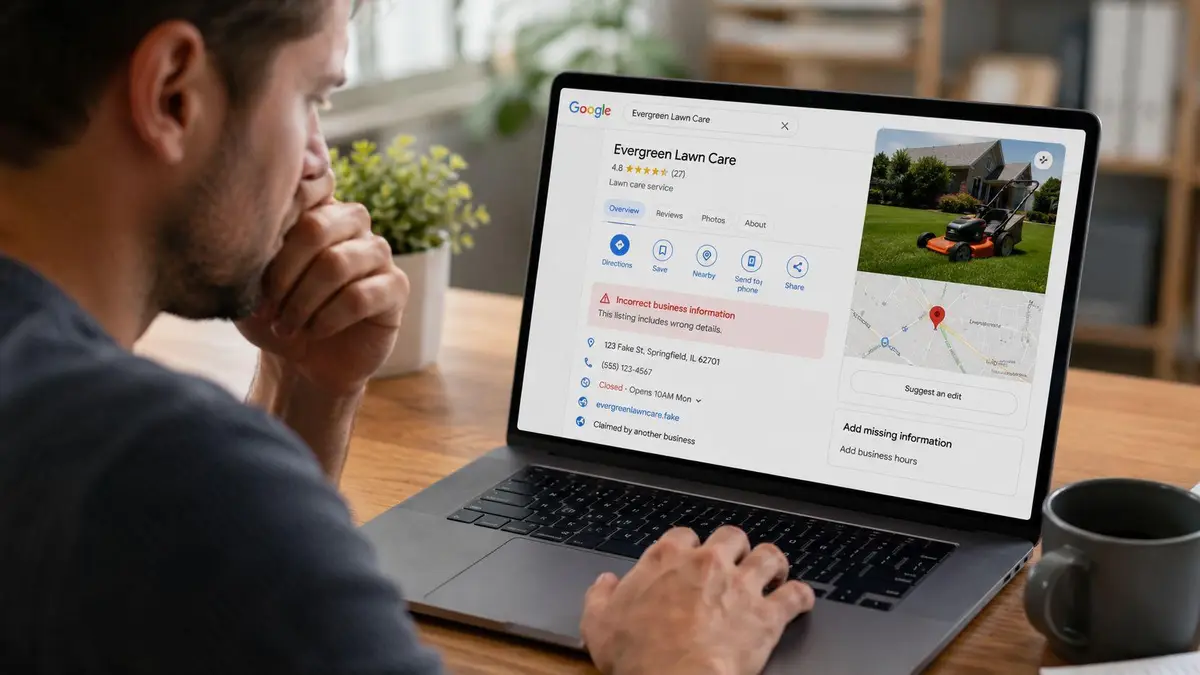
The most dangerous Google profile is often the one you don’t control. It can be fake, duplicated, impersonating a real entity, or attached to a real address without authorization. In those cases, the owner removal workflow is irrelevant because you’re not the owner.
Use public reporting channels strategically
Google refined the removal process in response to the fake-listing problem. About 85% of profile removals are initiated by the owner, while the remaining 15% come from third-party reports or Google’s moderation systems. That means your report is possible, but it will be scrutinized more aggressively than an owner action.
Your primary tool is the public listing itself. Open the profile, use Suggest an edit, then select Close or remove. From there, choose the reason that fits the facts. “Doesn’t exist here” is different from “spam, fake, or offensive,” and picking the wrong category weakens your case.
Match the report to the actual abuse
Many people often waste days at this stage.
- Fake location: Use “Doesn’t exist here” if the address is fabricated or misused.
- Duplicate profile: Seek removal or merge treatment rather than generic closure.
- Impersonation of your business: Report the listing and gather proof of lawful ownership, occupancy, or trademark use.
- Malicious competitor listing: Build a record that the entity isn’t operating where the profile claims it is.
If the listing uses your office, clinic, or residence, expect Google to demand proof that ties you to the address. That can become sensitive quickly. In impersonation matters, the legal playbook matters as much as the platform workflow, which is why this guide on legal options for online impersonation of a business is often the more relevant starting point.
Submit one accurate report first. Then support it with documentation. Volume without precision looks like spam. Precision with evidence looks credible.
Build a removal record, not just a complaint
An elaborate third-party attack rarely ends with one fake listing. It often includes review fraud, duplicate pages, and map edits designed to create confusion. Keep a file with screenshots, timestamps, URLs, and proof of your rights to the brand or location. If Google’s systems see conflicting claims, the party with coherent documentation usually wins.
Where a false profile is harming a transaction, investor diligence, recruiting, or family privacy, don’t wait for “community edits” to sort it out. Escalate while the evidence is still clean and before the listing acquires a review history that makes it look established.
Comparing Your Google Business Removal Options
The right method depends on your objective. Most damage comes from using the wrong tool for the right problem.
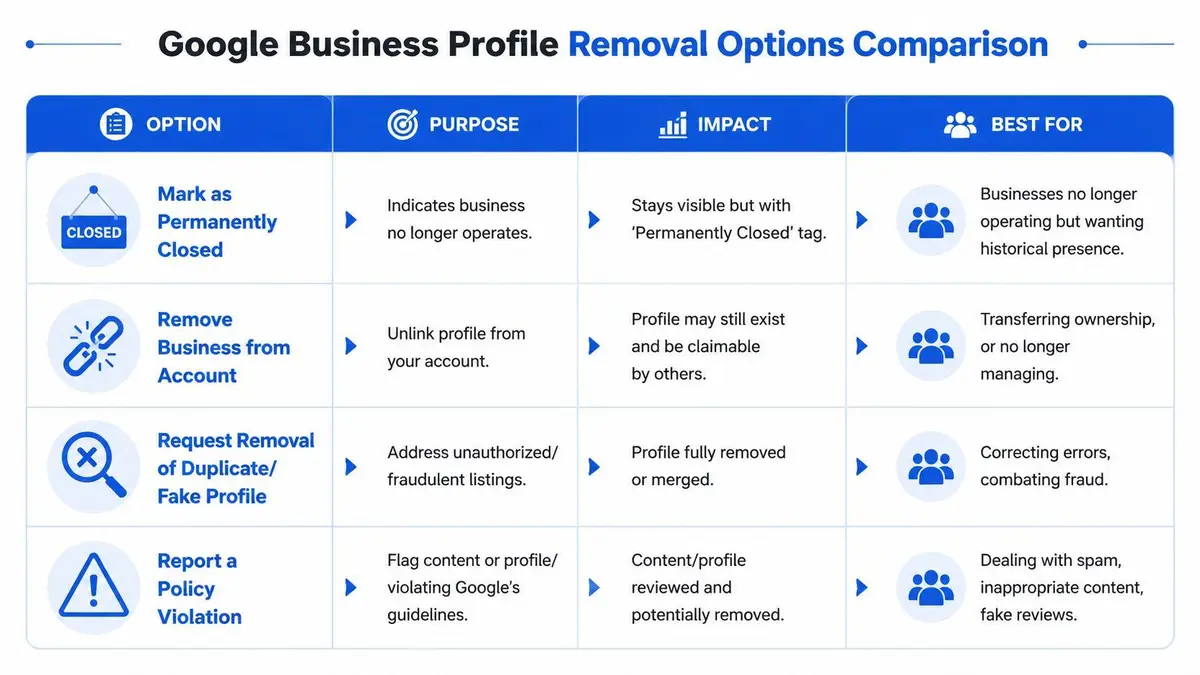
Some businesses want a historical marker. Others need complete disappearance. A private equity exit, a physician’s retirement, a family office relocation, and a harassment campaign do not call for the same action. If you’re also weighing the search consequences of keeping a listing alive in some form, the practical framing in these Boocoo SEO strategies is useful because it separates local visibility goals from broader brand control.
Use the correct mechanism
| Method | Who Can Use It | Typical Timeline | Best For |
|---|---|---|---|
| Mark as Permanently Closed | Owner or authorized admin | Varies by Google processing | A business that has ceased operations but doesn’t need de-indexing |
| Remove profile content and managers | Owner with proper permissions | Varies by de-indexing and review processing | A business or individual needing genuine erasure rather than closure |
| Suggest an Edit | Public users and affected parties | Varies by moderation review | Fake listings, duplicates, wrong addresses, unauthorized profiles |
| Legal request | Counsel or claimant with legal basis | Depends on evidence and platform review | Defamation, trademark abuse, court-ordered removals, complex impersonation |
What each option actually does
Mark as Permanently Closed preserves visibility. It signals a status change, not a disappearance.
Remove profile content and managers is the closest thing to deletion when you control the listing. That’s the route for a true remove Google My Business objective.
Suggest an Edit is a moderation request. It’s useful when the listing isn’t yours, but it isn’t a substitute for formal legal escalation.
Legal request sits outside routine user workflows. Use it when the listing is part of a wider attack, contains falsehoods with legal consequences, or refuses to come down through standard channels.
If your problem is reputational, “closed” is often the wrong answer. It tells the public the profile still deserves to exist.
Legal Escalation When Standard Removals Fail
There comes a point when platform tools stop being serious remedies. If someone is impersonating your business, attaching a false location to your name, or using Google’s public-edit system to attack a legitimate profile, the matter shifts from account management to evidence and legal positioning.
The neglected risk is the weaponization of Suggest an Edit. A malicious actor can try to mark a valid listing as closed or push removal signals around a profile they do not own. Google does provide a 7-day recovery window for deleted profiles, but most owners don’t know how to authenticate ownership, preserve evidence, and force a meaningful review before that window closes. By the time they understand the problem, the profile may already be purged.
When standard reporting is no longer enough
You should move beyond normal support channels when any of these conditions exist:
- The listing is part of a coordinated impersonation campaign
- The profile contains false location data tied to legal or regulatory exposure
- A former insider retained access and is acting against your interests
- The listing is tied to defamation, trademark misuse, or a pending dispute
- Google’s public-edit tools are being used repeatedly against a legitimate asset
At that stage, the issue is not whether a form exists. The issue is whether your evidence package is strong enough to survive legal scrutiny and platform review.
What legal escalation actually requires
A proper legal complaint isn’t a strongly worded email. It’s a structured claim supported by documents. Depending on the basis, that may include proof of business ownership, trademark rights, address control, court filings, settlement terms, regulatory records, or a detailed explanation of why a statement on the profile is false under the governing law.
The faster you move, the more options you preserve. Delay turns a reversible platform event into a permanent record problem.
Counsel also matters because a profile rarely exists in isolation. The same actor may be posting false reviews, running copycat websites, creating social impersonation accounts, or filing coordinated platform complaints. The legal advantage comes from treating the ecosystem as one attack surface.
This is one of the few areas where specialist intervention is justified early. A firm such as ContentRemoval.com can handle de-indexing strategy, review-related removal work, impersonation takedowns, and coordinated monitoring while legal counsel addresses the claims that require formal declarations or court-backed evidence. That division is practical. It keeps the technical and legal tracks moving at the same time.
Beyond Removal Proactive Reputation Defense
The profile you’re trying to erase is usually a symptom, not the whole problem. A founder who removes one hostile listing but leaves duplicate citations, fake review patterns, and unsecured account access in place hasn’t solved anything. He’s bought a little time.
The irreversible nature of this process is what changes the standard of care. According to Dazonn’s guide on removing a business from Google Business Profile, the act to remove a business is irreversible and immediately deletes the listing from Google Search and Maps, with a recovery window of only 7 days. For high-net-worth individuals and executives, that isn’t an administrative footnote. It’s a monitoring problem.
What real defense looks like
A serious protection strategy includes three layers.
First, access control. You need to know exactly who holds owner or manager privileges, which Google accounts are tied to the asset, and whether any former employee, consultant, agency, or franchise operator still has residual access.
Second, listing surveillance. Watch for new duplicates, fake locations, map edits, and review anomalies. If your team only notices a bad listing after it ranks for your name, you’re reacting too late. Tools focused on audit and visibility can help identify profile weaknesses before they turn into a dispute. For a practical diagnostic example, this tool to boost Google Maps visibility is useful because it surfaces profile issues that often sit upstream of suspension, duplication, or misuse.
Third, evidence readiness. Keep current records of incorporation, address occupancy, trademark ownership, and authorized representatives. When Google or counsel needs proof, speed matters.
Where DIY ends
DIY works when the facts are clean, ownership is clear, and no one is fighting you. It stops working when the profile intersects with litigation, harassment, impersonation, media scrutiny, or family security.
Use this threshold. Bring in professional help when any of the following is true:
- The listing concerns a personal residence, confidential office, or sensitive location
- The profile is attached to allegations, fake reviews, or defamatory content
- A third party has altered or removed a legitimate profile
- The account history is disputed after a sale, breakup, dismissal, or agency exit
- Speed matters more than experimentation
A Google Business Profile can be deleted in minutes and regretted for years. Such is the nature of the phrase remove Google My Business. The technical action is small. The reputational consequence isn’t.
If a Google Business Profile is exposing your name, company, address, or transaction history to the wrong audience, treat it as a reputation and legal issue, not a settings issue. ContentRemoval.com works with executives, public figures, family offices, and counsel to assess whether a profile should be closed, removed, de-indexed, or escalated through formal legal channels, then coordinates the evidence, takedown path, and monitoring required to keep the problem from returning.
Frequently asked questions
Why is my Google Business Profile still showing after I removed it?
The most common cause is a Permanently Closed flag left active, which can override the removal request and leave the listing visible as an archived record. Go back, uncheck the closed status, then confirm the removal. Search and Maps may also take time to reflect the change.
How do I remove a fake Google Business listing that uses my address?
Open the public listing, choose Suggest an edit, then Close or remove, and pick the reason that matches the facts, such as Doesn’t exist here for a fabricated address. Expect Google to ask for proof tying you to the address, and keep screenshots, timestamps and ownership documents ready.
Should I mark my business as permanently closed or delete the profile?
If the goal is to stop the listing and its reviews appearing in branded search, closing is usually the wrong choice because a closed listing stays public. Removing profile content and managers is the route that aims for erasure rather than a status change.
