
To cancel a Private Records membership, treat it as two problems: stopping the recurring charge and removing your listing. Cancel through the Account or Billing page and save every confirmation, escalate by email and phone if the portal stalls, revoke the recurring authorization with your card issuer, then submit the PrivateRecords opt-out separately because cancellation does not delete your data.
Key facts
- PrivateRecords terms state a cancellation request cancels upcoming billings; a verification email may take up to 48 hours.
- Cancel via portal, email, phone or written notice, and keep screenshots, emails and call notes as evidence.
- Ask your bank to revoke authorization for a recurring charge, using those words, if the merchant ignores you.
- The PrivateRecords opt-out takes about 10 minutes; verify age, location and relatives to avoid picking the wrong listing.
Where ContentRemoval.com comes in. ContentRemoval.com handles the exposure behind the billing problem: the same address history, phone numbers and relatives that PrivateRecords displays are usually mirrored across dozens of other broker sites and cached copies. Executives, physicians, lawyers and families dealing with harassment typically make contact once one listing reveals the pattern. A free, confidential 15-minute Exposure Scan maps where your records appear and what is removable, and the report is yours to keep. Get a Free, Confidential Exposure Scan or read how our court record removal work is done.
You saw the charge, searched for Private Records cancel membership, and assumed this would be simple. Log in, click cancel, stop the payment, move on.
That assumption is where people lose control.
With a service like PrivateRecords, you’re dealing with two separate problems. One is a billing relationship. The other is data exposure. If you solve only the first, you may stop paying while your name, address history, phone data, and related records remain visible. That is why people cancel, relax, and later discover they’re still listed.
PrivateRecords says it searches over 12 billion public records to build reports on its platform, according to PrivateRecords. That scale is the point. You are not dealing with a simple newsletter subscription. You are dealing with a public-record aggregation business.
The Critical Difference Between Cancellation and Removal
Individuals often reach this issue in the same state of mind. They found a recurring charge they no longer want, and they’ve started wondering why a people-search site has their information at all. They want one action that ends both problems.
They usually don’t get it.
The market has trained consumers to think cancellation means exit. In the data-broker space, that’s wrong. Independent coverage of Private Records notes that content about cancellation rarely explains whether ending the paid plan stops publication of personal information, which leaves users with the false impression that subscription cancellation equals data removal. That same coverage also notes that cancellation and deletion are distinct processes, and people are often surprised when their information reappears even after canceling subscriptions, as described in Optery’s Private Records opt-out guide.
That distinction matters more for executives, physicians, litigants, and public-facing families than for the average consumer. If your address history, relatives, or phone numbers remain easy to locate, the reputational and security risk doesn’t disappear because the billing stopped.
Practical rule: Treat this as a dual-track problem. Cancel the membership to stop future charges. Submit the opt-out separately to address the listing itself.
If you only handle the credit card issue, you’ve solved the smallest part of the problem. The durable fix is broader. That’s why serious privacy work usually starts with a full digital footprint cleanup, not a single cancellation click.
The right mindset is blunt. Stop the payment. Then remove the record. Then check where else your information is still circulating.
Executing a Standard Membership Cancellation
You need a result you can prove. The standard cancellation path is simple if you treat it like a billing dispute in the making, not a casual account change.
Start inside the account dashboard
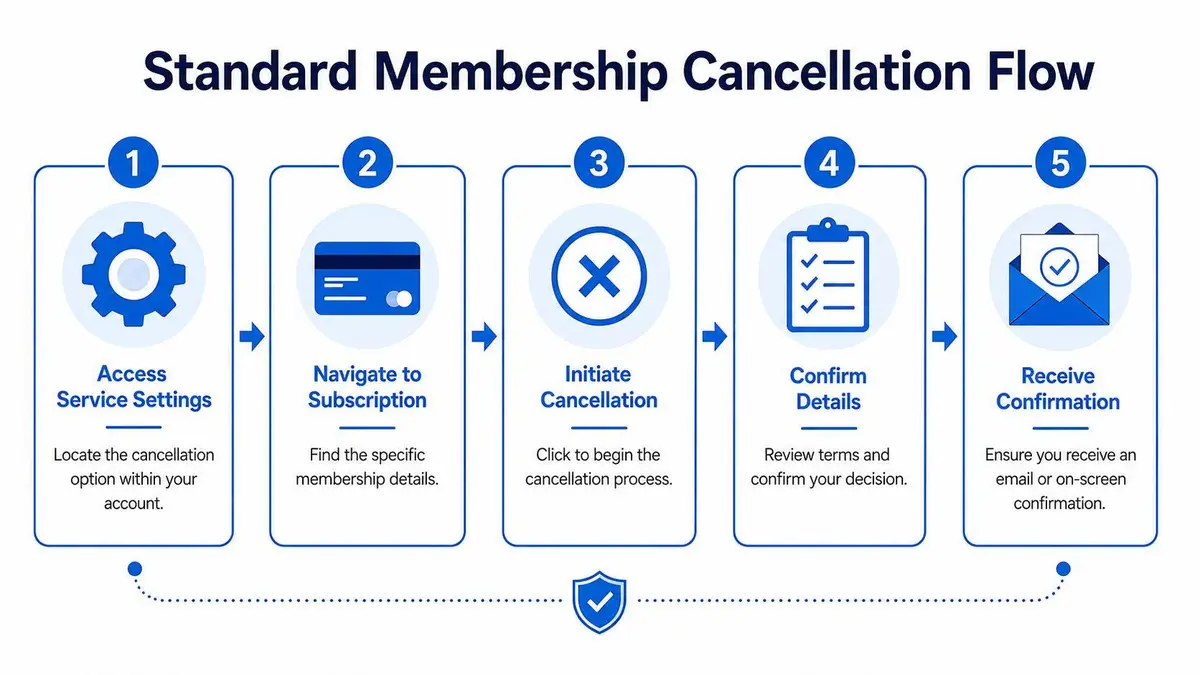
Log in and go straight to the pages where companies usually place recurring billing controls: Account, Settings, Subscription, Membership, or Billing.
Work methodically. Take a screenshot that shows you are signed in. Take another that shows the active plan. Then capture every cancellation screen, including any retention offer, confirmation prompt, or final status page. If the company asks why you are leaving, answer it and continue.
Do not confuse friction with failure. A delayed confirmation, a downgrade offer, or an extra click does not mean the process is complete. It means you need better documentation.
Complete the cancellation all the way through
Many billing disputes start because the user clicked “cancel” once and assumed the job was done. That mistake gives the company room to argue that the request was incomplete.
Use this sequence:
- Open the billing or membership page and confirm which plan is active.
- Choose cancel, end, or terminate membership. If the site pushes a pause, downgrade, or discount, decline it unless that is your actual choice.
- Read the final confirmation screen carefully and save it.
- Check your email right away for any confirmation message or follow-up step.
- Save the proof as screenshots or PDFs, including the message header and timestamp.
If no confirmation arrives, treat the cancellation as unconfirmed and keep pressing until you get written proof.
Cancellation only counts if you can document it.
Verify that billing actually stopped
You want three things: an on-screen confirmation, a confirmation email, and a changed account status when you log back in. If one is missing, your record is weak.
This standard matters with any recurring online service. If you want a useful comparison of how other subscription platforms structure exits and retention offers, this guide to compare LinkedIn Premium options shows the same pattern clearly.
Keep every screenshot and email in one folder. If the next card statement shows another charge, that file becomes your evidence. If your goal is broader than stopping renewals, build the second track separately with a formal account removal strategy. That is how you stop billing now without losing sight of the larger exposure problem.
Forcing Cancellation When Direct Methods Fail
When a company makes online cancellation awkward, stop behaving like a casual user and start acting like a claimant building a record.
PrivateRecords’ terms state that a cancellation request will cancel upcoming billings, which is the language that matters in a dispute. Independent guides also note that users may be able to cancel through the website, email, phone, or written request, and that a verification email may take up to 48 hours to arrive, according to PrivateRecords terms. That gives you multiple channels and removes the company’s ability to say the website was your only option.
Send a traceable written demand
Email is your best first escalation because it creates a timestamped record. Use a direct subject line. Include your full name, the email tied to the account, and the last four digits of the card if needed. State what you want in one sentence.
Use language like this:
I am submitting a formal request to cancel my PrivateRecords membership effective immediately and to stop all upcoming billings associated with my account.
Then add the facts. Date of request. Account email. Any order or transaction identifier. End with a demand for written confirmation.
Do not write an emotional essay. The person reading it needs a clear instruction, not your frustration.
Use the phone call to create a second record
Phone support is useful for speed, but only if you treat it like evidence gathering. Write down the date, time, number dialed, name of the representative, and what they said.
Your script should sound like this:
I am calling to submit a formal cancellation request for my PrivateRecords membership. I want all upcoming billings stopped immediately. Please confirm the cancellation status, the effective date, and any confirmation number associated with this call.
If the representative says you must wait for an email, ask when it was sent and note the answer. If they tell you to use a web form, ask them to document on the account that you requested cancellation by phone on that date.
Use more than one channel if needed
If the portal fails, use email and phone on the same day. If those fail, send a written notice as well. You are building an argument that you gave clear notice through every channel the company recognizes.
Here is the communication framework I recommend:
| Channel | Subject/Opening | Body/Script |
|---|---|---|
| Formal Cancellation Request for PrivateRecords Membership | State your full name, account email, and request that all upcoming billings be canceled immediately. Ask for written confirmation. | |
| Phone | I am submitting a formal cancellation request today | Ask the agent to stop upcoming billings, confirm status, and provide any reference number or notation placed on the account. |
| Written request | Formal notice of cancellation effective immediately | Identify the account, direct the company to end future billing, and request written confirmation that the membership has been canceled. |
A sloppy cancellation request invites delay. A precise one corners the company into a yes-or-no response.
Terminating Payments Directly with Financial Providers
If the merchant ignores you, stop funding the problem.

Some people hesitate, perceiving it as aggressive. It isn’t aggressive. It is basic financial control. You authorized recurring billing under certain conditions. Once you withdraw that authorization, your bank or card issuer becomes part of the enforcement mechanism.
Credit cards and bank cards
Call the number on the back of the card and say you need to revoke authorization for a recurring charge from the merchant. Use those words. Tell the bank you already attempted cancellation directly and want the recurring billing blocked.
The bank representative may ask whether the charge is pending, posted, or future-dated. Answer precisely. Then ask what notation they’ve placed on the account and whether additional dispute documentation is required if another charge appears.
Do not rely on vague assurances like “it should be okay now.” Ask what happens if the merchant submits another charge under the same descriptor.
PayPal and wallet-based billing
If you paid through PayPal or another digital wallet, the recurring authorization may survive even after you think the account is closed. Go into the wallet settings, find the list of automatic payments or recurring merchants, and revoke the authorization there.
That step matters because many users mistakenly assume deleting the merchant app or stopping use of the service also ends billing authority. It doesn’t.
Action standard: The moment direct cancellation stalls, block the merchant at the payment source the same day.
The same disciplined approach applies to the opt-out side. Independent guides report that the PrivateRecords online opt-out workflow is typically completed in about 10 minutes, but the primary operational mistake is selecting the wrong same-name listing, so users are told to verify age, location, and relatives before submitting the request, as noted in this PrivateRecords opt-out walkthrough on YouTube. The lesson carries over to billing disputes too. Precision wins. Sloppiness costs time.
A short operational primer can help if you need a visual reset before you contact your bank:
Why this step should come earlier than most people think
Consumers often waste days waiting for a merchant to “get back to them.” That delay serves the merchant, not you. If the company is unresponsive and another billing cycle is approaching, the financial provider is the faster path to control.
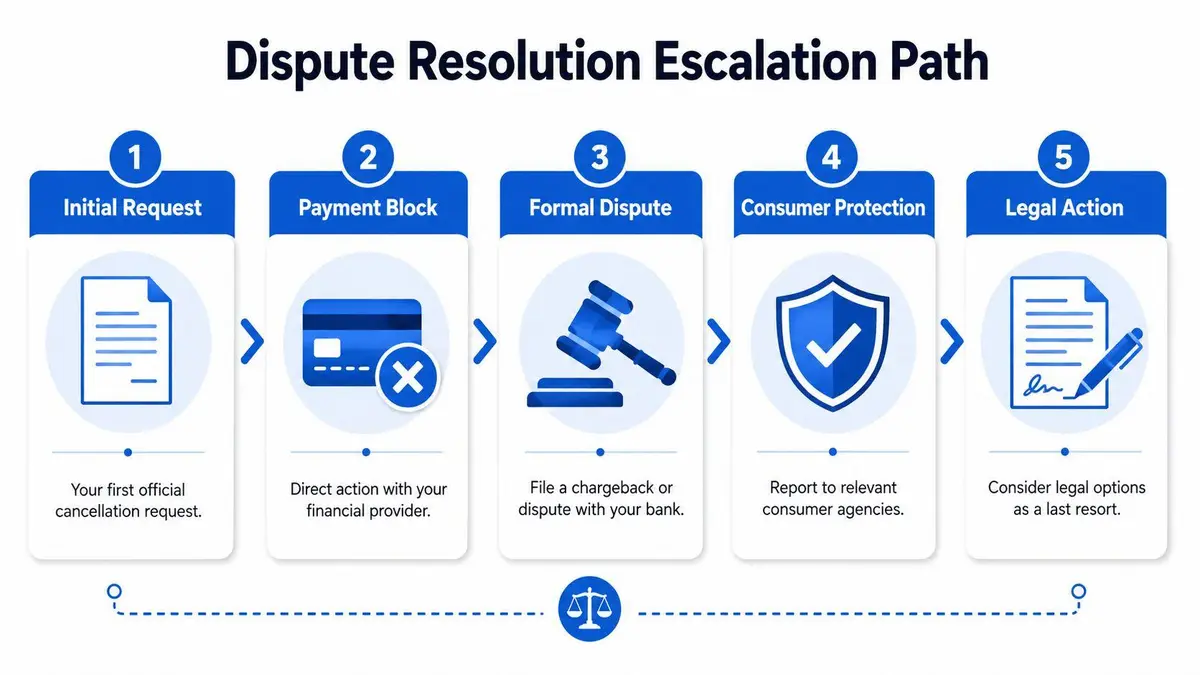
Use this escalation sequence:
- After one failed online attempt: move to written and phone cancellation immediately.
- After no usable confirmation: contact the card issuer or wallet provider and revoke recurring authorization.
- After another charge posts: open a formal dispute with your supporting evidence.
You are not obligated to let a merchant preserve access to your funds while it decides whether to answer you.
Documenting and Escalating Unresolved Disputes
The difference between a weak dispute and a successful one is paperwork.
If PrivateRecords or any similar merchant charges you after cancellation, don’t improvise. Assemble a clean record and file the dispute in the language banks recognize.
Build the dispute file
Your evidence package should include every point where you gave notice and every point where the company failed to honor it.
Include:
- Screenshots of the portal activity showing cancellation attempts, account status, and any error messages.
- Copies of emails you sent and received, including timestamps and headers where available.
- Call notes with date, time, representative name, and any confirmation or refusal.
- Card statements showing the disputed recurring charge.
- The company’s published process if the dispute involves failure to follow its own stated procedure.
PrivateRecords publishes an opt-out workflow with a four-step identity-verification sequence. Search by name and state, select the listing, submit personal details with CAPTCHA, and confirm via an email link. The company states removal is completed after confirmation, according to PrivateRecords opt-out. That published process can matter in a dispute because it shows the company’s own stated method and what the user was required to do.
Use bank-friendly dispute language
When you file the dispute, avoid dramatic phrasing. Use the categories financial institutions understand, such as cancelled recurring billing or services not rendered, depending on the facts.
Your explanation should read something like this:
I canceled this recurring membership and notified the merchant through its stated channels. The merchant continued or attempted to continue billing after cancellation. I am disputing the recurring charge and requesting reversal based on canceled recurring billing.
That wording is strong because it is factual. It doesn’t overreach.
Apply pressure outside the bank
A merchant may ignore one consumer. It tends to pay more attention when complaints begin appearing in formal channels. If the dispute remains unresolved, file complaints with consumer protection bodies such as the BBB and the FTC. Keep those complaints concise and attach the same supporting material.
If the company still resists, move to a written legal demand or counsel-led intervention. By that stage, your record should already be organized. That’s exactly the situation described in this guide on what to do when a website won’t remove your information.
A dispute is easier to win when the chronology is obvious. Notice given. Billing continued. Evidence preserved.
Beyond Cancellation A Strategy for True Data Removal
Stopping the charge is tactical. It is not the privacy solution.
People-search businesses don’t exist because of your membership fee. They exist because personal data is aggregated, organized, and made searchable. If your concern is exposure, harassment, executive targeting, family security, or reputational harm, the membership cancellation is the opening move, not the end state.
PrivateRecords is a data broker-style public records platform. Even if your own listing is removed there, that doesn’t mean the same information isn’t circulating through other broker sites, cached copies, indexing layers, or downstream data sources. That is why one-off DIY removals often create false confidence. You remove one profile, then discover parallel profiles elsewhere under slight variations of your name, old addresses, or family associations.
What a serious removal strategy looks like
A defensible strategy has three parts:
- Initial suppression work that targets the live listing you can identify now.
- Verification and monitoring so you know whether the record stays down or reappears.
- Broker-wide review that looks beyond one site and deals with the broader exposure pattern.
The hard truth is that public-record aggregation is persistent. For high-value individuals, this becomes a maintenance issue, not a one-time admin task.
Who should treat this as urgent
Some readers can tolerate lingering exposure better than others. If you’re in any of these categories, you shouldn’t:
- Executives and founders whose names are routinely searched by employees, litigants, competitors, or journalists.
- High-net-worth families concerned about residential privacy and household security.
- Lawyers, doctors, and public figures who attract adversarial attention.
- Anyone dealing with stalking, harassment, or coordinated online abuse.
For those people, “Private Records cancel membership” is not really a billing query. It is the first sign that a broader data exposure problem has surfaced.
You can handle the immediate issue yourself if you’re methodical. If the exposure is wider, treat it like risk management and get professional help before the next broker site surfaces your information again.
If your goal is more than stopping one recurring charge, ContentRemoval.com is built for exactly this kind of problem. The team handles high-stakes content removal, data broker exposure, and reputation protection for executives, public figures, and private clients who need a discreet, enforceable plan. Start with a confidential assessment, get a direct action strategy, and fix both issues properly: the billing problem in front of you and the data exposure behind it.
Frequently asked questions
Does canceling my PrivateRecords subscription remove my personal information?
No. Cancellation ends the billing relationship only. Your name, address history and phone data remain published until you complete the separate opt-out process, which involves searching your listing by name and state, submitting details with a CAPTCHA and confirming through an email link.
What if PrivateRecords keeps charging me after I canceled?
Assemble your evidence: portal screenshots, sent and received emails, call notes and card statements. Then file a dispute with your bank using the phrase canceled recurring billing, and if it stays unresolved, complain to the BBB and the FTC or move to a written legal demand.
How do I opt out of PrivateRecords?
PrivateRecords publishes a four-step workflow: search by name and state, select the correct listing, submit your details with a CAPTCHA and confirm via the email link. The company states removal is completed after confirmation, but the same data often persists on other broker sites, so verify and monitor afterward.
