
Google Alerts is a free early warning layer for newly indexed mentions of a name or brand, not a complete monitoring system. Configure it with exact-match quotation marks, As-it-happens frequency, and All results rather than Only the best results, then pair it with a triage protocol and broader monitoring for anything carrying legal or search visibility risk.
Key facts
- Choosing Only the best results can cause an estimated 30% loss of critical alerts, per Visualping
- Google filtering can suppress hostile pages it classes as low quality, duplicative, or spam-like
- Google removal standards are narrow: copyright infringement or personally identifiable information, not generic criticism
- DMCA processing typically runs 24 hours to 7 days on social platforms and 3 to 14 days for web hosts
Where ContentRemoval.com comes in. When a Google Alert surfaces defamation, impersonation, leaked material, or exposed personal data, ContentRemoval.com takes the matter from notification to removal across search engines, websites, and social platforms. The person themselves, a chief of staff, or the family office’s counsel usually makes the first call. A free 15-minute Exposure Scan maps what is removable, and the report is yours to keep. Get a Free, Confidential Exposure Scan or read how our search result removal work is done.
You’re usually not looking into Google Alerts because you’re curious. You’re looking because something already feels exposed.
A founder’s name appears in a niche blog post on Tuesday morning. By Wednesday afternoon, a trade publication has echoed it. By Thursday, the allegation, rumor, leak, or distorted quote is ranking for branded search. That is how online reputation problems spread. Subtly at first, then all at once.
Google Alerts still deserves a place in that workflow. It is free, familiar, and fast to deploy. But if you manage Google Alerts as though it were a full monitoring system, you’re operating with false confidence. For routine brand awareness, that may be tolerable. For executives, public figures, family offices, and legal teams, it is not.
Your First Line of Defense A Necessary But Flawed Tool
A reputational problem usually surfaces in fragments. A niche blog post. A scraped forum thread. A low-authority site that still ranks for a branded search. Google Alerts can catch some of that activity early. It should be running. It just should not be trusted as full coverage.
Google built Alerts as a free monitoring utility, and its age gives it an air of legitimacy. That is misplaced. The tool is best treated as a basic notification layer for newly indexed mentions tied to names, brands, products, or phrases you already know to watch. It gives you visibility at low cost. It does not give you dependable detection across the channels where high-risk narratives often start.
That gap creates legal and reputational exposure. Missed mentions mean delayed review, delayed escalation, and delayed response. By the time a harmful claim reaches a journalist, investor, regulator, opposing counsel, or a client doing diligence, the issue is already harder to contain.
Practical rule: Use Google Alerts as an early warning layer, not as your sole source of truth.
The distinction is critical. Reputational damage rarely begins with a front-page article. It starts in places that look too minor to matter until they are indexed, quoted, and repeated. If you want actual coverage, add a reputation monitoring system built for broader visibility and faster escalation instead of relying on one free Google product to do a job it was never designed to handle.
Experienced advisors already work this way. They use Google Alerts to catch easy signals, then pair it with tighter monitoring, documented review procedures, and a clear path to specialist intervention when the stakes justify it. If you want a useful companion perspective on the larger issue of credibility and digital perception, Legacy Builder on managing online trust offers a practical framework for thinking beyond simple notifications.
Initial Configuration for Maximum Intelligence Gathering
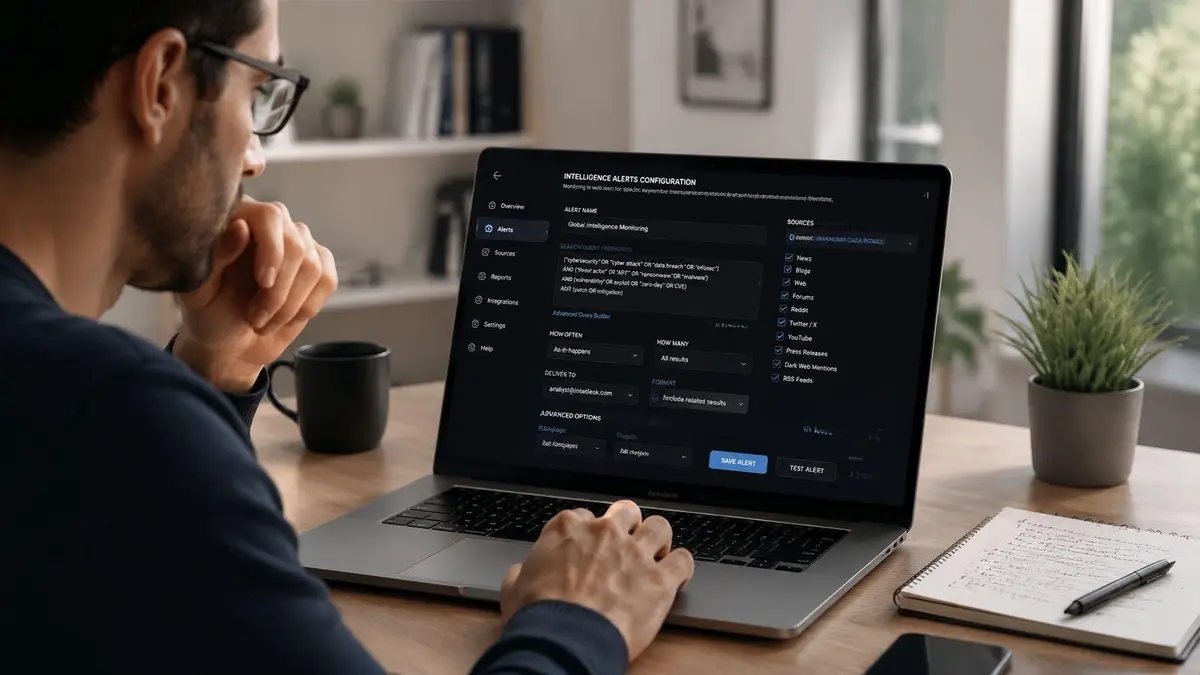
If you’re going to manage Google Alerts, configure it for intelligence gathering, not inbox comfort. Individuals often set alerts casually. They choose broad terms, accept default settings, and then complain that the results are either noisy or late. The fault usually starts in setup.
Start with names that can hurt you
Open Google Alerts while signed into your Google account. Create separate alerts for each of the following categories:
- Executive identities such as full legal names, common public versions of those names, and names that appear in press coverage.
- Brand assets including the company name, flagship products, slogans, and campaign tags.
- Sensitive terms such as internal project codenames, litigation-related phrases, or terms likely to appear in a leak.
- Common errors including misspellings, spacing variations, and alternate punctuations.
Use quotation marks around exact names and phrases. Exact matching won’t solve every noise problem, but it stops Google from treating fragments of a name as relevant.
Configure for speed, not convenience
For any alert tied to reputation risk, choose As-it-happens. Daily or weekly digests are administrative settings, not monitoring settings. If a hostile article, forum post, or copied document appears, a digest merely tells you that you were late.
The “How many” setting is even more important. A common pitfall is choosing Only the best results, which can cause an estimated 30% loss of critical alerts, according to Visualping’s guidance on setting up Google Alerts. For serious monitoring, select All results. Google’s definition of “best” is not aligned with legal risk, reputational sensitivity, or early-stage threat detection.
If a result is damaging, obscure, and new, that is exactly the result you need to see first.
Set source categories deliberately. News and blogs are obvious. Web results often matter just as much, especially for commentary pages and niche sites. Match language and region to the markets that affect your reputation, not just your headquarters.
A mature workflow also needs somewhere to route, review, and compare these signals. That’s where a dedicated reputation monitoring process becomes far more useful than a cluttered inbox full of disconnected notifications.
Avoid the default mistakes
Here’s the short version of a common misconception:
| Setting | Wrong choice | Better choice |
|---|---|---|
| Frequency | Once a day | As-it-happens for high-priority terms |
| Result type | Only the best results | All results |
| Keywords | One broad brand term | Separate alerts by person, brand, and risk phrase |
| Query scope | Perfect spelling only | Include variations and misspellings |
Google Alerts can be helpful, but only if you force it into a more aggressive posture than Google’s defaults encourage.
Advanced Query Optimization to Enhance Signal Fidelity
A wide net is useful at the start. Then you refine it. At this point, most users stop behaving like operators and start behaving like spectators.
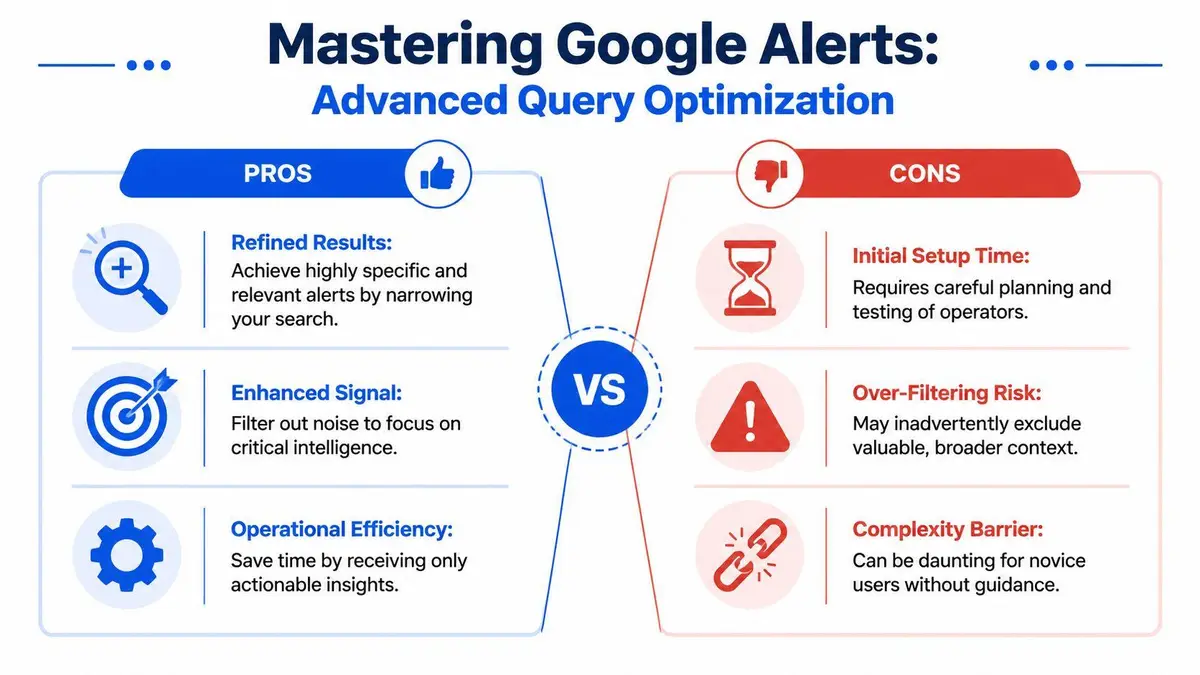
The right query structure improves signal quality without blinding you to real risk. Experts recommend reviewing alert keywords quarterly, and using site-specific searches such as a domain search can increase detection accuracy by 35%. The same guidance notes that 50% of users fail to refine their keyword lists, leading to 70% of alerts delivering irrelevant noise, according to this LinkedIn article on optimizing Google Alerts.
Use operators like a professional
Start with the obvious.
- Exact-match phrases like
"Firstname Lastname"reduce loose matching. - Exclusions such as
"Brand Name" -jobs -careersremove predictable clutter. - OR combinations let you watch related phrases in one alert where appropriate.
- Site restrictions such as
"Executive Name" site:example.comisolate domains that matter.
These operators aren’t cosmetic. They define what enters your field of view.
If you know a board member is likely to be discussed on a particular complaints site, industry forum, or gossip domain, create a separate alert for that location. Don’t rely on a generic name-only query and hope Google surfaces the right result.
Build parallel alerts for the same issue
One query is rarely enough. For a high-risk executive, use multiple alerts that approach the same threat from different angles.
| Monitoring goal | Example structure |
|---|---|
| Exact name match | "Jane Eleanor Smith" |
| Exclude recurring noise | "Jane Smith" -agent -speaker |
| High-risk context terms | "Jane Smith" lawsuit OR complaint OR investigation |
| Specific domain watch | "Jane Smith" site:forumdomain.com |
That is how you manage Google Alerts with discipline. You don’t ask one query to do every job.
For search visibility work, it also helps to understand how related Google surfaces shape what people discover after a negative mention appears. A focused review of Google related searches and reputation patterns can help you identify terms worth monitoring before they become entrenched.
A short visual walkthrough can help if you’re training a team member or assistant to handle setup carefully:
Refine without over-filtering
There is a line between precision and self-sabotage. If you exclude too much, you remove context that would have warned you early. If you include too much, your inbox fills with debris and you stop paying attention.
Tighten queries in layers. Don’t tighten them all at once.
That means keeping one or two broad alerts alive even after you build narrower ones. Broad alerts catch unexpected phrasing. Narrow alerts isolate likely threats. The two approaches work together.
Misspellings deserve their own attention. People often publish names incorrectly, especially in forums, scraped pages, reposts, and low-quality blogs. If a public figure’s surname is commonly misspelled, create that alert. If a brand is often written as two words instead of one, monitor both. Search systems don’t always normalize those variants the way you expect.
Establishing an Alert Triage and Response Protocol
An alert is not action. It is evidence that action may be required.
That distinction separates serious reputation management from inbox theater. Without a response protocol, people react emotionally, reply too quickly, ignore what matters, and preserve nothing. That is exactly how manageable incidents become expensive ones.
Use a disciplined triage sequence
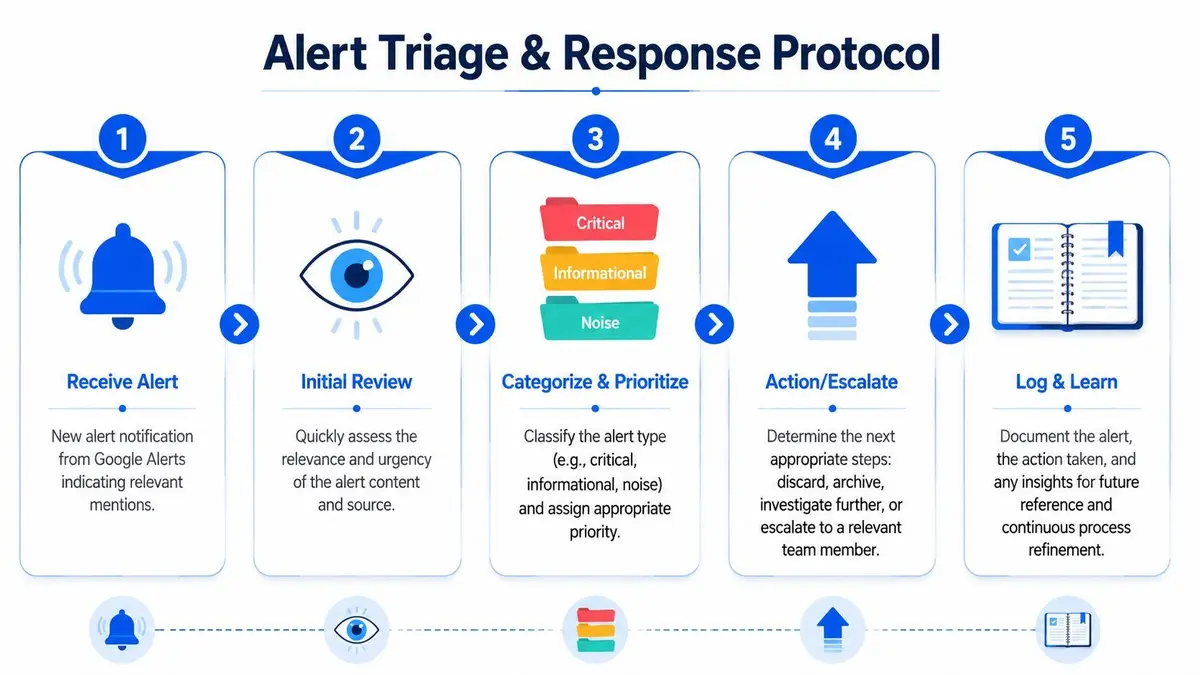
A simple protocol works better than a clever one.
First, classify the alert. Is it critical, informational, or noise? Critical means there is legal exposure, search visibility risk, impersonation, leaked material, or content likely to be repeated by others. Informational means it matters but doesn’t yet require intervention. Noise means archive and move on.
Second, assess the source itself. A hostile post on an obscure site may still matter if the domain indexes quickly or is frequently cited by journalists. A negative mention on a weak domain may be less urgent than a neutral mention on a publication with strong search visibility.
Third, decide whether the right response is silence, monitoring, direct outreach, legal review, or technical removal work. Most damage comes from doing the wrong thing publicly and too soon.
Keep a central log
If several people touch alerts, a shared record is essential. The log should capture:
- What appeared including the headline, URL, date, and a brief description
- Why it matters such as legal risk, ranking risk, impersonation, or privacy exposure
- Who owns it so accountability is clear
- What happened next including whether it was archived, escalated, or assigned for review
This doesn’t need to be complicated. It needs to exist. Teams already working inside Google Workspace often adapt their internal process around shared inboxes, labels, and review habits. If that environment is part of your operations, the Tooling Studio blog on Workspace apps is a useful starting point for thinking about workflow coordination.
Response standard: Never let the person most emotionally affected by the alert control the first outward response.
Governance matters more than most guides admit
Most “manage Google Alerts” advice is written for individuals. That’s inadequate for organizations. Google’s own admin controls allow organizations to turn Alerts on or off by organizational unit, as shown in Google’s Admin help documentation on managing Google Alerts access. What those basic controls don’t solve is governance.
Organizations need ownership, naming conventions, audit discipline, and duplication controls. If three departments create overlapping alerts for the same executive and nobody owns escalation, you don’t have a monitoring system. You have administrative noise.
For high-pressure environments, the protocol should answer four questions immediately: who reviews, who decides, who preserves evidence, and who approves outside contact. If any of those are unclear, your monitoring process is unfinished.
Recognizing the Critical Blind Spots and Failure Points
A reputational problem can surface, spread, and harden before Google Alerts sends anything useful. That is the operational risk. The tool gives you notice of some indexed public content. It does not give you reliable coverage.
Recent reporting on missed alerts and filtering behavior points to a simple conclusion. Google Alerts can fail to surface exactly the material you would want flagged first, especially when Google classifies it as low quality, duplicative, or spam-like, as described in RepScan’s analysis of missed Google Alerts and filtering issues. For routine monitoring, that is inconvenient. For executive, brand, or family office monitoring, it is a control failure.
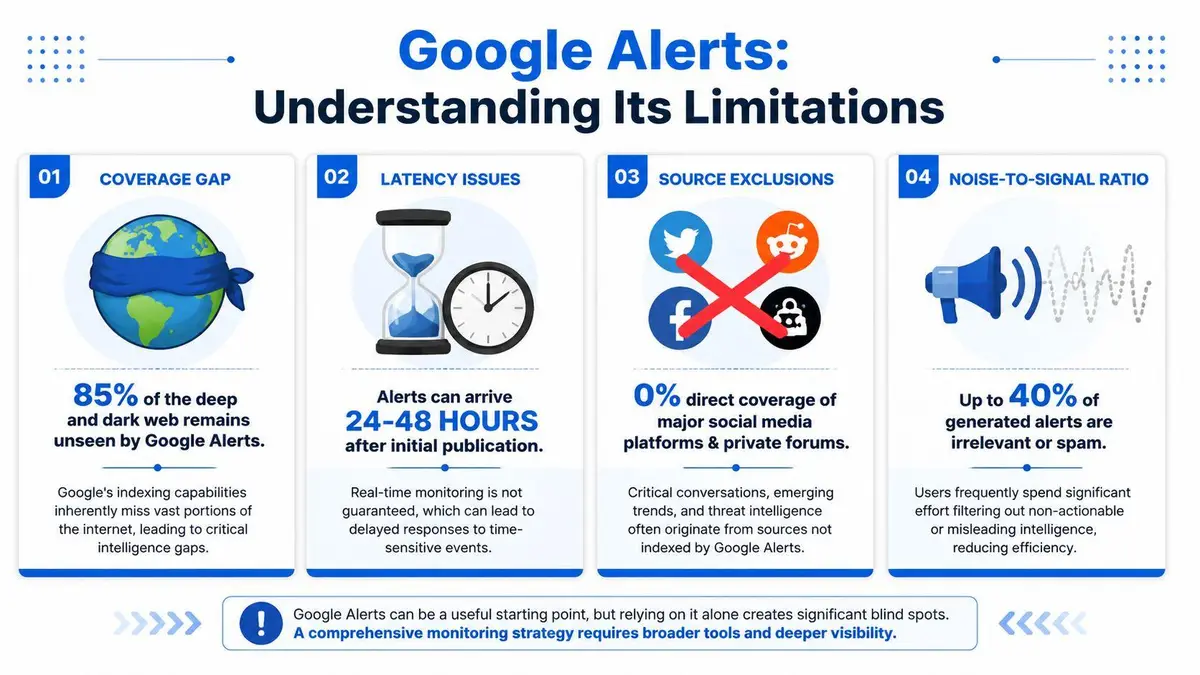
What Google Alerts doesn’t do well
These weaknesses are built into the product.
- Filtering can suppress hostile content. If Google discounts a page, your alert may never arrive.
- Indexing lag creates delay. Content must be discovered, indexed, and then included in an alert cycle.
- Coverage stops at the open web Google can practically reach. Private groups, closed forums, encrypted channels, and platform-native conversations often sit outside view.
- Email delivery adds another failure point. Alerts can be misrouted, buried, or filtered before anyone reviews them.
Google Alerts works as a basic early-warning layer. It does not work as a monitoring system for high-stakes reputation risk.
The Impact in Live Incidents
During a live incident, the first questions are immediate and specific. Who posted the content? Is it gaining traction? Is it appearing under branded search terms? Is it being copied, screenshot, or mirrored? Does it create a legal claim, or is it merely damaging?
Google Alerts answers only part of that set. It may tell you that something indexed exists. It will not reliably map reposting patterns, closed-channel distribution, coordinated amplification, or whether the content fits a viable takedown path. If you need those answers quickly, use a professional online monitoring approach built for faster risk detection.
Speed decides outcomes. Contify’s review of how Google Alerts works notes the platform’s dependency on indexing and limited scope, which is exactly why it falls short during fast-moving reputation events, as explained in Contify’s analysis of Google Alerts limitations.
A missed alert is a missed window to contain spread, preserve evidence, and choose the right response.
If you are protecting a senior executive, public figure, founder, or principal, assume the visible search index shows only part of the problem. That assumption is safer, more realistic, and far easier to defend than pretending a free alert product is giving you full coverage.
The Escalation Matrix When to Engage Professional Services
Some alerts should never remain in an internal queue.
Escalate immediately when content includes leaked confidential material, exposed personal data, impersonation, copied proprietary content, manipulated media, or a publication that creates clear legal exposure. Those are not “monitor and revisit” issues. They are intervention issues.
The same applies when harmful content begins to shape branded search results. Once a damaging result attaches itself to a personal or company name, the issue stops being a media annoyance and becomes a discoverability problem. At that point, monitoring alone is passive.
Know the legal threshold
Google’s removal standards are narrower than generally assumed. Google’s official policy requires that content violate specific legal standards such as copyright infringement or exposure of personally identifiable information. Generic negative reviews or criticism don’t qualify, and if a request is rejected, the content remains public unless the host itself is successfully challenged, as explained in Harvard’s summary of Google’s content removal framework.
That is why amateur escalation often fails. People report content they dislike rather than content that meets a removal basis.
If the issue involves copied original work, the DMCA route may apply. A valid notice must identify the copyright owner, specify the infringing URL, and state a good faith belief that the use is unauthorized. Hosting providers are required to act “expeditiously,” and typical processing times range from 24 hours to 7 days for social media platforms and 3 to 14 days for traditional web hosts, according to DMCA.com’s explanation of takedown requirements and timing. That sounds straightforward until a counter-notice appears, the host is offshore, or the content is mirrored across multiple domains.
Use a hard decision standard
Escalate beyond self-management when any of these are true:
- The content is unlawful or clearly infringing
- Private data or confidential material is exposed
- The publisher is anonymous, evasive, or hostile
- The issue is spreading across multiple URLs or platforms
- Search visibility is already affected
- You need speed, discretion, and preservation of evidence at the same time
A more resilient long-term posture usually involves professional online monitoring for peace of mind, not because free tools are useless, but because they aren’t built for legal complexity, covert spread, or reputation attacks that evolve by the hour.
When an alert points to defamation, impersonation, leaked material, copyright abuse, or private data exposure, delay is expensive. ContentRemoval.com handles high-stakes online reputation threats with legal precision, discreet escalation, and rapid action across search engines, websites, and social platforms. If the situation is live, start with a confidential assessment and get a clear plan before the damage spreads further.
Frequently asked questions
What settings should I use for Google Alerts to monitor my name?
Put the exact name in quotation marks, set frequency to As-it-happens, and choose All results rather than Only the best results. Create separate alerts for each executive, brand asset, sensitive phrase, and common misspelling instead of relying on one broad query.
Why did Google Alerts miss a negative article about me?
Google Alerts only surfaces content that has been discovered and indexed, and it can filter out pages Google classifies as low quality, duplicative, or spam-like. Private groups, closed forums, and platform-native conversations sit outside its reach entirely. Treat it as a basic notification layer rather than full coverage.
When should I escalate a Google Alert to a professional?
Escalate immediately when the content includes leaked confidential material, exposed personal data, impersonation, copied proprietary work, manipulated media, or a clear legal claim. The same applies once a harmful result starts appearing under branded search terms, because at that point monitoring alone is passive.
