
Removing search suggestions depends on where the suggestion lives. If it appears only on your device or account, clear account-level search activity, pause sync and disable autocomplete in Chrome, Edge, Firefox or Safari. If it appears for signed-out users on clean devices, it is a public prediction that changes only through platform reporting, a legal request, or stronger competing associations.
Key facts
- Test in a signed-out private window on a second device to tell local history from public autocomplete.
- Chrome’s autocomplete setting sits under Sync and Google services; Edge has a typed characters suggestion toggle.
- Some system-level search fields, such as iPhone Settings search, cannot be fully cleared of suggestions.
- Platform reports need the exact wording, reproduction screenshots, context of harm and supporting records.
Where ContentRemoval.com comes in. ContentRemoval.com handles damaging autocomplete and related search phrases for executives and families whose name now completes to an allegation or a private detail. The person, their assistant or their counsel usually reaches us after clearing browsers and seeing the phrase persist for others. A free 15-minute Exposure Scan maps whether the suggestion is local or public and which content is feeding it, and the report is yours to keep. Get a Free, Confidential Exposure Scan or read how our content removal work is done.
A search suggestion becomes a crisis the moment it attaches a damaging phrase to your name, your company, or a family member. You type the first few letters into a phone during a meeting, and the device surfaces something inaccurate, invasive, or defamatory. If that suggestion appears only on your machine, the problem is private. If it appears for everyone, the problem is public, commercial, and potentially legal.
Users often waste time on the wrong fix. They clear a browser, delete a few searches, and assume the issue is resolved. Then the phrase reappears on another device, in a different browser, or worse, in front of a prospective investor, board member, journalist, or child. That failure usually comes from misdiagnosis. Search suggestions don’t come from one place, and they don’t yield to one remedy.
If you’re trying to learn how to remove search suggestions, start with one rule. Contain what you control immediately, then escalate based on where the suggestion resides. That is how you protect privacy fast, preserve evidence, and avoid making a public-facing problem worse through random trial and error.
The Threat of a Compromised Search Bar
A chief executive sits down before a financing call and types her own name into a search bar to pull up a recent interview. Before she finishes the surname, the device proposes a phrase implying fraud. It may be false. It may be the residue of a rumor, a coordinated smear, or an old dispute that no longer reflects reality. It doesn’t matter. The suggestion itself creates risk.
That risk isn’t abstract. Counterparties form impressions quickly. Assistants see screens. Family members share devices. A search prompt can affect negotiations, hiring, media scrutiny, personal relationships, and physical safety if it exposes sensitive themes tied to a residence, children, health, or allegations.
Search suggestions are often treated as a nuisance. For high-value individuals, they’re a reputational signal with distribution built in.
The first mistake is trivializing the event. The second is assuming every suggestion is public. Some are local remnants from your own history. Others are generated by platform systems that reflect broader query behavior and algorithmic associations. Those are very different problems, and they require different responses.
Private irritation or public reputational threat
A private problem is embarrassing. A public problem is strategic.
If the suggestion appears only when you’re signed into a specific account, on a specific browser, or on a single device, you’re likely dealing with client-side data. That can often be contained quickly. If colleagues in another office, counsel in another city, or journalists on clean devices can reproduce the same prompt, the issue has moved beyond housekeeping. You’re now dealing with a platform-level output that may require reporting, suppression strategy, or legal intervention.
What control looks like
Control starts with discipline. Preserve screenshots. Test in a clean browser session. Check whether the suggestion appears while signed out. Confirm whether it appears across devices and regions. Then act in the right sequence.
People under pressure want one click. That isn’t how this works. The practical path runs from diagnosis, to client-side containment, to public influence or formal escalation, and finally to professional takedown support when the stakes justify it.
The Anatomy of a Search Suggestion
Search suggestions come from more than one system. If you treat them all as browser history, you’ll miss the underlying source and waste time. The cleanest way to think about this is simple. Some suggestions are a personal library. Others are a public billboard. A third category sits in between, where a platform infers associations and predicts what users may mean.
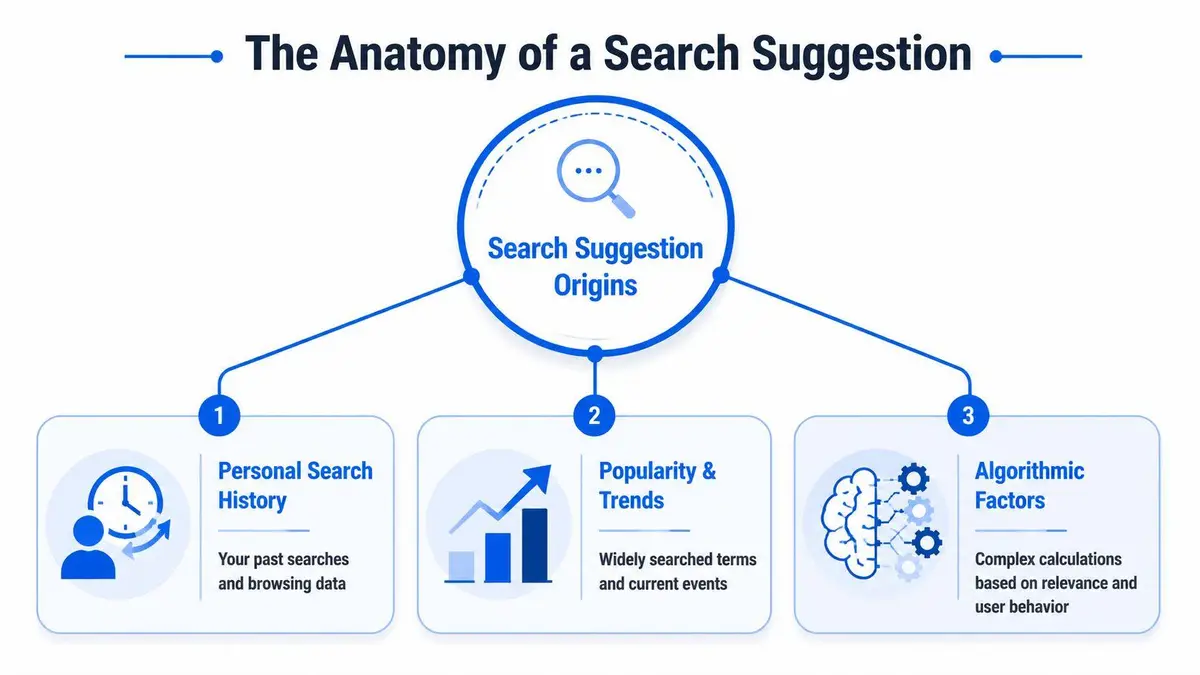
Personal history
These are the easiest to fix and the easiest to mistake for a larger problem. Your browser or account may suggest terms based on what you’ve searched before, what tabs are open, what bookmarks exist, and what data is synced across devices.
Mozilla states that Firefox’s address bar can surface search history, bookmarks, open tabs, top sites, and search suggestions, and that the preference browser.urlbar.maxHistoricalSearchSuggestions controls the limit for historical search suggestions. Mozilla documents the default as 2, and setting it to 0 disables those historical search suggestions entirely in Firefox’s settings layer, according to Mozilla’s Firefox support guidance.
That matters because it proves a core point. Some suggestions are local and configurable. You don’t need a legal campaign to remove a suggestion that’s being fed by your own machine.
Public and trending queries
These suggestions aren’t yours. They’re generated because many users are searching the same phrase, or because the platform predicts common completions based on broader behavior. This situation often blindsides executives. They clear their own history and still see the phrase. The phrase remains because the system wasn’t reading only from personal data in the first place.
If you need a plain-language primer on why search engines pair queries with popularity, relevance, and user behavior, Baslon Digital’s piece on understanding SEO basics is useful background. You don’t need to become an SEO operator, but you do need to understand that public autocomplete behaves more like a market signal than a private note.
Algorithmic and system-level outputs
Some suggestions are generated by platform logic that users can’t fully shut off. Consequently, many tutorials mislead readers by promising a universal off switch.
Apple Community discussions show the limit clearly. In the iPhone Settings search bar, users ask how to remove suggestions, and the accepted answer is effectively that they can’t fully remove them because the system is designed to surface apps and hidden items in certain contexts, as reflected in the Apple Community discussion on iPhone Settings search suggestions.
Practical rule: Before you try to remove a suggestion, identify whether you’re looking at a query suggestion, a history-based suggestion, a trending prompt, or a system search result. Full removal isn’t supported in every environment.
A fast diagnostic test
Use this sequence before you touch any settings:
| Test | What it suggests |
|---|---|
| Appears only on one device | Likely local history, browser, or account sync |
| Appears while signed out on multiple devices | More likely public or algorithmic |
| Appears inside an operating system search field | May be a system result with limited removal options |
| Reappears after clearing browser history | The source is probably broader than local history |
That distinction is the foundation of how to remove search suggestions without wasting a week on false fixes.
Immediate Containment Client-Side Fixes
You open a browser in a board meeting, type the first letters of your name or company, and a damaging phrase appears before you finish the query. If that suggestion is showing only in your environment, contain it immediately. Private suggestions are a device, browser, sync, or account problem until proven otherwise.

Start with stored account activity
Begin where the signal is likely being preserved. Browser history is only one layer. Signed-in search history, synced browsing data, saved form entries, and cross-device synchronization can all repopulate the same suggestion after a local cleanup.
Handle this in order:
- Review and delete the relevant account-level search activity.
- Pause or limit sync if the phrase is replicating across devices.
- Clear local browser history, cached form data, and address bar history on each affected device.
- Test again in a private window and on a second device.
That sequence prevents wasted effort. Clearing one laptop while the same account keeps feeding the suggestion back into Chrome, Edge, or mobile search is not a fix.
Browser-by-browser containment
Use the control that matches the source.
- Chrome and Google surfaces
Turn off Autocomplete searches and URLs in Chrome under Settings → You and Google → Sync and Google services. Then remove the related activity from the signed-in Google account if the phrase appears there. Google documents the setting in its Chrome privacy and services controls. If your concern extends beyond your own devices and into what others may see in Google results, review this guide on removing Google related searches and autocomplete associations. - Microsoft Edge
Edge gives you a direct suppression control. Go to Settings → Privacy, search, and services → Address bar and search and switch off Show me search and site suggestions using my typed characters. Microsoft also explains how to clear search history across selectable time ranges in its instructions for deleting search suggestions in Edge. - Firefox
Firefox separates address bar suggestions from search history controls more clearly than most browsers. Open Settings → Search and Privacy & Security, then disable search suggestions and remove saved search history if the phrase is being pulled from prior activity. - Safari and Apple devices
Safari requires a narrower diagnosis. Clear Safari history and website data, then check whether the phrase appears in Safari itself or in a wider iPhone or iPad search interface. If it appears inside system search rather than the browser, you are no longer dealing with a standard browser autocomplete issue.
One warning. Strange redirects, pop-ups, injected results, or browser settings that keep changing point to malware or an unwanted extension, not ordinary suggestion memory. In that case, treat the machine as compromised and use technical cleanup guidance such as Nerds 2 You expert virus removal.
A short walkthrough can help if you’re handling this under time pressure.
What these fixes actually accomplish
They protect your screen, your devices, and your accounts. They reduce the chance that a colleague, client, or family member sees a harmful prompt on hardware you control.
They do not change public autocomplete on clean devices. They do not remove phrases reinforced by broader search behavior, media coverage, or platform-level associations.
Treat client-side cleanup as containment. If the suggestion appears outside your own environment, the problem has moved from private hygiene to public reputation risk.
Influencing Public Autocomplete Suggestions
Public autocomplete doesn’t usually disappear because you asked nicely. It changes when the platform sees stronger, cleaner, more authoritative associations. If the damaging phrase is public-facing, the strategy is not deletion by housekeeping. The strategy is influence through replacement signals.
Why passive removal fails
Platforms generate public suggestions from multiple layers of data. One deletion request, one browser cleanup, or one account reset won’t reliably change a phrase that’s reinforced by search demand, related content, discussion threads, and repeated user behavior.
Google-owned ecosystems make this plain in adjacent contexts. YouTube guidance shows that suggestions are shaped by more than one history source. Users are told to stop future tracking by unchecking include your searches on YouTube, then remove existing signals through managed history controls and deletion by custom date range or all time, as shown in YouTube’s guidance on managing suggestion-driving history. The lesson is broader than YouTube. Single-step deletion is rarely enough when multiple data stores feed a suggestion.
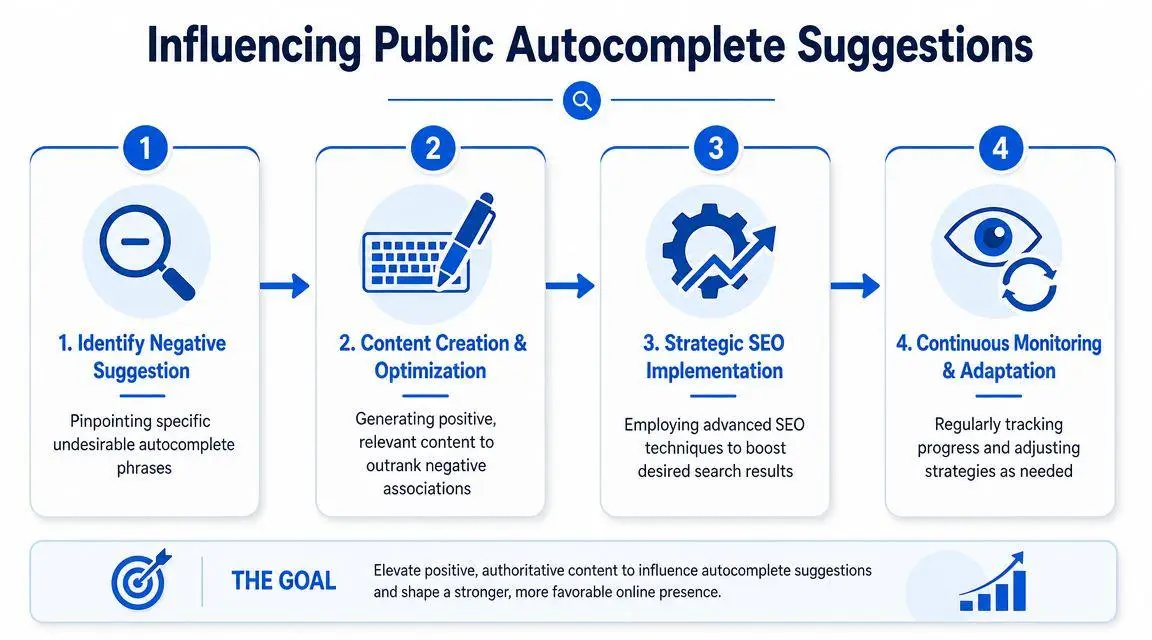
What actually changes public suggestions
You need a structured reputation campaign. Not noise. Not vanity content. Not generic press releases.
A workable approach usually includes:
- Identify the exact phrase
Record the full suggestion, where it appears, whether it varies by geography, and whether it’s tied to a person, brand, or event. Precision matters because remediation efforts must target the specific association. - Publish authoritative material that competes with the bad phrase
That means executive bios, controlled interviews, corporate pages, thought leadership, accurate third-party references, and legally supportable corrections. Weak content won’t displace entrenched associations. - Optimize for the entity, not just the keyword
Search engines connect names, companies, topics, and events. Your content has to reinforce the correct identity signals repeatedly and coherently. - Monitor and adapt
Suggestions shift. So should your campaign. If one phrase weakens and another emerges, the response has to follow the new pattern.
For readers dealing specifically with Google related queries, Google related search removal guidance provides a closer look at the issue from a removal and suppression standpoint.
The right mindset
Public autocomplete is a reputation battlefield. If you leave it untouched, the platform fills the vacuum with whatever signals are strongest. If those signals are hostile, stale, or false, your silence becomes part of the problem.
You don’t beat a harmful public suggestion with one deletion. You beat it by making the unwanted association less credible, less relevant, and less dominant than the record you build in its place.
Many executives resist because they want a clean technical fix. Public reputation threats don’t work that way. They require sustained pressure.
Escalation Pathways for Harmful Suggestions
When a suggestion is merely annoying, containment may be enough. When it implies criminal conduct, exposes private information, sexualizes a name, targets protected characteristics, or points toward unlawful content, you move out of settings and into formal escalation.
Platform reporting
Search engines and platforms usually provide reporting pathways for inappropriate predictions. Use them, but use them with evidence. A vague complaint rarely goes anywhere. A structured submission is harder to dismiss.
Your file should usually include:
- Exact wording
Capture the suggestion precisely. Small wording differences matter. - Reproduction evidence
Screenshots from clean browsers, signed-out sessions, and multiple devices help establish that the issue isn’t merely local. - Context of harm
Explain whether the suggestion is false, invasive, sexually explicit, threatening, or tied to private identifying data. - Supporting records
If the phrase contradicts a court ruling, a correction, a dismissal, or verified facts, attach that material in organized form.
Most user reports fail because they are emotional, imprecise, or unsupported. Platforms review categories. They don’t respond to outrage.
Legal framing matters
A harmful suggestion can intersect with several legal theories, but the platform won’t infer your case for you. Counsel has to connect the suggestion to a recognized basis for action, whether that involves defamation, privacy, impersonation, intellectual property, or another platform-policy violation.
That work becomes more concrete when you prepare a formal legal request. For a practical overview of that process, review how to submit a Google legal request.
When proof changes the result
Some requests are weak because they ask a platform to make a complex factual judgment with little substantiation. Others carry more force because they present a court order, identity documentation, copyright ownership records, or a clear showing that private personal information has been exposed in a way the platform’s policies recognize.
A short comparison helps:
| Situation | Likely path |
|---|---|
| Suggestion is only on your device | Local cleanup |
| Suggestion is public but not policy-violating | Reputation suppression strategy |
| Suggestion exposes sensitive private data | Platform report with documentation |
| Suggestion reflects defamatory content tied to adjudicated facts | Legal request supported by evidence or court order |
The burden is rarely “this feels unfair.” The burden is “this violates a policy or legal standard, and here is the proof.”
Preserve leverage
Don’t flood the platform with inconsistent submissions from multiple assistants, agencies, and law firms. That weakens credibility. Build one record. Keep it factual. Preserve screenshots and timestamps. Then escalate in a controlled way.
The difference between a dismissed report and an effective one usually isn’t emotion. It’s discipline.
Engaging Professional Takedown Services
At 7:30 a.m., a lender, reporter, or opposing counsel types your name into Google. The suggestion that appears under the search bar is now part of the conversation before you ever speak. Once that happens, this stops being a browser-cleanup task and becomes a reputational risk event.
Professional help makes sense when the issue affects revenue, financing, litigation posture, board confidence, family privacy, or deal timing. High-stakes autocomplete problems sit in two different categories, and treating them as one is a mistake. Some are private, client-side artifacts on a specific device or account. Others are public, server-side signals tied to indexed content, repeated searches, or coordinated amplification. A serious advisor separates those categories immediately, then acts on the right one.
What a serious engagement actually does
A proper takedown engagement begins with diagnosis, scope control, and an evidence plan. The first job is to determine whether the suggestion is local, public, synced across accounts, limited to one search engine, driven by an underlying page, or reinforced by multiple source URLs.

That distinction changes the strategy. If the problem is confined to a device, the answer is containment and account hygiene. If the phrase appears publicly across sessions and users, the work shifts to source analysis, platform requests, suppression planning, and legal positioning. Clients often fail because they keep applying private fixes to a public problem.
Good firms also impose discipline. One record. One chronology. One submission strategy. Conflicting reports from multiple assistants, agencies, and lawyers weaken credibility and create avoidable inconsistencies.
What to expect from a professional process
The strongest providers combine four functions in one workflow:
- Evidence development
They document the exact phrasing, where it appears, who can reproduce it, what content may be feeding it, and which policies or legal claims are available. - Platform-specific action
They submit requests to the correct product and team, not generic support channels that produce delay and drift. - Source-level remediation
If the suggestion is being fed by articles, forum posts, copied pages, or data-broker exposure, they address the source instead of chasing the symptom. - Monitoring and recurrence control
They track variant phrases, resurfacing across devices, and whether the underlying content ecosystem is still reinforcing the prediction.
Executives comparing providers should use a disciplined screening standard. This guide to evaluating professional content removal services for executives gives a practical framework.
When internal handling should stop
Bring in outside help if any of the following is true:
- The suggestion is visible to customers, investors, counterparties, or the press
Public autocomplete affects judgment before direct contact begins. - The issue involves minors, addresses, health information, sexual content, threats, or impersonation
Privacy and safety issues require faster escalation and tighter documentation. - The phrase appears tied to multiple pages, reposts, forum threads, or coordinated attacks
That usually means the suggestion is being reinforced from several directions at once. - Your team is improvising
Scattered screenshots, inconsistent explanations, and duplicate submissions make resolution harder.
One factual option in this market is ContentRemoval.com, which states that it handles unwanted Google related searches through an assessment-and-action workflow tied to removal efforts and broader reputation protection. For a high-value client, that integrated model is usually the right one. Browser settings, platform reporting, search suppression, and legal escalation should be managed as a single matter, not split into disconnected tasks.
If a search suggestion is tied to your name, your child, your company, or an active dispute, treat it as a public exposure problem first and a technical nuisance second. Speed matters. So does control.
If you need outside intervention, contact ContentRemoval.com for a confidential assessment. The right response is fast, discreet, and structured. A harmful suggestion left in place starts to look credible merely because it remains visible.
Frequently asked questions
Why does a bad search suggestion still show after I cleared my browser history?
Because the suggestion was never coming only from local history. Signed-in account activity and cross-device sync can repopulate it, and public suggestions are generated from broader query behavior and platform associations that a personal cleanup cannot touch. If it reproduces on a clean, signed-out device, it is a public problem.
Can I report a defamatory Google autocomplete suggestion?
Yes, search engines provide reporting routes for inappropriate predictions, but they review against categories rather than fairness. Submit the exact wording, screenshots from signed-out sessions on several devices, an explanation of the harm, and any court ruling, correction or dismissal that contradicts the phrase. A legal request is the route when the suggestion reflects adjudicated defamation or exposed private data.
How do you change a public autocomplete suggestion that does not break any policy?
Through replacement signals rather than deletion. Record the exact phrase, publish authoritative material such as executive bios, controlled interviews and accurate third-party references, reinforce the correct entity associations consistently, and monitor for variant phrases as the suggestions shift.
