Deleting recent searches on an iPhone means clearing several separate layers. Safari history is cleared under Bookmarks, then History, by entry or time range. Spotlight suggestions are controlled under Settings, Siri and Search. Apps like Google and Maps keep their own histories, and synced accounts can restore a term on another device unless cleared at the source.
Key facts
- Safari offers four clearing ranges: last hour, today, today and yesterday, or all history.
- Settings, then Safari, then Clear History and Website Data is the fallback path; AutoFill stays separate.
- The Google app deletes one search, a day, a week, a custom range or all time.
- A term cleared on the phone can return through iCloud sync, Siri suggestions or the account that stored it.
Where ContentRemoval.com comes in. ContentRemoval.com steps in when the search was only how someone discovered a public problem: an article, a court filing, a mugshot, an impersonation profile or leaked material that no phone cleanup will touch. Executives, attorneys and their assistants usually make contact once they realise the result is visible to anyone who searches. A free, confidential 15-minute Exposure Scan maps what is removable at the source and in search, and the report is yours to keep. Get a Free, Confidential Exposure Scan or read how our content removal work is done.
You handed your iPhone to someone for a photo, a boarding pass, or a quick search. A suggestion surfaced in Safari, Spotlight, or Google that wasn’t meant for anyone else. That moment is usually what sends people looking for how to delete recent searches on iPhone.
For many, it’s awkward. For an executive, public figure, attorney, or family office principal, it can become a liability.
Search history on an iPhone isn’t one neat list. It’s a set of overlapping records stored by Safari, individual apps, and sometimes synced services tied to your accounts. If you want discretion, don’t rely on a single “clear history” button and assume the job is done. Treat this as containment. Remove what’s visible now, then harden the device so the same exposure doesn’t happen again.
Your Digital Footprint and the Need for Discretion
A confidential query rarely stays confined to the app where you typed it. Someone searches a medical specialist, a litigation issue, a competitor, or a security incident. Hours later, the phrase appears as a suggestion on the lock-adjacent search screen, in a browser field, or inside a third-party app. The problem isn’t curiosity. The problem is exposure.
High-stakes clients usually don’t need generic privacy advice. They need control. That starts with understanding that an iPhone keeps multiple layers of memory. Safari remembers browsing activity. Apps often maintain their own recent searches. Account-based services may preserve activity beyond the device itself. If you only clear one layer, you leave the others intact.
That’s why digital discretion has to be methodical. You’re not deleting embarrassment. You’re reducing discoverability.
For readers who want a broader privacy baseline after the immediate cleanup, this primer on how to secure your online presence is a useful reference. If your concern goes beyond one device and into legacy traces tied to your name, this more focused approach to digital footprint cleanup is the right frame.
Search history is rarely just history. On a modern iPhone, it’s a live feed of prompts, suggestions, and residual clues.
There’s a practical distinction worth keeping in mind. A device can look clean while still being permissive. If Siri suggestions, app search logs, and synced account data remain untouched, the same issue returns the next time someone glances at your screen. The right response is two-part. First, remove the visible trail. Then shut down the channels that reintroduce it.
Immediate Triage Clearing Safari Search History
A phone handed to an assistant, driver, spouse, or security officer can expose more than a browser tab. Safari history is often the first visible trail, and it needs to be handled with precision.
Clear only what creates risk
Start inside Safari, not Settings. It gives you finer control, which matters if you need to remove a trace without disrupting the rest of the device.
Apple provides four history clearing ranges through Apple’s Safari history controls: last hour, today, today and yesterday, or all history. Use the smallest effective option. Broad deletion is lazy. Targeted deletion is cleaner and causes less disruption.
Follow this order:
- Open Safari.
- Tap the Bookmarks icon.
- Open History.
- If the exposure is limited to one or two searches or sites, swipe left on each entry and delete them individually.
- If the exposure covers a defined window, tap Clear and choose the narrowest relevant time range.
Use this rule set:
| Situation | Recommended action |
|---|---|
| One search or one site is sensitive | Delete the specific History entry |
| The last few minutes created exposure | Clear Last Hour |
| The issue happened earlier the same day | Clear Today |
| The exposure spans a short travel or meeting cycle | Clear Today and Yesterday |
| The device has broader privacy issues | Clear All History |
Use Settings only as a fallback
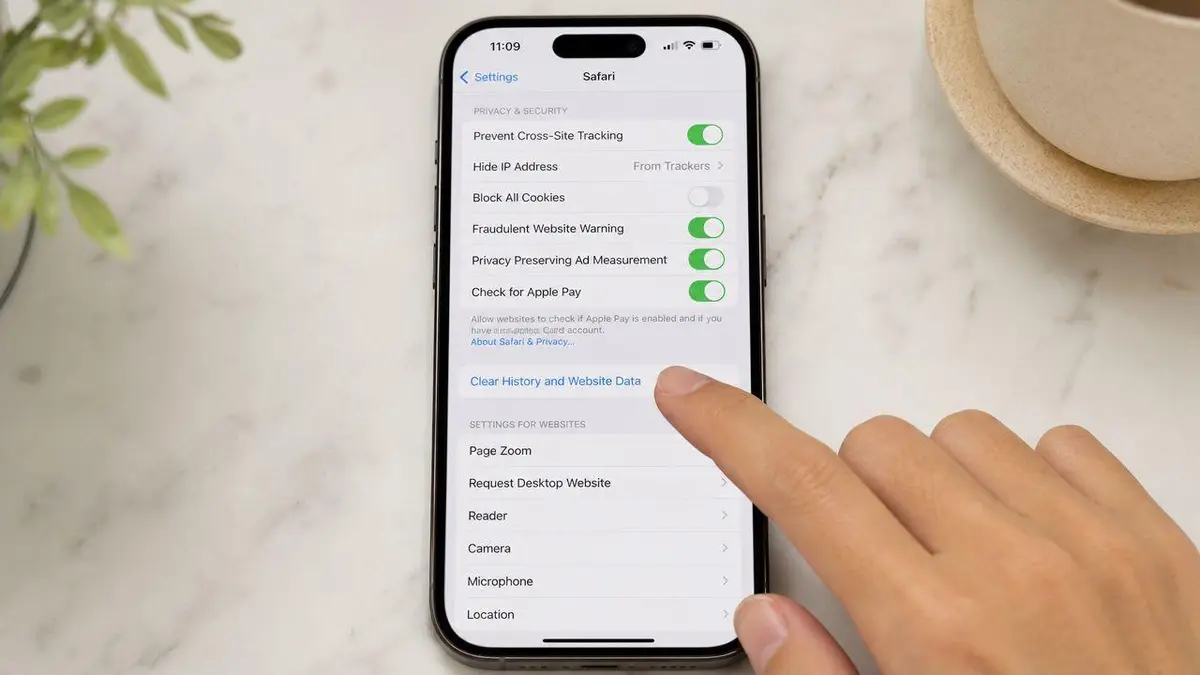
You can also clear Safari from Settings > Safari > Clear History and Website Data. Use that path if Safari will not open, if Screen Time restrictions complicate access, or if you are assisting someone remotely and need the shortest route through system menus.
Deletion here removes browsing history and website data, but it does not erase every convenience feature tied to Safari. AutoFill remains separate. That distinction matters. You can remove visible traces without forcing a rebuild of saved form habits on the device.
For clients dealing with recurring exposure, a structured online privacy removal service can help address traces that extend beyond the handset itself and into account-linked records.
A quick visual walkthrough can help if you need to move fast under pressure.
My recommendation
Delete individual Safari entries first. Use a time-range wipe only when you can define the exposure window with confidence. Reserve All History for devices that already show a pattern of poor search hygiene, shared access, or travel-related risk.
Treat Safari cleanup as triage, not final sanitization. History can disappear from view while related suggestions, synced records, or app-level traces remain elsewhere in the Apple ecosystem.
Securing Spotlight and System-Wide Searches
Safari is only one exposure point. On iPhone, system-wide search can surface activity from across the device, and that’s where many people get caught. A private search made in one app can reappear as a suggestion somewhere else.
Why Spotlight is the real blind spot
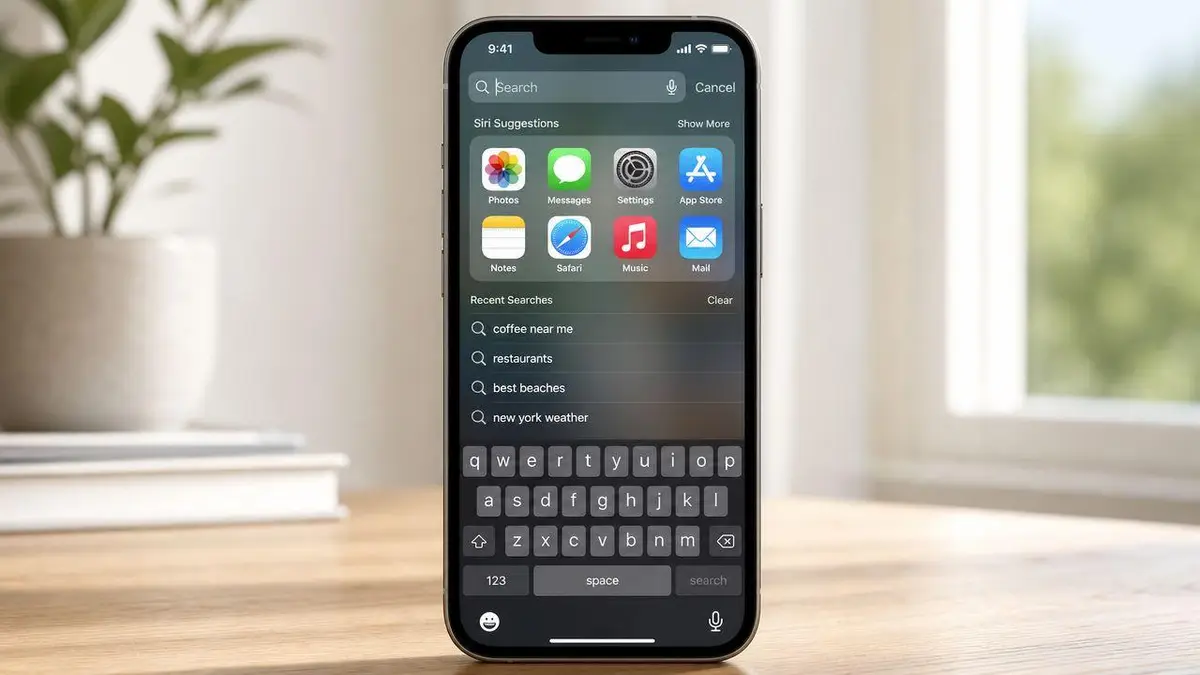
Swipe down from the Home Screen and iPhone search starts aggregating. It can pull from Apple apps, communication tools, maps, media, and third-party software. That means the risk isn’t limited to what a person can find inside Safari. The device itself can volunteer clues.
For high-visibility users, I don’t recommend leaving this behavior on default settings. Convenience is overrated when the phone regularly changes hands in cars, conference rooms, green rooms, and security checkpoints.
Use Settings > Siri & Search and audit the apps that should never contribute suggestions. Focus on anything tied to legal research, health, travel, finance, communications, dating, or press monitoring.
What to shut down
Don’t disable everything blindly. Target the apps that create reputational or personal risk.
- Browser and search apps should be reviewed first because they generate the most obvious prompts.
- Maps and travel apps often reveal destinations, addresses, and recent lookups.
- Messaging and mail apps can surface names, subjects, and recent interactions.
- Media and social apps may expose interests, identities, or accounts you don’t want previewed.
If a suggestion would be a problem on a locked desk, in a car, or in someone else’s hand, that app shouldn’t be feeding system-wide search.
For clients managing wider privacy exposure, this is usually where device cleanup turns into policy. The device shouldn’t just be cleaned. It should be configured to leak less in ordinary use. If you need a broader intervention around personal data exposure, online privacy service work sits above simple deletion and focuses on reducing what can surface in the first place.
My view is simple. Search deletion is reactive. Search hardening is professional.
Neutralizing Third-Party App Search Histories
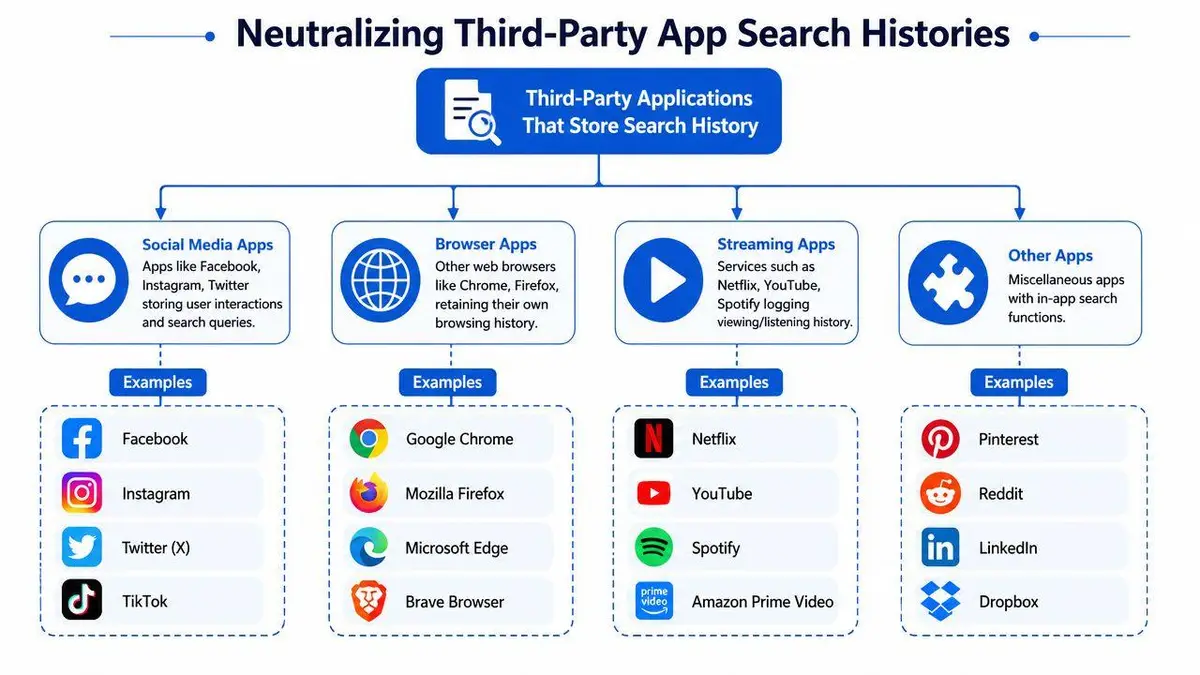
An iPhone is an ecosystem, not a single record. Every major app should be treated as its own archive until proven otherwise. If you use Google, Maps, social platforms, marketplaces, streaming apps, or secondary browsers, assume each one keeps its own recent searches.
Start with the Google app
Google’s official guidance for iPhone is unusually specific. In the Google app, you can delete one search, a day, a week, a custom range, or all time, and you can also remove searches directly from the search bar by swiping left and tapping Delete, according to Google’s iPhone search history help page. Google also notes that search history can be cleared from the device through Clear app history.
That tells you something larger. Search traces often sit in multiple layers inside one app.
Apply the same model everywhere else
Don’t memorize one app. Learn the pattern.
- Search bar memory: Open the app and tap into its search field. If recent terms appear, look for swipe-to-delete, edit, or clear options.
- In-app settings: Many apps hide search controls under history, privacy, account activity, or recent items.
- Account activity: If the app is account-based, assume some history may exist beyond the phone itself.
- Device-level leftovers: Some apps also cache local data that can survive after obvious recent searches are removed.
High-risk apps to inspect
Use this as a priority order, not a checklist for casual users.
| App category | What usually matters |
|---|---|
| Secondary browsers | Their own browsing and search history |
| Maps apps | Recent addresses, places, and route lookups |
| Social platforms | Name, account, hashtag, and profile searches |
| Streaming apps | Artist, title, or channel searches that resurface publicly |
| Shopping and marketplace apps | Product and seller lookups tied to personal interests |
Every searchable app is a potential disclosure surface. Delete at the source, not just on the phone.
This is also where ongoing monitoring becomes useful. If reputational risk extends beyond private device usage into recurring discovery issues, reputation monitoring can track what continues to appear around your name, brand, or business interests while you clean up the device side separately.
My recommendation is blunt. Audit the apps you use, not the ones privacy guides usually mention. The dangerous history is the one tied to your behavior, not someone else’s template.
Advanced Protocols for Complete Data Sanitization
A deleted search can return on a Mac, an iPad, a second browser, or an account dashboard you forgot was active. For a high-risk user, that is the core problem. Device cleanup only removes one visible layer.
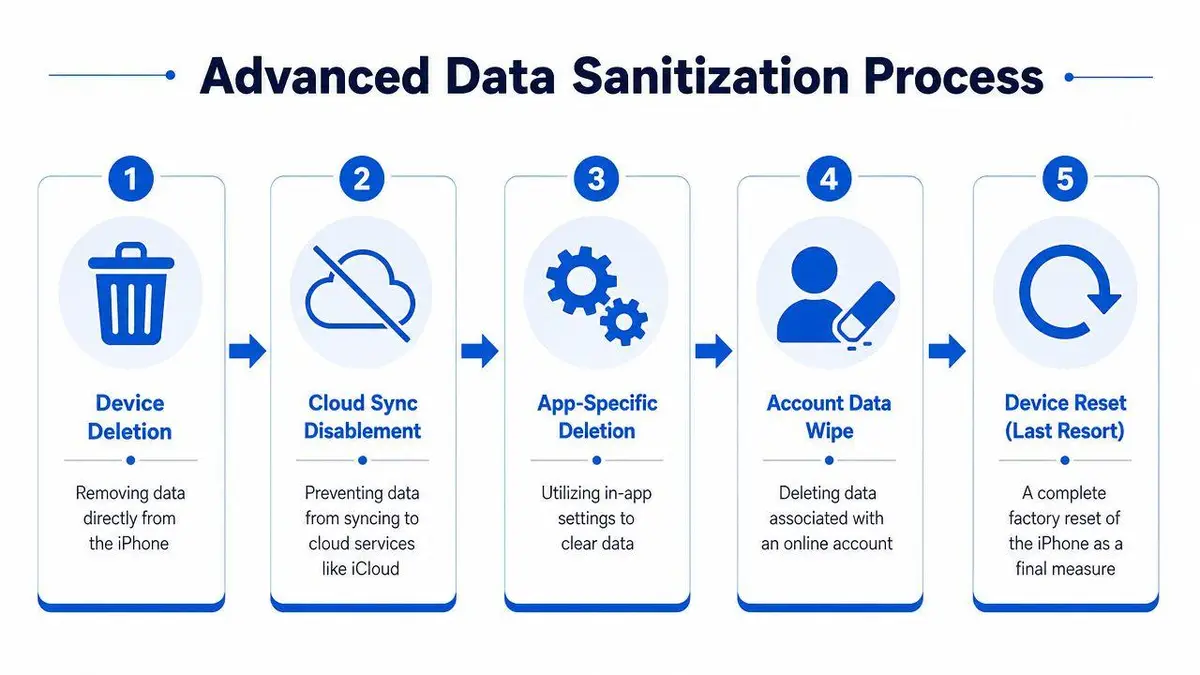
Device deletion is local, not universal
Deleting recent searches on the iPhone does not guarantee removal across the Apple ecosystem. Safari history can sync across devices. Search terms can persist in Siri and Spotlight suggestions, browser accounts, app accounts, and cloud-backed activity logs. If discretion matters, treat every synced surface as exposed until you verify it is clean.
Precision matters here. Delete only what creates risk, but verify every place that can restore it. A careless bulk wipe can destroy useful records without solving the actual exposure.
The sanitization sequence I advise
Handle the cleanup in a strict order.
- Stop immediate exposure on the phone. Remove the visible search or history entry from the device first.
- Check Apple sync paths. Review whether Safari, Siri, Spotlight, iCloud, and Handoff behavior could replicate that activity elsewhere.
- Clean the originating service. If the search happened in Chrome, Google, YouTube, Maps, Amazon, or another platform, delete it there. The source service often matters more than the phone.
- Inspect the account layer. Search history tied to an Apple ID, Google account, or app account can repopulate other devices and interfaces.
- Confirm from a second endpoint. Open another trusted device signed into the same ecosystem and verify the term does not reappear.
- Use device reset only for broader risk. Resetting an iPhone is a containment measure for compromised, unmanaged, or transferred devices. It is not a precise search-history solution.
A clean screen proves very little. A clean sync chain is the standard.
What complete means in practice
Complete sanitization means the term is gone from the phone, absent from synced Apple services, removed from the originating app or browser, and deleted from the account that stored it. If one layer survives, the search can return as a suggestion, a recent item, or a synced record on another device.
That is where casual cleanup fails. People remove what is visible. Effective cleanup removes what can reappear.
For sensitive matters, I also recommend a short validation window. Recheck the same services later the same day and again after the next sync cycle. If the term returns, you missed the system that still holds authority over that data.
When Deletion Is Not Enough
Deleting recent searches from your iPhone solves a device problem. It does not solve a public internet problem.
If the search concerned a damaging article, a court filing, leaked material, a false allegation, a mugshot, an impersonation profile, or defamatory content, removing your local search trail won’t remove the underlying result from search engines or websites. The phone can be clean while the reputational threat remains fully visible to investors, journalists, clients, counterparties, or family members.
That distinction matters. Self-help works when the risk is local discovery on a device you control. It stops working when the issue is indexed, copied, republished, or attached to your name online.
For many clients, the actual problem was never the search itself. The search was just how they discovered exposure.
If that’s your situation, treat iPhone cleanup as immediate containment and nothing more. The next step is source removal, de-indexing, suppression strategy, and monitoring. That work is legal, technical, and procedural. It needs to be handled discreetly.
If your iPhone is clean but the underlying content still threatens your name, company, or family, speak with ContentRemoval.com for a confidential assessment. They handle source removal, de-indexing, impersonation and defamation takedowns, and ongoing monitoring when device-level deletion no longer solves the underlying problem.
Frequently asked questions
Why do deleted searches keep showing up as suggestions on my iPhone?
Because Safari history is only one layer. Siri and Spotlight suggestions, in-app search logs and account-based history tied to your Apple ID or Google account can all reintroduce a term. Clear the originating app, review Settings, Siri and Search for apps that should not contribute, and check a second signed-in device.
Does clearing Safari history delete it from my other Apple devices?
Not reliably. Safari history can sync across devices through iCloud, so a term removed on the phone may persist on a Mac or iPad. The article recommends checking Apple sync paths, cleaning the originating service, and confirming from a second endpoint before treating the cleanup as complete.
Should I reset my iPhone to remove search history?
Only for broader risk, such as a compromised, unmanaged or transferred device. A reset is a containment measure, not a precise search-history tool, and it can destroy useful records without touching synced or account-level copies of the same search.