Google Maps My Reviews is a public record tied to your identity: anyone can click your name and see every review, photo and location you have posted. To manage it, sign in to each Google account you control, open Your contributions then Reviews, log every entry, then edit reviews with wording problems and delete those that expose habits or locations.
Key facts
- Reviews are public by default, and deleting a review is the only definitive way to make it private.
- Executives often have several Google accounts, including legacy Gmail, Workspace and assistant-managed profiles to audit.
- Google’s automated filters can hide reviews without explanation, often tied to attached photos or travel patterns.
- Google removes reviews about your business for policy violations, not because they are unfair or defamatory.
Where ContentRemoval.com comes in. ContentRemoval.com works on both sides of the Google Maps review problem: auditing and cleaning a principal’s own review trail across accounts, and removing false, impersonating or coordinated reviews aimed at a business or practice when standard flagging and the Reviews Management Tool have not worked. The executive, their assistant or their counsel usually makes contact. A free 15-minute Exposure Scan maps what is removable and the report is yours to keep. Get a Free, Confidential Exposure Scan or read how our review removal work is done.
A review you wrote in thirty seconds can become a liability years later.
That usually happens at the wrong moment. A board appointment is under discussion. A financing round is in diligence. A journalist starts pulling threads around your online footprint. Someone clicks your name on a single Google Maps review and finds a trail of opinions, locations, habits, and associations you never meant to package together.
For a private individual, that’s uncomfortable. For an executive, founder, investor, physician, creator, or public figure, it’s a security issue.
Google Maps “My Reviews” isn’t a casual archive. It’s a public record attached to your identity, your movements, and your judgment. If you have public visibility, or you value discretion, you should treat that record the same way you’d treat old litigation, leaked correspondence, or legacy social media posts. It needs an audit, a strategy, and in some cases, removal.
The Permanent Record of Your Public Opinion
An old restaurant review can reveal more than your taste in food. It can expose where you were, when you were there, what neighborhoods you frequent, and how you communicate when annoyed or impressed. That’s enough to create unnecessary friction in professional and personal settings.
Google Maps operates at public scale. More than one billion people use Google Maps every month, and reviews are public by default. Third parties can compile a complete history of a user’s “My Reviews” contributions by clicking on the reviewer’s name, and the only definitive way to make a specific review private is to delete it entirely, according to Google Maps review visibility reporting.
That means one visible review can act as a doorway to everything else.
Why this becomes a reputational problem
A high-profile client often assumes old reviews are buried. They usually aren’t. The issue isn’t only whether a review is flattering or negative. The issue is aggregation. A pattern of comments about medical offices, hotels, nightlife venues, competitors, political spaces, or luxury retail can be assembled quickly by anyone with curiosity and a browser.
Practical rule: If a stranger can infer your habits, preferences, or movements from your review history, you’ve already lost more privacy than you think.
This matters even in benign settings. A public-facing practice like Refresh Psychiatry patient feedback shows how review ecosystems shape trust and perception in sensitive service categories. The same machinery that helps a patient evaluate care can expose a reviewer’s own history with equal clarity.
If you haven’t reviewed your own footprint recently, start with a dedicated digital footprint cleanup process. That isn’t vanity work. It’s exposure mapping.
The right mindset
Treat Google Maps “My Reviews” as discoverable public commentary, not throwaway app activity.
For high-profile individuals, the risk isn’t theoretical. A forgotten review can contradict your current public position, reveal a past association you’d rather not spotlight, or invite scrutiny into your routines. Once you understand that, deletion stops feeling drastic. It starts looking prudent.
Conducting a Full Audit of Your Review History
Users often look at one account, find a handful of reviews, and assume they’re done. They aren’t. Executives often have multiple Google identities. A legacy Gmail account, a business Workspace login, an assistant-managed profile, maybe an older Android-linked account. If you miss one, you miss the point.
Google’s influence here is outsized. Google hosts roughly 57 to 58% of all online reviews worldwide, and 83% of consumers require recent review content to make informed choices, according to Google review market data. Your own review history sits on the most consequential review platform in the market. Audit it like evidence.
Desktop audit
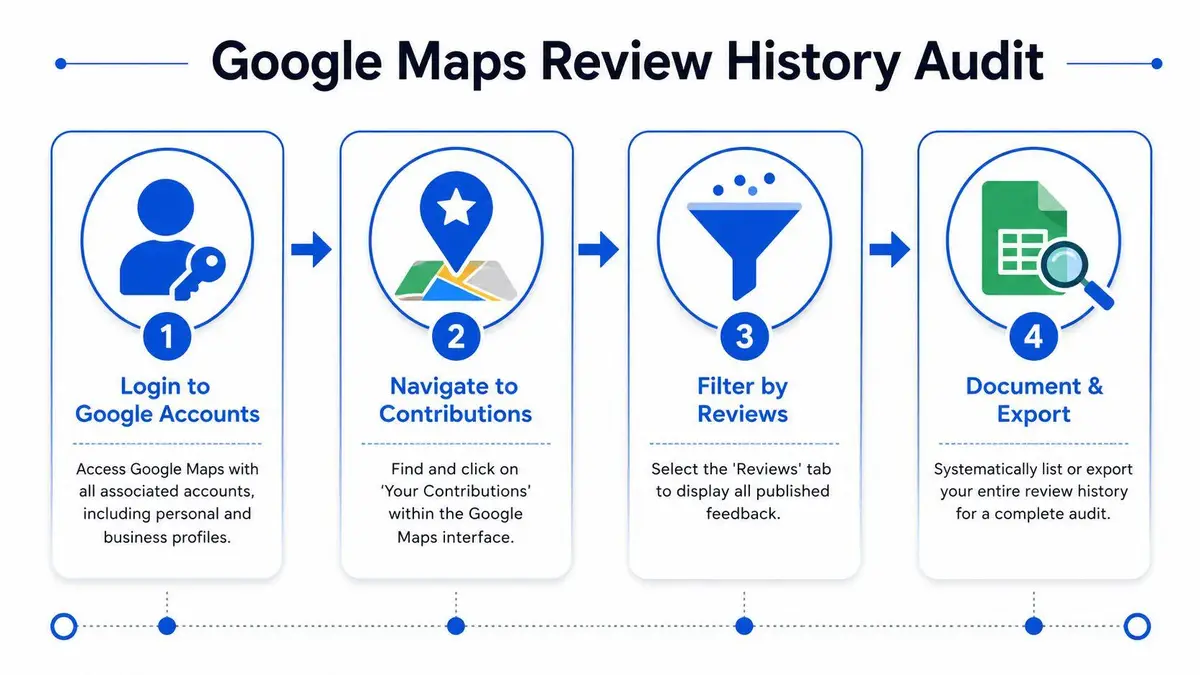
On desktop, sign into Google Maps with the first account you want to inspect. Open the menu, then go to Your contributions and select Reviews. Scroll through every visible entry. Don’t skim. Note the business name, date, star rating, text, photos, and whether the review still reflects your current judgment and risk tolerance.
Then repeat that process for every account you control. If you use Chrome profiles, audit each profile separately. If you use a password manager, search it for every Google credential tied to you, your company, and old devices.
iPhone and iPad audit
In the Google Maps app on iOS, tap your profile image, then open Your profile or Your contributions, depending on the app version. Go to Reviews and review the full list. Pay attention to attached media. A harmless text review may become more revealing when paired with a timestamped photo.
Android audit
On Android, the route is similar. Open Google Maps, tap your profile icon, then Your profile or Your contributions, followed by Reviews. If Android has ever auto-signed you into an additional Google account, check the account switcher carefully. Hidden sprawl is common.
Build an actual record
Do not rely on memory. Create a working log.
- List every account tied to your name, business roles, and past devices.
- Capture each review with date, venue, star rating, and any attached photo.
- Classify the risk. Harmless, outdated, politically sensitive, location-sensitive, professionally awkward, or privacy-invasive.
- Mark the action. Keep, edit, delete, or escalate for deeper monitoring.
The audit isn’t finished when you’ve found your reviews. It’s finished when you’ve documented what each one can cost you.
If your exposure is broad, ongoing reputation monitoring helps keep the problem from rebuilding itself through neglected accounts and stale content.
Strategic Deletion Versus Tactical Editing
Once you’ve assembled the full record, don’t start deleting impulsively. Some reviews should disappear. Others should be edited. The difference is strategic.
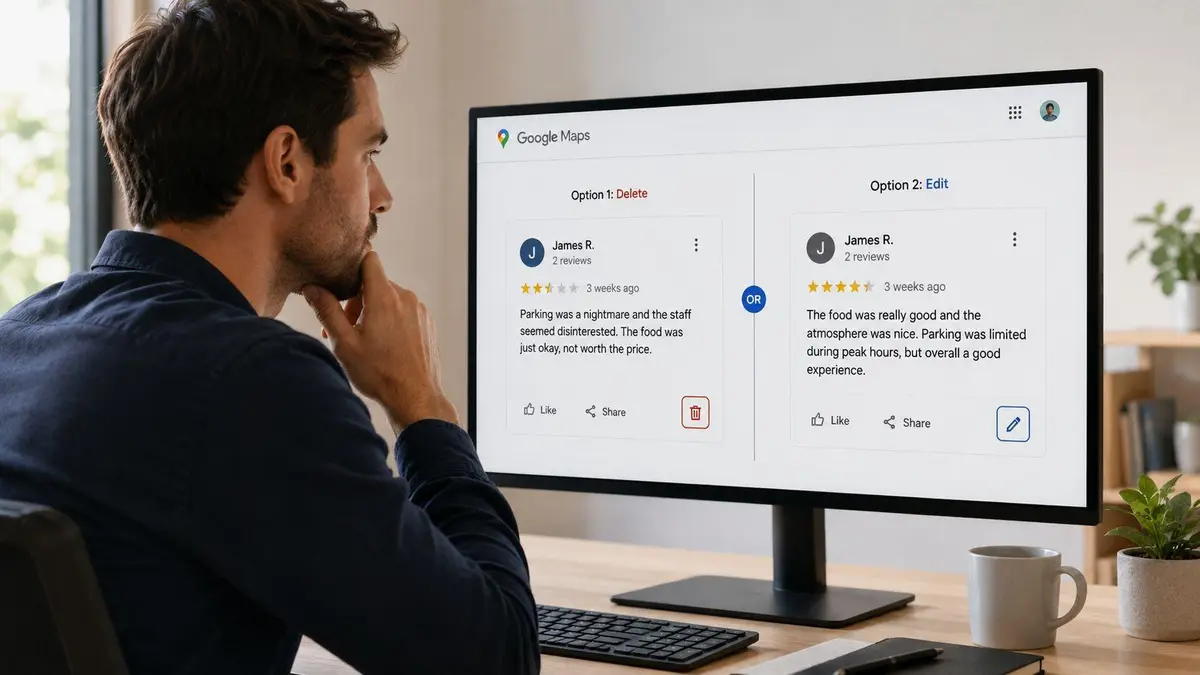
Deletion is best when the review itself creates risk. Editing is better when the underlying record is useful but the wording, tone, or context is no longer defensible.
When editing is the smarter move
A review may still serve you if it reflects normal public participation without exposing too much. In that case, revise it with discipline.
| Situation | Better move | Why |
|---|---|---|
| The tone is sharp or emotional | Edit | You keep the contribution but remove language that reads poorly in a screenshot |
| A factual detail is wrong or stale | Edit | You correct the record without drawing attention through deletion patterns |
| Your opinion changed over time | Edit | You can soften or update the review to reflect present reality |
| The business relationship still matters | Edit | Preserves discretion where deletion might look reactive if noticed internally |
Editing is often the right call for professionals who want a lower-profile cleanup. A revised review can remove sarcasm, legal risk, unnecessary specifics, or personal detail while avoiding a total wipe.
When deletion is the only sensible option
Delete the review if it exposes a pattern you don’t want linked to your identity. That includes health-related locations, children’s venues, private clubs, contentious businesses, competitor commentary, travel routines, or any review that includes photos revealing your presence.
Delete it if the review can be taken out of context. Delete it if it reads differently now than it did when you wrote it. Delete it if it links your name to a place you no longer want associated with your public persona.
If a review gives an adversary context, remove the context.
This short walkthrough is useful if you need a visual refresher before making changes:
A simple decision test
Ask three questions before you act:
- Would I be comfortable seeing this quoted in a legal letter, article, or board packet?
- Does this review reveal anything about where I go, who I meet, or how I react under stress?
- If someone aggregated all of my reviews, would this one add unwanted context?
If the answer is yes to any of those, the review needs intervention. Whether that intervention is editing or deletion depends on the level of exposure, not sentimentality about preserving your posting history.
Troubleshooting the Black Box of Hidden Reviews
Sometimes the problem isn’t what you published. It’s that Google hides it.
That frustrates ordinary users. For a high-profile person trying to manage online visibility with precision, it’s worse. You may think a review is live, only to discover it never appeared publicly or disappeared without notice. Google’s systems often make that decision before any human looks at it.
According to a Google Maps support discussion on hidden reviews, Google’s opaque, automated filters often remove reviews for “suspicious” flags without human review, creating a “black box” where even Google support lacks visibility into specific removal reasons. Recent updates show hidden reviews are often tied to photo attachments or location patterns, with no official guide explaining how to appeal these algorithmic decisions.
That lack of transparency matters because it distorts your ability to manage your own public record.
What likely triggers suppression
Hidden reviews often follow patterns, even when Google doesn’t explain them clearly. Reviews with attached photos can disappear. Reviews posted during unusual travel activity can disappear. Reviews from accounts that don’t fit Google’s confidence model can disappear.
That doesn’t always mean the content violated a policy. It often means the system distrusted the context.
What you can actually do
You don’t have many elegant options. That’s how it is.
- Remove attached photos first. If a review is hidden, strip out media and test whether the text alone survives.
- Avoid rapid posting across multiple locations. That behavior can look synthetic, especially if your travel pattern is atypical.
- Use consistent account signals. Posting from an account with fragmented history or unusual privacy behavior may invite scrutiny.
- Stop relying on support forums for resolution. They rarely produce a specific explanation, because support personnel often can’t see the trigger.
Google doesn’t just moderate reviews. It also mistrusts reviewers, and it rarely tells them why.
Why this matters strategically
For high-profile clients, hidden reviews create a false sense of control. You may think a public statement exists when it doesn’t. Or you may think an edited record is stable when the platform has already reduced or suppressed visibility.
That’s why review management can’t depend on platform goodwill. If your identity, movement patterns, or privacy settings put you outside the behavior of an average user, Google’s automation may treat you as suspicious even when you’re legitimate. Build your strategy around that possibility.
The High Bar for Removing Defamatory Reviews
A false review about a surgeon, founder, investor, or public-facing executive is rarely just an annoyance. It can influence patient decisions, investor confidence, media interest, and personal safety in a matter of hours. Treat it like an exposure event, not a customer service dispute.
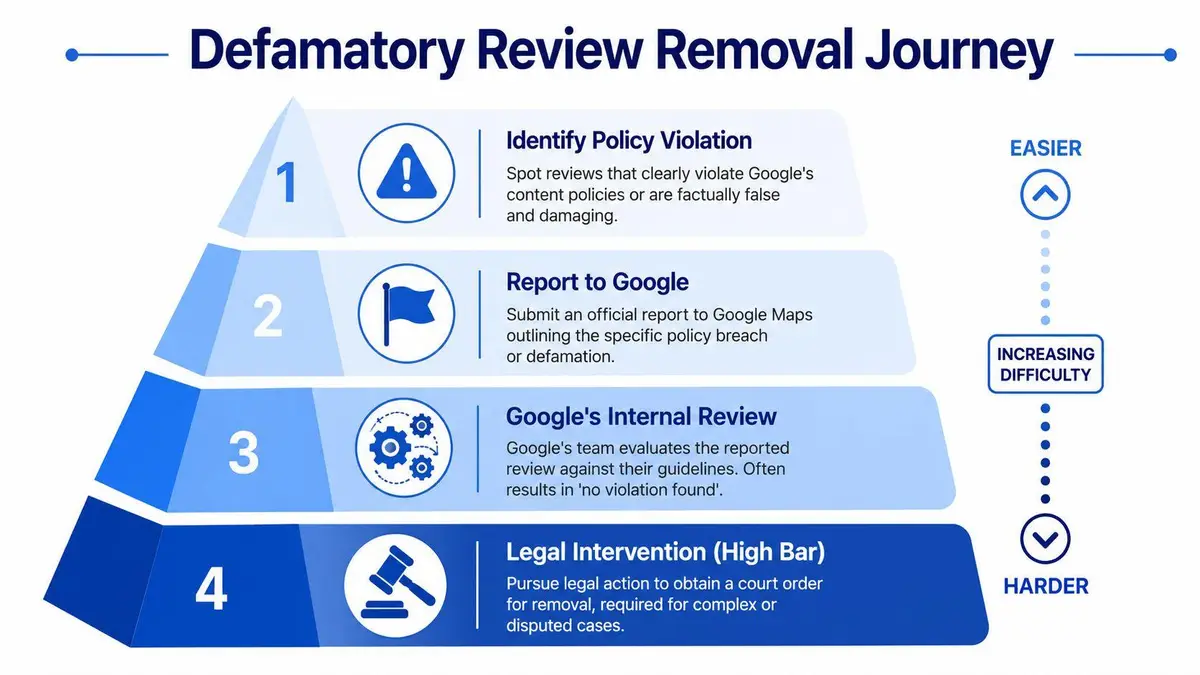
Google removes policy violations, not content you consider unfair or damaging. That distinction controls the outcome. If the review targets your business, practice, or name, your job is to match the content to a specific rule and support that claim with records Google can assess.
A practical baseline appears in ContentRemoval.com’s review removal guidance: review takedown requests are far more credible when they include verifiable evidence such as transaction records, access logs, or other documentation showing the reviewer had no legitimate customer relationship. For high-profile clients, that often means preparing a disciplined evidence file before anyone touches the reporting form.
What the process actually demands
Start with the platform route. Report the review through Google Business Profile Manager and choose the closest policy category, such as spam, off-topic content, impersonation, conflict of interest, or harassment. Precision matters. A weak category choice can sink a valid complaint before a human ever looks at it.
If the first report fails, move to a formal appeal through Google’s Reviews Management Tool. Keep the submission narrow, factual, and documented. Emotional language, speculation, and long narratives hurt you.
For clients facing identity-based attacks, privacy exposure, fabricated allegations, or coordinated abuse tied to a public profile, standard flagging is often too slow and too limited. That is the point to involve professional content removal services for review and defamation cases so evidence, escalation, and response control happen in the right order.
Evidence that gives you a real chance
The strongest removal requests prove something concrete. They do not argue tone.
Use evidence such as:
- Transaction records showing no appointment, purchase, reservation, or account tied to the reviewer
- Access logs, visitor logs, or security footage showing the person did not enter the premises
- Internal records that establish factual impossibilities in the review
- Screenshots showing impersonation, extortion, or coordinated posting behavior
- Proof of misidentification when the review confuses your business with another person or company
What usually fails is predictable.
| Weak approach | Why it fails |
|---|---|
| “This review is unfair” | Unfairness is not a Google policy category |
| “This is hurting us” | Reputational harm alone does not justify removal |
| “We know this person is lying” | Google expects proof, not confidence |
| A long rebuttal with private details | It does not prove a violation and can create a second risk |
If you cannot identify the policy violation and document it cleanly, your request is weak.
Defamation raises the stakes, not the odds
Many clients assume the word “defamation” changes the platform’s threshold. It does not. Google is not acting as a court, and it does not remove reviews merely because you label them defamatory. You still need to show that the content breaks a platform rule, contains prohibited personal information, reflects impersonation, or can be disproven with records.
That is why public responses require restraint. Staff should not improvise. A rushed reply can confirm private facts, disclose scheduling details, expose internal procedures, or turn a false post into a searchable controversy with your own name attached.
For luxury firms, medical practices, family office businesses, and founder-led brands, this is a security issue as much as a reputation issue. Preserve the review, secure the evidence, limit response authority, and decide early whether the matter belongs in routine moderation or a formal remediation track. The wrong choice costs time, visibility, and control.
When to Escalate to Professional Remediation
A review problem becomes a security problem faster than people expect. One false post can be copied into search results, screenshots, investor memos, group chats, and press inquiries before Google finishes its internal review. If your name, family, company, or address patterns are even indirectly tied to the business, delay is a risk decision.
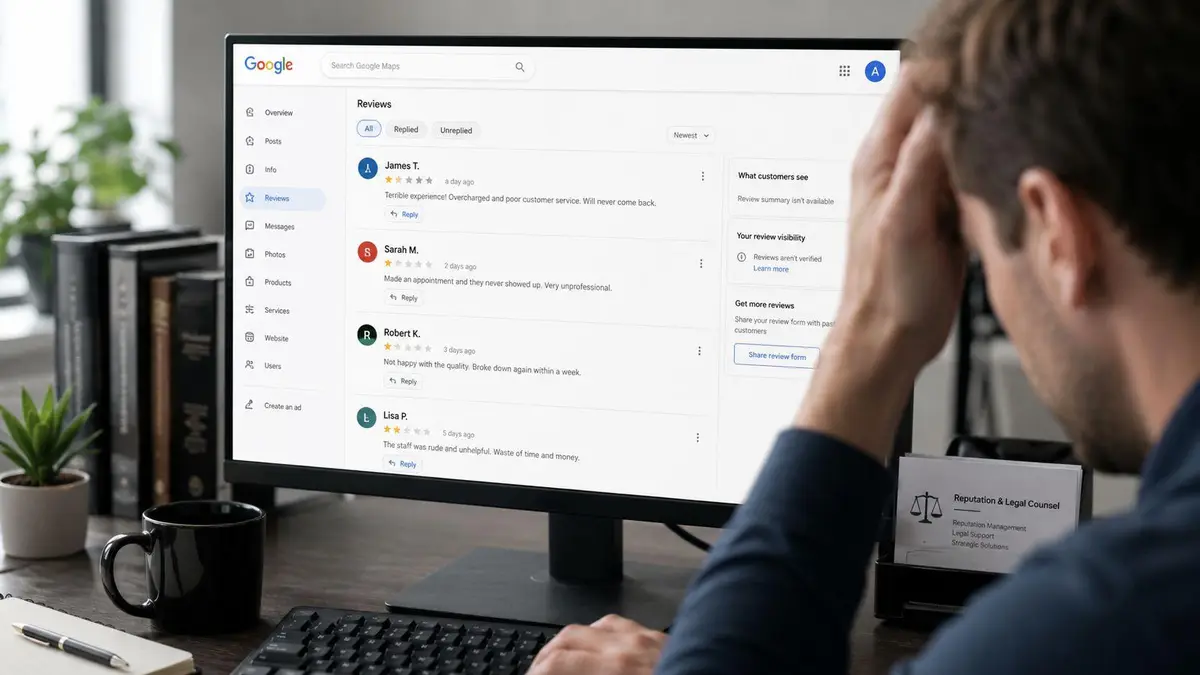
Handle routine cleanup yourself. Escalate immediately if the review activity suggests targeting, identity misuse, extortion, privacy exposure, or a false allegation that could influence clients, partners, donors, reporters, or regulators.
The key question is simple. Are you fixing a minor profile issue, or are you preserving control over a developing public record?
Signals that warrant outside remediation
Bring in a specialist early when the facts point to coordinated harm or when a public reply could create more liability than the review itself.
- Review attacks across multiple listings linked to your business, practice, portfolio, or personal brand
- False factual accusations that could affect hiring, investment, licensing, partnerships, or media coverage
- Impersonation by a former employee, competitor, activist, or anonymous actor using a name meant to look credible
- Posts exposing personal details such as staff identities, travel patterns, family references, contact information, or protected health and financial data
- Extortion or coercion disguised as customer feedback
- Platform gridlock after repeated reports, unclear status updates, or no meaningful path through support
What professional remediation changes
A capable remediation team does more than submit flags. It builds a record that can survive scrutiny, preserves evidence before edits or deletions destroy context, and keeps the matter tightly controlled across legal, communications, and security functions.
That discipline matters for high-profile clients. A poorly written rebuttal can confirm private facts. An angry escalation can harden platform resistance. A fragmented internal response can leave counsel, assistants, PR staff, and business operators working from different versions of the same incident.
Professional remediation also changes the decision tree. Some matters belong in platform reporting. Others require privacy analysis, identity misuse documentation, coordinated search removal work, or legal escalation outside Google. If the issue has already spread beyond Maps, you are no longer dealing with review management alone.
Once review abuse starts touching executive security, privacy, or legal exposure, informal handling stops being cost-effective.
If your case has crossed that line, a discreet content removal service for review abuse and privacy-driven cases is the prudent next step.
ContentRemoval.com advises executives, public figures, family offices, brands, and legal teams facing review abuse, defamation, privacy exposure, and platform inaction. If your Google Maps review history or business profile has become a reputational risk, start with a confidential assessment through ContentRemoval.com.
Frequently asked questions
Can other people see all the reviews I have written on Google Maps?
Yes. Reviews are public by default, and clicking a reviewer’s name shows their full contribution history including photos and dates. That aggregation can reveal neighborhoods, routines, health-related visits and associations, which is why public figures should audit and prune the record rather than assume old reviews are buried.
Should I edit or delete an old Google review I wrote?
Edit when the contribution is harmless but the tone or a stale detail reads poorly; that removes the risk without a visible deletion pattern. Delete when the review itself is the exposure: health or children’s venues, private clubs, competitor commentary, travel routines or photos that place you somewhere. If it would look bad quoted in a board packet or legal letter, act.
Why is my Google Maps review not showing up?
Google’s automated filters often hide reviews for suspicious signals without human review or explanation, and support staff usually cannot see the trigger. Common patterns include attached photos, rapid posting across locations and accounts with fragmented history. Remove the photo first and test whether the text alone survives.