You can edit a Google review only if you wrote it. Sign into Google Maps, open Your contributions, select Reviews, and edit the rating, text or media; the review then shows a Last edited timestamp. A business cannot edit a customer’s review. It can reply publicly, flag policy violations with evidence, or escalate legally when a review is false.
Key facts
- Reviewers edit their own posts through Your contributions in Google Maps on desktop or mobile.
- Businesses cannot change a third party’s star rating, text or date under any circumstances.
- Google flags succeed on policy mapping and evidence, not on how unfair the review feels.
- Reviews posted from lost or inaccessible accounts cannot be merged or edited by anyone else.
Where ContentRemoval.com comes in. ContentRemoval.com handles the business side of this problem: false, coordinated or insider Google reviews that a public reply and a standard flag cannot resolve, including reviews tied to accounts nobody can access. Owners, executives and their advisers usually reach out once the first flag has been denied. A free 15-minute Exposure Scan maps what is removable and the report is yours to keep. Get a Free, Confidential Exposure Scan or read how our review removal work is done.
A bad Google review creates two very different kinds of panic. The second is commercial. You’re an owner, executive, or adviser staring at a review that is false, strategic, or damaging, and you want to know whether you can edit it, remove it, or contain it before it affects trust. The first is personal. You posted a review months ago, facts changed, emotions cooled, or you made an error and now you want to fix it.
Those are not the same problem, and treating them as if they are leads people into expensive mistakes.
If you’re the original reviewer, the answer is straightforward. Google lets users edit their own reviews through Google Maps. If you’re the business being reviewed, you cannot rewrite a customer’s words. That limitation is deliberate. Google protects the integrity of its review system by reserving control to the original author and giving businesses a narrower set of tools: respond publicly, flag policy violations, document evidence, and escalate when the review crosses into defamation, impersonation, or coordinated abuse.
High-value clients often search “edit my google reviews” when the actual issue is governance, not editing. They need to know which situations are simple self-service tasks and which situations require a formal takedown strategy. That distinction matters because every wrong move leaves a record, strengthens the reviewer’s position, or signals weakness to future readers.
Introduction The Dual Urgency of a Google Review
You may be dealing with one of two scenarios right now. Either you want to revise something you wrote, or you need to manage something someone else wrote about you or your business. Google treats those scenarios very differently, and that split controls your options from the first click.
For individual users, editing a review is basic platform hygiene. You revisit your prior statement, correct the facts, update the star rating if appropriate, and move on. For companies, especially firms led by visible executives, the phrase “edit my google reviews” usually reflects a misunderstanding. You can’t edit a third party’s review. You can only shape the surrounding record and challenge content that violates policy or law.
That distinction isn’t academic. It determines whether your problem can be solved inside Google Maps in minutes or whether it requires evidence preservation, a public response strategy, and legal escalation.
Two paths, two levels of control
The practical division looks like this:
| Situation | What you control directly | What you don’t control |
|---|---|---|
| You wrote the review | Your star rating, text, and associated content in your own account | Another user’s response to your edit |
| Your business received the review | Your public reply, your internal documentation, your removal request | The wording of the customer’s original post |
Practical rule: If you authored the review, think in terms of revision. If someone else authored it, think in terms of response, evidence, and removal criteria.
The rest of this guide follows that logic. First, the clean self-service route. Then the harder reality for businesses, where reputation management is less about editing and more about controlled intervention.
For Individuals How to Correct or Update Your Own Review
If you wrote the review, Google gives you direct control over it. That capability was introduced with the Google Maps contributions update in 2014, and by 2015 Google was processing over 1.5 billion contributions annually. Edited reviews also display a “Last edited” timestamp, which is part of the platform’s transparency model for the 1 billion monthly active users across 220+ countries relying on Google Maps, as described in Google Maps help for editing or deleting reviews.
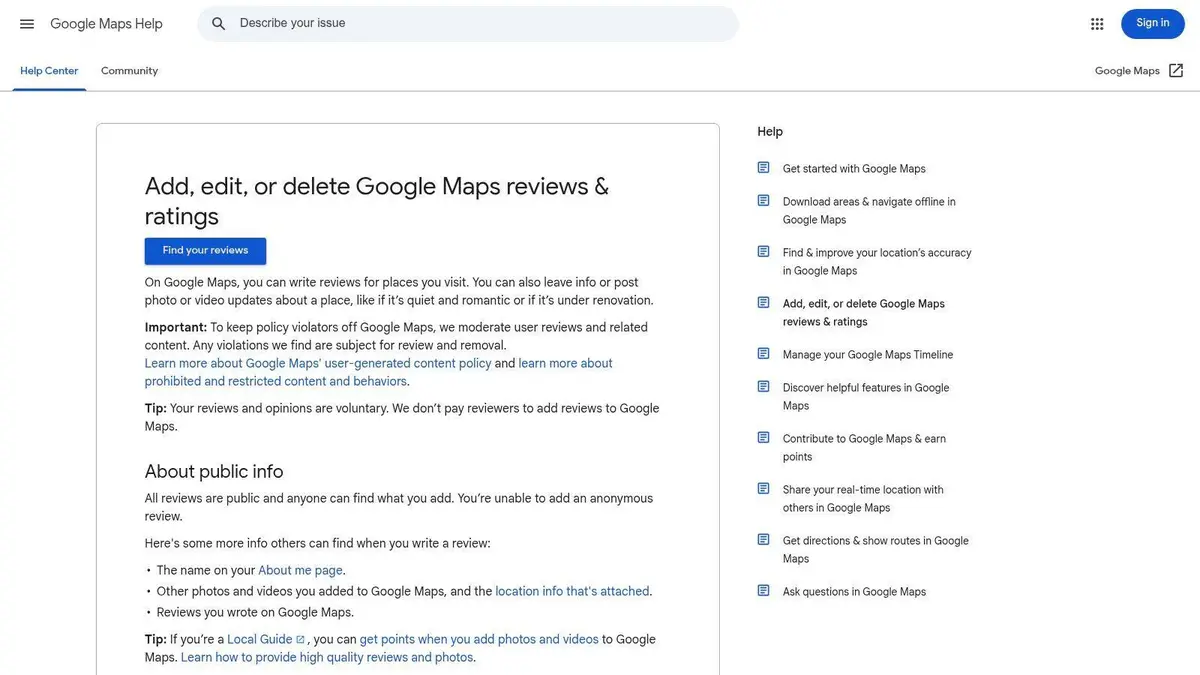
Google’s policy is sensible. It lets you correct the record while preserving trust in the system. You’re not erasing history invisibly. You’re updating your contribution on a platform built around public credibility.
Desktop steps in Google Maps
On desktop, use Google Maps rather than searching for old review emails or trying to locate the business profile manually. The shortest path is through your own contribution history.
- Open Google Maps while signed into the account that posted the review.
- Click the menu and go to Your contributions.
- Open the Reviews tab.
- Find the review you want to change.
- Select the option to edit.
- Revise the star rating, text, or attached media as needed.
- Save the changes.
This is cleaner than trying to post a second review to “correct” the first one. A duplicate explanation usually creates confusion. An edit creates a single current record.
Mobile steps in the Google Maps app
The mobile process is similar, but people often miss it because they look in the business listing instead of their profile activity.
- Open your profile area: Launch Google Maps and tap your account image.
- Go to contributions: Select Your contributions, then find Reviews.
- Locate the review: Scroll to the listing you want to update.
- Edit with precision: Change the rating or wording. Don’t turn it into a rant or a diary entry. Keep it factual.
- Save and verify: Confirm the updated review is visible from your account view.
A brief visual walkthrough can help if you’re doing this on a phone for the first time.
What your edit actually does
An edit changes the review currently attached to your account. It doesn’t create a hidden side file, and it doesn’t give the business authority over your text. The updated timestamp matters because it signals that readers are seeing your latest position, not a stale statement that no longer reflects reality.
That’s also why businesses cannot step into your account and “fix” a review, even if both sides now agree the original post was inaccurate. If you need to revise your own post and don’t have access to a business dashboard, this separate guide on removing a Google review without a business account covers the practical route.
Edit the original review. Don’t post a second one to explain the first. The second approach looks disorganized and weakens credibility.
For Businesses The Inviolable Nature of Customer Reviews
A business cannot edit a customer’s Google review. Not part of it. Not the star rating, not the text, not the update date. If the review was written by a third party, Google reserves control to that third party.
That frustrates executives because it feels irrational. A plainly unfair review sits on a profile tied to your name, your firm, and your revenue, yet you can’t touch it. Google’s reasoning is still obvious. If businesses could rewrite reviews, the platform would lose legitimacy immediately. The lock on direct editing is the price of public trust.
What you can do instead
Your standard toolkit has three components.
First, you can reply publicly. That isn’t customer service fluff. It’s audience management. Review readers are evaluating your response as much as the complaint itself.
Second, you can flag a review for policy violations when the content is fake, abusive, conflicted, duplicative, or otherwise noncompliant.
Third, you can escalate outside the normal interface when the issue is legal rather than merely reputational.
Those options are narrower than direct editing, but they’re not trivial. Used properly, they shape the record and preserve advantage.
Why your public reply matters more than you think
A review reply serves three audiences at once:
- The original reviewer, who may soften, update, or remove the review if you respond well.
- Future clients, who want to see whether you’re controlled under pressure.
- Google itself, because a measured, evidence-based record supports later escalation.
For law firms and other practices where trust is inseparable from professional standing, it’s useful to compare your review posture with broader guidance on digital credibility. Gorilla’s insights for attorneys are worth reading because they frame reputation management as an operational discipline, not a branding exercise.
A defensive reply rarely helps. A precise reply that corrects the record without overexposing facts often does.
What businesses get wrong
The most common mistake is trying to “argue the reviewer into submission” in public. That usually backfires. It signals volatility, invites more commentary, and can expose confidential facts you should never discuss on a public business profile.
The second mistake is passivity. Owners assume a false review will be obvious to everyone. It won’t be. Silence often reads like concession.
The third mistake is confusing unfairness with removability. A review can be exaggerated, one-sided, and harmful without violating Google policy. That’s why response strategy and removal strategy have to be treated separately.
A Strategic Framework for Responding to Public Feedback
A negative review goes live at 8:30 a.m. By 9:00, your staff wants to reply, your marketing lead wants it buried, and your legal team wants silence. All three instincts can create new problems. Public feedback needs a response framework, not improvisation.

Start by classifying the review correctly. Consumers updating their own review can usually fix the issue in minutes. Businesses responding to a third-party review face a different problem entirely. The public reply, the internal record, and any later removal effort must support each other. If they do not, you weaken your position.
Three review categories matter in practice.
When the complaint is legitimate
If the reviewer is a real customer and the criticism is broadly accurate, respond with discipline. A public reply should show accountability, direct the resolution offline, and avoid language that creates legal or operational exposure.
Use this structure:
- Acknowledge the experience: “We’re sorry your experience fell short of the standard we set.”
- Keep disputed details out of public view: “We want to review the matter directly.”
- Give a specific contact path: “Please contact our office at [channel] so we can address this promptly.”
That response does its job. It signals control to future readers and keeps your options open if the situation later expands into a broader reputation issue.
When the review reflects a misunderstanding
Some reviews come from confusion over billing, process, scheduling, or even the identity of the business involved. In those cases, correct the frame without sounding defensive.
“We take customer feedback seriously. Based on the information in this post, we cannot confirm that this review relates to a client or customer interaction with our business. We invite the reviewer to contact us directly so we can verify the issue and address any legitimate concern.”
This wording works because it does three things clearly. It questions the factual basis of the review. It avoids disclosure. It preserves a clean record if you later argue that the post is inauthentic.
When the review is malicious or weaponized
Executives frequently make costly errors in these situations. A false review from a competitor, former employee, activist, or anonymous account can tempt a public counterattack. Do not do it. Long, emotional replies read like loss of control, and they often disclose facts that should never appear on a business profile.
Use a short, formal response.
| Review type | Best public posture | What to avoid |
|---|---|---|
| Genuine negative experience | Calm acknowledgment | Contradicting every detail |
| Misunderstanding or uncertain identity | Controlled clarification | Accusing the reviewer outright |
| Malicious or false attack | Reserved denial plus documented escalation | Threats, sarcasm, excessive detail |
A concise example:
We have no record matching the claims in this review. We take false statements seriously and are reviewing the matter through the appropriate channels.
That is enough. The audience is not the reviewer. The audience is every prospective customer, referral source, investor, regulator, or journalist who may read the exchange later.
For executive teams repairing confidence after a burst of negative feedback, this guide on rebuilding trust with customers after bad reviews is useful because it treats the issue as trust reconstruction rather than cosmetic damage control.
Response principles that hold up under scrutiny
Strong review responses share four traits:
- They are shorter than the internal draft.
- They do not reveal private facts to prove a point.
- They protect later options, including escalation, platform reporting, and legal review.
- They are written for the silent reader, not for the person who posted in anger.
Self-service editing works for consumers who want to revise their own words. Businesses dealing with high-stakes falsehoods, coordinated attacks, confidentiality limits, or regulatory risk need professional intervention early. That line matters. If the review threatens revenue, licensing, deal activity, or brand trust, treat it as a reputational matter with legal consequences, not a customer service annoyance.
Initiating Takedowns The Standard Review Removal Protocol
Flagging a review is the official removal channel inside Google’s system. It is necessary, often useful, and frequently misunderstood. Businesses treat it like a complaint button. Google treats it as a policy enforcement mechanism.
That difference matters because Google’s systems don’t remove reviews merely because they are unfair or irritating. They look for violations. The platform’s machine learning systems are designed to detect inauthentic behavior and prohibited content patterns. According to analysis of Google’s review crackdowns and moderation patterns, Google removed approximately 55 million violating reviews in 2020, and newer machine learning systems enabled 45% more fake review takedowns in 2023. The same analysis notes that a spike of more than 1 to 3 reviews per week for a small business can trigger 80% to 90% auto-removal rates, which shows how heavily Google weighs review velocity patterns.
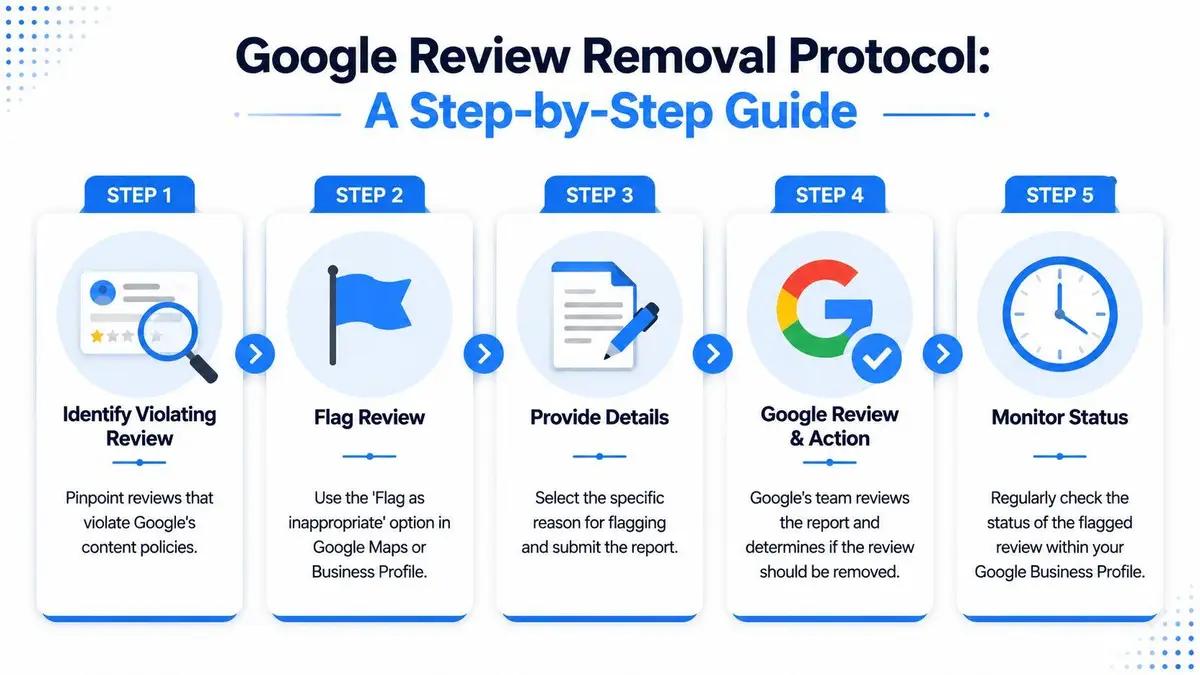
The immediate implication is simple. If you want a takedown, stop framing the problem as “this review hurt us.” Start framing it as “this review violates a specific rule, and here is the evidence.”
The standard protocol
The formal process is straightforward on paper and less forgiving in practice.
- Identify the precise violation. Don’t start with your emotions. Start with the category. Is it impersonation, off-topic content, conflict of interest, abusive language, fake engagement, or something else that squarely violates policy?
- Preserve the evidence. Capture screenshots, dates, profile details, and any related pattern information before the review changes or disappears.
- Flag the review inside Google Business Profile or Google Maps. Use the platform’s built-in reporting function and choose the reason carefully.
- Submit any additional removal request or appeal available through Google’s review process. Keep the framing narrow and factual.
- Monitor the status rather than repeatedly refiling the same argument.
What makes a flag more credible
Google’s systems and reviewers respond better to structured evidence than to outrage. A viable report usually includes:
- Clear policy mapping: Identify the exact reason the content violates rules.
- Objective supporting material: Use screenshots, timeline inconsistencies, or proof that the reviewer was never a customer.
- Pattern context: If multiple reviews arrived in a coordinated cluster, preserve that chronology.
- Consistent business records: Internal notes, booking logs, or service records should align with your claim.
Operational advice: A weak flag says, “This is false.” A strong flag says, “This appears to be an inauthentic review because we have no customer record, the account shows suspicious behavior, and the wording matches related submissions.”
Where DIY removal usually fails
Most self-filed takedown attempts fail for one of three reasons.
The first is poor categorization. Businesses choose a broad objection instead of the most accurate violation. The second is inadequate evidence. The third is over-argument. Long, emotional narratives don’t improve your odds.
The process also has a structural limit. Google’s systems are optimized for scale. They can identify obvious manipulation patterns, but they are less effective when a single review is carefully written, plausible on its face, and strategically harmful. That’s why review bombs, former employee retaliation, and coordinated attacks often sit in the gray zone between policy enforcement and legal misconduct.
A practical decision test
Use this test before you rely on standard flagging alone.
| Scenario | Standard flagging may be enough | Standard flagging is probably not enough |
|---|---|---|
| Obvious spam or duplicate content | Yes | |
| Review from a clearly conflicted party | Often | |
| Review with subtle falsehoods but no obvious policy marker | Yes | |
| Coordinated attack across multiple accounts | Yes | |
| Anonymous ex-employee allegations | Yes |
If your issue falls into the right-hand column, the platform process is still worth starting because it creates a procedural record. But don’t confuse “starting the process” with “solving the problem.”
Advanced Threats Requiring Professional Intervention
Some review problems are not really review problems. They are legal, operational, and reputational threats using Google’s review layer as the delivery mechanism. That distinction becomes obvious in high-stakes matters: a coordinated campaign against an executive, a false review posted by a former insider with confidential knowledge, or a damaging review tied to an account nobody in the organization can access anymore.
One neglected issue is old account control. Standard advice assumes the original reviewer can still sign in and edit the post. That assumption breaks down constantly in executive and family-office contexts where historical reviews may sit under legacy personal accounts, former employee accounts, or inaccessible profiles. According to OpenWidget’s discussion of editing Google reviews and account-access issues, more than 25% of “edit review” support queries involve lost or inaccessible accounts. The same source notes that Google doesn’t allow contribution merging and that account recovery succeeds only around 70% of the time.
Lost access means lost leverage
That creates a serious trap. If the damaging review was posted from an account you no longer control, standard “edit my google reviews” advice becomes useless. You can’t merge the contribution into a current account. You may not be able to recover the old one. Meanwhile, the review remains live and attributable.
That’s not a user-experience nuisance. For an executive, it can become a persistent reputational artifact with no simple self-service fix.
The scenarios that justify escalation
Professional intervention is usually warranted when the review issue includes one or more of these features:
- Coordinated activity: Multiple accounts post in a compressed period with aligned themes or language.
- Anonymous insider knowledge: The review contains details suggesting a former employee, vendor, or litigant with motive.
- Defamatory assertions: The post alleges criminality, fraud, dishonesty, or misconduct as fact.
- Account-control failure: The only person who can edit or delete the review no longer has access to the Google account.
- Cross-platform spread: The review becomes the seed for repetition elsewhere.
Each of those scenarios requires more than a dashboard workflow. They require source analysis, legal evaluation, and a decision about whether to pursue platform removal, source confrontation, or broader suppression and containment.
If the review threatens a financing event, professional licensing, a transaction, or your personal name in search, stop treating it as a customer-service issue.
Why professionals approach this differently
A specialist team doesn’t just file the same flag more aggressively. The work is different in kind. It usually combines platform policy analysis, evidence packaging, legal characterization, and controlled escalation. In some matters, the proper route is a defamation-based demand. In others, it is a platform legal notice, a coordinated abuse submission, or a source-level strategy tied to the reviewer’s identity and jurisdiction.
That is especially true when the text is crafted to avoid obvious policy triggers while still conveying a false factual attack. Google’s standard systems are not built to adjudicate complex factual disputes. Legal counsel and specialist reputation advisers are.
If the content crosses from unfair criticism into provably false factual harm, legal review should happen early. This resource on internet defamation attorney consultation for executives is a sensible starting point when the review has moved beyond platform moderation and into reputational injury.
The executive standard
Executives often wait too long because they assume escalation looks dramatic. It doesn’t. Competent intervention is usually discreet, disciplined, and procedural. The point isn’t to create noise. It’s to remove or neutralize harmful content with the least collateral exposure.
That is the correct mindset for serious matters. You don’t need generic reassurance. You need a clear distinction between what you can fix yourself, what you should document immediately, and what deserves a specialist response before the record hardens.
If you need a confidential assessment of a damaging Google review, whether it involves false allegations, coordinated attacks, or reviews tied to inaccessible accounts, ContentRemoval.com can evaluate the facts and outline the fastest defensible path to removal or containment.
Frequently asked questions
Why can’t a business edit a Google review posted about it?
Google reserves control of a review to the account that wrote it, which protects the credibility of the review system. A business can reply publicly, flag the review for a policy violation, or escalate outside the interface when the content is defamatory or coordinated, but it cannot rewrite the customer’s words.
Does Google show that a review has been edited?
Yes. An edited review displays a Last edited timestamp so readers know they are seeing the author’s current position. The edit replaces the original rather than creating a second review, which is why Google recommends editing instead of posting a follow-up.
What happens if the Google account that posted a review is lost?
Google does not allow contributions to be merged into another account, so the review cannot be edited or deleted through self-service. Account recovery does not always succeed, and the review remains live and attributable, which is why these situations often need a removal strategy rather than an editing one.