
Yellow Pages opt out is two separate processes. The print portal stops phone book delivery to an address: enter the address and phone number, log in with the emailed password and choose Opt Out of All. The YP.com digital removal targets a specific listing: submit the exact listing URL, your name as listed and an email, then complete verification.
Key facts
- A print opt-out does nothing for an online listing, and a digital request does not stop deliveries.
- Publishers may take up to 12 weeks to process requests for books already published.
- Digital removal needs the exact listing URL, the name exactly as listed and completed email verification.
- Escalation options are a legal demand letter, a paid removal service or de-indexing where search is the issue.
Where ContentRemoval.com comes in. ContentRemoval.com takes on directory and broker exposure when the standard forms stall or the record keeps returning: matching the exact listing, chasing verification, escalating to the publisher and tracking the broader broker feeds that republish the same phone number and address. Executive assistants and family office staff usually open the file. A free 15-minute Exposure Scan maps every listing and what can be removed, and the report is yours to keep. Get a Free, Confidential Exposure Scan or read how our data broker removal work is done.
Your address is public, your phone number is floating around, and the wrong directory listing is making itself useful to strangers. If you’re trying to clean this up fast, don’t start with the first form you find. Yellow Pages opt out is not one process, it’s two, and the difference decides whether you waste a week or stop the exposure.
Two Completely Different Opt-Out Processes Most Guides Confuse
Most bad advice assumes every yellow pages opt out request is the same. It isn’t. One workflow stops physical phone book delivery to an address, the other targets a digital YP.com listing that can expose your name, address, and phone number online.
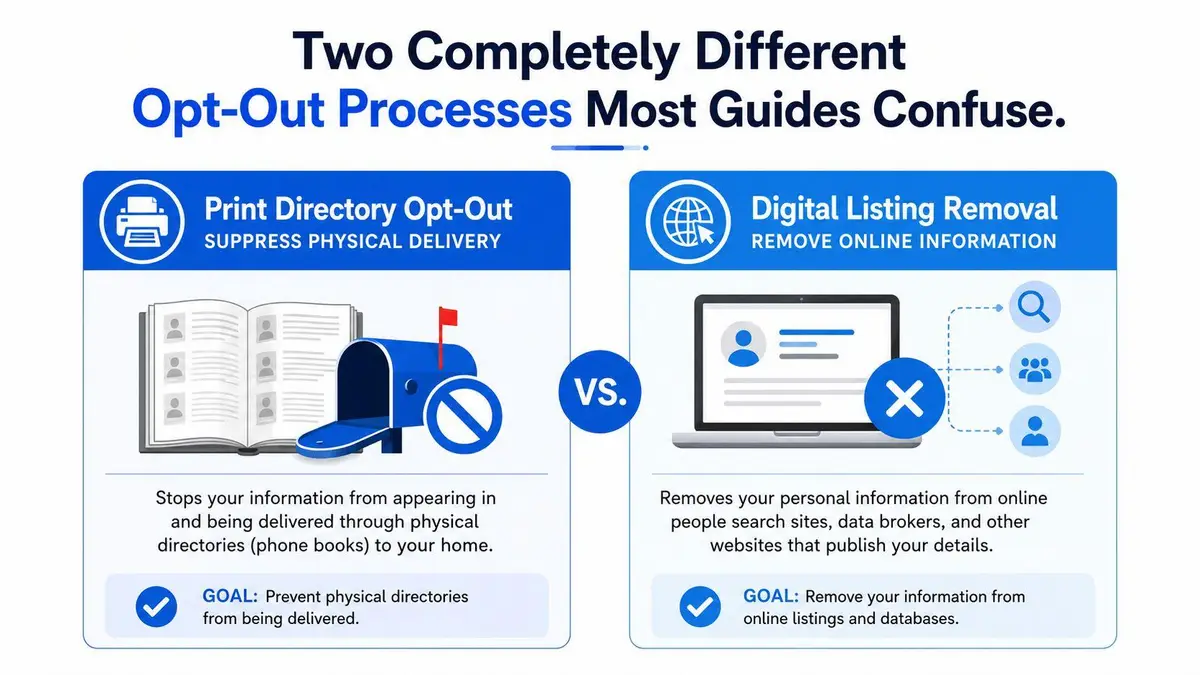
If unwanted books keep showing up at your door, you need the print suppression path. If the problem is that your information appears in search results or directory pages, you need the digital removal workflow. Those are not interchangeable, and the forms are not designed to solve the same problem. A service created for paper delivery does nothing to erase an online profile, and a digital privacy request does nothing to stop a truck from leaving books at your address.
Diagnose the problem before you touch a form
Start with the exposure itself. Mail clutter means print suppression. Online visibility means digital listing removal. If both are happening, you need both processes, in the right order.
The cleanest way to think about it is simple. Physical delivery affects your mailbox and porch. Digital listings affect how easily someone can find you through a browser, a name search, or a directory profile. That distinction matters because many guides collapse them into one mess, then send you to the wrong portal.
Practical rule: If you can hold the unwanted item in your hand, you’re dealing with print delivery. If you can click it, you’re dealing with digital suppression.
For a broader privacy framework around people-search exposure, the ContentRemoval.com guide to data brokers is the right companion piece. It helps you separate directory problems from the larger broker ecosystem that often republishes the same information.
Stopping Print Directory Delivery to Your Address
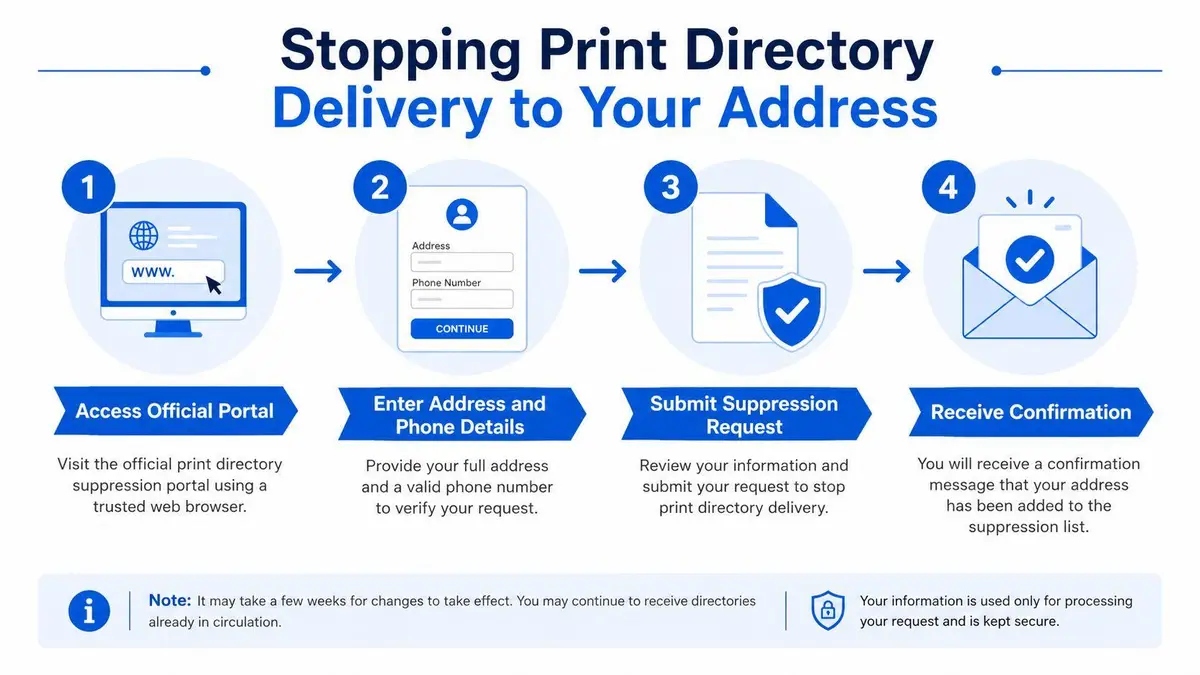
If the nuisance is a stack of books, use the official print opt-out flow and stop guessing. The portal asks for your address and phone number, then sends an email with an auto-generated password. That password is not decorative. You need it to log in and change delivery preferences.
Use the portal the way it was built
Enter the address exactly as the books are delivered, then provide the matching phone number. If the details don’t line up, the request can miss the right household record. After that, check the inbox for the auto-generated password and use it to access the preference screen.
Choose “Opt Out of All” if you want no delivery at all. If you only want to control specific directories, you can select individual books instead. That choice matters because partial preferences leave room for future delivery if one publisher refreshes its list differently from another.
Here’s the part many people skip. Confirmation and persistence are not the same thing. Even after a successful request, already-published books can keep circulating until the current distribution cycle ends, and one independent guide notes that publishers may take up to 12 weeks to process requests for already-published books (Clearnym’s Yellow Pages opt-out guide). Seattle’s public program is a good reminder that suppressing delivery has real scale, its opt-out service ran from May 2011 through April 2013, was used by more than 75,000 households and businesses, stopped delivery of more than 435,000 phone books, and saved almost 400 tons of paper a year (Seattle Utilities stop phone books page).
If books keep arriving after you submit, don’t assume the request failed. First check whether the current publishing cycle has simply not caught up.
Stopping print delivery helps with privacy and waste, but it does not remove any listing already visible online. If your exposure is digital, you need the next workflow instead of waiting for the mailbox to calm down.
Removing Your Information from YP.com Digital Listings
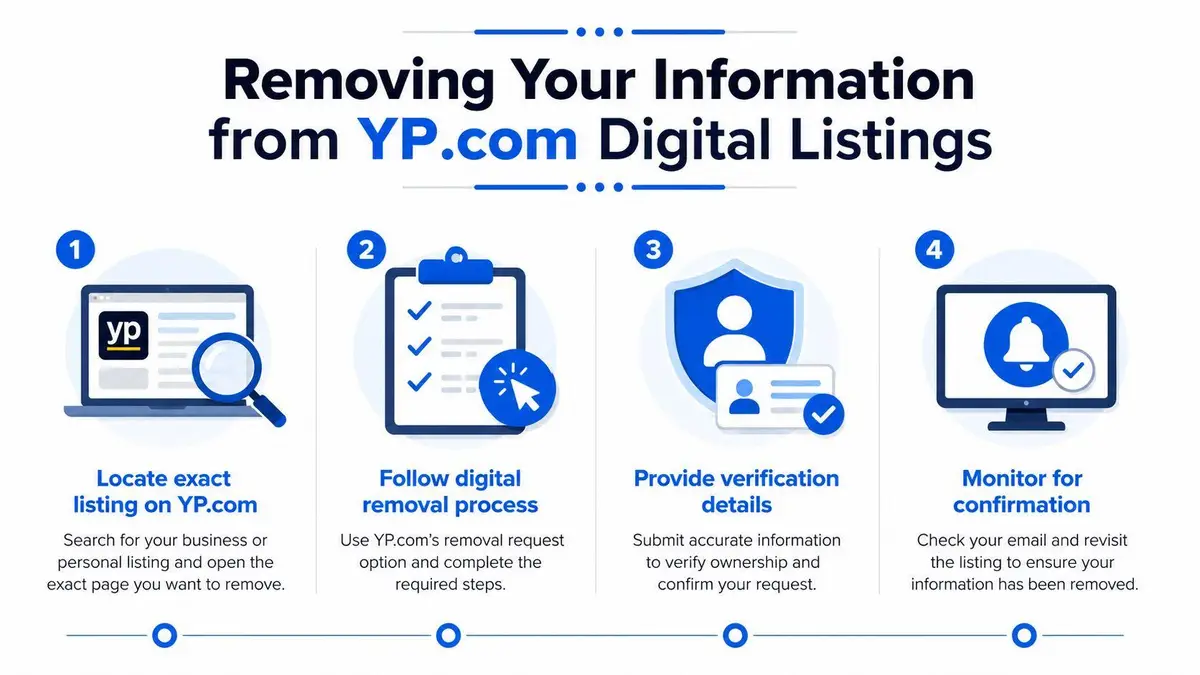
A print opt-out and a YP.com digital removal request solve different problems. Digital removal requires you to target the exact record, not just the right address. Start by finding the specific listing and copying the listing URL. That URL is the identifier the publisher uses to match your request to the record you want removed.
Submit the record the site can verify
Open the opt-out or privacy request form from the site footer or directly from the listing page. Submit the full name exactly as listed, the listing URL, a valid email address, and, when asked, proof of identity. Precision matters because the system uses those details to decide whether your request belongs to the record you want removed.
Email verification is the next failure point. If you do not complete it, suppression may never be finalized. Guides that look simple often skip this step, which is why people believe a listing has been removed when they have only opened a request. One practical guide also flags the need to re-submit only if the record remains live after the stated processing window, and to watch for the wrong URL or identifier pair because that can prevent suppression from sticking (OptimizeUp’s Yellow Pages removal guide).
Practical rule: Match the exact record first, then verify the email, then wait for the processing window to close before you decide whether escalation is necessary.
For executives and public figures, the issue is uncontrolled exposure. A separate strategic guide for executives on removing personal data from websites is useful if the listing is part of a broader reputation problem rather than a single directory page.
Do not confuse a successful form submission with removal. The request has to enter the queue, pass verification, and survive the publisher’s matching logic. If any one of those steps fails, the record stays live.
Processing Timelines and Data Reappearance
People want a clean answer here, and the answer is inconvenient. A yellow pages opt out request is a workflow, not a switch. If you do not track it, you lose control of it.
Treat the request as a monitored file
One independent guide says publishers may take up to 12 weeks to process requests for already-published books (Clearnym’s Yellow Pages opt-out guide). Another guide recommends checking back after 5 business days if no response arrives (MePrism’s opt-out guide). Those timelines serve different purposes. One covers early acknowledgement, the other covers final suppression.
Keep the confirmation ID, keep the email trail, and schedule a follow-up if the record is still visible after the stated window. If the request touched a digital listing, re-check it after the publisher’s processing period, then re-submit only if the record remains live. That pattern matters because data can resurface after refreshes or re-uploads, and directories and broker feeds do not stay still.
The problem is persistence. A record can disappear from one place and return through another feed, or stay visible long enough to matter because a publisher’s systems have not fully caught up. That is why “done” is a dangerous word in this space.
A tight operating rule is better:
- Save every confirmation: Keep the ID, the email, and the exact listing URL.
- Check the listing again: If it is still live after the stated window, escalate.
- Set a reminder: Re-verify periodically because fresh uploads can restore old data.
If your exposure is sensitive, the key question is not whether a request was sent. The question is whether it stayed removed after the next refresh cycle.
When Standard Forms Fail and Escalation Becomes Necessary
Standard forms are built for normal cases. High-risk cases are not normal. When the listing is tied to sensitive personal data, a public profile, or repeated non-response, stop relying on a basic submission box to solve the problem.
Escalate with leverage, not more patience
The first escalation path is a legal demand letter. That is the right move when a publisher ignores a valid request or keeps publishing information that creates genuine privacy harm. The second is a paid removal service with publisher relationships and a structured follow-through process. The third is technical suppression, including de-indexing requests when the problem is search visibility rather than source content.
For a practical overview of what to do when a site won’t comply, the ContentRemoval.com guide to stubborn removal requests is a useful reference. It fits the same pattern as directory work; if the first pass fails, pressure changes the result more often than repetition does.
Jurisdiction matters because not every request carries the same weight in every place. A good operator checks where the record is hosted, who controls the listing, and whether the problem is a directory publisher, a data broker, or a search engine index. Those are different targets. Treating them as one target is how people burn time and expose themselves longer than necessary.
If the record contains something you would never want published next to your name, stop using consumer-grade tactics. At that point, the cost of delay is the primary expense.
Building a Monitoring and Prevention Strategy
The right model is not “remove once and forget.” It’s monitor, verify, and keep a paper trail. That matters because directory data moves through broker networks, and yesterday’s correction can become tomorrow’s repost.
Keep the record under control
Review the listing on a set schedule, and keep the original request materials in one place. If you changed addresses, phone numbers, or business details, check whether the old record is still floating around under a prior version of your name. The point is to catch a reappearance before someone else does.
For a practical example of how organizations document privacy choices, the Miles Hansford Law Firm privacy notice shows how a professional firm lays out data handling in plain language. That kind of clarity is what you want in your own records, because clear documentation shortens escalation later.
Your prevention strategy should be blunt. Use the smallest public footprint you can justify, separate public contact details from private ones, and save every opt-out confirmation you receive. If the same listing keeps coming back after refreshes, stop treating it as a routine annoyance and move it into active reputation management.
The trigger for escalation is simple. If monitoring shows repeat reappearance, missed verification, or refusal to remove a record that should have been suppressed, the issue has outgrown DIY handling. At that point, professional intervention is cheaper than continued exposure.
ContentRemoval.com handles difficult removal problems for people who can’t afford trial and error. If your Yellow Pages listing, directory profile, or broader data exposure keeps resurfacing, visit ContentRemoval.com and get a confidential plan built for fast suppression and long-term monitoring.
Frequently asked questions
Why am I still getting phone books after opting out?
Already-printed books keep circulating until the current distribution cycle ends, and the article notes publishers may take up to 12 weeks to process requests for those. Check whether the cycle has caught up before assuming the request failed, and make sure you chose Opt Out of All rather than individual directories.
How do I remove my listing from YP.com?
Find the specific listing and copy its URL, open the opt-out or privacy request form from the site footer or listing page, submit your full name exactly as listed, the URL, a valid email and proof of identity if asked, then complete the email verification. A submitted form is not a removal until verification passes and the processing window closes.
What if my Yellow Pages listing comes back after removal?
Directory data moves through broker networks, so a record can return through another feed after a refresh. Keep the confirmation ID, email trail and listing URL, re-check on a schedule, resubmit if it reappears after the stated window, and treat repeat reappearance or refusal as the trigger to escalate.
