
Yahoo search removal means removing the browser hijacker that keeps redirecting Chrome, Firefox or Edge to search.yahoo.com, not just changing the default search engine. The lasting fix is layered: remove suspicious extensions, uninstall recently added programs, reset the browser, check the browser shortcut target and verify after a reboot. search.yahoo.com itself is a legitimate service.
Key facts
- Persistence points include a hijacking extension, an installed program, a corrupted shortcut and browser profile residue.
- Remove extensions and programs before resetting the browser, or the hijacker recompromises the fresh settings.
- Disable is not enough for a suspect extension, it must be removed entirely.
- Removal is verified only when the redirect stays gone after reboot, reopening and ordinary use.
Where ContentRemoval.com comes in. ContentRemoval.com is not a browser support service, but the second half of this post is our work: when Yahoo Search is surfacing hostile articles, impersonation profiles, leaked material or scraped records for your name or company. Executives, family offices and their counsel usually make contact once a search complaint alone has stalled. A free 15-minute Exposure Scan maps the underlying source pages and what can be removed, and the report is yours to keep. Get a Free, Confidential Exposure Scan or read how our content removal work is done.
The most common advice on Yahoo search removal is wrong. Changing the default search engine is not a fix. It is cosmetic cleanup.
If Yahoo keeps appearing in Chrome, Firefox, or Edge after you remove it, the browser is usually not making an independent choice. Something else is making it for you. In plain terms, you are not dealing with “Yahoo” as the core problem. You are dealing with a browser hijacker, usually delivered through an extension, bundled software, or a corrupted shortcut that keeps reasserting control.
That distinction matters. search.yahoo.com is a legitimate Yahoo search service, not a malware domain itself. The reason people hunt for “Yahoo search removal” is that their browser has been reconfigured to route searches to Yahoo without consent, and the redirect persists until the underlying cause is removed. Independent removal guidance has converged on the same practical sequence: remove suspicious programs, remove extensions, reset browser settings, and delete Yahoo from the default search engine list when possible, as described in PCRisk’s Yahoo redirect remediation guide.
Executives and public figures should treat this as more than an annoyance. If your browser can be altered without your approval, your digital environment is already compromised at a level you should not ignore. Control of your search settings is basic operational hygiene. Loss of that control often points to broader weakness.
Introduction Beyond a Simple Settings Change
Most online guides stop at the browser menu. That’s why people keep searching for Yahoo Search removal after they already “fixed” it once.
The recurring redirect is usually a symptom of a Potentially Unwanted Program or hijacking extension that has persistence. It survives the obvious change because the obvious change is not where actual control lies. Some guides tell you to switch Google back as your default and move on. That advice fails the moment the browser restarts, a synced profile reloads, or the hidden extension rewrites the setting again.
The practical lesson is simple. If Yahoo keeps returning, stop treating it like a preference issue. Treat it like a persistence problem.
Why the usual advice fails
A browser hijacker does not need to announce itself as malware. It only needs enough access to alter search, homepage, and startup behavior. That access often comes from software bundles, fake utility tools, coupon extensions, PDF converters, download assistants, or browser add-ons with broad permissions.
By the 2020s, removal guidance across major browsers had largely standardized around a layered cleanup model, not a single homepage edit. A long-standing BleepingComputer cleanup guide breaks the process into seven steps and uses multiple tools plus browser resets. That matters because it reflects how hijackers behave. They persist across more than one layer.
Practical rule: If the redirect survives one cleanup action, assume there are at least two persistence points left.
What a real fix looks like
A lasting fix addresses the browser, the extensions, the installed programs, and the settings that let the hijacker reappear. It also verifies that the browser shortcut and startup path have not been altered.
That is the standard I would apply for any client whose time and risk exposure are too valuable for trial and error. You don’t negotiate with persistence. You remove every anchor point.
Understanding the Persistence of Yahoo Redirects
The right analogy is a weed, not a typo. You can cut off what you see above the soil and still lose the fight because the roots remain intact.
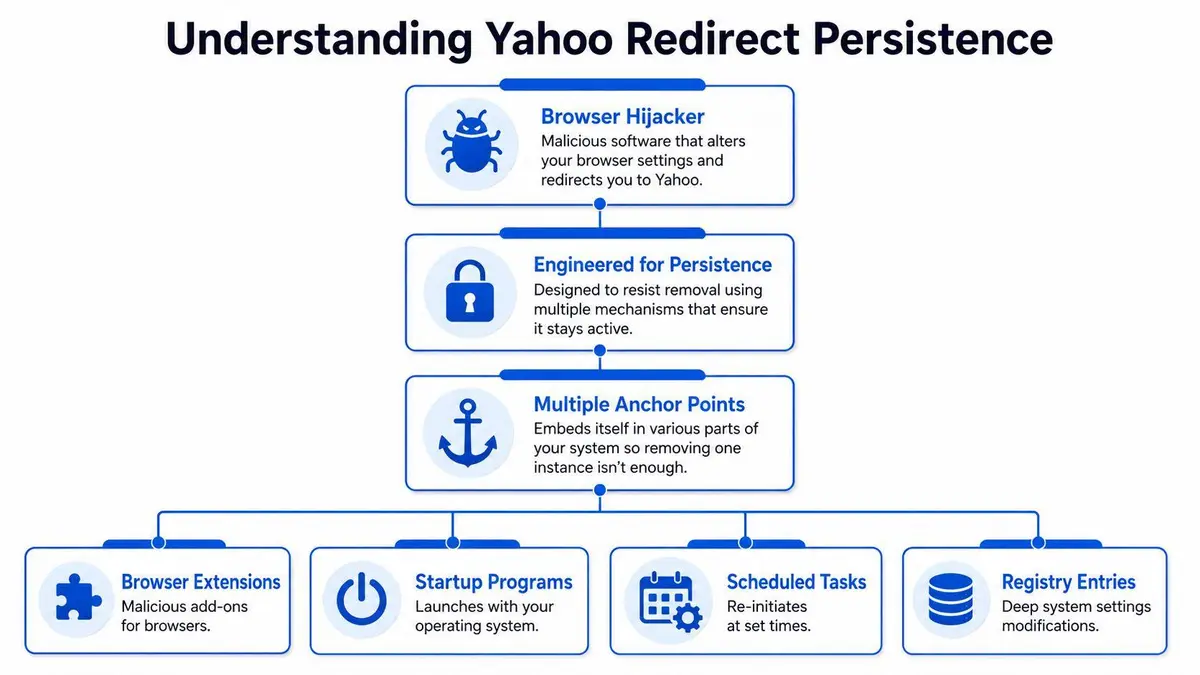
A Yahoo redirect typically persists because the unwanted software is engineered to survive partial cleanup. Mozilla support discussions repeatedly surface the same pattern: users remove the visible setting, but the browser settings revert because the actual cause is often an extension, bundled software, or even a corrupted shortcut target. Mozilla specifically advises users to inspect extensions and the desktop shortcut when the setting keeps changing back, as noted in this Firefox support discussion. If you are dealing with this issue at a higher level, our analysis of Yahoo search result removal strategies addresses the broader search visibility side as well.
The real anchor points
The browser setting is only one of several places a hijacker can hold onto control.
| Persistence point | What it does | Why users miss it |
|---|---|---|
| Browser extension | Forces search or homepage behavior | It may look harmless or use a generic name |
| Installed program | Reinstalls or reconfigures the browser | Users focus only on the browser |
| Shortcut corruption | Launches the browser with altered target behavior | Few users inspect shortcut properties |
| Browser profile residue | Restores unwanted settings after restart | A reset wasn’t performed or wasn’t complete |
A malicious extension is often the fastest route to persistence. It can lock search preferences, interfere with the delete option for search engines, or reapply its preferred setting whenever the browser launches. That is why some users report that they cannot delete the unwanted search engine at all.
Why Yahoo keeps coming back
Because the visible setting is often downstream from the underlying cause.
The deeper issue is not whether Yahoo is in the search engine menu. The deeper issue is whether something on the device still has authority to rewrite browser behavior. If that answer is yes, your cleanup is unfinished.
Remove the actor with control, not just the setting it changed.
Many consumer guides become dangerously incomplete. They describe the symptom but not the persistence model. For a high-profile user, that is unacceptable. If a system is altering browser behavior without authorization, you need to assume the problem may extend beyond a single tab or browser profile.
The Multi-Layered Removal Protocol
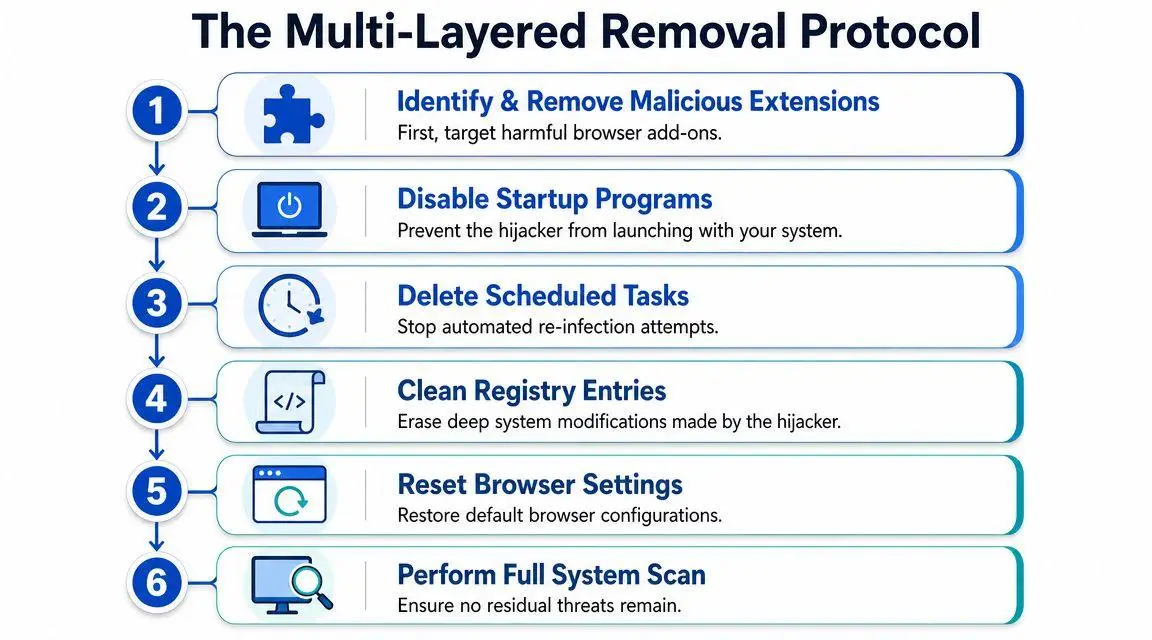
The correct removal sequence is staged, not improvised. Microsoft community guidance on Yahoo search hijackers reflects the same pattern security professionals use: first remove suspicious browser extensions, second reset the browser’s search and homepage settings, and finally uninstall recently added or unrecognized programs from the operating system. It also notes that incomplete cleanup is the primary reason redirects recur, as outlined in this Microsoft Answers remediation discussion. If search visibility is part of a wider business or brand problem, there is a separate layer involving search result removal work.
Start with extensions
Extensions are the most common enforcement mechanism because they sit directly inside the browser and can manipulate search behavior with minimal visibility.
In Chrome, open Extensions and remove anything you don’t explicitly recognize, approve, and still use. Be ruthless. If you installed it casually, remove it. Then open Settings, review the Search engine section, and remove Yahoo where the browser allows it.
In Firefox, open the Add-ons Manager with Ctrl+Shift+A and inspect extensions and plugins. If the browser has been reverting repeatedly, remove questionable add-ons before you touch search settings. Otherwise, the browser may be overwritten again.
Operational test: If you hesitate because an extension “might be useful,” remove it anyway. Utility is irrelevant if it altered your browser without consent.
A lot of users do this part halfway. That is a mistake. Disable is not enough. Remove.
Here is a practical walkthrough if you want a visual reference before doing the reset sequence:
Then inspect the operating system
If the browser keeps reverting, look for recently installed or unfamiliar software at the operating system level. Focus on timing. What changed just before the redirect first appeared?
Review installed applications and remove anything suspicious, newly added, or unnecessary. Hijackers often arrive bundled with another installer, so the application name may not mention Yahoo at all. It may present itself as a helper tool, media utility, optimization product, or browser enhancement.
A professional review at this stage usually follows this logic:
- Check install dates first. Correlate the first appearance of the redirect with applications added around the same time.
- Remove unknown software next. If you don’t trust it enough to identify its purpose immediately, it should not remain installed.
- Restart and retest. Persistence often reveals itself after reboot, not during the same session.
Reset the browser completely
Once the likely source has been removed, reset the browser. This is not overkill. It is cleanup.
In Chrome, use the built-in Reset settings function if manual changes have not held. In Edge, review search engine management under the Address bar and search settings, then reset the browser if the issue persists. Firefox requires equivalent cleanup of search preferences and website data. The point is the same across all three. You are clearing residual instructions left behind by the hijacker.
Do this after extension and program removal, not before. Resetting a browser while the hijacker still exists only gives the hijacker a fresh system to compromise again.
Check the browser shortcut and final traces
This is the part a majority skip, which is why they lose.
Inspect the browser shortcut properties on the desktop and taskbar. If the target path has been altered, launching from that shortcut may reintroduce the redirect behavior. Mozilla support specifically flags corrupted shortcut targets as a cause when settings keep reverting.
Finish with a full system scan using reputable tools already familiar to your IT team. The objective is not blind faith in a scanner. The objective is to catch the residue you did not manually identify.
Verifying Removal and Preventing Re-Infection
Removal is not complete when the browser looks normal once. It is complete when the browser remains normal after a reboot, after reopening the browser, and after ordinary use.
That difference matters because a common pitfall is assuming the visible search provider was the root cause. It often wasn’t. If a malicious extension or program remains installed, it can overwrite the browser again. The more disciplined methodology is to correlate the first appearance of the issue with install dates, remove the likely offending program, and then clean the browser, as described in this technical troubleshooting walkthrough. The same logic appears in search visibility work, where de-indexing alone fails if the source material remains live. That is why a deeper understanding of strategic URL de-indexing matters.

How to verify that the hijacker is gone
Use a short verification table instead of trusting your memory.
| Check | What success looks like |
|---|---|
| Reboot test | Browser opens without Yahoo redirect |
| Search test | Address bar searches use the provider you selected |
| Extension review | No unknown add-ons remain installed |
| App review | No suspicious recent software remains on the system |
| Shortcut review | Browser target path is clean and expected |
If even one of those fails, don’t declare victory.
The redirect returning after restart is proof of persistence, not bad luck.
How to stop this from happening again
Most reinfections come through software bundles and careless installation habits. The defense is not complicated. It is discipline.
- Use a zero-trust posture with freeware. If the installer is free, assume it may try to monetize the install.
- Read every installer screen. The dangerous checkbox is often preselected and framed as a recommendation.
- Decline add-ons and “recommended” extras. Browser extensions, search helpers, and toolbars should be rejected by default.
- Review synced browser profiles. An unwanted extension synced across devices can reintroduce the problem.
- Audit routine digital hygiene. A broader operating checklist helps. For website operators and internal teams, this ultimate SEO checklist for new websites is useful because it reinforces structured reviews of settings, tooling, and visibility controls that people often neglect.
Executives should push this one step further. Standardize software installation rights, limit extension sprawl, and require approval for browser-level tools. Convenience is how hijackers get invited in.
When Removal Means Reputation Management
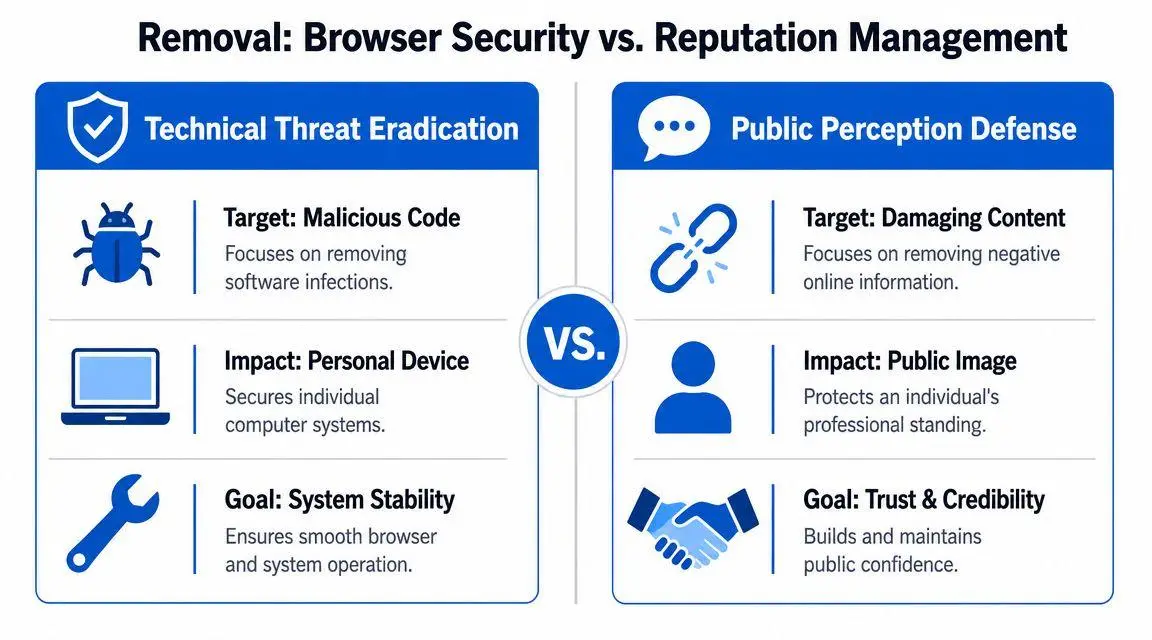
Treating Yahoo search removal as a browser fix is too narrow for anyone with public exposure. For executives, founders, physicians, investors, and families with assets, the harder problem is what appears when someone searches your name or company.
That issue includes hostile articles, false allegations, leaked personal material, impersonation profiles, scraped court records, and old pages that still damage hiring, deal flow, or trust. At that stage, the assignment is content control and risk containment.
The technical problem and the reputation problem are structurally similar
The pattern is the same in both cases. A visible symptom sits on top of a deeper persistence point.
A Chrome support thread makes that clear. Users report that they cannot remove the unwanted search engine because an extension, policy setting, or other software is still controlling the browser, as reflected in this Chrome Help thread. Reputation work follows the same logic. A delisting request often goes nowhere if the source page is still live, still indexed, and still supported by a publisher that has no reason to cooperate.
| Browser hijacker problem | Reputation problem |
|---|---|
| Visible symptom is the redirect | Visible symptom is the damaging result |
| Root cause sits in a persistence layer | Root cause is the live source content |
| Surface edit fails | A search complaint alone fails |
| Full remediation clears every anchor point | Full remediation addresses source removal, indexing, and legal action |
What serious Yahoo Search removal actually means for executives
If harmful results rank in Yahoo Search, the response is no longer a cleanup task. It becomes a coordinated removal strategy.
That strategy can include publisher outreach, de-indexing requests where rules allow them, privacy and impersonation complaints, copyright analysis, factual challenge letters, and suppression campaigns built around stronger assets you control. Each path has a different standard, a different timeline, and a different chance of success. Casual outreach usually fails because it is sent to the wrong party, framed poorly, or unsupported by evidence.
High-profile clients waste time by sending emotional emails, arguing facts in public, or assuming a platform will intervene because the result is unfair. Platforms respond to policy triggers. Publishers respond to risk, process, and pressure. If the page stays live and defensible, the search result usually stays live too.
For serious matters, Yahoo search removal means removing or neutralizing the underlying content, then containing reappearance through monitoring and follow-up. That is reputation management, not browser support.
Engaging Professional Takedown Services
Executives get into trouble when they treat a reputation attack like a browser bug. The technical side of a Yahoo redirect can be cleared with a disciplined cleanup process. Harmful Yahoo search results require source-level removal, policy-based pressure, and strict control over who contacts whom.
That work is specialized.
A credible takedown campaign can involve direct publisher negotiation, host and registrar escalation, platform complaints tied to privacy or impersonation rules, copyright review, evidence preservation, search de-indexing requests where standards are met, and monitoring for reposts. Those tracks do not sit in one department. They cut across legal judgment, technical investigation, and strategic communications. High-profile clients should not hand that mix to an internal generalist or a family office assistant.
The main advantage of a professional team is not convenience. It is execution quality. Skilled operators know which party controls removal, what documentation will survive scrutiny, which arguments trigger a policy review, and when legal pressure helps versus when it hardens resistance. Poor outreach does real damage. It alerts hostile publishers, creates a public record, and burns options you may need later.
Professional intervention also protects discretion. Sensitive matters should be handled with discretion, with evidence organized before any contact is made and with a clear sequence for escalation if the first approach fails. That is how serious reputation work gets done.
If the problem is limited to a nuisance redirect, finish the technical protocol and move on. If Yahoo is surfacing content that affects your name, family, company, or credibility, bring in a takedown team that handles removal as a coordinated risk matter.
If damaging Yahoo search results are affecting your reputation, ContentRemoval.com can assess the matter confidentially and outline a removal strategy based on the source content, the platform, and the legal and technical options available. For executives, public figures, and family offices, that is the sensible starting point.
Frequently asked questions
Why does Yahoo keep coming back as my search engine?
Because something on the device still has authority to rewrite browser behavior, usually a hijacking extension, a bundled program or a corrupted browser shortcut. Changing the default setting treats the symptom. The article’s rule is that if the redirect survives one cleanup action, assume at least two persistence points remain.
Is search.yahoo.com a virus?
No. It is a legitimate Yahoo search service. The problem is a browser hijacker that routes your searches there without consent. Removing the hijacker’s anchor points clears the redirect, and Yahoo can then be deleted from the search engine list where the browser allows it.
What if the problem is harmful results about me on Yahoo Search?
That is a reputation matter rather than a browser fix. A delisting request usually fails while the source page stays live and defensible, so the work involves publisher outreach, de-indexing where rules allow, privacy or impersonation complaints, copyright analysis and monitoring for reposts, with evidence organized before any contact.
