
To remove a site from Google, add a noindex tag to the pages, let Googlebot recrawl them, then block crawling in robots.txt and return a 410 status for deleted content. For fast relief, verified owners can use the Search Console Removals tool, which hides URLs for about six months. Third-party sites require the owner’s cooperation or a legal removal request.
Key facts
- Blocking Googlebot in robots.txt before noindex is processed leaves pages indexed indefinitely.
- A 410 Gone status signals intentional removal and de-indexes faster than a 404.
- Search Console temporary removals process in 24 to 48 hours and expire after roughly six months.
- Bing needs its own removal through Bing Webmaster Tools; Google removals do not propagate.
Where ContentRemoval.com comes in. ContentRemoval.com handles the harder half of this problem: sites and pages you do not control, where the owner refuses, the content is defamatory or private, or the removal has to hold across Google, Bing and regional engines in more than one jurisdiction. Contact usually comes from the person named, their web or IT lead, or their lawyer after technical fixes have run out. A free 15-minute Exposure Scan maps what is removable, and the report is yours to keep. Get a Free, Confidential Exposure Scan or read how our search result removal work is done.
When a website, page, or piece of content becomes a liability rather than an asset, understanding how to remove site from Google becomes essential. Whether you’re dealing with outdated business information, privacy concerns, duplicate content, or reputation issues, the ability to control what appears in search results can protect both personal and professional interests. Google’s search index contains billions of pages, and while visibility is often desirable, there are legitimate scenarios where removal is the strategic choice. This comprehensive guide explores the technical methods, legal pathways, and strategic considerations for removing websites and content from Google’s search results in 2026.
Understanding Google’s Indexing and Removal Framework
Google’s search engine operates through an automated process of crawling, indexing, and ranking web content. Before you can effectively remove site from Google, you need to understand how content enters and remains in the search index.
The crawling process begins when Google’s bots discover URLs through links, sitemaps, or direct submissions. Once discovered, content is analyzed, categorized, and stored in Google’s massive index. This indexed content then becomes eligible to appear in search results based on relevance and ranking factors.
Why Site Owners Choose to Remove Content from Google
Several legitimate reasons drive the decision to remove site from Google:
- Business closures or rebranding requiring the elimination of outdated company information
- Privacy protection when personal information appears in search results
- Duplicate content issues that dilute SEO value across multiple domains
- Reputation management to address harmful or defamatory content
- Legal compliance including GDPR, copyright violations, or court orders
- Security concerns such as exposed sensitive data or compromised pages
Understanding your specific removal objective determines which method will prove most effective. Temporary removals differ significantly from permanent de-indexing strategies.

Methods to Remove Site from Google Permanently
Permanent removal requires changes at the source level, ensuring Google’s crawlers understand your content should no longer appear in search results. These methods offer long-term solutions rather than temporary fixes.
Implementing Noindex Meta Tags
The noindex directive tells search engines not to include specific pages in their index. Add this meta tag to the HTML head section of pages you want excluded:
<meta name="robots" content="noindex, nofollow">This method allows your page to remain accessible to users who have the direct URL while preventing it from appearing in search results. Google typically processes noindex tags within days of recrawling the page, though complete removal may take several weeks.
Blocking Crawlers with Robots.txt
The robots.txt file provides instructions to search engine crawlers about which parts of your site they can access. To remove site from Google entirely, add these directives to your robots.txt file located at your domain root:
User-agent: Googlebot
Disallow: /
Important consideration: Robots.txt prevents crawling but doesn’t guarantee removal of already-indexed content. Pages blocked by robots.txt may remain in the index with limited information displayed.
| Method | Speed | Permanence | Technical Difficulty | Best For |
|---|---|---|---|---|
| Noindex Tags | 1-4 weeks | Permanent (while tag remains) | Low | Individual pages |
| Robots.txt | Immediate blocking | Permanent (while file remains) | Low | Entire directories |
| Password Protection | Immediate | Permanent | Low | Complete site access restriction |
| Content Deletion | 1-3 months | Permanent | Medium | Complete removal |
| 410 Status Code | 2-8 weeks | Permanent | Medium | Deleted content |
Using HTTP Status Codes Strategically
When content is permanently deleted, configure your server to return a 410 “Gone” status code rather than 404 “Not Found.” The 410 code explicitly tells Google the page has been intentionally removed and won’t return, prompting faster de-indexing.
A 404 status suggests temporary unavailability, and Google may continue attempting to crawl the URL. The 410 status provides definitive removal signals that accelerate the de-indexing process.
Temporary Removal Options Through Google Search Console
Google Search Console offers built-in tools for temporary content removal, useful when you need immediate action while implementing permanent solutions. These methods provide quick relief but require follow-up with permanent strategies.
The Removals Tool for Urgent De-indexing
Google’s Removals report in Search Console allows verified site owners to temporarily block URLs from search results for approximately six months. This tool proves invaluable for:
- Addressing urgent reputation issues while developing permanent solutions
- Removing outdated content during website migrations
- Blocking accidentally published confidential information
- Managing duplicate content conflicts temporarily
Access the Removals tool by navigating to your Search Console property, selecting “Removals” from the left sidebar, and submitting URL removal requests. Google typically processes these requests within 24-48 hours.
Critical limitation: Temporary removals expire after roughly six months. Without implementing permanent removal methods, content will reappear in search results. According to Search Engine Journal’s analysis of Google’s removal features, this tool should be considered a stopgap measure rather than a complete solution.
Combining Temporary and Permanent Strategies
The most effective approach pairs temporary removal requests with permanent technical implementations. Submit your removal request through Search Console for immediate effect, then implement noindex tags or content deletion to ensure long-term de-indexing.
This dual approach provides immediate protection while establishing sustainable removal infrastructure. Monitor your Search Console to verify both the temporary removal confirmation and eventual permanent de-indexing as Google recrawls your updated pages.
Removing Third-Party Content from Google
The challenge intensifies when you need to remove site from Google but don’t control the hosting website. Third-party content requires different strategies than owned properties.
Legal Removal Requests Under Google’s Policies
Google provides specific legal removal pathways for content that violates policies or laws:
- Copyright infringement through DMCA takedown notices
- Personal information including financial data, government IDs, or contact details
- Defamation in certain jurisdictions with appropriate court orders
- Explicit content shared without consent
- Right to be Forgotten requests in applicable regions
The Right to be Forgotten represents a significant legal mechanism in European jurisdictions, allowing individuals to request removal of personal information from search results. This legal concept has expanded globally, though implementation varies by region.
For professionals managing sensitive reputation issues, specialized reputation management services can navigate these complex legal pathways more efficiently than individual efforts.
Contacting Website Owners Directly
Before pursuing legal channels, attempt direct communication with the website owner or webmaster. Many legitimate publishers will remove or modify content upon request, especially if:
- Information is factually incorrect or outdated
- Content violates their own publication standards
- Privacy concerns are raised with supporting documentation
- Copyright ownership can be demonstrated
Document all communication attempts, as this evidence strengthens subsequent legal removal requests if direct contact fails.

Advanced De-indexing Techniques for Complex Scenarios
Some situations require sophisticated approaches beyond standard removal methods. These advanced techniques address complex technical and strategic challenges.
Managing Subdomain and Directory-Level Removals
Organizations often need to remove site from Google at the subdomain or directory level while maintaining other sections of their web presence. This selective removal requires precise technical implementation.
For subdomain removal (e.g., old.example.com), apply noindex tags or robots.txt directives specifically to that subdomain without affecting the main domain. Configure separate Search Console properties for each subdomain to monitor removal progress independently.
Directory-level removal involves targeting specific URL paths:
User-agent: Googlebot
Disallow: /old-directory/
This approach proves valuable during website restructuring, brand transitions, or when retiring specific product lines or services.
Addressing Cached and Archived Content
Even after successful de-indexing, Google’s cached versions and third-party archives like the Wayback Machine may preserve content. To remove site from Google’s cache:
- Submit a cache removal request through the Removals tool
- Implement noindex tags to prevent future caching
- Use the
noarchivemeta tag to prevent cache storage:<meta name="robots" content="noarchive">
For archive sites beyond Google’s control, contact the archive service directly. Many archives honor removal requests for privacy or legal reasons, though they’re not legally obligated to comply in all jurisdictions.
Handling Redirect Chains and Legacy URLs
Complex website histories create redirect chains and orphaned URLs that continue appearing in search results. To remove site from Google when dealing with historical URLs:
- Audit all redirect chains using tools like Screaming Frog or similar crawlers
- Identify orphaned URLs without incoming links or current references
- Return 410 status codes for genuinely deleted content
- Update or remove any remaining internal links pointing to removed content
- Submit updated sitemaps excluding removed URLs
This comprehensive cleanup ensures Google receives consistent signals about content removal across all technical touchpoints.
Regional and Jurisdiction-Specific Removal Considerations
Geographic location significantly impacts your ability to remove site from Google. Different jurisdictions offer varying legal protections and removal mechanisms.
GDPR and European Data Protection Rights
The European Union’s General Data Protection Regulation provides robust removal rights for individuals. Under GDPR, individuals can request:
- Right to erasure (right to be forgotten) for outdated or irrelevant personal data
- De-indexing of search results containing personal information
- Data portability allowing individuals to control their information
GDPR removal requests require:
- Completing Google’s online removal request form
- Providing identification verification
- Specifying exact URLs and search queries
- Demonstrating why removal serves the public interest
Google evaluates requests individually, balancing privacy rights against public interest in information access. Approval rates vary based on the nature of content and the requester’s public profile.
North American Privacy Frameworks
While the United States lacks comprehensive federal privacy legislation equivalent to GDPR, several state-level laws provide removal mechanisms:
- California Consumer Privacy Act (CCPA) grants limited removal rights for California residents
- Virginia Consumer Data Protection Act (VCDPA) offers similar protections
- Canada’s Personal Information Protection and Electronic Documents Act (PIPEDA) provides Canadian removal pathways
These frameworks generally focus on data controllers (websites collecting information) rather than search engines, making direct contact with source websites often more effective than Google removal requests.
Asian and Global Privacy Regulations
Different regions implement varied approaches:
| Region | Key Legislation | Removal Mechanisms | Scope |
|---|---|---|---|
| Japan | Act on Protection of Personal Information (APPI) | Court orders, direct requests | Personal data |
| South Korea | Personal Information Protection Act (PIPA) | Administrative requests, litigation | Comprehensive personal data |
| Australia | Privacy Act 1988 | Complaints to Privacy Commissioner | Limited removal rights |
| Brazil | Lei Geral de Proteção de Dados (LGPD) | Data subject requests, regulatory complaints | Broad personal data protection |
Understanding jurisdiction-specific rights helps determine the most effective removal strategy for your situation.
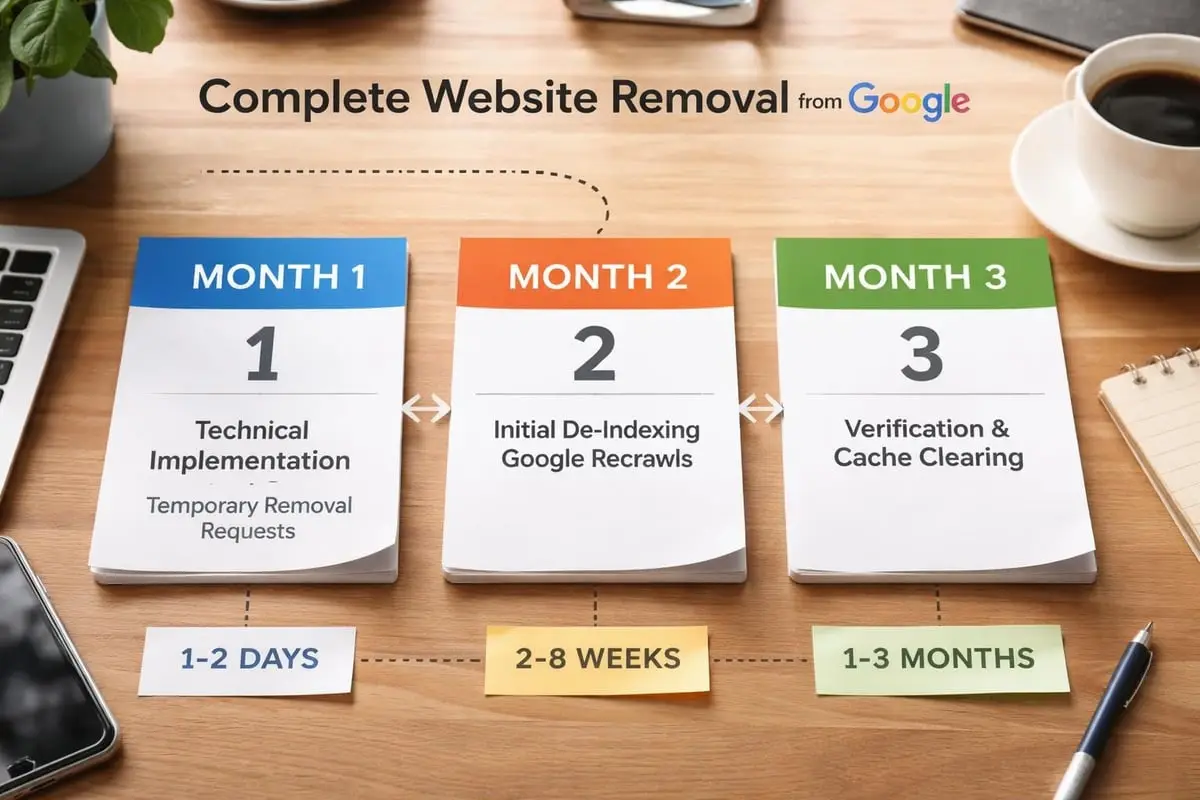
Timeline Expectations for Google De-indexing
Realistic timeline expectations prevent frustration during the removal process. The time required to remove site from Google varies based on method and circumstances.
Typical Processing Times by Method
Different removal approaches follow distinct timelines:
- Search Console temporary removal: 24-48 hours for initial processing, 6-month duration
- Noindex tag implementation: 3-7 days for crawling, 2-4 weeks for complete removal
- Robots.txt blocking: Immediate crawl prevention, 4-8 weeks for index clearing
- 410 status codes: 2-6 weeks for de-indexing already-crawled content
- Legal removal requests: 2-6 weeks for initial review, potentially months for complex cases
- Third-party content removal: Highly variable, weeks to months depending on cooperation
Factors Affecting De-indexing Speed
Several variables influence how quickly Google removes content from search results:
- Crawl frequency: Popular sites get recrawled more often, accelerating removal
- Number of URLs: Single pages remove faster than entire websites
- Incoming links: Heavily linked content takes longer to fully de-index
- Cache persistence: Cached versions may outlast primary index entries
- Technical implementation quality: Properly configured signals process faster
Monitor progress through Search Console’s URL Inspection tool, which shows current indexing status and recent crawl activity. Be patient-complete removal rarely happens overnight, even with perfect technical implementation.
Common Mistakes That Prevent Successful Removal
Many removal attempts fail due to preventable errors. Understanding these pitfalls helps you remove site from Google successfully on the first attempt.
Technical Implementation Errors
Blocking Google before implementing noindex tags represents the most common critical mistake. When you block Google with robots.txt before adding noindex tags, crawlers can’t see the noindex instruction, leaving content indexed indefinitely.
The correct sequence:
- Add noindex tags to all pages you want removed
- Allow Google to crawl and process the noindex tags (1-2 weeks)
- Verify de-indexing through Search Console
- Optionally add robots.txt blocking for future prevention
Inconsistent signals confuse Google’s indexing algorithm. Sending mixed messages-such as a noindex tag combined with an XML sitemap that includes the same URL-creates processing conflicts. Ensure all technical signals align toward the same removal objective.
Administrative and Access Issues
Attempting to remove site from Google without verified Search Console access limits your options to indirect methods. Verify ownership of your property in Search Console before crisis situations arise, enabling rapid access to removal tools when needed.
Insufficient documentation undermines legal removal requests. When submitting copyright, privacy, or defamation-based removal requests, provide comprehensive supporting evidence including:
- Proof of identity or copyright ownership
- Screenshots showing offensive content in context
- URLs of all affected pages
- Explanation of legal basis for removal
- Relevant court orders or legal opinions
Monitoring and Follow-Through Failures
Submitting a removal request doesn’t guarantee successful processing. Failed attempts occur regularly due to technical errors, incomplete information, or policy mismatches. Comprehensive guides on removing unwanted search results emphasize the importance of persistent monitoring and follow-up.
Set up monitoring systems to track:
- Search Console removal request status
- Index status for removed URLs
- New instances of similar content appearing
- Competitor or malicious re-publication of removed content
Consider implementing automated monitoring through tools or services that alert you when removed content reappears or similar issues emerge.
Alternative Search Engines and Global De-indexing
Google dominates search but doesn’t operate alone. Comprehensive removal strategies address all major search engines and discovery platforms.
Bing and Yahoo Removal Processes
Microsoft’s Bing (which powers Yahoo search results) offers its own removal mechanisms through Bing Webmaster Tools. The process parallels Google’s approach with some differences:
- Bing Webmaster Tools provides a URL removal tool similar to Google Search Console
- Removal processing times average 2-3 days for temporary blocks
- Permanent removal requires identical technical implementation (noindex, robots.txt, 410 codes)
Submit removal requests to both Google and Bing separately-changes in one index don’t automatically propagate to the other. For comprehensive strategies on managing content across multiple search engines, coordinate implementation across all platforms simultaneously.
Regional Search Engines
Depending on your geographic market, additional search engines may matter:
- Baidu (China): Requires Baidu Webmaster Tools verification and follows distinct removal policies
- Yandex (Russia): Offers Yandex Webmaster removal tools with Russia-specific legal frameworks
- DuckDuckGo: Aggregates results from other engines, so removals from source engines filter through
- Naver (South Korea): Maintains separate index requiring direct removal requests
Social Media Platform De-indexing
Social platforms like Facebook, LinkedIn, Instagram, and Twitter maintain their own internal search systems while also appearing in Google results. To remove site from Google when content appears on social platforms:
- Delete or privatize content within the social platform
- Submit Google de-indexing requests for cached social media URLs
- Adjust privacy settings to prevent future indexing
- Monitor Google search results for lingering social media snippets
For particularly sensitive social media content requiring urgent removal, specialized services focused on digital footprint cleanup can expedite the process across multiple platforms simultaneously.
Preventing Future Indexing Issues
Proactive strategies prevent the need to remove site from Google in the future. Building proper infrastructure from the start saves significant time and resources.
Strategic Robots.txt Configuration
Thoughtfully configured robots.txt files prevent search engines from indexing sensitive areas before publication:
User-agent: *
Disallow: /admin/
Disallow: /private/
Disallow: /staging/
Disallow: /test/
Allow: /public/
This configuration blocks administrative areas, private content, and testing environments while allowing public content indexing. Review your robots.txt quarterly to ensure it reflects current site architecture.
Development and Staging Environment Protection
Development and staging sites frequently leak into search results, creating duplicate content issues and exposing unfinished work. Protect these environments through:
- Password authentication requiring login before any content access
- IP whitelisting restricting access to specific networks
- Noindex meta tags on all development and staging pages
- Subdomain blocking in robots.txt for dev.example.com or staging.example.com
Content Publication Workflows
Implement review processes before content publication to catch potential issues:
- Privacy review: Scan for personal information, confidential data, or sensitive details
- Legal review: Verify compliance with regulations and absence of defamatory content
- SEO review: Ensure proper meta tags, including strategic noindex where appropriate
- Technical review: Confirm proper canonicalization and indexing directives
For organizations publishing regularly, automated tools can flag potential privacy violations or compliance issues before publication, reducing emergency removal scenarios.
Tools and Resources for Effective Site Removal
Leveraging the right tools streamlines the removal process and improves success rates. Both free and premium options support different aspects of the de-indexing workflow.
Google’s Official Removal Tools
Google provides several official resources for site owners:
- Google Search Console Removals Tool: Temporary URL and site removal requests
- URL Inspection Tool: Verify current indexing status and request re-crawling
- Legal Removal Request Forms: Specialized forms for copyright, personal information, and other legal removals
- Outdated Content Tool: Request removal of outdated snippets and cached content
Google’s official removal documentation provides comprehensive technical specifications and policy details for each removal type.
Third-Party Monitoring and Analysis Tools
Several tools help monitor removal progress and identify residual indexed content:
- Google Search operators: Use
site:example.comqueries to see what remains indexed - SEO crawlers: Tools like Screaming Frog identify indexing directives and crawl issues
- Monitoring platforms: Services like BrandYourself or Reputation.com track search results over time
- Cache checkers: Verify removal from Google’s cache and identify cached versions
When to Engage Professional Services
Complex removal scenarios often benefit from professional expertise. Consider specialized assistance when:
- Legal removal requests require court orders or attorney involvement
- Third-party sites refuse voluntary removal of defamatory content
- Multiple jurisdictions complicate removal strategy
- Urgent timeline demands exceed typical processing speeds
- Technical implementation requires expertise beyond your team’s capabilities
Professional content removal services combine legal knowledge, technical expertise, and platform relationships to accelerate outcomes that might otherwise take months or prove impossible through individual efforts.
Measuring Removal Success and Ongoing Maintenance
Confirming successful removal requires systematic verification across multiple dimensions. Incomplete removal monitoring often leads to false confidence while residual content persists.
Verification Checklist
Confirm removal success by checking:
Google Search Results
- Direct URL searches:
"https://www.example.com/removed-page" - Site operator searches:
site:example.com keyword - Cached version availability:
cache:example.com/removed-page - Image search for visual content
- News search for articles and press coverage
Technical Indicators
- Search Console index coverage reports showing “Excluded” status
- Server logs confirming reduced Googlebot activity
- Analytics data showing eliminated search traffic to removed URLs
Third-Party Indicators
- Archive.org Wayback Machine snapshots
- Other search engines (Bing, DuckDuckGo)
- Social media platform search results
- Browser autocomplete suggestions
Ongoing Monitoring Protocols
Successful removal isn’t permanent without ongoing vigilance. Content can reappear through:
- Cached versions expiring and being recreated
- Archive sites scraping historical versions
- Competitors or malicious actors republishing removed content
- Technical changes accidentally removing noindex tags or robots.txt rules
Implement quarterly monitoring:
- Run comprehensive site operator searches across major search engines
- Review Search Console index coverage for unexpected additions
- Verify robots.txt and noindex implementations remain intact
- Check for new instances of removed content on third-party sites
- Update removal documentation with current status and next review date
For high-stakes reputation scenarios, continuous monitoring through automated alerts provides immediate notification when removed content reappears or similar issues emerge.
Legal and Ethical Considerations
The ability to remove site from Google carries significant responsibility. Understanding legal boundaries and ethical implications ensures appropriate use of removal mechanisms.
Legitimate Removal Scenarios
Ethically justified removal requests typically involve:
- Privacy protection removing personal information that poses security risks
- Accuracy corrections eliminating factually incorrect or outdated information
- Legal compliance addressing copyright violations, court-ordered removals, or regulatory requirements
- Business transitions removing defunct company information after closures or acquisitions
- Consent violations removing content published without proper authorization
These scenarios balance individual rights against public interest in information access.
Questionable Removal Attempts
Removal requests raise ethical concerns when motivated by:
- Suppressing legitimate criticism or negative but accurate reviews
- Hiding public record information that serves legitimate public interest
- Circumventing accountability for past actions or statements
- Manipulating public perception through selective information removal
- Violating others’ free speech rights by removing lawful expression
Courts and platform policies generally deny removal requests that primarily serve to manipulate public perception rather than protect legitimate privacy or legal rights. Video tutorials on URL removal often emphasize this distinction between legitimate privacy protection and improper censorship attempts.
Platform Policy Compliance
Each platform maintains removal policies balancing competing interests. Violating these policies through:
- Fraudulent identification in removal requests
- Misrepresenting legal status or ownership
- Submitting bulk automated removal requests
- Abusing DMCA or privacy request systems
These violations can result in account suspension, legal liability, or permanent denial of future removal requests. Always submit accurate, truthful information in removal requests and respect platform decision-making processes.
Site Removal in the Context of Reputation Management
The decision to remove site from Google often represents one component of broader reputation management strategy. Understanding how removal integrates with other reputation tactics optimizes overall outcomes.
Removal vs. Suppression Strategies
Two primary approaches address negative search results:
Removal eliminates content entirely from search results through technical de-indexing or legal takedowns. This approach works best when:
- Content is factually false or defamatory
- Privacy violations justify removal
- Legal grounds support takedown requests
- You control the hosting website
Suppression pushes negative content to later search result pages through positive content creation, SEO optimization, and strategic link building. This approach proves more effective when:
- Content is truthful but unflattering
- Removal requests would likely be denied
- Creating positive alternatives is feasible
- Long-term reputation building is the goal
Most comprehensive strategies combine both approaches-removing what’s removable while suppressing what remains.
Building Positive Digital Presence
While working to remove site from Google, simultaneously develop positive content that provides context and demonstrates current reality:
- Professional profiles on LinkedIn, industry platforms, and professional directories
- Positive press coverage and media mentions
- Expert content creation through blogs, articles, and thought leadership
- Community involvement and philanthropic activity documentation
- Awards, certifications, and professional achievements
This positive content foundation provides important context even if some negative content persists in search results.
Long-Term Reputation Resilience
Sustainable reputation management extends beyond crisis response to proactive reputation building:
- Monitor your digital footprint through automated alerts and regular searches
- Control your owned properties through strategic noindex use and privacy settings
- Build authoritative presence across professional platforms and industry publications
- Respond appropriately to criticism with professionalism and transparency
- Document your narrative through controlled, authentic communication channels
Resources like detailed guides on removing your website from Google often emphasize that removal represents one tactical option within broader reputation strategy rather than a complete solution.
Successfully navigating the complexities of removing content from Google requires technical expertise, legal knowledge, and strategic patience. Whether you need to remove site from Google due to privacy concerns, business changes, or reputation protection, the methods outlined above provide a comprehensive framework for achieving your objectives. For high-stakes situations requiring urgent attention, expert guidance, or complex multi-jurisdiction removals, professional assistance can dramatically accelerate outcomes while ensuring compliance with platform policies and legal requirements. Content Removal specializes in direct takedown and de-indexing strategies across search engines, websites, and social platforms, helping individuals and organizations permanently remove harmful content and restore online reputation with discretion and proven results.
Frequently asked questions
Why is my site still in Google after I blocked it in robots.txt?
Because robots.txt stops crawling, not indexing. Pages already in the index can remain listed with limited information, and if you blocked Googlebot before it could read a noindex tag, it never sees the instruction. Add noindex first, wait for the recrawl, verify in Search Console, then block.
How long does it take for Google to remove a website?
Search Console temporary removals take 24 to 48 hours, noindex tags usually clear in 2 to 4 weeks after a crawl, robots.txt blocking takes 4 to 8 weeks to clear the index, 410 codes 2 to 6 weeks, and legal requests 2 to 6 weeks for review. Heavily linked or rarely crawled sites take longer.
Can I get a website I do not own removed from Google?
Not with technical tools, since those need verified ownership. You can ask the site owner to remove or change the page, then use Google’s legal removal paths for copyright, personal information, non-consensual explicit content, court-ordered defamation or right to be forgotten requests in applicable regions.
