
Removing your business from Google depends on the scenario. A closed business is marked Permanently Closed in the Google Business Profile dashboard, which keeps the listing and reviews visible. An inaccurate listing is corrected through Suggest an edit. A fake listing is reported through Google’s business redressal form with evidence. Full deletion is rarely granted if any public record remains.
Key facts
- Marking a profile Permanently Closed is instant but leaves the name, address, photos and reviews online.
- Remove all other managers from a profile before removing yourself, or the removal fails.
- If a listed owner ignores an ownership request for three days, Google lets you proceed to verify.
- Review reports succeed only when tied to a named policy such as conflict of interest or impersonation.
Where ContentRemoval.com comes in. ContentRemoval.com handles the harder end of business removal: a profile controlled by a former agency, a fake listing built to divert or defame, or a wave of reviews that outlive a closed company. Owners, their general counsel or their marketing lead usually get in touch after Google’s automated channels have denied the request. A free 15-minute Exposure Scan maps which listings and mentions are removable, and the report is yours to keep. Get a Free, Confidential Exposure Scan or read how our search result removal work is done.
Removing a business presence from Google is not a simple administrative task; it is a strategic process where the correct initial action dictates the outcome. An incorrect maneuver can result in brand damage or a failure to resolve the underlying issue. The procedure for a legitimate business closure is fundamentally different from that required to combat a fraudulent or malicious listing created to inflict reputational harm.
Initial Strategies for Business Removal from Google
The impetus to remove a business from Google Search and Maps often arises from a high-pressure situation, such as a company dissolution, a complex rebranding, or, more critically, an attack via a fraudulent listing designed to damage your reputation. Before taking any action, you must precisely define your objective. The steps for removing a profile for a closed business are entirely distinct from those required to eliminate a duplicate entry siphoning customers or a fabricated one intended for slander.
Diagnosing Your Removal Scenario
Your first obligation is to correctly identify your situation. This step determines the entire subsequent course of action. A rushed decision at this stage can lead to a permanent loss of control over critical digital assets or a failure to scrub the problematic listing.
The following flowchart outlines this critical initial decision, guiding your strategy based on whether you are dealing with a business closure, an incorrect listing, or a malicious entity.
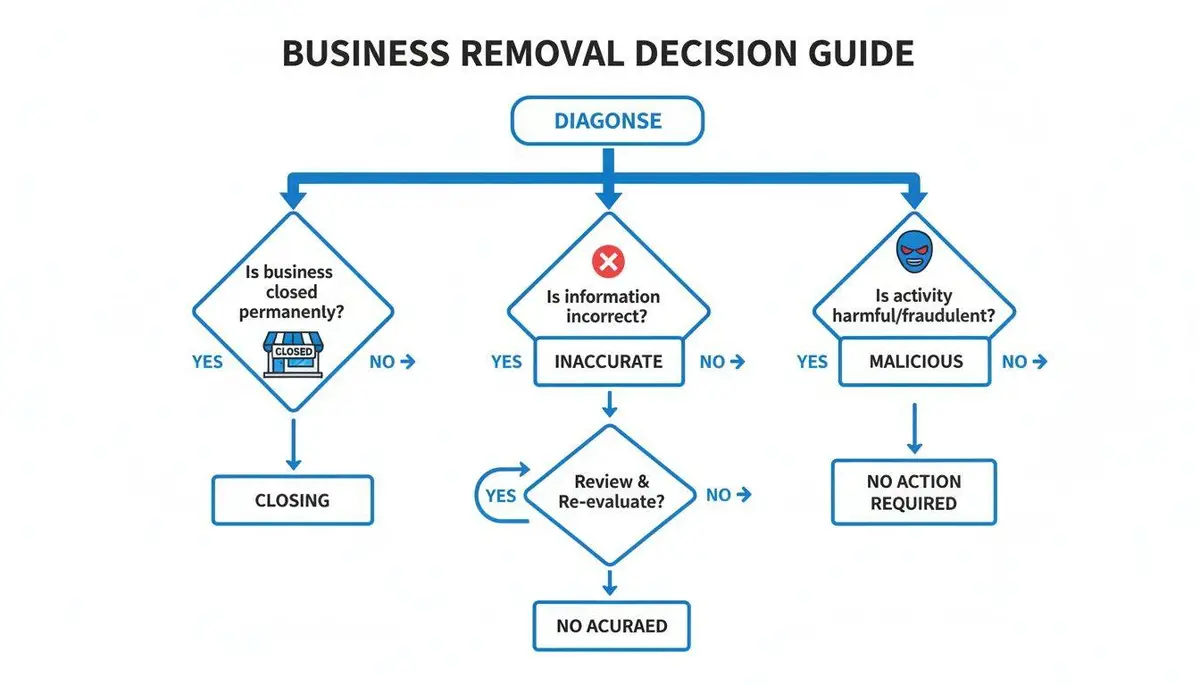
As illustrated, the correct strategy is contingent on your end goal. Are you managing a standard shutdown, correcting erroneous data, or neutralizing an attack? Each path requires a different set of Google’s tools and reporting channels. We can distill the common scenarios into three primary categories, each with a specific initial action.
Business Removal Scenarios and Initial Actions
| Removal Scenario | Primary Goal | Recommended First Action |
|---|---|---|
| Legitimate Business Closure | Inform the public the business is closed while preserving its history, including reviews. | Mark the business “Permanently Closed” within your Google Business Profile dashboard. |
| Inaccurate or Duplicate Listing | Correct erroneous information (e.g., outdated phone number, incorrect address) or consolidate a duplicate profile. | Use the “Suggest an edit” feature on the public Google Maps listing or update it directly if you have access. |
| Malicious or Fake Listing | Achieve swift and complete removal to mitigate reputational and financial damage. | Immediately use Google’s business redressal form to report the fraudulent listing with supporting evidence. |
Your objective will fall into one of these three categories. Understanding which one applies to your situation is the key to executing a successful removal strategy from the outset. A legitimate closure aims to inform the public to prevent confusion. Correcting an inaccurate or duplicate listing is a matter of data hygiene to ensure customers find correct details. A malicious listing requires immediate, total removal to stop the damage.
A critical preliminary step: Before attempting any removal, ensure you have absolute control of your core digital assets. This includes ownership of your official Google Business Profile, your website’s domain name, and all related social media accounts. Losing access during this process can create an irrecoverable and complex problem.
Strategic First Moves
Once your scenario is identified, your initial actions must be targeted and precise.
For a legitimate business closure, you will begin inside your Google Business Profile dashboard. Marking the location as “Permanently Closed” is the official protocol. This action informs the public that you are no longer operational but preserves the profile’s history, including all reviews.
Conversely, when addressing an inaccurate listing that you do not control, the first move is to navigate to the listing on Google Maps and select “Suggest an edit.” If you do control the profile, you should log in and correct the information directly.
For fake or malicious profiles, you must escalate immediately. The standard “Suggest an edit” function is too slow for urgent threats. The correct action is to report the profile using Google’s business redressal form. This is a formal complaint process that allows you to provide evidence that the listing is fraudulent or harmful. Utilizing the appropriate tool from the start conserves valuable time and places you on an expedited path to resolution.
The Technical Process of Profile Removal
Having determined the necessity of removing your business from Google, understand that the process is more complex than a single click. The chosen path, and its navigation, determines the difference between a clean resolution and a persistent digital ghost that creates long-term confusion.
Google provides two primary options that lead to substantially different outcomes.

The image illustrates the core strategic choice: are you ceasing operations or attempting to erase the profile entirely? A clear understanding of your objective is the prerequisite for success.
Closure vs. Removal: A Critical Distinction
The most direct route is to mark your business as “Permanently Closed.” This action can be executed instantly from your Google Business Profile (GBP) dashboard and immediately communicates to customers on Search and Maps that you are no longer open, preventing unwanted calls or visits.
The significant caveat is that the profile itself persists. Your business name, former address, photos, and every review remain visible online. For a business with a strong, positive reputation, this can be advantageous, as it preserves a favorable history.
Requesting a complete removal is a more substantial undertaking. The objective is to scrub the profile content and sever your connection to it. While this seems ideal for a clean slate, Google’s primary mission is to map the physical world, not to facilitate a business’s disappearance. If Google’s systems can find any public records of your business, such as old directory listings or government filings, it will almost invariably reject the removal request.
Do not assume a removal request will be granted. If Google’s crawlers find any residual trace of your business online, they will default to marking the profile as “closed,” regardless of your request for complete removal. This is a common point of failure.
The Correct Protocol for Removing a Profile You Own
If you have access to a single business profile, the process is relatively direct. You begin within your GBP dashboard.
First, navigate to your Business Profile settings. Locate the option for “Remove Business Profile” and then select “Remove profile content and managers.” The critical step is to remove all other managers and users from the profile before attempting to remove yourself. Failure to do so will cause the process to fail.
If you are managing a chain of locations, this process must be repeated for every individual profile you intend to close or remove. There is no bulk removal function. Google designed this intentionally to prevent catastrophic errors, but it creates a significant manual burden for any large organization.
Regaining Control When You Are Locked Out
One of the most difficult situations is needing to remove a profile for which you lack access. This often occurs when a former principal used a personal email to create it or a past marketing agency retains control.
Your initial move should be an attempt to reclaim ownership. Go to the public profile on Google and find the “Own this business?” link. Clicking this sends an ownership request to the current listed owner. If they fail to respond within three days, Google’s system is designed to allow you to proceed with verifying your ownership.
If they deny the request or the automated system fails, you must escalate by contacting GBP support directly. You must be prepared with irrefutable proof of your connection to the business and a clear rationale for its removal.
This requires official documentation:
- Business dissolution papers
- Legal name change or rebranding announcements
- Utility bills for the business address
A disorganized or incomplete request will be dismissed. You must construct a meticulous case to bypass automated responses and reach a human agent who can intervene. For many, this is the point where professional assistance becomes the most effective path to breaking the deadlock.
Managing your GBP is only one component. To address other information appearing about your business online, you can learn how to remove search results from Google in our more extensive guide.
Eradicating Your Website and Third-Party Mentions

Managing your Google Business Profile is a necessary first step, but it is far from a complete solution. The greater challenge lies in addressing the myriad other online mentions of your business, in directories, old news articles, and on partner websites. These digital footprints do not automatically vanish. They can persist in search results for years, presenting an outdated or confusing image to anyone who encounters them. This is a common and costly oversight. You must proactively pursue and eliminate every external mention.
Source Removal vs. De-Indexing: A Tactical Analysis
To truly scrub your business from Google, you must understand two key strategies: source removal and de-indexing. Source removal is the complete deletion of content by the website owner. De-indexing involves requesting that Google hide a specific URL from its search results, even though the page remains live.
Source removal is the superior strategy, as it is permanent. Once the content is deleted, it cannot be re-crawled and reappear. This is always the primary objective, particularly in high-stakes reputation cases. The difficulty lies in compelling webmasters to cooperate.
When source removal is not possible, the strategy shifts to de-indexing. This involves directly petitioning Google to hide a URL, bypassing the website owner. While not as permanent, a Google policy or algorithm change could theoretically reverse it, it is a highly effective method for controlling what the public finds.
The optimal strategy is always two-pronged. First, press for removal at the source. Simultaneously, for every webmaster who is unresponsive or refuses, a de-indexing request must be prepared. This dual approach ensures no damaging content remains visible.
Executing a Webmaster Takedown Request
A request for content removal directed at a webmaster must be executed with precision. An email that is demanding, emotional, or vague will be discarded. Your communication must be professional, direct, and provide a compelling reason for compliance.
Successful requests share several key characteristics:
- Clarity: State your objective and provide the exact URL of the page in question. Do not force the webmaster to investigate.
- Rationale: Briefly explain why the page should be removed. Is the business dissolved? Is the information inaccurate and causing confusion? Adhere strictly to the facts.
- Facilitation: Frame the request as mutually beneficial. You are not only resolving your issue but also helping them maintain an accurate website. Avoid legal threats unless it is a final resort and you are prepared to follow through.
For example, explain that your business has officially closed and their outdated listing is causing confused customers to contact them, thus positioning the removal as a simple housekeeping task that benefits their users.
Utilizing Google’s “Remove Outdated Content” Tool
When a webmaster deletes a page but it continues to appear in Google’s search results, Google’s “Remove outdated content” tool becomes necessary. It is designed to address the lag time between a website change and Google’s next crawl. Our guide on how to remove outdated content from Google provides a deep dive into this process.
This tool is not for requesting the removal of live content. It functions only if the webpage has already been altered or deleted. You submit the URL, and Google verifies whether the content you want removed is truly gone from the live site. If confirmed, the search snippet and cached link typically disappear within days.
For preventative control, if your site operates on WordPress, learning how to make your WordPress site private is an excellent measure. It instructs search engines not to index your site, giving you ultimate control over its visibility.
Escalation to Legal Action
When polite requests fail and damaging content persists, escalation is required. Legal instruments like DMCA takedown notices and defamation claims are not initial steps; they are deployed when all other avenues have been exhausted.
A DMCA (Digital Millennium Copyright Act) notice is appropriate when a website uses your copyrighted property (such as your logo, proprietary photos, or unique text) without permission. A defamation claim is a more serious action applicable when content is not merely inaccurate but provably false and actively harming your reputation.
These are not simple web forms. A successful legal claim requires a well-structured argument, substantial evidence, and a firm grasp of the relevant law. This is the stage where professional legal or reputation management counsel is essential. Attempting to navigate these complex legal waters independently can easily backfire, exacerbating the situation and prolonging the damage.
Navigating Google’s Content and Review Moderation
If your business is the target of fake reviews or false information, deleting your Google Business Profile is an inadequate response. The negative content often persists, becoming a permanent liability to your reputation. The only effective solution is to engage with Google’s content moderation system, a complex and often opaque process where algorithms and human reviewers make decisions with minimal transparency.
Success in this arena depends not on emotional appeals but on constructing a case that aligns perfectly with Google’s own policies, thereby providing a clear justification for action.

Interpreting Google’s Content Policies
Google’s content policies are the sole determinant of success. Your ability to have a malicious review removed depends entirely on proving it violates a specific rule. Complaints such as “this is unfair” or “this person is lying” are systematically ignored. You must identify the precise policy violation.
To do so, you must know what Google defines as a violation. Reports that achieve approval almost always fall into one of these categories:
- Conflict of Interest: The review originates from a competitor, a disgruntled former employee, or a paid actor.
- Impersonation: The reviewer is using a false identity or falsely claiming to be a customer.
- Off-Topic or Spam: The review is irrelevant to a genuine customer experience and serves only to manipulate ratings or attack an individual.
- Hate Speech or Harassment: The content contains personal threats or attacks a protected group.
When you file a report, you must select one of these violations. Your entire argument and all provided evidence must directly support the claim that this specific rule has been broken.
How Google’s Algorithms Process Your Report
Most reports fail because they are initially processed by a machine, not a human. Google uses automated systems, including machine learning, to filter the immense volume of reports it receives. These algorithms are trained to detect obvious spam and clear policy violations. You can discover more insights about how Google’s systems target fake reviews to understand why the framing of your report is so critical.
If your claim is vague or lacks evidence tied to a specific policy, the algorithm will likely reject it instantly. A human reviewer will never see it.
Your report is not initially being read by a sympathetic human. It is being scanned by a machine looking for specific data points and policy triggers. Frame your request for the machine first, and the human second.
For example, do not simply state, “This person was never a customer.”
Instead, structure your report as follows: “We have no record of a client by this name in our CRM or appointment logs for the specified date range. This indicates the review does not reflect a genuine customer experience and violates the policy against off-topic content.” This structured, evidence-based language is precisely what the system is designed to recognize and escalate.
Structuring Reports for Optimal Results
When under attack, your response must be both swift and precise. Structuring removal requests in a specific manner dramatically improves the probability of success. Your objective is to build a case so compelling that there is no room for subjective interpretation by a reviewer.
Here are tactics for different situations:
- For a Fake Review: Document everything. If the reviewer claims a visit on a specific day, provide proof you were closed. If their name is absent from your client database, state that fact clearly.
- For Competitor Sabotage: Use public information to your advantage. If you suspect a rival employee posted the review, locate their LinkedIn profile and include the link as evidence of a conflict of interest.
- For a Coordinated Attack: If you observe a sudden influx of 1-star reviews with similar language, do not report them individually. Group them as a single, coordinated campaign. This pattern is a significant red flag for the inauthentic activity Google’s systems are designed to detect.
Treat every report as a self-contained legal brief. By providing Google with precisely the evidence it needs, presented logically, you bypass the common pitfalls that cause most reports to be denied and advance your case to an agent empowered to resolve the issue.
So, you have reached an impasse. You have submitted the forms, adhered to Google’s policies, and presented a clear, logical case for removing your business information. Yet, nothing changes. The damaging content persists, and your requests are met with denial or silence.
This is a common and intensely frustrating scenario. When facing a serious threat to your business’s reputation, the self-service tools are no longer sufficient. This is the point at which you must decide whether to concede or escalate. For our clients, concession is not an option.
When to Engage Legal Counsel
If Google and the third-party website owner refuse to cooperate, legal action often becomes the most potent tool. This is not about issuing empty threats; it is about leveraging the force of law to compel action. A formal court order is one of the few instruments that can obligate a platform like Google to remove content it would otherwise ignore.
This path is typically reserved for specific, high-stakes situations.
The most common grounds for judicial intervention are:
- Defamation: The content includes verifiably false statements of fact that are causing tangible harm to your business. This does not apply to subjective opinions; you must prove the statements are factually untrue.
- Trademark Infringement: A party is using your registered business name, logo, or other intellectual property to confuse or mislead consumers, which is common with fraudulent business listings.
- Copyright Infringement: A third party has stolen and published your original photos, website text, or videos without permission. While a DMCA notice is the first step, this can be escalated legally if the notice is disregarded.
Obtaining a court order is a serious legal process. It demands meticulous documentation, a robust legal argument, and a clear demonstration of the damages incurred. Once obtained, the order can be submitted through Google’s legal complaint channels, triggering a non-automated, high-priority review. For a full breakdown, see our guide on how to submit a Google legal request.
A court order fundamentally changes the dynamic. Your request is no longer a suggestion that Google can disregard. It becomes a legal mandate that they are obligated to follow. This is often the decisive factor in removing the most stubborn and harmful online content.
The Role of Specialized Reputation Experts
While a court order is powerful, it is not the only escalation path. Specialized reputation management firms operate in the space between standard platform requests and full-scale litigation. We bring a unique synthesis of procedural expertise, established platform relationships, and proven strategies to succeed where individuals and even many law firms cannot.
This is especially true for nuanced policy violations that Google’s automated review systems and first-tier support staff consistently fail to recognize. For example, a flood of negative reviews may not meet the legal standard for defamation, but it could constitute a clear, coordinated attack that violates Google’s policies against inauthentic engagement.
We know how to identify these patterns. The strategy for removing a fake review targeting a real estate agency is distinct from that for a medical practice. Each industry has unique nuances in how platforms process content flags, and mastery of these unwritten rules is critical.
Deploying Advanced Takedown Strategies
When you engage a professional firm, we do not simply resubmit your original request. We initiate a multi-pronged campaign designed to apply maximum pressure from every available angle.
A professional campaign often includes:
- Forensic Evidence Gathering: We build an airtight case file that leaves no room for misinterpretation. This frequently involves compiling technical data, user activity logs, and public records to systematically disprove false claims.
- Multi-Channel Escalation: We do not rely on a single form. We engage multiple departments within Google simultaneously, from policy and legal to engineering, often through back-channels unavailable to the public.
- Strategic Host and Registrar Pressure: We employ advanced negotiation tactics with the website’s hosting provider and domain registrar, framing the issue around their own liability and terms of service violations.
If you have exhausted all self-service options to remove your business from Google, it is a clear indication that the problem has surpassed the scope of DIY solutions. Escalation is not about trying harder; it is about changing the rules of engagement with a level of experience and resources that only a dedicated professional team can provide.
Frequently Asked Questions About Business Removal
When attempting to remove a business from Google, you will quickly discover that official help guides do not address the complexities of real-world scenarios. Here are the answers to the most common questions we encounter from clients under pressure.
How Long Does Business Removal Take?
There is no standard timeline. Marking your Google Business Profile as “Permanently Closed” is instantaneous, but this only changes the status. The listing itself remains. A request to have the entire profile removed from Google Maps can take weeks or months and is frequently denied if Google finds any conflicting information online.
Securing the removal of third-party mentions is a different matter entirely. This requires individual outreach to each website, and the timeline is wholly dependent on the responsiveness of their webmasters. It is a persistent and laborious process.
Will Removing My Profile Delete Negative Reviews?
No. This is a critical misunderstanding. Closing or removing your Google Business Profile does not erase its history. It does prevent new reviews and reduces the profile’s visibility, but existing reviews, both positive and negative, will likely persist in Google’s search results.
Eliminating genuinely defamatory or false reviews is a separate process. It requires navigating Google’s legal or content moderation channels, a battle that often continues long after the primary business profile has been addressed.
The digital echo of a closed business can linger for years. While closing a profile silences future commentary, it does not rewrite the past. A dedicated strategy is required to address legacy content that could continue to impact your personal or professional reputation.
Can I Remove a Listing I Do Not Own?
Yes, you can report a business listing that you do not own. The simplest method is using the “Suggest an edit” feature on Google Maps to flag the business as “permanently closed” or “doesn’t exist here.” This is effective for basic corrections of outdated information.
However, for a malicious or fake profile created as an attack, this standard method is too slow and often ineffective. A more aggressive approach is necessary to prove the listing is fraudulent and compel Google’s intervention. This typically involves filing formal complaints, a core competency of a professional reputation management firm.
While Google has been deleting customer reviews at record levels, its automated systems are notoriously poor at identifying sophisticated, defamatory attacks. A deeper analysis of these trends reveals why a hands-on, expert approach is often the only path to a successful outcome.
What If Google Denies My Removal Request?
A denial of your removal request is not uncommon. It occurs frequently when Google’s automated systems find any public data corroborating the business’s existence, such as an old directory entry or a public record. A denial is not the end of the process; it is your signal to escalate.
At this point, you must transition from simple requests to building a formal case. Your next move may involve compiling extensive documentation to prove the business’s dissolution, employing specific legal arguments, or engaging a firm with the expertise to bypass automated barriers and reach decision-makers within Google.
When standard methods fail and your reputation is at stake, you need a partner who can force a resolution. The team at ContentRemoval.com specializes in these complex cases. We invite you to schedule a confidential consultation to develop a clear strategic plan for your specific situation at ContentRemoval.com.
