
To remove a website from Google Search, site owners use Search Console’s Removals tool for temporary suppression of about six months, then noindex tags or a 404 or 410 status for permanent de-indexing. For sites you do not control, contact the publisher first, then use Google’s legal forms for copyright, personal information, court orders or right to be forgotten requests.
Key facts
- The Search Console Removals tool hides URLs for roughly six months and does not delete content at the source.
- Google accepts personal-information removals for government IDs, bank details, signatures, medical records and doxxing contact data.
- Google typically rejects requests over public records, legitimate news coverage and business contact information.
- Bing powers Yahoo, DuckDuckGo and Ecosia results, so it needs its own removal request.
Where ContentRemoval.com comes in. ContentRemoval.com works the harder half of this problem: pages on non-cooperative third-party sites, legal removal requests that need correct evidence and framing, coordination across Google, Bing and regional engines, and suppression when no removal ground exists. Executives, brands and their counsel usually make contact after a self-service request has been declined or has lapsed. A free 15-minute Exposure Scan maps what is removable and the report is yours to keep. Get a Free, Confidential Exposure Scan or read how our search result removal work is done.
When harmful, outdated, or unwanted content appears in Google search results, the urgency to google search remove website information becomes critical for individuals and businesses alike. Whether you’re dealing with defamatory articles, privacy violations, or simply outdated information that no longer represents your brand, understanding Google’s removal mechanisms is essential for maintaining your online reputation. This comprehensive guide explores the technical, legal, and strategic approaches to removing website content from Google search results in 2026, providing actionable insights for site owners, reputation managers, and anyone seeking to control their digital presence.
Understanding Google’s Website Removal Framework
Google operates the world’s largest search index, crawling billions of web pages and making them discoverable to users worldwide. When you need to google search remove website content, understanding the fundamental distinction between removal types is critical for success.
Temporary vs. Permanent Removal
Google offers two primary pathways for content removal, each serving different strategic purposes. Temporary removal hides URLs from search results for approximately six months, while permanent removal requires addressing the content at its source.
Temporary removal methods include:
- Using Google Search Console’s Removals tool for urgent situations
- Blocking pages with noindex meta tags or robots.txt directives
- Password-protecting content to make it inaccessible to crawlers
- Requesting SafeSearch filtering for explicit content
Permanent removal requires:
- Deleting the actual content from the website server
- Returning a 404 or 410 HTTP status code
- Maintaining blocks until Google recrawls and updates its index
- Implementing ongoing monitoring to prevent reappearance
The official Google documentation on removing site information provides technical specifications for each method, emphasizing that true removal only occurs when content is eliminated at the source.

Site Owner Removal Methods
When you control the website hosting the content, you possess the most direct path to google search remove website information from search results. This control provides multiple strategic options for managing your search visibility.
Using Google Search Console Removals Tool
Google Search Console offers verified site owners immediate control over search result visibility through its dedicated Removals tool. This feature provides temporary suppression while you implement permanent solutions.
| Removal Type | Duration | Use Case | Requirements |
|---|---|---|---|
| Temporary URL | 6 months | Urgent suppression | Verified ownership |
| Outdated Content | Permanent | Cached results | Content already removed |
| SafeSearch | Permanent | Adult content | Explicit material |
| Directory | 6 months | Entire sections | Path-level control |
To execute a temporary removal request, navigate to the Removals section in Search Console, select “New Request,” and enter the specific URL or directory path you want suppressed. Google typically processes these requests within 24 hours, making this the fastest method available for verified site owners.
Implementing Noindex Directives
The noindex meta tag represents the most reliable long-term solution for preventing pages from appearing in search results while keeping them accessible to users who have direct links.
Implementation options include:
- HTML meta tag: Add
<meta name="robots" content="noindex">to the page head section - HTTP header: Return
X-Robots-Tag: noindexin server responses - Robots.txt: Block crawling entirely with
Disallowdirectives - Password protection: Require authentication to access content
Each method communicates your intent to google search remove website pages from the index, though they differ in accessibility and permanence. The noindex approach allows existing visitors to access content while preventing new discovery through search engines.
Deleting Content Permanently
The most definitive solution involves removing content from your server entirely and ensuring Google receives appropriate HTTP status codes during recrawl attempts.
When deleting pages, configure your server to return a 404 (Not Found) or 410 (Gone) status code. The 410 status explicitly signals permanent removal, potentially accelerating Google’s de-indexing process compared to 404 responses. According to Google’s guidance on URL removal, these status codes inform crawlers that content no longer exists and should be removed from the index.
Removing Content You Don’t Control
The challenge intensifies when attempting to google search remove website content hosted on domains you don’t own or manage. This scenario requires a combination of communication, legal strategies, and Google’s reporting mechanisms.
Direct Contact with Site Owners
Your first action should always involve reaching out to the website operator or content publisher directly. Many removals succeed through simple requests, particularly when dealing with legitimate concerns about accuracy, privacy, or copyright.
Effective contact strategies:
- Identify the website owner through WHOIS records or contact pages
- Present clear, factual reasons for requesting removal
- Reference specific policies violated (privacy, terms of service, accuracy standards)
- Propose reasonable alternatives like updates or corrections
- Document all communication for potential escalation
Google emphasizes this approach as the primary method for content you don’t control, noting that they cannot remove content simply because it’s unfavorable without valid legal grounds.
Legal Removal Grounds
Certain content categories qualify for removal from Google search results based on legal frameworks and Google’s own policies, even when you cannot secure deletion from the source website.
Google accepts removal requests for:
- Copyright infringement: Using the DMCA takedown process for unauthorized use of protected works
- Personal information: Doxxing, financial data, government IDs, and explicit imagery shared without consent
- Court-ordered removals: Valid legal orders from appropriate jurisdictions
- Right to be forgotten: EU and UK residents can request delisting of certain personal data
The right to be forgotten established through the landmark Google Spain v AEPD case created legal precedent for removing outdated or irrelevant personal information from search results, though this right remains geographically limited and subject to balancing tests against public interest.
Submitting Legal Removal Requests
Google provides specialized forms for different removal categories, each requiring specific documentation and justification to google search remove website results successfully.
| Removal Category | Form Location | Required Evidence | Geographic Scope |
|---|---|---|---|
| Copyright | Legal Help Center | Ownership proof, infringement details | Global |
| Personal Information | Privacy Request | Affected data, harm explanation | Global |
| Right to be Forgotten | European Privacy | Identity verification, relevance argument | EU/UK only |
| Court Orders | Legal Removal | Certified court documents | Jurisdiction-specific |
When submitting legal requests, precision and documentation determine success rates. Include exact URLs, clear explanations of violations, and supporting evidence demonstrating your legal basis for removal. Google’s guidance on content removal requests outlines evaluation criteria and processing timelines for different request types.

Technical De-indexing Strategies
Beyond Google’s official removal tools, technical strategies can prevent indexing or accelerate de-indexing when you need to google search remove website content systematically.
Robots.txt Configuration
The robots.txt file serves as the primary communication mechanism between websites and search engine crawlers, establishing which sections of your site should remain private.
User-agent: Googlebot
Disallow: /private-section/
Disallow: /temporary-content/
This directive blocks Google from crawling specified directories, preventing new indexing. However, robots.txt alone won’t remove already-indexed content. You must combine crawl blocking with removal requests or noindex tags on existing pages.
Meta Robots and X-Robots-Tag
For granular page-level control, meta robots directives offer flexibility in how search engines handle specific content elements.
Advanced directives include:
noindex, nofollow: Prevent indexing and link followingnoarchive: Block cached versions in search resultsnosnippet: Prevent text snippets in search listingsunavailable_after: Schedule automatic de-indexing after a specific date
These directives help you google search remove website elements selectively while maintaining other pages in the index. The unavailable_after directive proves particularly valuable for time-sensitive content like promotions or temporary announcements that should automatically disappear from search results after expiration.
Canonical Tags and Redirects
Sometimes the goal isn’t complete removal but rather consolidating duplicate content or redirecting authority to preferred URLs.
Canonical tags (<link rel="canonical" href="https://example.com/preferred-version">) signal which version of similar content should appear in search results, effectively removing duplicate pages from consideration. Similarly, 301 redirects permanently move content from old URLs to new locations, transferring search equity while removing the original URL from the index.
Understanding Google’s URL Removals Tool Limitations
Many users misunderstand the functionality and scope of Google’s URL Removals Tool, leading to frustration when results don’t meet expectations. Search Engine Journal’s explanation of the tool clarifies that it temporarily hides pages rather than removing them from Google’s index.
What the Tool Actually Does
The Removals Tool provides temporary suppression of URLs in search results for approximately six months. During this period, the URL won’t appear in Google search results, but Google continues to crawl and index the page if it remains accessible.
Important limitations:
- Removal expires after six months unless content is deleted
- Only affects Google.com properties, not other search engines
- Requires Search Console verification for your own site
- Cannot remove content from third-party sites without legal grounds
- Doesn’t prevent re-indexing if content remains available
This tool serves best as an emergency measure while you implement permanent solutions through content deletion, noindex implementation, or source-level removal.
Common Misconceptions
Users frequently attempt to google search remove website content using the Removals Tool for scenarios where it’s ineffective or inappropriate.
The tool cannot:
- Remove content from the source website
- Delete information from other search engines
- Provide permanent removal without source changes
- Override legal obligations of content publishers
- Remove content from social media platforms
Understanding these limitations helps set realistic expectations and guides you toward more effective strategies for different removal scenarios. For comprehensive content removal across multiple platforms and search engines, specialized content removal services employ combined legal, technical, and strategic approaches that extend beyond Google’s self-service tools.
Personal Information Removal Procedures
Google introduced expanded options for removing personal information from search results, responding to growing privacy concerns and regulatory requirements. Time’s coverage of this feature details the types of information now eligible for removal.
Eligible Information Categories
In 2026, Google accepts removal requests for specific categories of personal information that pose security or privacy risks.
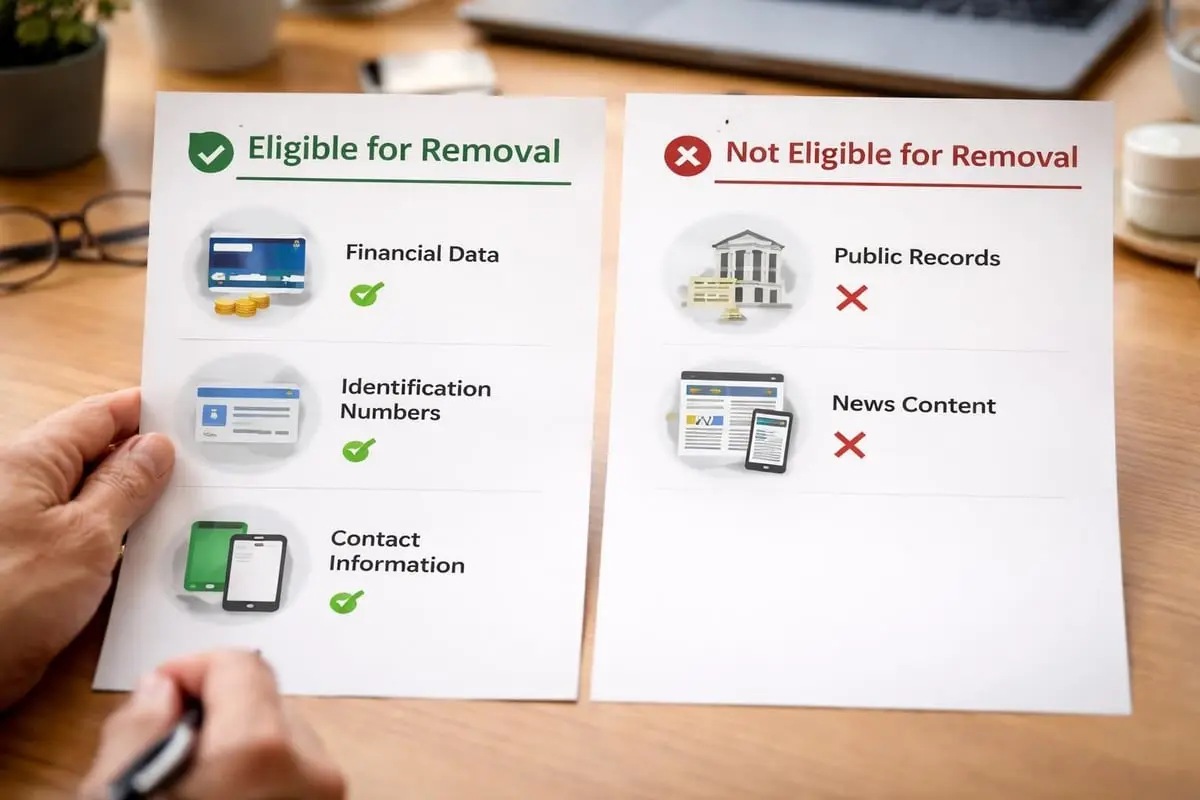
Removable personal data includes:
- Government identification numbers (Social Security, passport, etc.)
- Bank account and credit card numbers
- Physical signatures in digital format
- Confidential medical records
- Login credentials and passwords
- Explicit personal images shared without consent
- Personal contact information used for doxxing
To request removal, use Google’s “Remove personal information from Google” form, providing specific URLs, the type of information appearing, and explanation of privacy concerns. Google evaluates each request individually, balancing privacy rights against public interest considerations.
Non-Eligible Content
Understanding what Google won’t remove helps focus efforts on viable strategies to google search remove website content through alternative methods.
Google typically rejects removal requests for:
- Public record information (court documents, professional licenses)
- News articles featuring your name in legitimate reporting
- Business contact information for operating companies
- Information you voluntarily published on your own sites
- Content subject to genuine public interest
When Google denies removal based on public interest, consider alternative reputation management strategies like digital footprint cleanup or content suppression through strategic publishing.
Accelerating the De-indexing Process
After implementing removal methods, content may persist in search results for days or weeks until Google recrawls the affected URLs. Several strategies can accelerate this de-indexing timeline.
Requesting Recrawls
Google Search Console’s URL Inspection tool allows you to request immediate recrawling of specific pages, expediting the discovery of deletions or noindex directives.
Steps to request recrawl:
- Enter the URL in Search Console’s URL Inspection tool
- Review the current indexing status
- Click “Request Indexing” to prioritize recrawling
- Monitor the Coverage report for de-indexing confirmation
Google typically processes recrawl requests within a few days, significantly faster than waiting for natural crawl cycles that might occur weeks apart for low-priority pages.
Removing Cached Results
Even after Google de-indexes a page, cached versions may persist in search results, displaying outdated content snapshots. To google search remove website cached results specifically, use the “Remove outdated content” tool.
This tool requires:
- The page no longer exists (returns 404/410) OR
- The page contains a noindex directive OR
- The specific content has been removed from the page
Submit the cached URL through the tool, and Google will refresh its cache, removing outdated snapshots from search results within days rather than weeks.
Multi-Search Engine Removal Strategy
While Google dominates search market share, comprehensive removal strategies must address other search engines to fully google search remove website content from online visibility.
Bing and Yahoo Removal
Microsoft’s Bing powers both Bing.com and Yahoo search results, requiring separate removal processes from Google.
Bing Webmaster Tools provides similar functionality to Google Search Console, including:
- URL removal requests through the Content Removal tool
- Block URLs feature for preventing indexing
- Robots.txt and meta robots tag support
- Cached content removal options
Submit removal requests through Bing Webmaster Tools with verified site ownership, or use Bing’s content removal request form for third-party content meeting legal removal criteria.
Alternative Search Engines
Smaller search engines like DuckDuckGo, Ecosia, and regional platforms source results from various indexes, complicating universal removal efforts.
| Search Engine | Primary Index Source | Removal Method |
|---|---|---|
| DuckDuckGo | Bing + own crawler | Bing removal + contact |
| Ecosia | Bing | Bing removal sufficient |
| Yandex | Independent | Yandex Webmaster Tools |
| Baidu | Independent | Baidu Webmaster |
For comprehensive search visibility suppression, address removal at the source level through content deletion and noindex implementation, which affects all search engines simultaneously.
Monitoring and Maintenance
Successfully removing content requires ongoing monitoring to verify removal success and detect reappearance through archival sites, scraped copies, or re-indexing.
Verification Techniques
After initiating removal processes, systematic verification ensures your efforts achieved the intended results.
Monitoring approaches:
- Perform exact URL searches in Google using
site:operator - Search for unique content phrases in quotation marks
- Check Google Search Console’s Index Coverage report
- Monitor cached results through
cache:search operator - Use third-party monitoring tools for automated detection
Set up regular monitoring schedules (weekly initially, then monthly) to catch any reappearance quickly and address it before search visibility rebuilds.
Preventing Re-indexing
Content removed from search results can reappear if preventive measures lapse or new links emerge directing crawlers to supposedly removed pages.
Prevention strategies include:
- Maintain noindex tags indefinitely on pages you want excluded
- Continue blocking crawler access through robots.txt
- Keep deleted pages returning 404/410 status codes
- Monitor for new backlinks that might trigger recrawling
- Implement redirect chains for legitimately moved content
For ongoing protection against harmful content and search result monitoring, reputation management services provide continuous surveillance and rapid response to new threats.
Managing Removal Timelines and Expectations
Understanding realistic timelines helps manage expectations when you need to google search remove website content urgently.
Typical Removal Timeframes
Different removal methods operate on varying schedules based on technical processes and review requirements.
Expected timelines:
- Search Console temporary removal: 24-48 hours
- Noindex implementation: 3-7 days after recrawl
- Content deletion (404/410): 1-4 weeks for full de-indexing
- Legal removal requests: 1-6 weeks depending on complexity
- Right to be forgotten: 4-8 weeks including review period
- Cached content removal: 2-5 days with request submission
Urgent situations requiring immediate action may justify temporary removal tools while permanent solutions process, creating layered protection during transition periods.
Factors Affecting Speed
Several variables influence how quickly Google processes removal requests and updates search results.
Speed determinants:
- Page authority: High-authority pages receive more frequent crawls
- Backlink volume: Many inbound links trigger more recrawl attempts
- Request type: Automated removals process faster than manual reviews
- Documentation quality: Complete legal requests avoid back-and-forth delays
- Recrawl frequency: Rarely-crawled sites take longer to update
For time-sensitive removals involving reputation crises or privacy emergencies, combining multiple methods accelerates results. Implement noindex tags while submitting formal removal requests, delete content while requesting recrawls, and use temporary suppression tools during permanent solution processing.
International Removal Considerations
Global online presence requires understanding geographic variations in removal rights and search engine policies when attempting to google search remove website content across jurisdictions.
EU and UK Right to be Forgotten
European data protection regulations grant individuals significant control over personal information appearing in search results, creating rights unavailable in most other regions.
Key provisions:
- Request removal of inadequate, irrelevant, or excessive personal data
- Balance personal privacy against public interest considerations
- Apply to EU/UK search domains (google.de, google.co.uk, etc.)
- May not extend to google.com or other international domains
- Require identity verification and relevance documentation
The right to be forgotten doesn’t create absolute removal rights. Google evaluates each request against public interest factors, often denying requests involving public figures, professional information, or matters of legitimate public concern.
Regional Search Engines
Countries with strong local search engines require separate removal approaches tailored to regional regulations and platform policies.
Major regional platforms:
- Baidu (China): Requires ICP licensing for webmaster tools access
- Yandex (Russia): Operates independent webmaster platform with removal tools
- Naver (South Korea): Limited removal options; focuses on source-level deletion
- Seznam (Czech Republic): Small market share; typically follows source removals
When operating internationally, prioritize removal efforts based on search engine market share in relevant geographic markets rather than attempting universal removal across all platforms simultaneously.
Professional Removal Services vs. DIY
The decision to google search remove website content independently versus engaging professional services depends on complexity, urgency, legal factors, and technical capability.
When DIY Removal Works
Site owners removing their own content or addressing straightforward scenarios often succeed with Google’s self-service tools.
Suitable DIY scenarios:
- Removing content from websites you own and control
- Implementing technical changes (noindex, redirects, deletions)
- Requesting temporary URL suppression through Search Console
- Submitting clear copyright violations with documented ownership
- Removing explicit personal information that clearly violates policies
These situations involve well-documented processes with predictable outcomes, making professional assistance unnecessary for technically competent individuals.
When Professional Help Becomes Necessary
Complex removal scenarios involving legal considerations, third-party sites, or strategic reputation management benefit from professional expertise.
Professional service indicators:
- Content hosted on non-cooperative third-party sites
- Legal gray areas requiring attorney consultation
- Multiple platforms and search engines requiring coordination
- Defamatory content requiring legal removal processes
- International removals across different jurisdictions
- High-stakes situations with significant reputation impact
Professional removal firms bring specialized knowledge of platform policies, legal frameworks, and escalation procedures that dramatically improve success rates in challenging cases. They also provide discretion and case management that prevents additional attention to sensitive matters.
Advanced Suppression Techniques
When complete removal proves impossible, suppression strategies reduce the visibility of unwanted content by displacing it in search results with positive or neutral alternatives.
Search Engine Optimization for Suppression
Strategic content creation and optimization can push negative results to page two and beyond, where they receive minimal visibility.
Suppression tactics include:
- Creating authoritative content targeting your name or brand keywords
- Optimizing social media profiles for high search rankings
- Publishing press releases and articles on high-authority sites
- Building backlinks to positive content to increase authority
- Leveraging video, images, and diverse content formats
This approach works particularly well when legal removal grounds don’t exist but search visibility reduction provides adequate protection. Effective suppression requires ongoing effort to maintain positive content rankings above unwanted results.
SERP Diversification
Google displays diverse content types in search results, including images, videos, news, and knowledge panels. Populating these result types with controlled content reduces space available for harmful information.
Diversification strategies:
- Optimize images and videos for branded searches
- Maintain active, optimized social media presence
- Secure knowledge panel control through entity verification
- Generate news coverage through legitimate PR efforts
- Create and optimize location listings for local visibility
By occupying multiple result positions with positive content across different formats, you effectively limit the visibility and impact of unwanted search results even when complete removal remains unattainable.
Successfully navigating Google’s removal ecosystem requires understanding the technical mechanisms, legal frameworks, and strategic options available for different scenarios. Whether you control the content or need to address third-party publications, combining the right tools and approaches determines your success in managing search visibility.
When standard removal methods prove insufficient or the stakes justify professional intervention, Content Removal specializes in comprehensive content removal and reputation management across search engines, websites, and social platforms. Our case-managed approach combines legal expertise, technical implementation, and strategic suppression to protect individuals and businesses from harmful online content, delivering discretionary service focused on permanent solutions rather than temporary fixes.
Frequently asked questions
Does Google’s URL Removals tool permanently delete a page?
No. It temporarily hides the URL from Google results for about six months while Google continues to crawl the page if it remains accessible. Permanent removal needs the content deleted with a 404 or 410 response, or a noindex directive, and the removal expires unless one of those is in place.
How do I get Google to remove a page I do not own?
Contact the site owner or publisher first with a clear, factual request and document the exchange. If that fails, use Google’s legal forms where grounds exist: DMCA for copyright, the personal-information form for doxxing or sensitive identifiers, a court order, or a right to be forgotten request for EU and UK residents. Google will not remove a page just because it is unfavorable.
How long does it take for a removed page to disappear from Google?
Search Console temporary removals process in about 24 to 48 hours, noindex takes effect 3 to 7 days after recrawl, deleted content can take 1 to 4 weeks to drop fully, and legal requests run 1 to 6 weeks. Requesting a recrawl through URL Inspection and using the Remove outdated content tool for stale snippets can shorten the wait.
