Deleting an old email account safely is a controlled decommissioning. Map every service that still uses the address for logins, recovery or billing, export mail and attachments you may need later, move recovery paths to a stronger replacement, then close the correct layer with the provider. Afterward, remove public traces of the address and watch for reuse or impersonation.
Key facts
- Gmail can be deleted as a single service under Data and Privacy without destroying the whole Google Account.
- Removing an account from Outlook clears one device; it does not terminate the mailbox or alias.
- Custom domains involve three separate controls: the registrar, the DNS host and the email host.
- A closed address can later be reassigned, so update banking, social and enterprise logins first.
Where ContentRemoval.com comes in. ContentRemoval.com helps when a retired address keeps surfacing in people-search listings, cached pages, old bios and breach data long after the mailbox is closed. Executives, family office administrators and their IT or legal advisers usually make contact after a reset notice or breach alert names an inbox they thought was gone. A free, confidential 15-minute Exposure Scan maps where the old identity still appears and what is removable, and the report is yours to keep. Get a Free, Confidential Exposure Scan or read how our content removal work is done.
You usually discover the problem too late. An assistant flags a password reset tied to an address you haven’t used in years. A breach notice names an inbox from a prior venture. A journalist, litigant, or opportunist finds an abandoned email identity still attached to filings, subscriptions, or executive accounts. At that point, “delete the old account” sounds simple. It isn’t.
For executives, founders, and family offices, an old email account is rarely just an inbox. It’s a residual identity token, a recovery channel, a records repository, and sometimes an attack surface with your name on it. If you want to know how to delete old email accounts safely, start with the correct premise. This is not cleanup. It’s controlled decommissioning.
The Hidden Liabilities of Dormant Email Accounts
Dormant email accounts create exposure long after you stop using them. For executives, founders, and high-net-worth families, that exposure is rarely limited to stray messages. An old address can still anchor password resets, preserve links to prior entities, and tie your name to deals, domains, and contacts that should no longer be discoverable.
The security risk is obvious. The reputational risk is usually worse.
A forgotten address often survives in data broker profiles, archived sites, breach dumps, historical domain records, and vendor systems. That gives an attacker enough material to impersonate you, target your staff, or build a convincing social engineering approach around a real but neglected identity. If the account sits on a custom domain from a sold company, dissolved SPV, or legacy family office structure, the problem expands. Control of the inbox, the domain, and the history attached to both can separate over time, creating openings you do not see until someone else uses them.
Deleting the mailbox alone does not solve that. It only removes one visible asset while the surrounding references remain in circulation. Clients who take this seriously pair account retirement with broader digital footprint cleanup so the address disappears from the public and commercial systems that make impersonation easier.
There is also a liability issue many people miss. Old inboxes often hold approvals, side letters, board discussions, deal correspondence, and instructions that may matter in a dispute, audit, or investigation. Delete first, and you can erase records you may need later while leaving the identity itself exposed elsewhere. That is poor risk management.
Email retirement should also align with safeguarding your company’s email, especially when former executive addresses still influence trust, vendor routing, or domain reputation. Former identities continue to carry authority long after the business use case ends.
Dormant accounts do not sit. They remain available for misuse until you close every dependency and remove the residual trail. For high-visibility individuals, old email is not clutter. It is a live liability.
The Pre-Deletion Security Audit
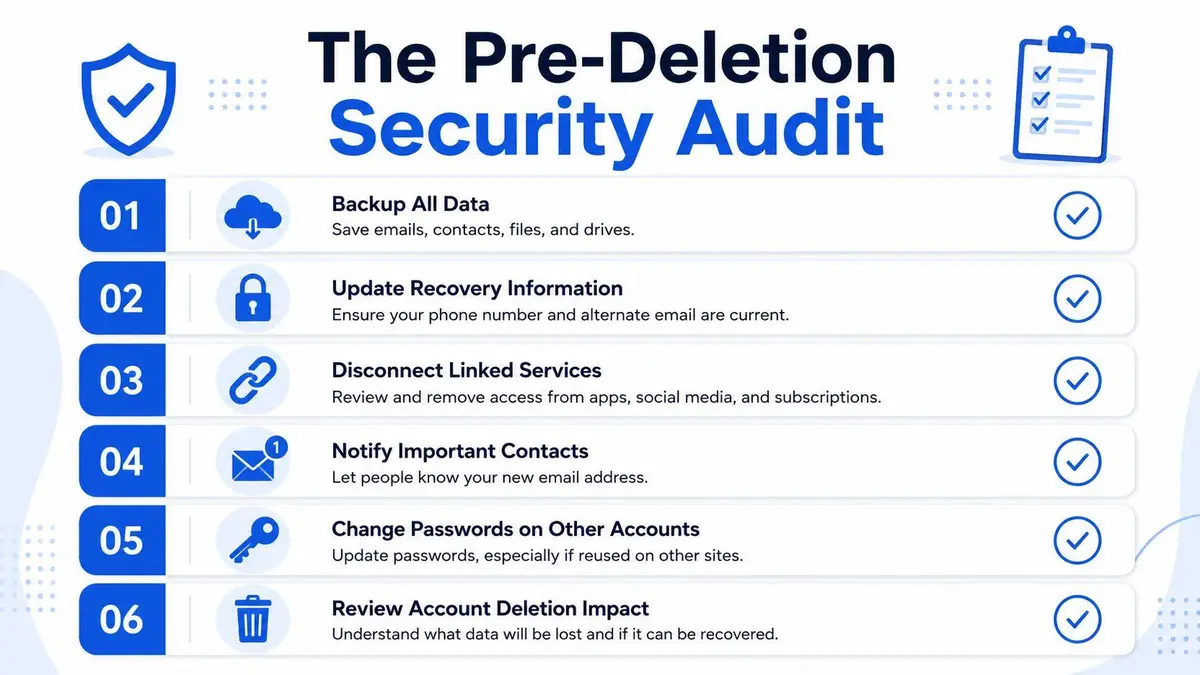
A retired executive closes an old inbox on Friday and learns on Monday that a wealth platform, a vendor portal, and a travel profile still route password resets to that address. The account is gone. The exposure is not. Pre-deletion work decides whether account closure reduces risk or creates a fresh control failure.
Build the identity map first
Start with dependency mapping, not deletion screens. List every service tied to the address: banking alerts, board portals, brokerage logins, private aviation accounts, tax software, insurer access, legal platforms, payroll systems, household staff tools, and any account where the old inbox still receives recovery links or billing notices. If the address ever served as a username, recovery email, or admin contact, treat it as active until you verify otherwise.
Check the inbox, password manager, browser-saved logins, and account settings across major services. Search for terms like welcome, verify, reset, statement, invoice, and administrator. Your goal is to find every place where the old address still has authority. If you need a broader process for retiring linked profiles, use an account removal workflow for connected services before you close the mailbox itself.
Preserve what creates legal, financial, or reputational exposure
Do not destroy evidence you may need to defend yourself later. Export mail, contacts, calendars, and attachments before you make any irreversible change. For executives and HNWIs, old inboxes often contain approval chains, side agreements, KYC documents, wire instructions, NDAs, litigation correspondence, and personal travel records. Those files carry legal value and impersonation risk at the same time.
Use a direct triage model:
- Retain regulated and disputed material in the correct archive if the mailbox includes tax, compliance, employment, governance, or transaction records.
- Extract relationship intelligence such as key counterparties, trusted assistants, recurring vendors, and prior approval patterns.
- Delete low-value clutter only after you have preserved records that counsel, finance, or your family office may need.
Attachments deserve special attention. Old passports, signature pages, cap tables, medical documents, and board decks often sit in forgotten folders long after the visible inbox looks harmless.
Lock down the replacement before you cut over
The new address must be stronger than the one you are retiring. Update recovery emails, phone numbers, passkeys, and authenticator apps on every linked account. Change passwords on high-value services first. Then test real sign-ins and real password resets. If a reset still lands in the old inbox, you are not ready to delete it.
For business, family office, or household operations, this control work should align with broader guidance on safeguarding your company’s email. Account retirement creates confusion. Confusion creates openings for social engineering, invoice fraud, and executive impersonation.
Control the human handoff
Technology is only half the audit. The other half is behavior. Your assistant, banker, pilot scheduler, outside counsel, and long-time counterparties may keep using the old address from memory or autocomplete. That creates misdelivery, missed instructions, and a clean opening for spoofing if the address or domain later gets reused.
Set one replacement address. Communicate it to a short, high-trust list first. Update signatures, secure document portals, billing contacts, and investor relations records before broad notice goes out. For custom or private domains, confirm who controls the domain, the registrar account, DNS, and forwarding rules. Deleting a mailbox while leaving those controls loose is poor risk management.
A pre-deletion audit ends when four conditions are met: all dependencies are mapped, records are preserved, the replacement account is tested, and the people around you have stopped using the old identity.
Executing Account Closure Major Provider Protocols
Account closure is where expensive mistakes happen. An executive decides an address is old, an assistant removes it from a phone or laptop, and everyone assumes the risk is gone. It is not. The mailbox may still exist, still receive resets, still appear in a directory, or still anchor a paid service, recovery path, or public-facing identity.
Gmail requires precision
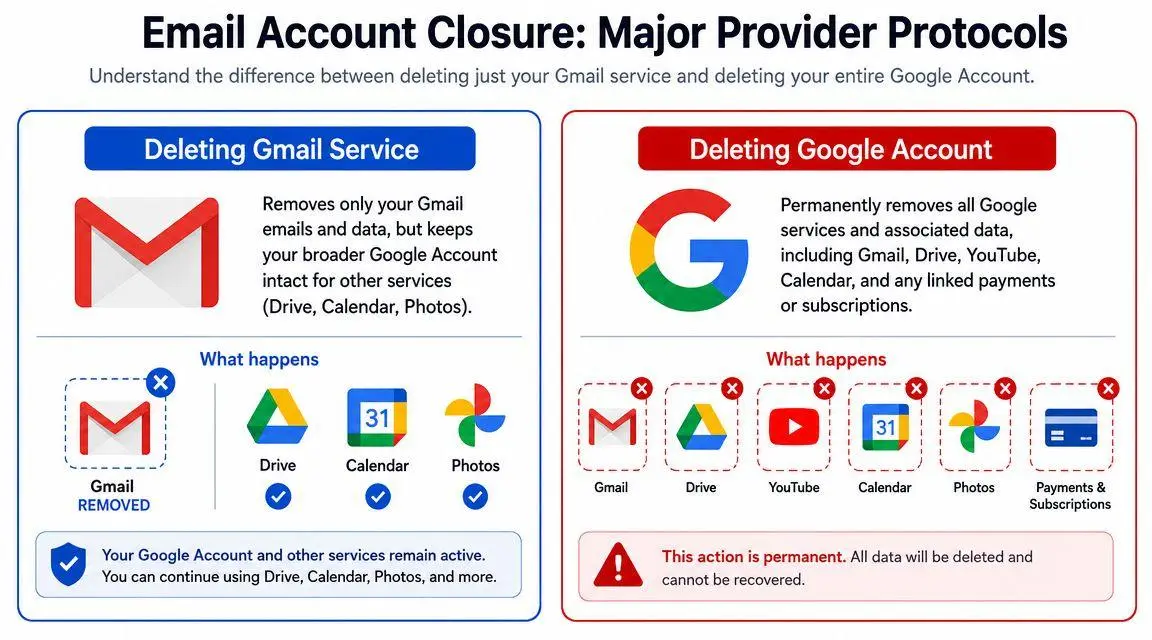
With Gmail, the first decision is simple. Are you retiring the mailbox, or destroying the entire Google identity tied to it?
For many clients, deleting only the Gmail service is the right move. Google places that option under Data & Privacy, then Data from apps and services you use, then Delete a Google service. From there, you can remove Gmail while keeping the broader Google Account in place, as outlined in this Gmail deletion guide. That preserves access to other Google assets through a non-Gmail address.
Make that choice carefully. A Google Account often sits behind Drive files, calendars, YouTube channels, payment records, old app logins, and family or household settings. If you delete the whole account when your real objective was to retire one inbox, you create a recovery problem, not a cleanup win.
| Action | Result | Main risk |
|---|---|---|
| Delete Gmail service | Removes Gmail while preserving the broader Google Account | Overlooking a workflow still tied to the mailbox |
| Delete entire Google Account | Removes access across Google services tied to that identity | Losing records, subscriptions, files, and account access far beyond email |
A short walkthrough can help if you need the interface in front of you:
The common failure here is speed. Someone deletes first and checks dependencies later. That is backward. For a public figure, investor-facing principal, or family office executive, one overlooked recovery route can expose private files, disrupt operations, or hand an attacker a useful starting point.
Microsoft and Outlook are often misunderstood
Microsoft creates a different class of error. Removing an account from Outlook often deletes cached local content and changes what appears on one device. It does not necessarily terminate the mailbox, remove an alias, or change organizational routing. Microsoft distinguishes between client-side removal and provider or admin-level action in Microsoft’s explanation of removing unused addresses.
Use exact instructions with your IT team. “Delete the email” is sloppy language and it produces sloppy results. Decide which action you want:
- Remove a device profile so the mailbox no longer appears in Outlook on that machine.
- Remove an alias so the address stops receiving mail.
- Disable or delete the mailbox at the provider or tenant level.
- Change directory or routing rules so the address stops surfacing internally and externally.
These are separate administrative actions. In regulated businesses and executive offices, they carry different retention, access, and reputational consequences.
Yahoo, legacy webmail, and other consumer accounts
Legacy webmail deserves more skepticism than it usually gets. Old Yahoo, AOL, and similar accounts often sit at the center of forgotten recovery chains, newsletter archives, account registrations, and personal correspondence that still has legal or reputational value.
Treat these addresses as exposed assets. They are older, widely circulated, and more likely to appear in breach data, contact databases, old PDFs, and cached pages. Before closure, identify where the address still appears and whether it remains capable of receiving password resets or sensitive messages.
Delete the dependency first. Then delete the mailbox.
Apple and iCloud-linked email
Apple-linked addresses also require discipline because the mailbox is often tied to a broader Apple identity. That can include device access, purchases, family settings, account recovery, and service subscriptions. Closing the address without reviewing those dependencies creates operational friction at best and a lockout problem at worst.
For high-visibility clients, I recommend a conservative rule. If the address touches device management, payment history, or recovery settings, preserve the Apple account and change the contact architecture before you remove the mailbox function.
AOL and older addresses with public residue
Older addresses create a problem that goes beyond access. They leave residue. An old AOL or legacy webmail address may still sit on conference bios, archived press releases, old LLC filings, donor pages, vendor records, and scraped people-search sites. That public residue gives attackers a believable identity marker for spoofing, phishing, and impersonation.
Closing the account is only half the job. Remove public references where possible and document the ones that cannot be removed. If the old address is still circulating online, the cleanup usually overlaps with broader account removal support.
The standard here is straightforward. The account is not fully retired until the provider has terminated access, the address has stopped functioning as a recovery point, and the old identity no longer carries public credibility.
Terminating Email on Custom and Private Domains
Consumer guides barely touch the issue that matters most for discerning clients. A custom-domain address such as ceo@companydomain.com or principal@familyoffice.net is not just a mailbox at a public provider. It sits inside an ownership and control stack.

Know who controls what
There are usually three separate actors involved, and they don’t perform the same function.
| Component | What it controls | Why it matters for deletion |
|---|---|---|
| Domain registrar | Ownership of the domain name | Deleting a mailbox doesn’t remove the domain itself |
| DNS host | Routing instructions for domain services | Mail may still route unless the service is properly changed |
| Email host | The actual mailbox and stored mail | This is where mailbox suspension, export, and deletion happen |
In many executive environments, the email host is Google Workspace, Microsoft 365, or a private mail server managed by internal or outsourced IT. That means deleting an address usually requires administrator action, not a consumer-facing settings page. If counsel, compliance staff, or a family office administrator has any role in retention, they need to sign off before anyone destroys data.
Separate deactivation from destruction
On private domains, the question is rarely “Can we delete this account?” Rather, the question is “What are we trying to accomplish?” Sometimes the right answer is full deletion. Sometimes it’s suspension, alias removal, forwarding, legal hold, or archive-only status.
Use this sequence when instructing staff:
- Freeze access first if there’s any concern about misuse or pending review.
- Export and preserve records before changing mailbox status.
- Remove aliases and forwarding rules that keep the identity alive behind the scenes.
- Confirm directory and device cleanup so the address stops appearing to employees and vendors.
- Decide whether the address should bounce, forward, or remain reserved after closure.
That last point is strategic. For a principal, founder, or public-facing executive, you may not want the old address reusable internally at all. Reserve it if necessary. Retire it visibly. Don’t recycle it casually.
Watch for post-employment and transaction liability
Custom-domain addresses create a specific liability after departures, acquisitions, family office restructuring, or role changes. A mailbox that belonged to a former executive may still receive deal flow, confidential attachments, or legal notices long after it should have been terminated. If the organization leaves forwarding rules in place without governance, messages can drift to the wrong custodian. If it disables the account without managing external expectations, senders may continue transmitting sensitive material into a void.
That’s why mailbox decommissioning on private domains must be treated as a governance issue, not an IT help-desk request. The address may touch confidentiality, privilege, record retention, and brand integrity all at once.
Post-Deletion Risk Mitigation and Monitoring
Most deletion guides stop at the click. That’s where serious risk begins.
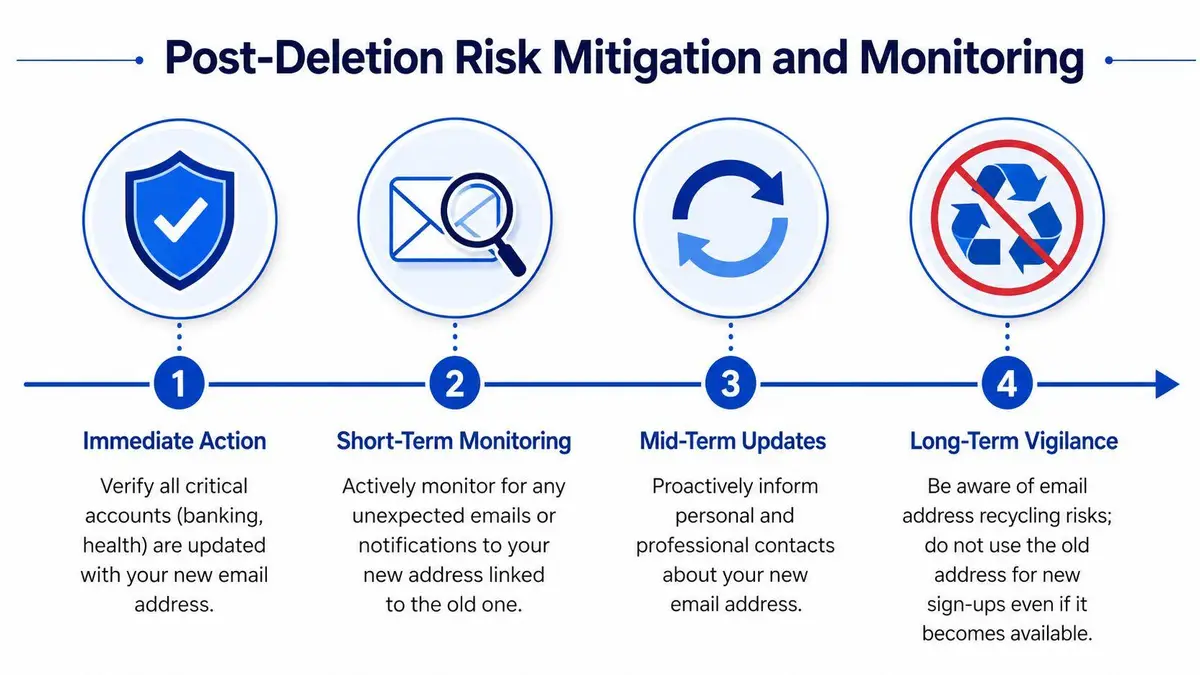
Closing an email account means relinquishing ownership, which can lead to the address being reassigned later, and consumer guidance warns that this makes it imperative to update connected services, especially banking, social, and enterprise logins, before deletion. The same guidance also notes that if you can’t log in, recovery often comes first because deletion usually requires proving identity through backup channels, as explained in AT&T’s guidance on old email account risks.
Assume the old identity may still be targeted
If an address had any public profile, treat it as a persistent impersonation asset even after closure. People who knew the address may continue using it. Automated systems may still send to it. Attackers may test it against legacy services or attempt to recreate a similar identity elsewhere.
Immediate post-deletion work should include:
- Verification of critical account updates across banking, legal, medical, and enterprise services.
- Contact correction with assistants, counsel, household staff, and external gatekeepers.
- Public-trace review for old website pages, PDFs, bios, and directories that still display the retired address.
A deleted inbox doesn’t erase the reputation trail attached to that address.
Monitor beyond the mailbox
Reputation management and security start to overlap. You’re not just watching for account-access issues. You’re watching for resurfacing identity signals. Old email addresses can appear in data broker listings, cached search results, leaked credential collections, and AI-generated summaries that stitch together stale public information.
That’s one reason executive teams increasingly pay attention to broader visibility tools, including resources on tracking AI search visibility. If outdated identity details are still being repeated or inferred, deleting the mailbox alone won’t solve the problem.
The practical monitoring stack should include three layers:
| Monitoring layer | What to look for | Why it matters |
|---|---|---|
| Account layer | Failed resets, old contact details, service notifications | Confirms migration actually held |
| Public web layer | Directories, cached pages, old bios, leaked references | Limits impersonation and profiling |
| Reputation layer | Search results, AI summaries, misuse of stale contact identities | Protects brand and personal credibility |
Keep the retired address dead
Don’t reuse it casually, don’t reintroduce it through old forms, and don’t let staff keep it alive in contact cards “just in case.” The moment a retired identity drifts back into circulation, you lose the clarity that deletion was supposed to create.
For ongoing oversight, executives usually need some form of reputation monitoring that catches stale or malicious references before they spread. The point isn’t paranoia. It’s discipline. If the address mattered enough to retire, it matters enough to watch afterward.
Conclusion A Strategic Approach to Digital Legacy
A dormant mailbox tied to your name, company, or family office can outlive the moment you stop using it. That is why email retirement should be treated as a controlled decommissioning, not routine cleanup. Preserve records first, map every linked identity, separate device cleanup from actual account closure, and assume the address may still be targeted after deletion.
That’s the mistake many people make when considering email account deletion. They focus on the inbox they can see and miss the dependencies they cannot. For a public-facing principal, investor, founder, or executive, that gap creates real exposure. Access failures, disclosure issues, phishing risk, and reputational damage all start there.
The standard is simple. Audit before deletion. Preserve before destruction. Close the correct layer. Retire or reserve sensitive identities on custom domains. Then monitor for reuse, impersonation, and stale references that keep the address alive after the provider says it is gone.
If the account touches executive identities, legacy businesses, litigation holds, public records, or private domains, treat closure as part of digital legacy management. In those cases, a discreet outside review is often the safer way to finish the job. If you’re dealing with legacy inboxes tied to executive identities, old businesses, public records, or custom domains, ContentRemoval.com can help assess the risk, remove exposed traces, and manage the reputational fallout with discretion. For high-stakes cases, that is responsible risk control.
Frequently asked questions
What should I do before deleting an old email account?
Build a dependency map of every service that uses the address as a username, recovery email or admin contact, then export mail, contacts and attachments that may have legal or financial value. Update recovery details on linked accounts and test a real password reset before you close anything.
Does deleting Gmail delete my whole Google Account?
Not if you choose the right option. Google lets you delete only the Gmail service under Data and Privacy, then Delete a Google service, which keeps Drive, calendars and other assets reachable through a non-Gmail address. Deleting the entire account removes access across all Google services.
Can someone else get my old email address after I delete it?
Closing an account relinquishes ownership, and some providers can reassign the address later. That is why the article stresses updating connected services before deletion and never reusing the retired identity casually, since anyone who knew it may keep sending sensitive mail there.